
ComfyUI-LoraTags
A powerful, sleek, and highly optimized LoRA loader for ComfyUI with modern tag management, automated Civitai metadata fetching, and seamless multi-LoRA stacking.
Nodes (2)
ComfyUI-LoraTags 🏷️


ComfyUI-LoraTags is a sleek, highly optimized LoRA loader for ComfyUI. It replaces the standard LoRA loading experience with a modern tag management system, automated Civitai metadata fetching, and seamless multi-LoRA stacking — all inside a single, thoughtfully designed custom node.
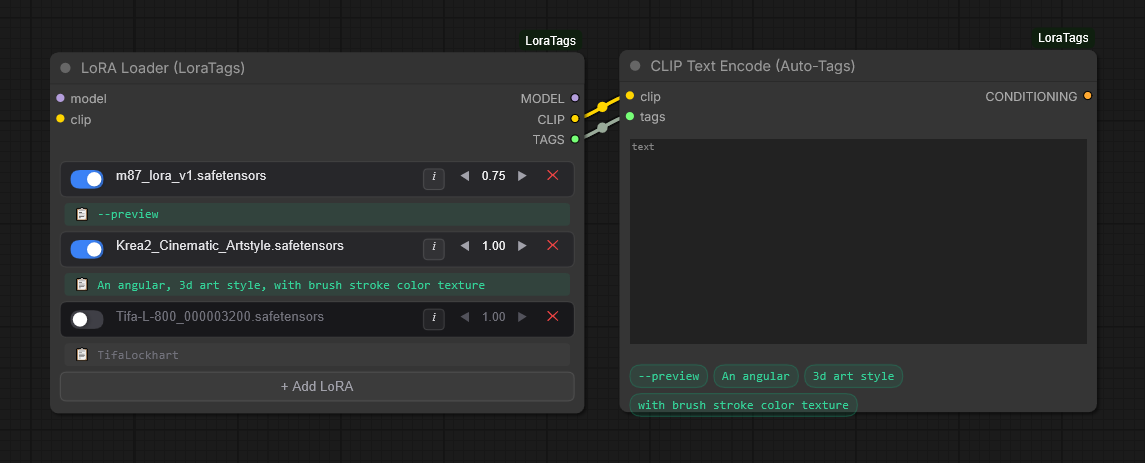
✨ Key Features
📚 Infinite LoRA Stacking
Keep your workflows clean. Instead of daisy-chaining multiple standard LoRA loaders, LoraTags lets you stack as many LoRAs as you need inside a single node. Toggle them on/off, adjust strengths, or delete them with a single click.
🌐 Automated Civitai Integration
Click the i (Info) button on any LoRA to open the Tag Manager modal. The plugin calculates the SHA256 hash of your .safetensors file and queries the Civitai API to fetch:
- The official model name
- The original trained trigger words
- Up to 4 preview images
- A direct link to the model's Civitai page
🧠 Master Database Tag Manager
No more .txt companion files cluttering your hard drive. All tags are saved to a centralized lora_master_tags.json file inside the plugin folder.
- Locked tags (green bubbles): retrieved automatically from Civitai
- Custom tags (blue bubbles): typed in manually — add, edit, or remove at will
🔗 Auto-Tagging CLIP Text Encoder
Route all your active LoRA trigger words directly into your prompt. Connect the TAGS output to the custom CLIP Text Encode (Auto-Tags) node, and your saved triggers are automatically appended to your prompt. Active tags are displayed as responsive bubbles right on the canvas.
📋 One-Click Clipboard Copying
Prefer manual prompting? Your saved trigger words are shown right on the canvas beneath each LoRA. Click the 📋 icon to instantly copy them to your clipboard.
🎨 Modern Canvas UI
Built with a custom HTML5 Canvas rendering engine that bypasses the default LiteGraph widgets, featuring:
- Smooth, iOS-style toggle switches
- Glassmorphism panels with semi-transparent borders
- Clean, minimalist typography and icons
📦 Installation
Method 1 — ComfyUI Manager (coming soon)
Once approved in the ComfyUI Manager registry, you'll be able to search for ComfyUI-LoraTags in the custom nodes list and install with one click.
Method 2 — Git Clone (recommended)
cd ComfyUI/custom_nodes/
git clone https://github.com/iiTzMYUNG/ComfyUI-LoraTags.git
Then restart ComfyUI and hard-refresh your browser (Ctrl+Shift+R).
Method 3 — Manual Download
- Click the green
<> Codebutton at the top of this repo and select Download ZIP. - Extract the
.zipfile. - Move the extracted
ComfyUI-LoraTagsfolder into yourComfyUI/custom_nodes/directory. - Restart ComfyUI and hard-refresh your browser.
🚀 How to Use
- Add the nodes — double-click the canvas and search for
LoRA Loader (LoraTags)andCLIP Text Encode (Auto-Tags). - Connect the wires — link the
TAGSoutput from the LoRA Loader to thetagsinput of the Auto-Tags Text Encoder. - Stack LoRAs — click
+ Add LoRAto create a new slot, then choose a.safetensorsfile from the dropdown. - Manage tags — click the
iicon on any LoRA row to fetch tags from Civitai or add your own. - Generate — type your base prompt; active tags are appended automatically.
📂 File Structure & the Master Database
Saving tags generates a lora_master_tags.json file inside the ComfyUI-LoraTags directory.
The plugin respects your existing folder structure — for example, models/loras/SDXL/neon.safetensors will be categorized under an SDXL header in the JSON. This keeps the database portable, so you can back it up or share it with friends as a single file.
🤝 Contributing
Contributions, issues, and feature requests are welcome! Check the issues page if you'd like to help improve the UI or add functionality.
📜 License
This project is licensed under the MIT License — see the LICENSE file for details.