
ComfyUI-FitDiTx
ComfyUI implementation of 'FitDiTx: Advancing the Authentic Garment Details for High-fidelity Virtual Try-on'
Nodes (3)
ComfyUI-FitDiTx
ComfyUI custom nodes based on https://github.com/BoyuanJiang/FitDiT
Installation
cd ComfyUI/custom_nodes
git clone https://github.com/ihmily/ComfyUI-FitDiTx
pip install -r requirements.txt
Download Models
cd ComfyUI/models
pip install huggingface_hub --upgrade
hf download BoyuanJiang/FitDiT --local-dir FitDiT_models

cd ComfyUI/models/clip
hf download openai/clip-vit-large-patch14 --local-dir clip-vit-large-patch14

hf download laion/CLIP-ViT-bigG-14-laion2B-39B-b160k --local-dir CLIP-ViT-bigG-14-laion2B-39B-b160k
FitDiT: Advancing the Authentic Garment Details for High-fidelity Virtual Try-on
<div style="display: flex; justify-content: center; align-items: center;"> <a href="https://arxiv.org/abs/2411.10499" style="margin: 0 2px;"> <img src='https://img.shields.io/badge/arXiv-2411.10499-red?style=flat&logo=arXiv&logoColor=red' alt='arxiv'> </a> <a href="https://github.com/BoyuanJiang/FitDiT" style="margin: 0 2px;"> <img src='https://img.shields.io/badge/GitHub-Repo-blue?style=flat&logo=GitHub' alt='GitHub'> </a> <a href="https://huggingface.co/spaces/BoyuanJiang/FitDiT" style="margin: 0 2px;"> <img src='https://img.shields.io/badge/Space-ZeroGPU-orange?style=flat&logo=Gradio&logoColor=red' alt='Demo'> </a> <a href="http://demo.fitdit.byjiang.com/" style="margin: 0 2px;"> <img src='https://img.shields.io/badge/Demo-Gradio-gold?style=flat&logo=Gradio&logoColor=red' alt='Demo'> </a> <a href='https://huggingface.co/BoyuanJiang/FitDiT' style="margin: 0 2px;"> <img src='https://img.shields.io/badge/Hugging Face-ckpts-orange?style=flat&logo=HuggingFace&logoColor=orange' alt='huggingface'> </a> <a href='https://byjiang.com/FitDiT/' style="margin: 0 2px;"> <img src='https://img.shields.io/badge/Webpage-Project-silver?style=flat&logo=&logoColor=orange' alt='webpage'> </a> <a href="https://raw.githubusercontent.com/BoyuanJiang/FitDiT/refs/heads/main/LICENSE" style="margin: 0 2px;"> <img src='https://img.shields.io/badge/License-CC BY--NC--SA--4.0-lightgreen?style=flat&logo=Lisence' alt='License'> </a> </div> <p align="center"> 👋 Join our <a href="resource/img/QQ_group.jpg" target="_blank">QQ Chat Group</a> </p> <p align="center">FitDiT is designed for high-fidelity virtual try-on using Diffusion Transformers (DiT).
<div align="center"> <img src="resource/img/teaser.jpg" width="100%" height="100%"/> </div>Updates
2025/1/16: We provide the ComfyUI version of FitDiT, you can use FitDiT in ComfyUI now.2025/1/9: We provide a Huggingface Space of FitDiT, thanks for Huggingface community GPU grant for providing the GPU resources.2024/12/20: The FitDiT model weight is available.2024/12/17: Inference code is released.2024/12/4: Our Online Demo is released.2024/11/25: Our Complex Virtual Dressing Dataset (CVDD) is released.2024/11/15: Our FitDiT paper is available.
Gradio Demo
Our algorithm is divided into two steps. The first step is to generate the mask of the try-on area, and the second step is to try-on in the mask area.
Step1: Run Mask
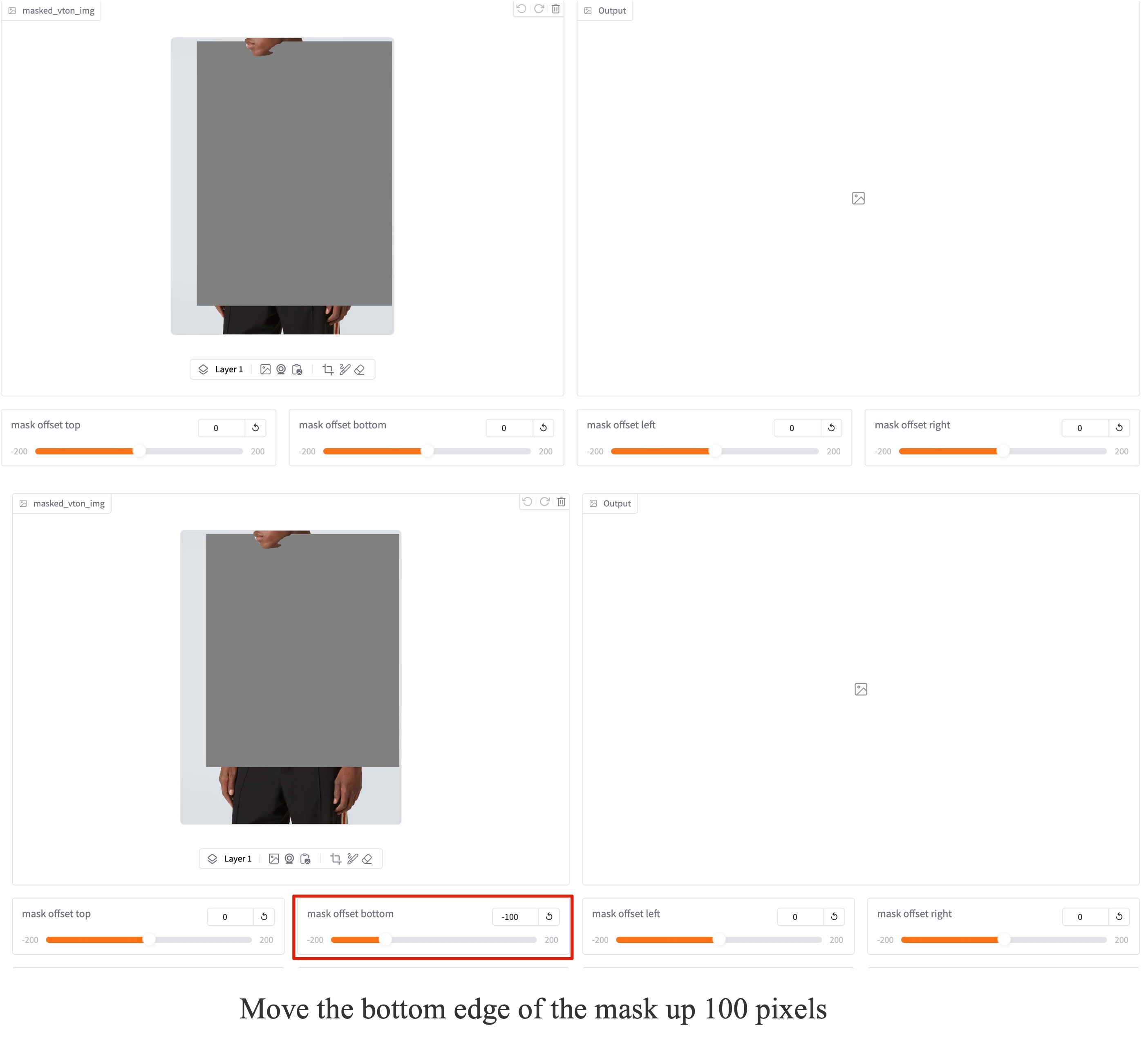
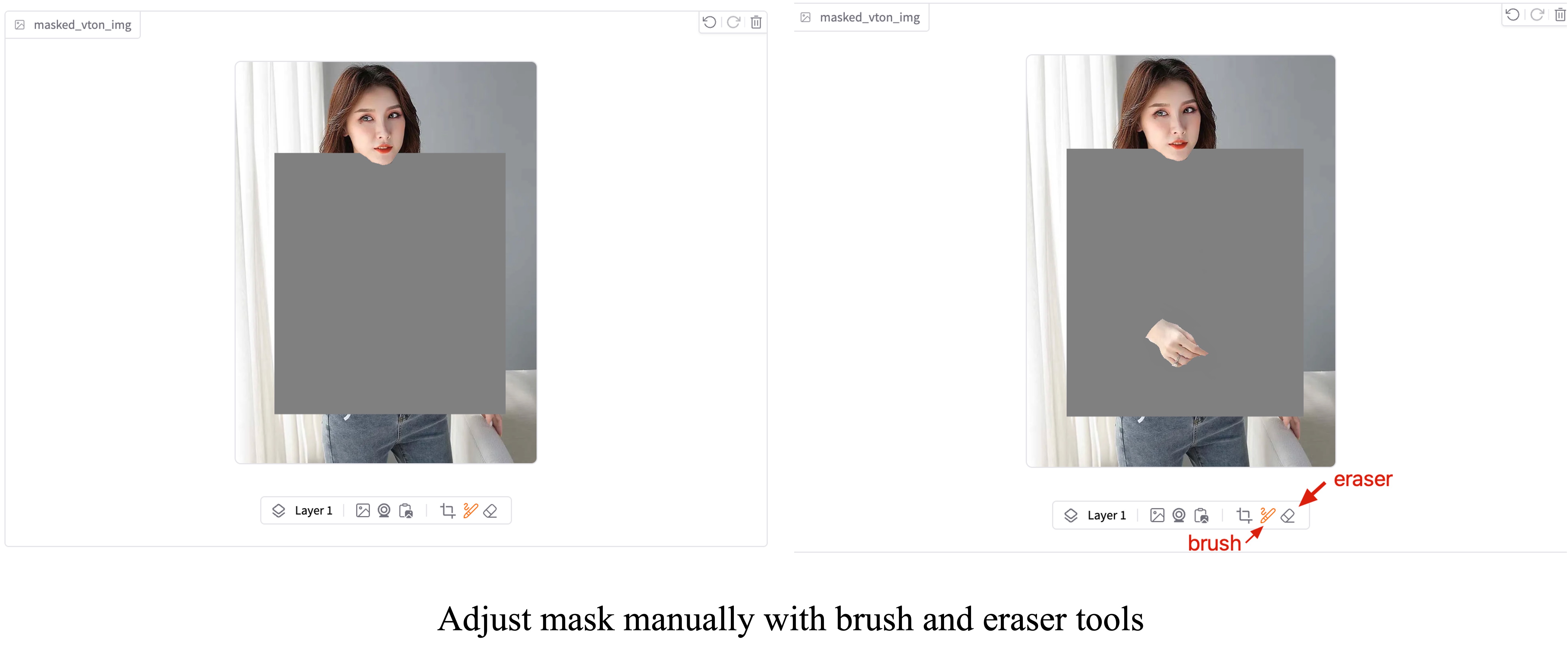
You can simpley get try-on mask by click Step1: Run Mask at the right side of gradio demo. If the automatically generated mask are not well covered the area where you want to try-on, you can either adjust the mask by:
-
Drag the slider of mask offset top, mask offset bottom, mask offset left or mask offset right and then click Step1: Run Mask button, this will re-generate mask.
-
Using the brush or eraser tool to edit the automatically generated mask
Step2: Run Try-on
After generating a suitable mask, you can get the try-on results by click Step2: Run Try-on. In the Try-on resolution drop-down box, you can select a suitable processing resolution. In our online demo, the default resolution is 1152x1536, which means that the input model image and garment image will be pad and resized to this resolution before being fed into the model.
Local Demo
First apply access of FitDiT model weight, then clone model to local_model_dir
Enviroment
We test our model with following enviroment
torch==2.4.0
torchvision==0.19.0
diffusers==0.31.0
transformers==4.39.3
gradio==5.8.0
onnxruntime-gpu==1.20.1
Run gradio locally
# Run model with bf16 without any offload, fastest inference and most memory
python gradio_sd3.py --model_path local_model_dir

# Run model with fp16
python gradio_sd3.py --model_path local_model_dir --fp16

# Run model with fp16 and cpu offload, moderate inference and moderate memory
python gradio_sd3.py --model_path local_model_dir --fp16 --offload

# Run model with fp16 and aggressive cpu offload, slowest inference and less memory
python gradio_sd3.py --model_path local_model_dir --fp16 --aggressive_offload
Third-Party Creations
We found there've been some 3rd party applications or tutorial based on our FitDiT. Many thanks for their contribution to the community! If you have any related work that you would like to see displayed, please submit it in the issue. These projects have not been verified by us. If you have any questions, please seek help from the original project authors.
Tutorial
Applications
- Local one-click integration package of FitDiT, which can be found at deepface forum
Star History
Contact
This model can only be used for non-commercial use. For commercial use, please visit Tencent Cloud for support.
Citation
If you find our work helpful for your research, please consider citing our work.
@misc{jiang2024fitditadvancingauthenticgarment,
      title={FitDiT: Advancing the Authentic Garment Details for High-fidelity Virtual Try-on},
      author={Boyuan Jiang and Xiaobin Hu and Donghao Luo and Qingdong He and Chengming Xu and Jinlong Peng and Jiangning Zhang and Chengjie Wang and Yunsheng Wu and Yanwei Fu},
      year={2024},
      eprint={2411.10499},
      archivePrefix={arXiv},
      primaryClass={cs.CV},
      url={https://arxiv.org/abs/2411.10499},
}