
QwenVL-F
Fork of ComfyUI-QwenVL: Qwen-VL nodes (Qwen2.5-VL / Qwen3-VL, Transformers and GGUF backends) for text generation, image understanding, and video analysis. Adds local-only model discovery — models are picked from models/text_encoders and models/LLM with no automatic downloading — plus explicit mmproj selection, up to 3 image inputs on the Advanced nodes, a thinking-mode toggle, Gemma 4 / Qwen3.5 / Qwen3.6 / Qwen3.8 GGUF support, and MTP speculative decoding.
Nodes (5)
A Qwen-VL that actually looks at your images — no API, no key, no auto-download
Multi-image, video frames, beam search
Quantization in the file, not a widget
The Qwen-VL GGUF node with everything on the table (and the mmproj selector)
A local prompt enhancer that turns 'girl in forest' into something the sampler respects
QwenVL for ComfyUI (Fork)
This is a fork of 1038lab/ComfyUI-QwenVL with the following additions:
Fork Changes
[!NOTE] With recent ComfyUI updates, what this custom node provides can now be done with ComfyUI's built-in TextGenerate node, so there is no longer much reason to install it.
- Local-only model discovery (no automatic downloading): Every download path has been removed from all six nodes — no
snapshot_download, nohf_hub_download, no background download threads. Model dropdowns are built purely by scanning your disk, so you place models yourself and reload ComfyUI. If a model is missing, the node raises an error listing the folders it looked in instead of starting a download.- Scanned folders:
ComfyUI/models/text_encodersandComfyUI/models/LLMby default, both scanned recursively (subfolders included). Configurable viabase_dirsinhf_models.json/gguf_models.json; entries can be afolder_pathskey (soextra_model_paths.yamlroots are picked up —text_encodersis one of ComfyUI's own), aComfyUI/modelssubfolder, or an absolute path. Folders are scanned in order and the first match wins on a name clash. - What gets listed: HF checkpoints are directories holding a
config.jsonnext to weight shards — the QwenVL nodes list only vision checkpoints (detected fromconfig.json), while the Prompt Enhancer lists all of them and picks the text-only or VL code path automatically. GGUF nodes list every.ggufby its path relative to its root. - Backward compatible: model names saved in older workflows (including the
[local] relative/pathform) still resolve. - The model entries in
hf_models.json/gguf_models.jsonare no longer read; they remain only as a reference list of where to download models from by hand.
- Scanned folders:
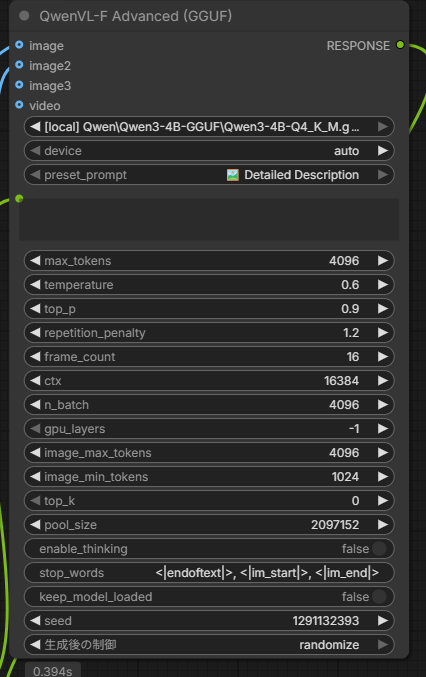
- Explicit mmproj selection: GGUF Advanced nodes gained an
mmproj_namewidget listing every*mmproj*.gguffound on disk. The defaultautokeeps the previous behaviour of picking the projector sitting next to the chosen model. - Context length control for the GGUF Prompt Enhancer: a
ctxwidget (default 8192) replaces the context length that used to come from the catalog. - Multiple image reference support: Advanced nodes (HF / GGUF) accept up to 3 image inputs (
image,image2,image3) for simultaneous multi-image analysis. - Thinking mode toggle:
enable_thinkingswitch on all nodes (Simple / Advanced, HF / GGUF). Enables the<think>...</think>reasoning mode for Qwen3-VL Thinking models; disabled by default. - Gemma 4 GGUF support: GGUF nodes auto-detect Gemma models by filename and switch to
Gemma4ChatHandler, bypass the Qwen-specific/thinkprefix injection and MROPE image-resize guard, and strip Gemma's<|channel|>reasoning markers from the output. Requires the JamePeng fork of llama-cpp-python v0.3.35+. Qwen models continue to work unchanged. - Qwen3.5 / 3.6 / 3.8 GGUF support: the chat handler is chosen from the filename —
Qwen35ChatHandlerfor Qwen3.5 and Qwen3.6, the template-drivenGenericMTMDChatHandlerfor Qwen3.8 (it reads the chat template embedded in the GGUF),Qwen3VLChatHandler/Qwen25VLChatHandlerfor the older VL models. These families takeenable_thinkingas a template flag instead of the/thinkprefix, and their prompt-side<think>prefill is stripped from the answer. Version detection only accepts a dot or underscore separator, soQwen3-8Bstays a plain Qwen3 model. - MTP (multi-token prediction) speculative decoding: an
mtp_draft_tokenswidget on the GGUF Advanced node and the GGUF Prompt Enhancer drafts from the NextN/MTP heads baked into Qwen3.5 / 3.6 / 3.8 MTP GGUF builds (0= off,2is a good starting point). Needs llama-cpp-python v0.3.48+; it is text-only, so it is skipped while a vision (mmproj) handler is loaded, and a GGUF without MTP tensors falls back to ordinary decoding instead of failing the workflow. - Dependency install helper (
tools/install_helper.py): A CLI that works out thepip installcommands your environment needs for a CUDA build of PyTorch and a vision-capablellama-cpp-pythonwheel, and prints them — it never installs anything itself; you run the printed command. When everything is already current it says so instead of emitting a command. See the install guide.- Targets the right interpreter: pass
--python "C:\AI\ComfyUI\python_embeded\python.exe"and the report describes that environment (Python/ABI tag, installed versions), not the one running the script. - Picks a build that actually exists: the CUDA version comes from
nvidia-smi(falling back tonvcc, thentorch.version.cuda), then the highest build not exceeding it is chosen from the PyTorch index and the JamePeng release assets — so a driver reporting CUDA 13.3 still resolves to the newest published wheels. - Only reports real work: versions are compared before anything is printed, and a same-version-different-build case (e.g.
2.9.1bundling cu126 against2.9.1+cu130) is flagged with the reason. Options:--cuda,--force,--no-torch/--no-llama,--repo.
- Targets the right interpreter: pass
Below is the original README from the upstream repository.
QwenVL for ComfyUI
The ComfyUI-QwenVL custom node integrates the powerful Qwen-VL series of vision-language models (LVLMs) from Alibaba Cloud, including the latest Qwen3-VL and Qwen2.5-VL, plus GGUF backends and text-only Qwen3 support. This advanced node enables seamless multimodal AI capabilities within your ComfyUI workflows, allowing for efficient text generation, image understanding, and video analysis.
📰 News & Updates
-
2026/02/08: v2.1.1 Fixed compatibility for Transformers 4.x and 5.x [Update]
-
2026/02/05: v2.1.0 Added SageAttention support with per-GPU architecture optimization, improved FP8 model handling, and automatic attention mode selection. [Update]
- SageAttention Support: New attention mode with per-GPU optimized kernels (SM80, SM89, SM90, SM120)
- Improved FP8 Handling: Better support for pre-quantized FP8 models with automatic SDPA fallback
- Smart Attention Selection: Auto mode now tries Sage → Flash → SDPA for optimal performance
- Progress Bar: Added ComfyUI progress bar for model loading and generation stages
- Better Memory Management: Improved cache clearing when changing attention modes or quantization
-
2025/12/22: v2.0.0 Added GGUF supported nodes and Prompt Enhancer nodes. [Update]
[!IMPORTANT]
Install llama-cpp-python before running GGUF nodes instruction
- 2025/11/10: v1.1.0 Runtime overhaul with attention-mode selector, flash-attn auto detection, smarter caching, and quantization/torch.compile controls in both nodes. [Update]
- 2025/10/31: v1.0.4 Custom Models Supported [Update]
- 2025/10/22: v1.0.3 Models list updated [Update]
- 2025/10/17: v1.0.0 Initial Release
- Support for Qwen3-VL and Qwen2.5-VL series models.
- Automatic model downloading from Hugging Face.
- On-the-fly quantization (4-bit, 8-bit, FP16).
- Preset and Custom Prompt system for flexible and easy use.
- Includes both a standard and an advanced node for users of all levels.
- Hardware-aware safeguards for FP8 model compatibility.
- Image and Video (frame sequence) input support.
- "Keep Model Loaded" option for improved performance on sequential runs.
- Seed parameter for reproducible generation.

✨ Features
- Standard & Advanced Nodes: Includes a simple QwenVL node for quick use and a QwenVL (Advanced) node with fine-grained control over generation.
- Prompt Enhancers: Dedicated text-only prompt enhancers for both HF and GGUF backends.
- Preset & Custom Prompts: Choose from a list of convenient preset prompts or write your own for full control.
- Multi-Model Support: Easily switch between various official Qwen-VL models.
- Automatic Model Download: Models are downloaded automatically on first use.
- Smart Quantization: Balance VRAM and performance with 4-bit, 8-bit, and FP16 options.
- Hardware-Aware: Automatically detects GPU capabilities and prevents errors with incompatible models (e.g., FP8).
- Reproducible Generation: Use the seed parameter to get consistent outputs.
- Memory Management: "Keep Model Loaded" option to retain the model in VRAM for faster processing.
- Image & Video Support: Accepts both single images and video frame sequences as input.
- Robust Error Handling: Provides clear error messages for hardware or memory issues.
- Clean Console Output: Minimal and informative console logs during operation.
- SageAttention Support: GPU-optimized attention mechanism with per-architecture kernels (Ampere, Ada, Hopper, Blackwell).
- Progress Bar: Visual feedback during model loading and generation stages.
- Intelligent Cache Management: Automatically clears VRAM when changing attention modes or quantization settings.
🚀 Installation
-
Clone this repository to your ComfyUI/custom_nodes directory:
cd ComfyUI/custom\_nodes git clone https://github.com/1038lab/ComfyUI-QwenVL.git -
Install the required dependencies:
cd ComfyUI/custom\_nodes/ComfyUI-QwenVL pip install \-r requirements.txt -
Restart ComfyUI.
Optional: SageAttention Support
For optimal performance on supported GPUs, install SageAttention:
pip install sageattention
🧭 Node Overview
Transformers (HF) Nodes
- QwenVL: Quick vision-language inference (image/video + preset/custom prompts).
- QwenVL (Advanced): Full control over sampling, device, and performance settings.
- QwenVL Prompt Enhancer: Text-only prompt enhancement (supports both Qwen3 text models and QwenVL models in text mode).
GGUF (llama.cpp) Nodes
- QwenVL (GGUF): GGUF vision-language inference.
- QwenVL (GGUF Advanced): Extended GGUF controls (context, GPU layers, etc.).
- QwenVL Prompt Enhancer (GGUF): GGUF text-only prompt enhancement.
🧩 GGUF Nodes (llama.cpp backend)
This repo includes GGUF nodes powered by llama-cpp-python (separate from the Transformers-based nodes).
- Nodes:
QwenVL (GGUF),QwenVL (GGUF Advanced),QwenVL Prompt Enhancer (GGUF) - Model folder (default):
ComfyUI/models/llm/GGUF/(configurable viagguf_models.json) - Vision requirement: install a vision-capable
llama-cpp-pythonwheel that providesQwen3VLChatHandler/Qwen25VLChatHandler(plusQwen35ChatHandler,GenericMTMDChatHandlerandGemma4ChatHandlerfor the newer families)
See docs/LLAMA_CPP_PYTHON_VISION_INSTALL.md
🗂️ Config Files
- HF models:
hf_models.jsonhf_vl_models: vision-language models (used by QwenVL nodes).hf_text_models: text-only models (used by Prompt Enhancer).
- GGUF models:
gguf_models.json - System prompts:
AILab_System_Prompts.json(includes both VL prompts and prompt-enhancer styles).
📥 Download Models
The models will be automatically downloaded on first use. If you prefer to download them manually, place them in the ComfyUI/models/LLM/Qwen-VL/ directory.
HF Vision Models (Qwen-VL)
| Model | Link | | :---- | :---- | | Qwen3-VL-2B-Instruct | Download | | Qwen3-VL-2B-Thinking | Download | | Qwen3-VL-2B-Instruct-FP8 | Download | | Qwen3-VL-2B-Thinking-FP8 | Download | | Qwen3-VL-4B-Instruct | Download | | Qwen3-VL-4B-Thinking | Download | | Qwen3-VL-4B-Instruct-FP8 | Download | | Qwen3-VL-4B-Thinking-FP8 | Download | | Qwen3-VL-8B-Instruct | Download | | Qwen3-VL-8B-Thinking | Download | | Qwen3-VL-8B-Instruct-FP8 | Download | | Qwen3-VL-8B-Thinking-FP8 | Download | | Qwen3-VL-32B-Instruct | Download | | Qwen3-VL-32B-Thinking | Download | | Qwen3-VL-32B-Instruct-FP8 | Download | | Qwen3-VL-32B-Thinking-FP8 | Download | | Qwen2.5-VL-3B-Instruct | Download | | Qwen2.5-VL-7B-Instruct | Download |
HF Text Models (Qwen3)
| Model | Link | | :---- | :---- | | Qwen3-0.6B | Download | | Qwen3-4B-Instruct-2507 | Download | | qwen3-4b-Z-Image-Engineer | Download |
GGUF Models (Manual Download)
| Group | Model | Repo | Alt Repo | Model Files | MMProj | | :-- | :-- | :-- | :-- | :-- | :-- | | Qwen text (GGUF) | Qwen3-4B-GGUF | Qwen/Qwen3-4B-GGUF | | Qwen3-4B-Q4_K_M.gguf, Qwen3-4B-Q5_0.gguf, Qwen3-4B-Q5_K_M.gguf, Qwen3-4B-Q6_K.gguf, Qwen3-4B-Q8_0.gguf | | | Qwen-VL (GGUF) | Qwen3-VL-4B-Instruct-GGUF | Qwen/Qwen3-VL-4B-Instruct-GGUF | | Qwen3VL-4B-Instruct-F16.gguf, Qwen3VL-4B-Instruct-Q4_K_M.gguf, Qwen3VL-4B-Instruct-Q8_0.gguf | mmproj-Qwen3VL-4B-Instruct-F16.gguf | | Qwen-VL (GGUF) | Qwen3-VL-8B-Instruct-GGUF | Qwen/Qwen3-VL-8B-Instruct-GGUF | | Qwen3VL-8B-Instruct-F16.gguf, Qwen3VL-8B-Instruct-Q4_K_M.gguf, Qwen3VL-8B-Instruct-Q8_0.gguf | mmproj-Qwen3VL-8B-Instruct-F16.gguf | | Qwen-VL (GGUF) | Qwen3-VL-4B-Thinking-GGUF | Qwen/Qwen3-VL-4B-Thinking-GGUF | | Qwen3VL-4B-Thinking-F16.gguf, Qwen3VL-4B-Thinking-Q4_K_M.gguf, Qwen3VL-4B-Thinking-Q8_0.gguf | mmproj-Qwen3VL-4B-Thinking-F16.gguf | | Qwen-VL (GGUF) | Qwen3-VL-8B-Thinking-GGUF | Qwen/Qwen3-VL-8B-Thinking-GGUF | | Qwen3VL-8B-Thinking-F16.gguf, Qwen3VL-8B-Thinking-Q4_K_M.gguf, Qwen3VL-8B-Thinking-Q8_0.gguf | mmproj-Qwen3VL-8B-Thinking-F16.gguf |
📖 Usage
Basic Usage
- Add the "QwenVL" node from the 🧪AILab/QwenVL category.
- Select the model_name you wish to use.
- Connect an image or video (image sequence) source to the node.
- Write your prompt using the preset or custom field.
- Run the workflow.
Advanced Usage
For more control, use the "QwenVL (Advanced)" node. This gives you access to detailed generation parameters like temperature, top_p, beam search, and device selection.
⚙️ Parameters
| Parameter | Description | Default | Range | Node(s) | | :---- | :---- | :---- | :---- | :---- | | model_name | The Qwen-VL model to use. | Qwen3-VL-4B-Instruct | - | Standard & Advanced | | quantization | On-the-fly quantization. Ignored for pre-quantized models (e.g., FP8). | 8-bit (Balanced) | 4-bit, 8-bit, None | Standard & Advanced | | attention_mode | Attention mechanism: auto (Sage→Flash→SDPA), sage, flash_attention_2, sdpa | auto | auto, sage, flash_attention_2, sdpa | Standard & Advanced | | preset_prompt | A selection of pre-defined prompts for common tasks. | "Describe this..." | Any text | Standard & Advanced | | custom_prompt | Overrides the preset prompt if provided. | | Any text | Standard & Advanced | | max_tokens | Maximum number of new tokens to generate. | 1024 | 64-2048 | Standard & Advanced | | keep_model_loaded | Keep the model in VRAM for faster subsequent runs. | True | True/False | Standard & Advanced | | seed | A seed for reproducible results. | 1 | 1 - 2^64-1 | Standard & Advanced | | temperature | Controls randomness. Higher values = more creative. (Used when num_beams is 1). | 0.6 | 0.1-1.0 | Advanced Only | | top_p | Nucleus sampling threshold. (Used when num_beams is 1). | 0.9 | 0.0-1.0 | Advanced Only | | num_beams | Number of beams for beam search. > 1 disables temperature/top_p sampling. | 1 | 1-10 | Advanced Only | | repetition_penalty | Discourages repeating tokens. | 1.2 | 0.0-2.0 | Advanced Only | | frame_count | Number of frames to sample from the video input. | 16 | 1-64 | Advanced Only | | device | Override automatic device selection. | auto | auto, cuda, cpu | Advanced Only | | use_torch_compile | Enable torch.compile optimization for faster inference. | False | True/False | Advanced Only |
💡 Quantization Options
| Mode | Precision | Memory Usage | Speed | Quality | Recommended For | | :---- | :---- | :---- | :---- | :---- | :---- | | None (FP16) | 16-bit Float | High | Fastest | Best | High VRAM GPUs (16GB+) | | 8-bit (Balanced) | 8-bit Integer | Medium | Fast | Very Good | Balanced performance (8GB+) | | 4-bit (VRAM-friendly) | 4-bit Integer | Low | Slower* | Good | Low VRAM GPUs (<8GB) |
* Note on 4-bit Speed: 4-bit quantization significantly reduces VRAM usage but may result in slower performance on some systems due to the computational overhead of real-time dequantization.
🎯 Attention Mode Guide
| Mode | Description | Best For | | :---- | :---- | :---- | | auto | Automatically selects best available: Sage → Flash → SDPA | Most users (recommended) | | sage | SageAttention with GPU-optimized kernels | Speed on modern GPUs (RTX 40 series, Hopper, Blackwell) | | flash_attention_2 | Flash Attention 2 | Speed when Sage unavailable | | sdpa | PyTorch SDPA (default) | Compatibility, FP8/BitsAndBytes models |
Note: FP8 models and BitsAndBytes quantization automatically use SDPA regardless of selection.
🤔 Setting Tips
| Setting | Recommendation | | :---- | :---- | | Model Choice | For most users, Qwen3-VL-4B-Instruct is a great starting point. If you have a 40-series GPU, try the -FP8 version for better performance. | | Memory Mode | Keep keep_model_loaded enabled (True) for the best performance if you plan to run the node multiple times. Disable it only if you are running out of VRAM for other nodes. | | Quantization | Start with the default 8-bit. If you have plenty of VRAM (>16GB), switch to None (FP16) for the best speed and quality. If you are low on VRAM, use 4-bit. | | Attention Mode | Use "auto" for best performance. SageAttention provides fastest inference on supported GPUs. | | Performance | The first time a model is loaded with a specific quantization, it may be slow. Subsequent runs (with keep_model_loaded enabled) will be much faster. |
🧠 About Model
This node utilizes the Qwen-VL series of models, developed by the Qwen Team at Alibaba Cloud. These are powerful, open-source large vision-language models (LVLMs) designed to understand and process both visual and textual information, making them ideal for tasks like detailed image and video description.
🗺️ Roadmap
✅ Completed (v2.1.0)
- ✅ SageAttention support with per-GPU architecture optimization
- ✅ Improved FP8 model handling with automatic SDPA fallback
- ✅ Smart attention selection (auto: Sage → Flash → SDPA)
- ✅ Progress bar for model loading and generation
- ✅ Better memory management and cache clearing
✅ Completed (v2.0.0)
- ✅ GGUF model support via llama.cpp backend
- ✅ Prompt Enhancer nodes for text-only optimization
✅ Completed (v1.0.0)
- ✅ Support for Qwen3-VL and Qwen2.5-VL models.
- ✅ Automatic model downloading and management.
- ✅ On-the-fly 4-bit, 8-bit, and FP16 quantization.
- ✅ Hardware compatibility checks for FP8 models.
- ✅ Image and Video (frame sequence) input support.
🙏 Credits
- Qwen Team: Alibaba Cloud - For developing and open-sourcing the powerful Qwen-VL models.
- ComfyUI: comfyanonymous - For the incredible and extensible ComfyUI platform.
- llama-cpp-python: JamePeng/llama-cpp-python - GGUF backend with vision support used by the GGUF nodes.
- SageAttention: SageAttention - Efficient attention implementation with GPU-optimized kernels.
- ComfyUI Integration: 1038lab - Developer of this custom node.
📜 License
This repository's code is released under the GPL-3.0 License.