
LLM Widget
A standalone LLM widget node for ComfyUI: ask a local CLIP/GGUF or an OpenAI/Gemini-compatible API a question about a connected image or video, without running the graph.
ComfyUI-LLM-Widget
日本語 | English
接続した画像や動画について LLM に質問し、その答えをノード上に保持する ComfyUI ノードです。 ノードは 1 つだけです。
このノードは エディタ上で 動作します。グラフの実行より前に、グラフの実行とは無関係に動きます。 ✦ ボタンを押すと答えが返ってくる。キューには何も積まれず、ワークフローの他のノードも動きません。 ワークフローの中では常時 バイパス、またはミュート した状態で置いておくことを想定しています。 処理の一段階ではなく、道具として使うノードです。
主な用途は、生成用プロンプトの下書きや書き直し、プロンプトの翻訳、参考画像の説明、 あるいは単に画像を添えて質問すること。
バックエンドは、OpenAI 互換の /v1/chat/completions エンドポイント、OpenAI の Responses API
(/v1/responses)、Google 純正の Gemini generateContent、または llama-cpp-python 経由の
ローカル GGUF です。
インストール
cd ComfyUI/custom_nodes
git clone <this repository> ComfyUI-LLM-Widget
ComfyUI を再起動してください。Python の依存パッケージは追加されません。
GGUF を使う場合のみ、ComfyUI の環境に llama-cpp-python と、models/text_encoders/ または
models/LLM/ 以下の .gguf が別途必要です。
vision 対応の llama-cpp-python
GGUF で画像を読ませるには、マルチモーダルの chat handler(Qwen3VLChatHandler、
Qwen25VLChatHandler、Gemma4ChatHandler など)を含むビルドが必要です。PyPI の upstream 版には
これらが 入っていないことが多い ため、handler を同梱しているフォークのリリース wheel を
インストールしてください
(JamePeng/llama-cpp-python)。
handler がなくても動きますが、その場合はテキストだけを見て答えます。
tools/install_helper.py が必要なコマンドを組み立ててくれます。CUDA のバージョンを検出し、
PyTorch のインデックスと上記リポジトリのリリース資産を確認したうえで、指定した環境に対する
pip install の行をそのまま出力します。すでに最新であればその旨を表示します。
このスクリプトは
git cloneした場合にだけ入っています。 Comfy Registry(ComfyUI-Manager やcomfy node install)経由のパッケージからは除外してあるため、そちらでインストールした場合はtools/フォルダごと存在しません。必要なら、このリポジトリからtools/install_helper.pyだけを 取得して実行してください。標準ライブラリだけで動き、ノード本体はこのファイルに依存しません。
python tools\install_helper.py --python "C:\AI\ComfyUI\python_embeded\python.exe"
主なフラグは --cuda cu130(検出をスキップ。CPU ビルドなら cpu)、--force
(最新でもコマンドを出力する)、--no-torch / --no-llama。--python を指定すれば対象環境を
アクティベートしておく必要はありません。このフラグを省くのは対象環境が既にアクティブなときだけに
してください。そうでないと PATH の先頭にある Python について報告することになります。
手動で行う場合は、まず ComfyUI を停止 し、pip freeze > requirements-backup.txt で
バックアップを取ってから、Python のバージョン(cp310 〜 cp313)、プラットフォーム
(win_amd64)、ビルド種別が一致する wheel を選んで force-reinstall します。
C:\AI\ComfyUI\python_embeded\python.exe -m pip install --upgrade --force-reinstall llama_cpp_python-....whl
CUDA wheel のビルドタグ(cu121、cu130 など)は、実際に入っている CUDA ランタイムと
一致していなければなりません。食い違うと、ファイルは確かにそこにあるのに
cannot load ggml.dll というエラーになります。判断がつかない場合は CPU wheel を選んでください。
入れ終えたら確認します。
C:\AI\ComfyUI\python_embeded\python.exe -c "from llama_cpp.llama_chat_format import Qwen3VLChatHandler, Qwen25VLChatHandler; print('handlers OK')"
ここで失敗するなら、その wheel が vision 非対応か、ComfyUI が使っているのとは別の Python に
入ってしまっています。インストールで OpenCV が許容するより新しい numpy が入ってしまった場合は、
pip install --upgrade "numpy<2.3" で戻してください("pillow<12" も同様)。
ノード
LLM Widget(カテゴリ: LLM Widget)
| スロット | 型 | 備考 |
| --- | --- | --- |
| image, image2 … image10(入力) | IMAGE | 任意。モデルには スロット番号 で image 1 … image 10 として渡ります(image2 を空けても image3 は image 3 のまま)。複数の参照画像を番号で指す編集モデル向けのプロンプトを書かせるときは、その番号で質問してください |
| video(入力) | VIDEO | 任意 |
| text(出力) | STRING | 任意 — 通常は未使用。実行時の動作 を参照 |
ウィジェット:
- toolbar — ✦ 実行(リクエスト中は ■ 停止に変わる)、経過時間、⏏ モデルを解放(Gemini 以外で 表示)、⧉ 答えをコピー、⌫ 会話を消去(continue モードのときだけ表示)、⚙ 設定。その上には、 接続したメディアごとに実際に送られるものを示すチップが並びます。
- system_prompt — 自由記述。ワークフローと一緒に保存されます。「テンプレート」と呼べるものは
これだけです。すぐ上のタブで複数のシステムプロンプトを保存しておき、切り替えて使えます:
クリックで切り替え、ダブルクリックで名前変更、
+で追加、×で削除、開いているタブの◀▶で並べ替え。送られるのは開いているタブだけです。タブはノードごとにワークフローへ 保存され、system_promptの値は常に開いているタブの内容なので、実行時(API 実行を含む)も そのまま使われます。 - generate_on_execute — 既定はオフ。下記参照。
- answer — 答えが入る場所。編集可能で、ワークフローと一緒に保存されます。continue モードでは ここが会話ログそのものになります(会話を続ける を参照)。
- question — 質問内容。会話ログの下、✦ ボタンのすぐ上に置いてあります。
ウィジェットの並びはモードによらず固定です。ComfyUI はウィジェットの値を 順番(インデックス)
で保存するため、設定によって並びを変えると、一方のモードで保存したワークフローをもう一方で開いた
ときに question と answer が入れ替わってしまいます。
0.1.1 以前で保存したワークフロー は
questionとanswerが逆に読み込まれます。 一度だけ手で入れ替えて保存し直してください。
|ノード|設定画面|
|--|--|
|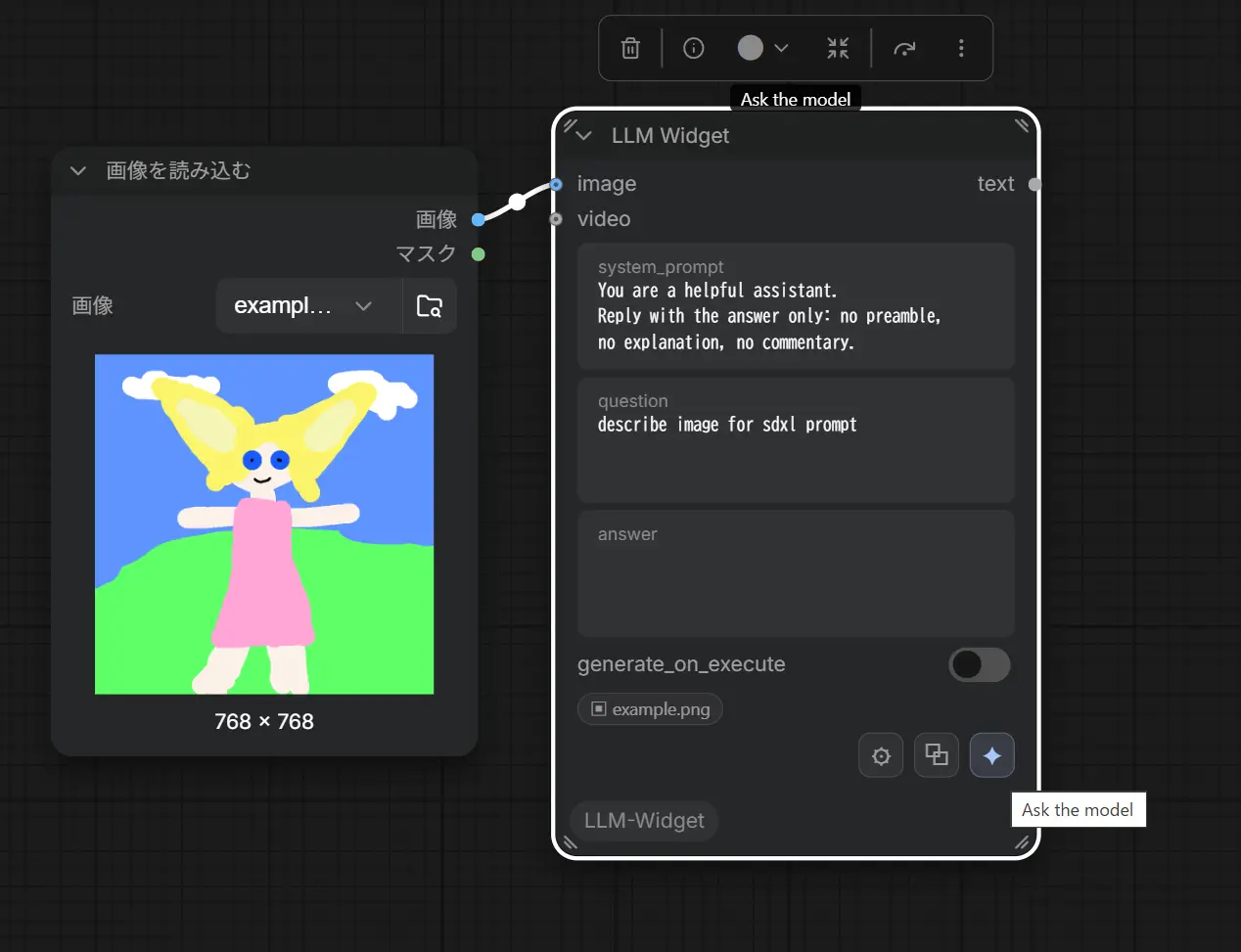 |
|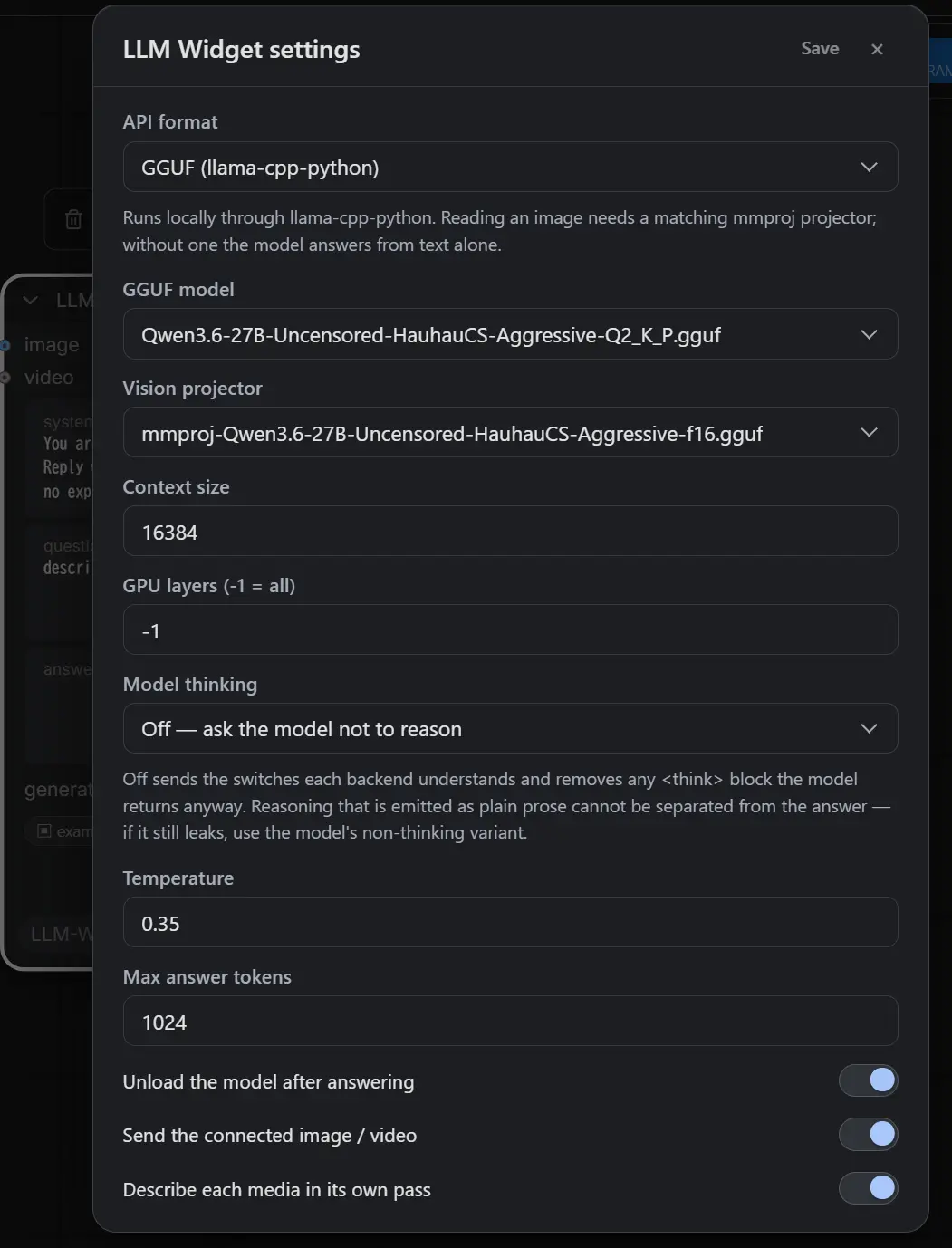 |
|
接続したメディア
エディタから送れるのは、ComfyUI の input/、output/、temp/ フォルダに ファイルとして
既に存在するメディアだけです。Load Image や動画ローダーを繋ぐのは有効ですが、VAE Decode の
出力を繋いでも送れません。その画像はグラフを実行するまでファイルとして存在しないからです。
Reroute ノードは辿って追跡します。
どちらなのかはツールバーのチップが示します。赤い取り消し線はそのメディアがスキップされることを 意味し、実行結果でも警告として報告されます。黙って何もないまま答えさせることはしません。
チャットメッセージには動画のチャンネルがないため、OpenAI と GGUF では動画を静止画にして送ります。
候補は 1 秒に 1 枚ずつ取り、最初と最後のフレームは必ず残したうえで、残りの枠を 直前のフレーム
からの変化量が大きい順 に埋めます。動きのないショットが何枚も送られる一方で途中のカットが
まったく見えない、という等間隔サンプリングの弱点を避けるためです。枚数は Video frames sent
(既定 4 枚、2〜12 枚)で決めます。
間隔が等しくならないので、リクエストには各フレームの タイムスタンプ(0.0s / 6.0s / 8.0s / 10.0s のうち…)も併記します。これを書かないと、止まっているショットとカットの並びが「4 秒間の
ゆっくりした動き」として読まれてしまいます。Gemini にはファイルをそのまま渡します。
実行時の動作
generate_on_execute がオフ(既定)のとき、グラフを実行しても保存済みの answer が text 出力に
渡されるだけです。通常はこれが望ましい動作です。ノードはエディタ上で既に仕事を終えています。
ヘッドレス実行や API 実行のときはオンにしてください。質問は実行中に、実際の IMAGE / VIDEO
テンソルを使って(ファイルは不要)処理され、結果は出力に流れると同時にノードの answer
ウィジェットにも書き戻されます。
設定
⚙ のダイアログは インストール全体で共通 です。ノードごとではないので、すべての LLM Widget
ノードが 1 つのバックエンドを共有します。設定は nodes.py の隣の llm_widget.json に保存され、
このファイルは API キーを平文で 保持するため gitignore してあります。
| 設定 | 対象 | 意味 |
| --- | --- | --- |
| API format | 全て | OpenAI-compatible (chat completions)、OpenAI Responses API、Gemini、GGUF、ComfyUI text encoder |
| API URL | openai / responses / gemini | パスは自動補完されます。http://host:1234、.../v1、完全な /v1/chat/completions や /v1/responses のいずれでも可(形式を切り替えても打ち直し不要)。送信先は下記の allowed_api_urls にあるものだけ |
| API key | openai / responses / gemini | Authorization: Bearer / x-goog-api-key として送信。openai / responses では省略可(ローカルサーバー向け。空ならヘッダー自体を送りません)、Gemini では必須 |
| Model | openai / responses / gemini | Gemini では id 単体、models/<id>、モデルの完全な URL のいずれでも可 |
| Request timeout (seconds) | openai / responses / gemini | サーバーが何も返さないまま待つ上限(10〜7200、既定 600)。✦ と generate_on_execute で共通 — リクエストのタイムアウト を参照 |
| GGUF model | gguf | スキャン対象フォルダで見つかった .gguf |
| Vision projector | gguf | auto はモデルの隣の最初の mmproj*.gguf を使用。none はテキストのみに固定 |
| Context size | gguf | n_ctx |
| GPU layers | gguf | n_gpu_layers。-1 で全レイヤーをオフロード |
| Text encoder | clip | models/text_encoders の .safetensors — ComfyUI のテキストエンコーダを LLM として使う を参照 |
| Model thinking | 全て | Off(既定)または Keep — 推論(thinking) を参照 |
| Temperature | 全て | |
| Max answer tokens | 全て | ローカルバックエンドでは max_tokens。答えの長さの上限 |
| Continue the conversation | 全て | 前回までのやり取りも一緒に送ります — 会話を続ける を参照 |
| Exchanges kept in the history | 全て | 送るやり取りの上限(新しい方から数えて何往復ぶんか) |
| Blank line between the log entries | 全て | ログの各ブロックの間に空行を入れるか。オフで詰めた IRC ログになります |
| Unload after answering | gguf / clip | モデルを常駐させず、すぐに VRAM を解放。オフのままでもツールバーの ⏏ でいつでも解放できます |
| Send the connected image / video | 全て | オフにすると質問は純粋なテキストとして送られます |
| Video frames sent | 全て | 動画 1 本を何枚の静止画にするか(2〜12、既定 4)。Gemini はファイルをそのまま送るため無関係です |
| Describe each media in its own pass | gguf | 下記参照 |
送信先の許可リスト(allowed_api_urls)
HTTP バックエンド(openai / responses / gemini)への要求は、llm_widget.json の allowed_api_urls に
載っている送信先にしか送られません。比較は スキーム・ホスト・ポート(オリジン)単位で、
パスは見ません。127.0.0.1、::1、localhost は同じものとして扱います。既定値:
"allowed_api_urls": [
  "http://localhost:1234",
  "http://localhost:11434",
  "http://localhost:8080",
  "http://localhost:8000",
  "https://api.openai.com",
  "https://generativelanguage.googleapis.com"
]
LM Studio(1234)、Ollama(11434)、llama.cpp server(8080)、vLLM(8000)の既定ポートと、
OpenAI / Gemini の公式エンドポイントです。別のポートや別のサーバー(OpenRouter、LAN 上の
別マシンなど)を使うときは、nodes.py の隣にある llm_widget.json をテキストエディタで開いて
この配列に追加してください。再起動は不要で、次の要求から反映されます。⚙ ダイアログには現在の
リストが表示されますが、ダイアログからは変更できません。設定ルートが送ってきた値は無視され、
リストにない URL の保存はその場で拒否されます。
これは Comfy Registry の指摘(SSRF)への対処です。設定ルートで宛先を書き換えられると、
この ComfyUI プロセスに API キー・質問・画像を任意のホストへ送らせ、その応答を読み取らせる
ことができてしまうためです。宛先を決められるのはサーバーの持ち主がこのファイルで指定したものだけ、
という形にしてあります。同じ理由で HTTP リダイレクトには従いません(3xx はエラーになります)。
169.254.* などのリンクローカルアドレスはリストに書いても拒否されます。
ComfyUI のテキストエンコーダを LLM として使う
API format を ComfyUI text encoder (safetensors) にすると、models/text_encoders にある ComfyUI 形式の
.safetensors をそのまま LLM として動かします。llama-cpp-python も mmproj も要りません。たとえば
Qwen-Image 2.1 のテキストエンコーダは Qwen3-VL-8B そのものなので、画像生成用に既に持っているファイルで
プロンプトを書かせられます。ComfyUI 本体の Generate Text ノードと同じ仕組み(CLIP.generate)ですが、
グラフを実行せずに ✦ から動き、system prompt・会話の履歴・複数の画像がそのまま使えます。
- 対応するのは LLM ベースのエンコーダ だけです(Qwen3-VL、Qwen3.5、Gemma など)。CLIP-L や T5 は 文章を生成できないので、選ぶとエラーになります。
- system prompt と履歴と複数サイズの画像をチャットとして渡せるのは Qwen3-VL / Qwen3.5 系です。それ以外は ComfyUI 内蔵の 1 ターン用テンプレートに頼るため、system prompt と履歴は質問文の中に畳み込まれ、画像は 1 枚目の大きさに揃えられます。
lm_headを削って配布されているファイルでは意味のある文章になりません。その場合は完全な重みのものを 使ってください。- ワークフローの実行中は断ります。 ComfyUI のモデル管理にはロックが無く、実行中のグラフと同時に モデルを出し入れすると VRAM の管理が競合するためです。逆に、生成中にワークフローをキューするのも 避けてください。
- ワークフロー側の CLIP Loader とは別に読み込みます。VRAM が足りなくなれば ComfyUI が通常どおり
退避させますが、すぐ空けたいときは ⏏ か
Unload after answeringを使ってください。 - 画像は長辺 1024px に縮めてから渡します(1 枚あたりおよそ 1000 トークン)。
- ■ で停止できます。ComfyUI 自身の Cancel と同じ割り込みフラグを使うので、次のカーネルで 止まります(ワークフローの実行中はフラグが共有のため立てません)。停止するとエンコーダは 解放されます。
- Qwen3 系のエンコーダは、ComfyUI が最初の生成で捕捉した CUDA graph でデコードします。本体は
ノードの実行が終わるたびにそれを捨てますが、✦ はノードではなくモデルも常駐したままなので、
このパックが生成のたびに自分で捨てています。これが無いと 2 回目の ✦ が 1 回目の解放済み KV
キャッシュに書き込み、ComfyUI 全体が
scatter gather kernel index out of boundsで落ちます。 このメッセージが出たらメモリ不足ではありません。報告してください。
会話を続ける(continue モード)
Continue the conversation をオンにすると、answer ウィジェットが IRC のログのような
会話ログになります。1 回のやり取りごとに次の 2 ブロックが追記され、次の質問にはその上の
やり取りが一緒に送られます。
<you> 猫の写真のプロンプトを書いて

<llm> a photograph of a tabby cat sitting on a windowsill, ...

<you> もう少し夕方っぽく

<llm> a photograph of a tabby cat sitting on a windowsill at golden hour, ...
Blank line between the log entries をオフにすると空行なしで詰まります。
<you> 猫の写真のプロンプトを書いて
<llm> a photograph of a tabby cat sitting on a windowsill, ...
<you> もう少し夕方っぽく
<llm> a photograph of a tabby cat ... at golden hour, ...
どちらの書き方も同じように読み取れます。ターンの終わりは次のマーカーが始まる位置なので、途中で 設定を切り替えても、それ以前のログはそのまま会話として扱われます。
会話の実体はこのテキストだけです。どこにも別の履歴は持っていません。つまり 行を書き換えれば モデルの記憶が変わり、消せば忘れます。ウィジェットは普通のテキストボックスのままなので、 IME も、リサイズも、undo も今までどおり効きます。ワークフローと一緒に保存されるので、 会話の続きは次に開いたときにも残っています。
- 質問を送ると
questionは空になります。質問はログの中に入っているためです。 - ⌫ でログ全体を消せます(確認あり)。continue モードのときだけ表示されます。
- 最初のマーカーより前にある文字列は会話の一部として扱いません。モードを切り替える前から 入っていた答えなので、勝手に消さずそのまま残します。
- 過去のやり取りは テキストだけ を送ります。画像や動画は今回の質問にだけ付きます。
- ノードの
text出力に出るのは常に 最後の<llm>ブロックだけ です。ログ全体が流れて 下流を壊すことはありません。⧉ でコピーされるのも同じくその答えだけです。 - 会話が伸びればコンテキストを食います。
Exchanges kept in the historyで送る往復数を、 ローカル GGUF ならContext sizeも合わせて調整してください。
Describe each media in its own pass(GGUF)
画像と質問全体を 1 つのマルチモーダルプロンプトにまとめるのではなく、まず短いシステムプロンプトで 接続されたメディアを 1 つずつ説明させ、次にその説明だけを使って画像なしで実際の質問に答えさせます。
合計時間は長くなりますが、個々のステップは小さくなります。これが重要なのは、llama-cpp の プロンプト評価フェーズは中断できないからです。大きなマルチモーダルプロンプトを 1 回投げることが、 エディタがしばらく固まったように見える原因です。この方式なら、メディアとメディアの間で キャンセルが効く余地も生まれます。
説明パスにはこのモード専用のトークン上限があります。推論を止める手段が無い モデル(Gemma に
/no_think は無く、0.4 より前の llama-cpp では handler にもスイッチがありません)は、その枠を
思考で使い切ってしまい、思考の途中で打ち切られた出力には答えが 1 文字も
含まれません(閉じマーカーが来ないため)。そこで Gemma 系にだけ思考ぶんの余白を上乗せしています
(max_length とは別枠です。どうせ捨てるテキストのための余白なので)。
それでも全部の説明が失敗した場合は、メディアが繋がっていなかったことにはしません。ログに警告を 出したうえで、通常どおり画像を質問に添付する経路に切り替えます。
停止
リクエスト実行中、✦ ボタンは ■ に変わります。押すとブラウザの fetch を中断し、同時に サーバーにも通知します。サーバー側ではローカル GGUF をトークンの合間で止め、モデルを解放します。 キャンセル後に届いた HTTP の答えは破棄されます。モデルのロードと llama-cpp のプロンプト評価は 依然として中断できません。
モデルの解放(⏏)
グラフを流す前に VRAM を返したいときのための明示的なボタンです。何をするかはバックエンドで 変わります。
gguf — GGUF は次の質問で再ロードしなくて済むように常駐します。Unload after answering を
オフにしている場合、⏏ がそれを解放する手段です。生成中は ⏏ が無効になり、サーバー側も実行中の
解放要求を拒否します — 生成中の Llama を閉じると llama-cpp ごと落ちるためです。
openai / responses — ローカルサーバーに解放を依頼します。宛先は設定の API URL から導出します
(http://127.0.0.1:1234/v1/chat/completions → http://127.0.0.1:1234)。どのサーバーかは
設定させず、常駐モデルの一覧で自動判別します:
| | 一覧(判別に使用) | 解放 |
|---|---|---|
| LM Studio | GET /api/v1/models の loaded_instances | POST /api/v1/models/unload に instance_id |
| Ollama | GET /api/ps | POST /api/generate に {"model": …, "keep_alive": 0} |
互いに相手のパスを持たないので、どちらが応答したかがそのまま判別になります。解放するのは
設定した Model に一致するものだけです。タグは両側で省略可能に扱うので、llama3.2 は
llama3.2:latest に一致し、LM Studio の 2 つめのインスタンス key:2 にも一致します。一致
しなければ何もせず、実際にロードされているモデル名を返します。
どちらも応答しなければ(素の llama.cpp サーバー、クラウドのエンドポイント)その旨を表示します。 クラウドでは元より意味がありませんが、ボタンは出したままにしてあります。
なお、この判別のためだけに API format を Ollama / LM Studio / その他に分けてはいません。生成の
経路はどれも同じ /v1/chat/completions で、ボタン 1 つのために設定を三重化する価値がないためです。
gemini — 解放するものが無いのでボタン自体を出しません。
推論(thinking)
Model thinking = Off(既定)のとき、リクエストには各バックエンドが解釈できるスイッチが
すべて載ります。OpenAI 互換サーバーには chat_template_kwargs.enable_thinking=false、
Gemini には thinkingConfig.thinkingBudget=0、Qwen 系には /no_think。未知のフィールドを
拒否するエンドポイントに対しては、それを外してもう一度送るので、厳格な API でもちゃんと答えが
返ります。Responses API にはスイッチを送りません。chat_template_kwargs は chat completions の
拡張で Responses API は受け付けず、推論は別の reasoning 出力アイテムに入るため、答えの
テキストには元々含まれないからです。
GGUF ではスイッチを モデル自身のチャットテンプレートの中 で立てます。メディアを含まない
ターンは、GGUF の tokenizer.chat_template の先頭に enable_thinking = false と
reasoning_effort = low を付けたものを llama-cpp の Jinja フォーマッタで描画するので、
llama-cpp-python のバージョンに依存しません。llama-cpp-python 0.4.x には chat_template_kwargs
引数そのものが無く、以前の版はそれを送って TypeError を受け、外して再送した結果、モデルの
既定(Qwen3.5 では思考オン)で走っていました。Qwen3.5 の GGUF はそのまま max_length を
全部思考に使い切り(「The model spent all N tokens reasoning…」)、N をいくら増やしても同じでした。
メディアを含むターンは vision handler を通ります。handler は自前のテンプレートを描画するため、
そのクラスが持つスイッチ(0.4.x では enable_thinking=False、旧 Qwen handler では
force_reasoning=False)をコンストラクタで渡し、Keep のターンではターンごとに戻します。
handler の族はファイル名から選びますが、qwen3.5 / qwen3.6 … は Qwen3-VL 用ではなく
Qwen3.5 用を選びます。Qwen3-VL のテンプレートには切るべきスイッチがありません。
Qwen3.8 はオン/オフのスイッチを 深さ に変えました。テンプレートが読むのは reasoning_effort
で、既定は xhigh です。そのため chat_template_kwargs には enable_thinking=false と一緒に
reasoning_effort=low(そのテンプレートが受け付ける最も浅い値。none は無効)も載せます。古い
テンプレートは前者しか読まず、reasoning_effort を知らないテンプレートはそれを無視するだけなので、
どちらのモデルでも同じリクエストが通ります。
それでもモデルが吐いてしまったものは後処理で除去します。最後の </think> までが、その閉じタグ
自体も含めて削除されます。閉じタグだけを手掛かりにしているのは意図的です。ほとんどの Qwen の
チャットテンプレートは assistant ターンで <think> を あらかじめ開いて いるため、返ってくる
テキストは裸の推論文から始まり、開始タグはレスポンスに含まれません。タグではなく channel
マーカーを使うモデルも同様に扱います。Harmony 形式の <|channel|>final<|message|> に加えて、
パイプが片側だけの綴り(Gemma 4 の <|channel>thought … <channel|> のように、開始と閉じで
向きが変わるもの)も、最後のマーカーまでを推論として落とします。
マーカーが一切ない 推論(「Here's a thinking process: 1. Analyze user input…」がただの平文で 続くもの)は答えと分離できません。どこで終わるのかを示すものが何もないからです。スイッチを 送ってもこの形で漏れるモデルなら、その non-thinking 版を使ってください。
Keep はスイッチを一切送らず、除去も行いません。推論を読みたいときに使います。
答え全体がコードフェンスで囲まれていた場合、それを外すのは言語指定がないか、散文的な言語
(```、```text、```prompt)のときだけです。```python のブロックは書かれたまま
残すので、コードを頼めばコードがそのまま得られます。
OpenAI Responses API
API format を OpenAI Responses API にすると、/v1/chat/completions の代わりに /v1/responses へ
送ります。OpenAI 本家のほか、LM Studio、llama.cpp server、vLLM など同じ形を話すサーバーでも
使えます。システムプロンプトは instructions、会話は input のメッセージ、画像は
input_image パーツ、答えは output の output_text から取り出します。store: false を
付けるので、サーバー側に会話は残りません — 会話の状態は answer 欄のログだけです。URL の
補完は chat completions と同じで、.../v1/chat/completions と書いてあっても /v1/responses に
付け替えます。⏏ も同じサーバーに対して同じ手順で動きます。
リクエストのタイムアウト
HTTP バックエンド(openai / responses / gemini)への要求は、以前は 600 秒固定で打ち切って
いました。遅いエンドポイントの先にいる推論モデルや、画像を 10 枚添えた質問は、それより長く
かかっても正当です。⚙ の Request timeout (seconds)(llm_widget.json の http_timeout、
10〜7200、既定 600)で変えられます。✦ と generate_on_execute で同じ値を使います。これは
「サーバーが何も送ってこない時間」の上限で、接続と各読み取りに別々に適用されるため、やり取り
全体の上限ではありません。超えたときは設定名を挙げたエラーになります。⏏ は管理用の呼び出し
なので、別の短い上限のままです。
ブラウザ側にも、もう一つ短い上限がありました。 ComfyUI フロントエンド 1.55 以降の
api.fetchApi には独自の 60 秒タイムアウトがあり、超えると Fetch timeout というエラーで
要求を中断します。600 秒に設定しても 1 分で切れていたのはこれで、サーバー側は気づかずに生成を
続けていました。✦ と ⏏ の呼び出しはこの上限を外す(timeoutMs: null)ようにしたので、
効くのはサーバー側の http_timeout だけになります。古いフロントエンドではこのオプションは
無視されます。
LM Studio が画像を拒否したとき(WebP → JPEG)
LM Studio の OpenAI 互換サーバーは、デコードできない画像に対して
400 'url' field must be a base64 encoded image
を返します。文面は紛らわしいのですが、送っている画像は base64 のデータ URL そのもので、 問題は 画像形式 です。LM Studio は JPEG と PNG しかデコードせず、WebP にこのエラーを返します (lmstudio-bug-tracker #1752)。 ComfyUI の入力画像は WebP であることが珍しくありません。
API format が openai または responses のとき、本文がこのメッセージに一致する 400 が返ると、
添付した画像をすべて JPEG(品質 90、透明部分は白で埋める)に変換して一度だけ送り直します。
thinking スイッチの再試行は失敗したステップから続けます — 拒否されたのはスイッチではないからです。
すでに JPEG だった画像は変換しないので、変換できるものが無かったときや、JPEG でも拒否された
ときは、その旨を付けたエラーになります。動画から取り出した静止画は最初から JPEG なので、この
再送は起きません。Gemini はファイルを MIME タイプ付きでそのまま送り、ローカル形式はパーツを
自分でデコードするので、どちらも対象外です。
開発
- Python の変更には ComfyUI の完全な再起動 が必要です。
web/*.jsの変更は ブラウザのハードリフレッシュ だけで反映されます(WEB_DIRECTORY経由で配信)。- ComfyUI なしで実行できるものはありません。検証はキャンバス上での手動確認です。
ライセンス
MIT。nodes.py と web/llm_widget_ui.js のかなりの部分は nkxx188/ComfyUI-MiniMaxH3-Easy を
基にしており、その MIT ライセンスと著作権表示は LICENSE に残してあります。
<a id="english"></a>
ComfyUI-LLM-Widget (English)
日本語 | English
A single ComfyUI node that asks an LLM a question — optionally about a connected image or video — and keeps the answer on the node.
It runs from the editor, before and independently of any graph execution. Press the ✦ button and the answer appears; nothing is queued, nothing else in the workflow runs. The node is meant to sit in a workflow permanently bypassed or muted, as a tool rather than a step.
Typical uses: drafting or rewriting a generation prompt, translating one, describing a reference image, or just asking a question with a picture attached.
Backends: an OpenAI-compatible /v1/chat/completions endpoint, OpenAI's Responses API
(/v1/responses), Google's native Gemini generateContent, or a local GGUF through
llama-cpp-python.
Install
cd ComfyUI/custom_nodes
git clone <this repository> ComfyUI-LLM-Widget
Restart ComfyUI. No Python dependencies are added.
For the GGUF format you additionally need llama-cpp-python in ComfyUI's environment, and
a .gguf under models/text_encoders/ or models/LLM/ — the same folders
ComfyUI-QwenVL-F and ComfyUI-MiniMaxH3-Easy scan, so a model installed for one of them is
found here too.
llama-cpp-python with vision
Reading an image through a GGUF needs a build that ships the multimodal chat handlers
(Qwen3VLChatHandler, Qwen25VLChatHandler, Gemma4ChatHandler, …). The upstream PyPI
package usually does not have them, so install a release wheel from a fork that does —
JamePeng/llama-cpp-python. Without
one the model still answers, from the text alone.
tools/install_helper.py works out the command for you. It detects the CUDA version, checks
the PyTorch index and the release assets of that repository, and prints the exact
pip install line for the environment you point it at — or tells you it is already current.
This script only comes with a
git clone. It is excluded from the Comfy Registry package (ComfyUI-Manager,comfy node install), so an install made that way has notools/folder at all. If you need it, fetchtools/install_helper.pyfrom this repository on its own and run it: it uses nothing but the standard library, and the node itself does not depend on it.
python tools\install_helper.py --python "C:\AI\ComfyUI\python_embeded\python.exe"
Useful flags: --cuda cu130 (skip detection, cpu for CPU builds), --force
(re-emit a command even when current), --no-torch / --no-llama. With --python the
target environment does not have to be activated; drop the flag only when it already is,
or you will be reporting on whichever Python is first on your PATH.
To do it by hand: stop ComfyUI first, back up with pip freeze > requirements-backup.txt,
then pick a wheel matching your Python (cp310 … cp313), your platform (win_amd64) and
your build type, and force-reinstall it:
C:\AI\ComfyUI\python_embeded\python.exe -m pip install --upgrade --force-reinstall llama_cpp_python-....whl
A CUDA wheel's build tag (cu121, cu130, …) must match the CUDA runtime you actually
have; a mismatch shows up as cannot load ggml.dll even though the file is right there. If
you are unsure, take the CPU wheel. Then verify:
C:\AI\ComfyUI\python_embeded\python.exe -c "from llama_cpp.llama_chat_format import Qwen3VLChatHandler, Qwen25VLChatHandler; print('handlers OK')"
A failure here means the wheel has no vision support, or it went into a different Python
than the one ComfyUI uses. If the install pulled in a numpy newer than OpenCV accepts, pin
it back with pip install --upgrade "numpy<2.3" (same idea for "pillow<12").
The node
LLM Widget (category: LLM Widget)
| Slot | Type | Notes |
| --- | --- | --- |
| image, image2 … image10 (input) | IMAGE | optional. The model receives them as image 1 … image 10 by socket number (image3 stays image 3 with image2 left empty), so refer to them by that number when asking for a prompt for a multi-reference edit model |
| video (input) | VIDEO | optional |
| text (output) | STRING | optional — normally unused, see Execution |
Widgets:
- toolbar — ✦ run (becomes ■ stop while a request is in flight), elapsed time, ⏏ unload the model (shown for every backend but Gemini), ⧉ copy the answer, ⌫ clear the conversation (shown in continue mode only), ⚙ settings. Above it, a chip per connected media shows what will actually be sent.
- system_prompt — free text, saved with the workflow. This is the only "template"
there is. The tabs right above it keep several system prompts on the node: click to switch,
double-click to rename,
+to add,×to delete,◀▶on the open tab to reorder. Only the open tab is sent. The tabs are saved per node with the workflow, and thesystem_promptvalue is always the open tab's text, so an execution (API runs included) uses it as is. - generate_on_execute — off by default, see below.
- answer — where the result lands. Editable; saved with the workflow. In continue mode this is the conversation log itself, see Continuing the conversation.
- question — what you are asking. It sits below the log, right above the ✦ button.
The order is the same in both modes. ComfyUI serializes widget values by index, so an order
that followed the setting would load a workflow saved under one mode with question and answer
swapped under the other.
Workflows saved with 0.1.1 or earlier load with
questionandanswerswapped. Swap them back once and save.
Connected media
The editor can only send media that already exists as a file in ComfyUI's
input/, output/ or temp/ folder. Wiring a Load Image or a video loader works;
wiring the output of a VAE Decode does not, because that image has no file until the
graph runs. Reroute nodes are followed through.
A chip in the toolbar tells you which it is — struck through and red means the media will be skipped, and the run reports it as a warning rather than letting the model invent a description.
Videos are sampled into stills for the OpenAI and GGUF formats, since a chat message has no
video channel. Candidates are taken at one per second; the first and the last frame are
always kept, and what is left of the budget goes to the frames that changed most from
the one before them — so a held shot is not sent several times over while the cut in the
middle of the clip goes unseen. How many stills you get is Video frames sent (4 by
default, 2–12).
Because that spacing is deliberately uneven, the request also states each still's
timestamp (at 0.0s / 6.0s / 8.0s / 10.0s of a 10.0s clip…). Without it a held shot
followed by a cut reads as four steady seconds of slow motion. Gemini receives the file
whole.
Execution
With generate_on_execute off (the default), running the graph just hands the stored
answer to the text output. This is what you want: the node has already done its work in
the editor.
Turn it on for a headless or API run. The question is then answered during execution, using
the actual IMAGE/VIDEO tensors (no file needed), and the result is pushed back into the
node's answer widget as well as onto the output.
Settings
The ⚙ dialog is installation-global, not per-node — all LLM Widget nodes share one
backend. It is stored in llm_widget.json next to nodes.py, which holds a plaintext
API key and is gitignored.
| Setting | Applies to | Meaning |
| --- | --- | --- |
| API format | all | OpenAI-compatible (chat completions), OpenAI Responses API, Gemini, GGUF, or ComfyUI text encoder |
| API URL | openai / responses / gemini | The path is completed for you: http://host:1234 , .../v1 and a full /v1/chat/completions or /v1/responses all work, and switching the format does not mean retyping it. Only a destination listed in allowed_api_urls (below) is ever contacted |
| API key | openai / responses / gemini | Sent as Authorization: Bearer / x-goog-api-key. Optional for openai / responses (a local server usually has none; empty means no header at all), required for Gemini |
| Model | openai / responses / gemini | For Gemini a bare id, models/<id> or a full model URL are all accepted |
| Request timeout (seconds) | openai / responses / gemini | How long the server may go without sending anything (10–7200, default 600). Shared by ✦ and generate_on_execute — see Request timeout |
| GGUF model | gguf | Any .gguf found under the scanned folders |
| Vision projector | gguf | auto picks the first mmproj*.gguf next to the model; none forces text-only |
| Context size | gguf | n_ctx |
| GPU layers | gguf | n_gpu_layers, -1 offloads everything |
| Text encoder | clip | A .safetensors under models/text_encoders — see Using a ComfyUI text encoder as the LLM |
| Model thinking | all | Off (default) or Keep — see Reasoning |
| Temperature | all | |
| Max answer tokens | all | max_tokens for the local backends, the answer length cap |
| Continue the conversation | all | Send the earlier turns along with the question — see Continuing the conversation |
| Exchanges kept in the history | all | How many of the most recent exchanges are replayed |
| Blank line between the log entries | all | Whether the log's blocks are separated by a blank line. Off gives a tight IRC log |
| Unload after answering | gguf / clip | Frees VRAM immediately instead of keeping the model resident. Leave it off and use the toolbar's ⏏ when you want the VRAM back |
| Send the connected image / video | all | Off means the question is asked as pure text |
| Video frames sent | all | How many stills one video becomes (2–12, default 4). Not used by Gemini, which gets the file whole |
| Describe each media in its own pass | gguf | See below |
Allowed destinations (allowed_api_urls)
A request to an HTTP backend (openai / responses / gemini) is only sent to a destination listed under
allowed_api_urls in llm_widget.json. The comparison is by scheme, host and port (the
origin); the path does not matter, and 127.0.0.1, ::1 and localhost count as the same
host. The default:
"allowed_api_urls": [
  "http://localhost:1234",
  "http://localhost:11434",
  "http://localhost:8080",
  "http://localhost:8000",
  "https://api.openai.com",
  "https://generativelanguage.googleapis.com"
]
That is LM Studio (1234), Ollama (11434), llama.cpp server (8080) and vLLM (8000) on their
default ports, plus the official OpenAI and Gemini endpoints. For another port or another
server — OpenRouter, a box on the LAN — open llm_widget.json next to nodes.py in a text
editor and add it to the array. No restart is needed; the next request reads the file. The ⚙
dialog shows the current list but cannot change it: whatever the settings route sends for
this key is ignored, and saving a URL that is not on the list is refused on the spot.
This answers a Comfy Registry finding (SSRF). If the settings route could point the API URL
anywhere, whoever reaches it could make this ComfyUI process send the API key, the question
and the images to any host and read the reply back. Now only the server's owner, through this
file, decides where it may connect. For the same reason HTTP redirects are not followed (a 3xx
is an error), and link-local addresses such as 169.254.* are refused even when listed.
Using a ComfyUI text encoder as the LLM
With the API format set to ComfyUI text encoder (safetensors), a .safetensors in ComfyUI's own
format under models/text_encoders is run as the LLM — no llama-cpp-python, no mmproj. The text
encoder of Qwen-Image 2.1 is Qwen3-VL-8B, for one, so the file you already have for generating
images can write their prompts. It is the mechanism behind ComfyUI's own Generate Text node
(CLIP.generate), but it runs from ✦ without executing the graph, and the system prompt, the
conversation history and several images all work.
- Only LLM-based encoders can do this (Qwen3-VL, Qwen3.5, Gemma, …). A CLIP-L or a T5 cannot generate text and is refused.
- Qwen3-VL / Qwen3.5 get a real chat: system prompt, earlier turns, images of any mix of sizes. Every other family only has ComfyUI's built-in single-turn template, so the system prompt and the history are folded into the question and the images are resized to match the first one.
- A file distributed without its
lm_headwill not produce meaningful text; use one with the full weights. - It is refused while a workflow is running. ComfyUI's model management has no lock, and moving a model in and out next to an executing graph races over the same VRAM bookkeeping. For the same reason, do not queue a workflow while an answer is being generated.
- It is loaded separately from the workflow's CLIP Loader. ComfyUI offloads it as usual when VRAM
runs short; use ⏏ or
Unload after answeringto get the memory back right away. - Images are shrunk to 1024px on the long side first (about a thousand tokens each).
- ■ stops it the way ComfyUI's own Cancel button would, through the interrupt flag every kernel checks — only while no workflow is running, since the flag is global. Stopping releases the encoder.
- A Qwen3 encoder decodes through CUDA graphs that ComfyUI captures on the first generation and
normally discards after each node. ✦ is not a node and the model stays loaded between presses,
so this pack discards them itself after every generation — without that, the second ✦ writes
into the first one's freed KV cache and the whole ComfyUI process aborts with
scatter gather kernel index out of bounds. If you ever see that message, it is not out-of-memory; report it.
Continuing the conversation
With Continue the conversation on, the answer widget becomes an IRC-style log. Every turn
appends two blocks to it, and the exchanges above the question are sent with the next one:
<you> Write a prompt for a photo of a cat

<llm> a photograph of a tabby cat sitting on a windowsill, ...

<you> More like early evening

<llm> a photograph of a tabby cat sitting on a windowsill at golden hour, ...
Turn Blank line between the log entries off and the blocks are written tight:
<you> Write a prompt for a photo of a cat
<llm> a photograph of a tabby cat sitting on a windowsill, ...
<you> More like early evening
<llm> a photograph of a tabby cat ... at golden hour, ...
Both spellings read back the same — a turn ends where the next marker begins — so switching the setting mid-conversation leaves the earlier log perfectly readable.
That text is the entire conversation — there is no history stored anywhere else. Edit a line and you change what the model remembers; delete one and it forgets. The widget is still an ordinary text box, so IME composition, resizing and undo all work as before, and the log is saved with the workflow like any other widget value.
- Sending a question clears the
questionbox, since the question is in the log by then. - ⌫ clears the whole log (it asks first). It is only shown in continue mode.
- Anything above the first marker is not treated as part of the conversation. It is whatever the field held before the mode was switched on, and it is left alone rather than deleted.
- Earlier turns are sent as text only; a connected image or video is attached to the current question.
- The node's
textoutput is always the last<llm>block alone, so the whole log never leaks into whatever is wired downstream. ⧉ copies that same reply. - A long conversation costs context. Tune
Exchanges kept in the history— and, for a local GGUF,Context sizewith it.
Describe each media in its own pass (GGUF)
Instead of putting the images and the whole question in one multimodal prompt, the model first describes each connected media on its own with a short system prompt, then answers the actual question from those descriptions with no images attached.
It is slower in total but each individual step is small, which matters because llama-cpp's prompt-evaluation phase cannot be interrupted — a single large multimodal prompt is the reason the editor can appear frozen for a while. It also gives cancellation a chance to land between assets.
The describe pass has a token budget of its own. A model whose reasoning cannot be switched
off — Gemma has no /no_think, and on llama-cpp builds before 0.4 its chat handler has no
switch — spends that budget on
the thought, and an output cut off mid-thought contains no answer at all, since the closing
marker never arrives. Gemma-family models therefore get extra headroom on top (separate from
max_length, because it pays for text that is discarded anyway).
If every description fails regardless, the run does not pretend no media was connected: it logs a warning and falls back to attaching the images to the question, the way the mode does when it is off.
Stopping
While a request is running the ✦ button becomes ■. Pressing it aborts the browser's fetch and tells the server, which stops a local GGUF between tokens and releases the model. An HTTP answer that arrives after a cancel is discarded. Model loading and llama-cpp's prompt evaluation still cannot be interrupted.
Unloading the model (⏏)
The explicit way to hand VRAM back before queueing the graph. What it does depends on the backend.
gguf — a GGUF stays resident so the next question does not reload it, and with Unload after answering off nothing ever frees it. ⏏ does. It is disabled while a generation is
running and the server refuses the request too: closing a Llama that is still generating
takes llama-cpp down with it.
openai / responses — asks the local server to free it. The address comes from the configured API URL
(http://127.0.0.1:1234/v1/chat/completions → http://127.0.0.1:1234). Which server it is
is detected rather than configured, by asking what it has resident:
| | Listing (the detection) | Unload |
|---|---|---|
| LM Studio | GET /api/v1/models → loaded_instances | POST /api/v1/models/unload with instance_id |
| Ollama | GET /api/ps | POST /api/generate with {"model": …, "keep_alive": 0} |
Neither server has the other's route, so whichever answers is the answer. Only models
matching the configured Model are unloaded, with the tag optional on both sides: llama3.2
matches llama3.2:latest, and a second LM Studio instance's key:2 matches its key. If
nothing matches, nothing is unloaded and the reply says what is resident.
If neither answers — a plain llama.cpp server, a cloud endpoint — it says so. Pointless against the cloud, but the button is left visible anyway.
The API format is deliberately not split into Ollama / LM Studio / other for this: every one
of them generates through the same /v1/chat/completions, and tripling the settings for one
button is not worth it.
gemini — nothing to free, so the button is not shown.
Reasoning
With Model thinking = Off (the default) the request carries every switch the backends
understand — chat_template_kwargs.enable_thinking=false for OpenAI-compatible servers,
thinkingConfig.thinkingBudget=0 for Gemini, /no_think for the Qwen family. An endpoint
that rejects the unknown field gets the request again without it, so a stricter API still
answers. The Responses API gets no switch at all: chat_template_kwargs is a chat-completions
extension it does not accept, and a model's reasoning lives in separate reasoning output
items there, so it is never part of the answer text in the first place.
For GGUF the switch is set inside the model's own chat template: a turn without media is
rendered through llama-cpp's Jinja formatter over the GGUF's tokenizer.chat_template with
enable_thinking = false and reasoning_effort = low prepended, so it works on every
llama-cpp-python build. llama-cpp-python 0.4.x has no chat_template_kwargs argument at all;
earlier versions of this widget sent it, got a TypeError, retried without it and ran with the
model's default, which for Qwen3.5 is thinking — a Qwen3.5 GGUF then spent the whole
max_length reasoning ("The model spent all N tokens reasoning…") however large N was set. A
turn with media goes through the vision chat handler, which renders its own template and is
constructed with whichever switch its class declares (enable_thinking=False on 0.4.x,
force_reasoning=False on the older Qwen handlers); a Keep turn flips it back per turn.
The handler family is chosen from the filename, and qwen3.5 / qwen3.6 / … pick the Qwen3.5
handler rather than the Qwen3-VL one, whose template has no switch to turn.
Qwen3.8 turned that on/off switch into a depth: its template reads reasoning_effort
and defaults to xhigh. chat_template_kwargs therefore carries reasoning_effort=low —
the shallowest value the template accepts, none is not one of them — alongside
enable_thinking=false, not instead of it: older templates read only the latter, and a
template that has never heard of the variable simply ignores it.
Whatever a model emits anyway is cleaned up afterwards: everything up to and including the
last closing </think> is removed. The closing tag alone is enough on purpose — most
Qwen chat templates pre-open <think> in the assistant turn, so what comes back starts
with bare reasoning prose and the opening tag is never in the response. Models that mark
their reasoning with channels instead of tags are handled the same way: Harmony's
<|channel|>final<|message|>, and the half-piped spellings too — Gemma 4 opens with
<|channel>thought and closes with <channel|>, and everything up to that last marker goes.
Reasoning that carries no marker at all ("Here's a thinking process: 1. Analyze user input…" as plain text) cannot be separated from the answer — nothing says where it stops. If a model leaks like that despite the switches, use its non-thinking variant.
Keep sends none of the switches and strips nothing, for when you want to read the reasoning.
A fenced answer is unwrapped only when the fence has no language or a prose-ish one
(```, ```text, ```prompt). A ```python block is left exactly as written, so
asking for code still gives you code.
OpenAI Responses API
With the API format set to OpenAI Responses API the request goes to /v1/responses instead
of /v1/chat/completions. That is OpenAI itself and any server that mirrors the shape (LM
Studio, llama.cpp server, vLLM). The system prompt is sent as instructions, the conversation
as input messages, images as input_image parts, and the answer is read from the
output_text parts of output. store: false is set, so nothing of the exchange stays on the
server — the log in the answer field is the only conversation state. The URL is completed the
same way as for chat completions, and a URL that still says .../v1/chat/completions is
rewritten to /v1/responses. ⏏ works against the same servers in the same way.
Request timeout
A request to an HTTP backend (openai / responses / gemini) used to be cut off after a fixed
600 s. A reasoning model behind a slow endpoint, or a question with ten images attached, can
legitimately need longer. The limit is now Request timeout (seconds) in the ⚙ dialog
(http_timeout in llm_widget.json, 10–7200, default 600), shared by ✦ and
generate_on_execute. It is the time the server may go without sending anything — the
connect and each read are timed separately — not a cap on the whole exchange. A request that
hits it fails with a message that names the setting. ⏏ keeps its own short limit; it is a
management call, not a generation.
The browser had a second, shorter limit. ComfyUI frontend 1.55 and later give
api.fetchApi a 60 s timeout of its own and abort the request with a Fetch timeout error —
which is what a 600 s setting still ran into after one minute, while the server went on
generating. The ✦ and ⏏ calls now opt out of that limit (timeoutMs: null), so the server's
http_timeout is the only one. An older frontend ignores the option.
Images LM Studio will not decode (WebP → JPEG)
LM Studio's OpenAI-compatible server answers
400 'url' field must be a base64 encoded image
to an image it will not decode. The message is misleading: the images this node sends are base64 data URLs. What the server means is the image format — it decodes JPEG and PNG and says this for WebP (lmstudio-bug-tracker #1752), and ComfyUI inputs are often WebP.
With openai or responses as the API format, a 400 whose body matches that message makes
the node transcode every attached image to JPEG (quality 90, transparency flattened onto white)
and send the request once more. The thinking-switch retry resumes from the step that failed,
since the switch was not what was rejected. Images that were already JPEG are not re-encoded;
if nothing could be, or the server rejects the JPEGs too, the error says so. Sampled video
frames are JPEG already and never trigger this. Gemini takes the file whole with its own MIME
type and the local formats decode the parts themselves, so neither is affected.
Development
- Python changes need a full ComfyUI restart.
web/*.jschanges need only a browser hard refresh (served viaWEB_DIRECTORY).- There is nothing to run without a ComfyUI installation; verification is manual on the canvas.
License
MIT. Substantial parts of nodes.py and web/llm_widget_ui.js are adapted from
nkxx188/ComfyUI-MiniMaxH3-Easy, whose MIT license and copyright notice are kept in LICENSE.