
ComfyUI_iAskAsk_SoulX_FlashHead
ComfyUI custom nodes for SoulX-FlashHead — generate talking head videos from a reference image and driving audio.
Nodes (2)
ComfyUI_iAskAsk_SOULX_FlashHead



ComfyUI custom nodes for SoulX-FlashHead — generate talking head videos from a reference image and driving audio.
Provider Website: http://iaskask.com/
Features
- Realistic talking head video generation from a single portrait photo + audio
- Supports both Pro and Lite model variants
- Long audio slicing support — generates coherent videos for arbitrary-length audio
- Custom checkpoint paths for model flexibility
- BFloat16/Float16 autocast for memory efficiency
Requirements
Install via ComfyUI manager or manually:
pip install -r requirements.txt
Key dependencies: optimum-quanto, diffusers, transformers, librosa, imageio-ffmpeg, av, mediapipe, loguru.
Setup
ComfyUI/custom_nodes/
└── ComfyUI_iAskAsk_SoulX_FlashHead/
This plugin uses the flash_head module from SoulX-FlashHead (bundled as a submodule).
Model Download
Two models are required: SoulX-FlashHead-1_3B (~12GB) and wav2vec2-base-960h. Two download scripts are provided:
| Region | Script | Source |
|--------|--------|--------|
| Global | python download_model_huggingface.py | HuggingFace Hub |
| China | python download_model_modelscope.py | ModelScope (falls back to HuggingFace for wav2vec2) |
Models are saved to models/ by default. After downloading, the Loader node's default paths will work automatically:
ComfyUI/models/Soul-AILab/SoulX-FlashHead-1_3B/ComfyUI/models/facebook/wav2vec2-base-960h/
Nodes
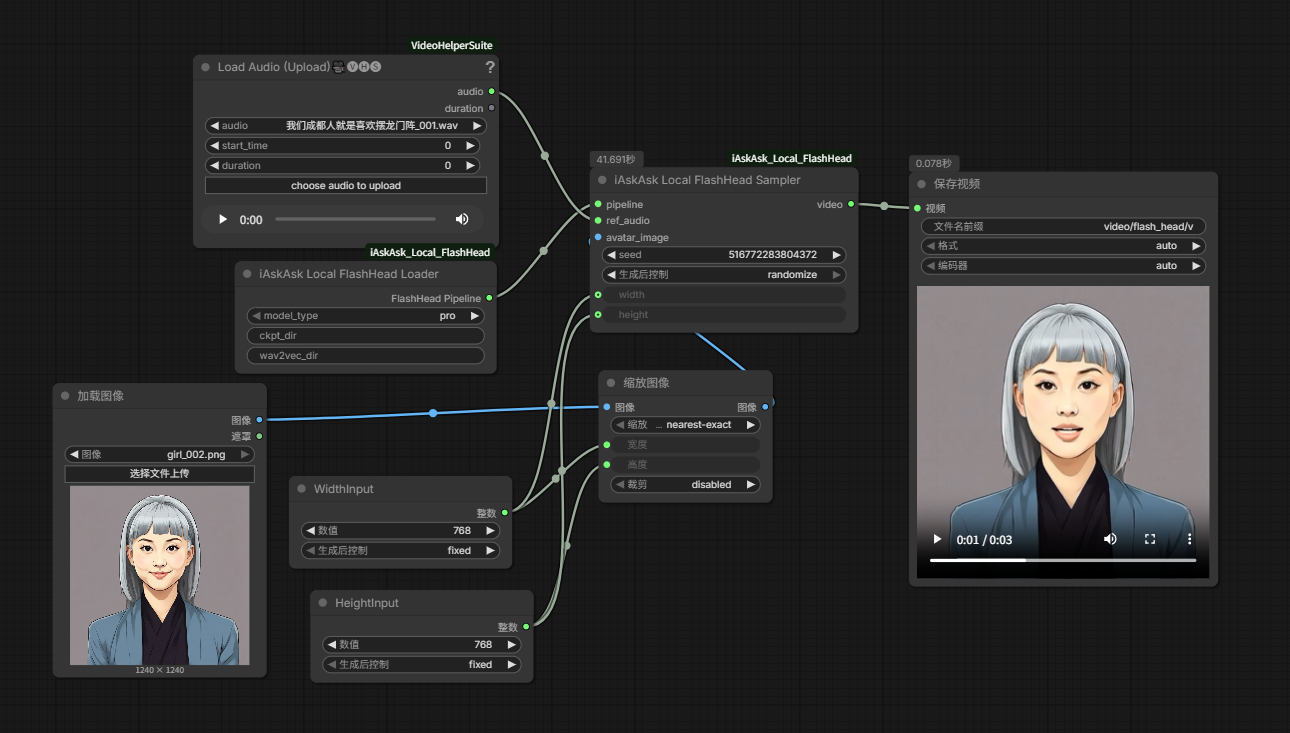
iAskAsk Local SoulX FlashHead Loader
Loads the FlashHead pipeline.
| Parameter | Type | Default | Description |
|-----------|------|---------|-------------|
| model_type | pro / lite | lite | Model variant |
| ckpt_dir | STRING | ComfyUI/models/Soul-AILab/SoulX-FlashHead-1_3B | Custom checkpoint path |
| wav2vec_dir | STRING | ComfyUI/models/facebook/wav2vec2-base-960h | Custom wav2vec path |
iAskAsk Local FlashHead Sampler
Generates video from pipeline, reference image, and audio.
| Parameter | Type | Default | Description |
|-----------|------|---------|-------------|
| pipeline | Pipeline | — | From the Loader node |
| ref_audio | AUDIO | — | Driving audio signal |
| avatar_image | IMAGE | — | Reference face image |
| seed | INT | 42 | Random seed (use -1 for random) |
| width | INT | 512 | Output video width |
| height | INT | 512 | Output video height |
Usage
- Install SoulX-FlashHead (submodule) per its setup instructions.
- Download models using one of the scripts above.
- Load the workflow from
workflow/(or create your own):- iAskAsk Local SoulX FlashHead Loader → configure model paths
- Load Image → your reference portrait
- Load Audio → driving audio
- iAskAsk Local FlashHead Sampler → connect pipeline, image, audio
- Preview/Export Video → view result
Example Assets
Sample files are included in assets/ for quick testing:
girl_001.png— reference portraitgirl_001_voice.wav— driving audiogirl_001_out.mp4— sample output
Testing Notes
Manual testing by the author:
- Launch ComfyUI, fix width & height to 512×512 (recommended)
- The test can run continuously for 1+ minutes of generation without issues
Acknowledgements
- SoulX-FlashHead — core model and inference pipeline
- iAskAsk — ComfyUI integration provider
Development
This project was built completely using opencode — an AI coding tool — with the DeepSeek V4 Flash Free model (truly free, via opencode zen).
Developer contributed debugging assistance during development.