
HWP Nodes
HWP custom node pack for ComfyUI — global seed control and workflow utilities
Nodes (6)
One number to set, every sampler in the graph follows
The pixel size of a latent, no VAE decode required
Live longest-or-shortest from a width and a height
Type a Ratio, Get VAE-Safe Width and Height
One save node, six formats, and a filename that's actually the filename
A seed that stays put, with a NOISE socket you don't expect
ComfyUI-HWP-Nodes
A small collection of custom ComfyUI nodes by hwprinz, covering seed/noise control, simple latent/size utilities, and an advanced multi-format image save node.
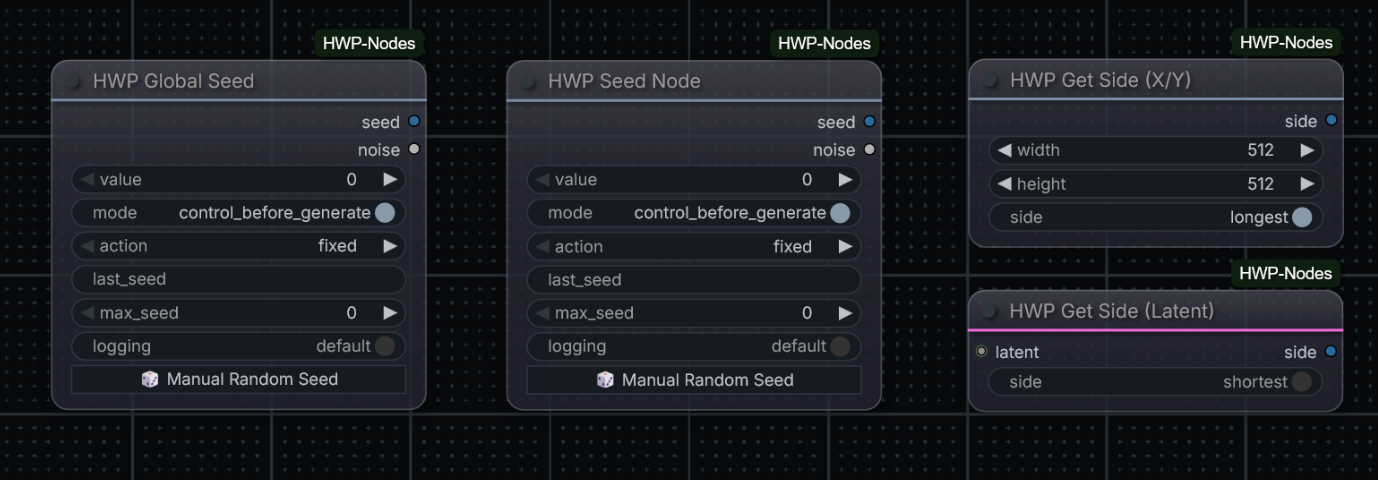
Nodes
| Node | File | Purpose |
|---|---|---|
| HWP Global Seed | global_seed.py | Broadcasts one seed value to every seed / noise_seed int widget in the workflow |
| HWP Seed Node | seed_node.py | Local (non-broadcasting) seed + noise source for a single sampler |
| HWP Get Side (Latent) | get_side_from_latent.py | Returns the longest/shortest pixel-space dimension of a LATENT |
| HWP Get Side (X/Y) | get_side_from_xy.py | Returns the longest/shortest of a width/height pair |
| HWP Save Image (Advanced) | image_save.py | Multi-format save (PNG/JPG/WEBP/TIFF/ICO) with timestamps, metadata, blind watermark and per-file logging |
| HWP Aspect Size | aspect_size.py | width/height from a model's pixel budget + free aspect ratio (e.g. 5:2), capped at the model family's max side, rounded to a VAE-safe multiple |
Finding the nodes
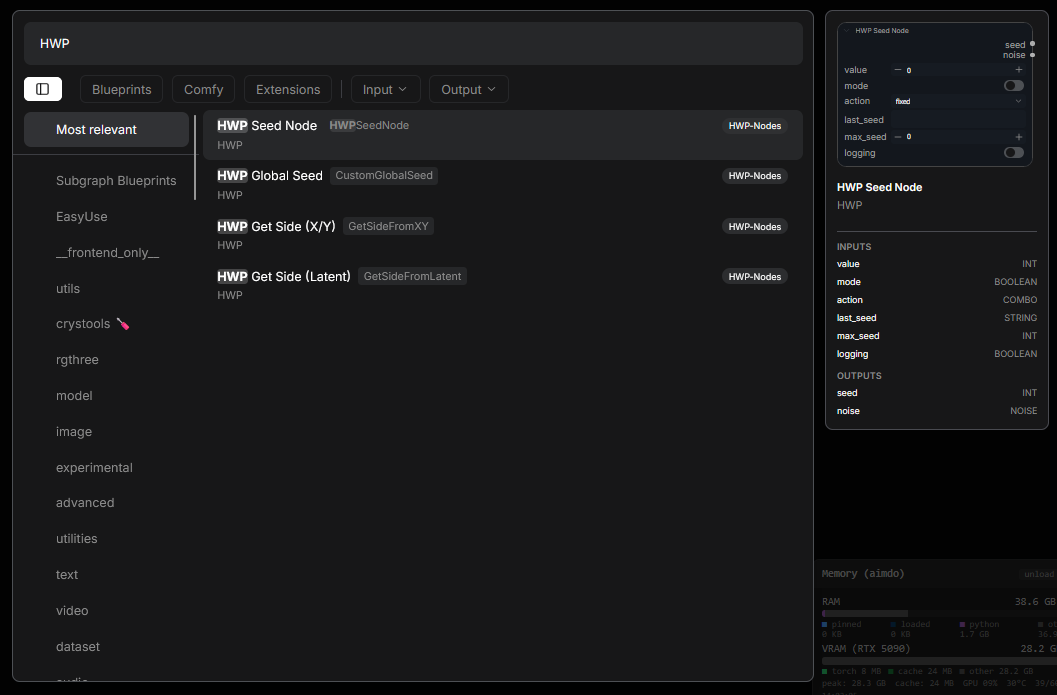
All nodes are registered under the HWP category. To find them, just type HWP into the node search (right-click canvas → Add Node):
HWP Global Seed
File: nodes/global_seed.py · Category: HWP
Global seed controller for ComfyUI workflows. Distributes a single seed value to every other seed / seed_num / noise_seed int widget in the workflow, so you only need to manage one seed control instead of one per sampler. This is the seed value only — the node's noise output is a separate NOISE object that you wire like any other output; it is not broadcast (see Outputs below).
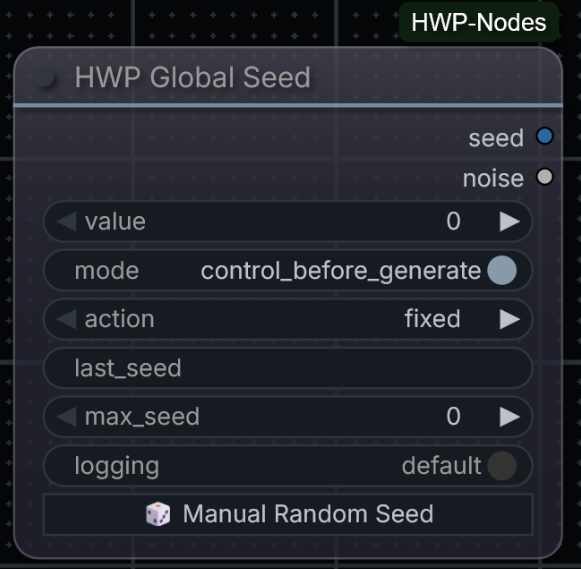
Inputs
| Input | Type | Default | Description |
|---|---|---|---|
| value | INT | 0 | The base seed |
| mode | ENUM | control_before_generate | control_before_generate computes the next seed before this run's prompt is sent (this run uses the new value); control_after_generate uses the current value now and prepares the next one for the following queue |
| action | ENUM | fixed | fixed, increment, decrement, randomize, or their ... for each node variants (see below) |
| max_seed | INT | 0 (→ 1125899906842624) | Ceiling that increment/decrement wraps at |
| logging | ENUM | default | default logs one summary line per run; verbose also logs per-node seed updates |
The plain action variants advance one shared value for every node. The ... for each node variants give each downstream seed widget its own successive value — e.g. increment for each node hands out value, value+1, value+2, …
Outputs
| Output | Type | Description |
|---|---|---|
| seed | INT | The resolved seed value. On this (global) node it is also broadcast to every seed / seed_num / noise_seed int widget in the workflow — or wired to a single INT input like any other output |
| noise | NOISE | The same seed wrapped as a ready-to-use noise object (via ComfyUI's own Noise_RandomNoise) — useful for workflows (e.g. Flux.2 / SamplerCustomAdvanced) that need a NOISE input directly, without a separate RandomNoise converter node. Wired, not broadcast: connect it to a NOISE input — unlike the seed value it is never auto-applied, so it must always be connected |
HWP Seed Node
File: nodes/seed_node.py · Category: HWP
A local seed + noise source — the non-global counterpart of HWP Global Seed. It looks and behaves like HWP Global Seed (see screenshot above) — the only difference is that it does not broadcast anything: the outputs only reach the node(s) you explicitly wire them to. It exposes the same seed/noise outputs and the same fixed/increment/decrement/randomize actions. Use it when you want a controllable seed for one specific sampler without touching the rest of the workflow.
Inputs
| Input | Type | Default | Description |
|---|---|---|---|
| value | INT | 0 | The base seed |
| mode | ENUM | control_before_generate | Same semantics as HWP Global Seed |
| action | ENUM | fixed | fixed, increment, decrement, or randomize |
| max_seed | INT | 0 (→ 1125899906842624) | Ceiling that increment/decrement wraps at, and cap for randomize |
| logging | ENUM | default | default logs one summary line per run; verbose also logs per-run seed detail |
Outputs
| Output | Type | Description |
|---|---|---|
| seed | INT | The resolved seed value — applied only to the node(s) you wire it to (this node broadcasts nothing) |
| noise | NOISE | The same seed wrapped as a ready-to-use noise object (via ComfyUI's own Noise_RandomNoise) — wired, not broadcast: connect it to a NOISE input, like this node's seed |
HWP Get Side (Latent)
File: nodes/get_side_from_latent.py · Category: HWP
Takes a LATENT input and returns either its longest or shortest pixel-space dimension (auto-converted from latent space via ×8), selected with a longest/shortest toggle.
The computed value is also displayed below the node after a run (bare number, like the built-in Get Image Size node).
Inputs
| Input | Type | Default | Description |
|---|---|---|---|
| latent | LATENT | — | The latent to measure |
| side | ENUM | longest | longest or shortest |
Outputs
| Output | Type | Description |
|---|---|---|
| side | INT | The selected pixel-space dimension |
HWP Get Side (X/Y)
File: nodes/get_side_from_xy.py · Category: HWP
Takes width/height integers and returns either the longest or shortest of the two, selected with the same longest/shortest toggle.
The computed value is also displayed below the node after a run (bare number, like the built-in Get Image Size node).
Inputs
| Input | Type | Default | Description |
|---|---|---|---|
| width | INT | — | Width value |
| height | INT | — | Height value |
| side | ENUM | longest | longest or shortest |
Outputs
| Output | Type | Description |
|---|---|---|
| side | INT | The selected value |
HWP Save Image (Advanced)
File: nodes/image_save.py · Category: HWP
An advanced terminal save node modeled on LayerStyle's SaveImage Plus (Advanced), extended with TIFF, WEBP and multi-resolution ICO output. Unlike the core Save Image node it writes exactly the file the widget says, keeps a per-file -> Saved image to <full path> log line for every written file, and supports timestamped filenames, workflow metadata and an invisible blind watermark.
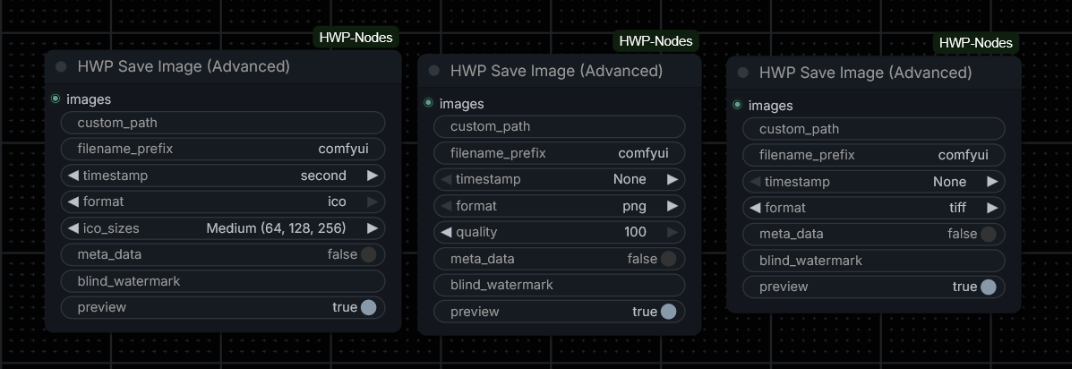
Inputs
| Input | Type | Default | Description |
|---|---|---|---|
| images | IMAGE | — | The image batch to save (one file per image) |
| custom_path | STRING | "" | Directory to save into (created if missing); empty = ComfyUI's output/ folder. Supports %date and %time tokens |
| filename_prefix | STRING | comfyui | Base filename; also supports %date and %time tokens |
| timestamp | ENUM | None | Appends _NNNNN (counter), _YYYY-MM-DD_HH-MM-SS (second) or _YYYY-MM-DD_HH-MM-SS-mmm (millisecond) to the filename |
| format | ENUM | png | png, jpg, webp, webp (lossless), tiff, ico |
| quality | INT | 100 | See the per-format table below — hidden in the UI when the format ignores it (webp (lossless), tiff, ico) |
| ico_sizes | ENUM | Medium (64, 128, 256) | ICO resolution preset — hidden in the UI until format is ico (the value is still sent and ignored for other formats) |
| meta_data | BOOLEAN | False | Embed the workflow prompt + metadata (PNG text chunks, or EXIF UserComment JSON for jpg/webp/tiff). Honours the core --disable-metadata flag. ICO cannot store metadata (a warning is logged) |
| blind_watermark | STRING | "" | Text to embed invisibly. The QR payload is kept in the chroma (U/V) channels only — luma is left untouched, so flat regions like sky/wall stay clean and the mark is imperceptible. Lossless PNG output (and JPG at 4:4:4) preserve it. Extractable with the blind_watermark library using password_img=1, password_wm=1; images too small to carry the payload are saved without it (a warning is logged) |
| preview | BOOLEAN | True | Show a result image in the UI. When saving to a custom_path the real files land there and a PNG preview is shown instead (saved to temp) |
No output. This is a terminal node.
Formats and quality
| Format | Extension | Quality widget | Encoding |
|---|---|---|---|
| png | .png | compression level (100 − q) // 10 (q 100 → level 0) | lossless, alpha preserved |
| jpg | .jpg | JPEG quality | 4:4:4 (subsampling=0); RGBA is composited over white |
| webp | .webp | WEBP quality | lossy, method=6 (slowest, best ratio), alpha preserved |
| webp (lossless) | .webp | ignored | lossless, method=6, alpha preserved |
| tiff | .tiff | ignored | LZW — lossless, suited for final archive quality, alpha preserved |
| ico | .ico | ignored | multi-resolution ICO, 32-bit RGBA |
ICO multi-resolution: the ico_sizes preset picks the embedded sizes (e.g. Small (32, 48, 64)). Every size is resampled by PIL directly from the full-resolution source image — some other packs pre-resize the frames first and end up upscaling from the smallest entry, which is why their "multi-resolution" output looks soft; that defect does not apply here.
Metadata layout: PNG files get the prompt and each extra_pnginfo key as text chunks; JPG/WEBP/TIFF get a JSON blob {"prompt": …, …extra_pnginfo} in the EXIF UserComment tag (same layout as the other HWP-ecosystem save nodes).
HWP Aspect Size
File: nodes/aspect_size.py · Category: HWP
Computes a width × height pair for a text-to-image model. Pick the model preset (its base pixel budget stays constant), enter a free-form aspect ratio as two integers — e.g. 5 × 2 for a Discord banner — and the node returns both dimensions rounded up to multiples of a downscale_factor, so the result is always VAE-safe. The preset additionally bakes in the model family's max side: extreme ratios get scaled down so the long side never exceeds it (mild ratios are unaffected). The resolved size is also shown below the node after a run, with a (capped) suffix when the max side engaged.
Modelled on Drift's Aspect Size V2 (DJZ-Nodes), with the preset list renamed/extended so entries name the models they actually fit.
Inputs
| Input | Type | Default | Description |
|---|---|---|---|
| model_type | ENUM | SD 1.5 | The model family's pixel budget and max side (see presets below) |
| aspect_ratio_width | INT | 1 | Aspect ratio, width part (free integer) |
| aspect_ratio_height | INT | 1 | Aspect ratio, height part (free integer) |
| downscale_factor | INT | 32 | Both output dimensions are rounded up to multiples of this (1–128) |
| batch_size | INT | 1 | Batch size of the latent output (1–4096) |
| model | MODEL | Optional. The model the latent will be sampled with (the same MODEL chain that feeds your sampler). See Native latent output |
Outputs
| Output | Type | Description |
|---|---|---|
| width | INT | Pixel width, multiple of downscale_factor |
| height | INT | Pixel height, multiple of downscale_factor |
| latent | LATENT | An empty latent at the resolved size — wire this straight into your sampler and skip your own empty-latent node; the INT outputs above keep working for everything else. Native layout when a model is connected, built-in EmptySD3LatentImage layout (16 ch) otherwise |
Presets
A preset carries two numbers: the model family's total pixel budget (width × height) and a max side in pixels (— = uncapped). The aspect ratio decides how the budget is split into width and height; at extreme ratios the constant budget makes the long side grow past what the model family handles — and the content starts repeating — so the long side is scaled down to the max side first, and both dimensions are then rounded up to the downscale_factor. Mild ratios never reach the cap. The menu is sorted by ascending base budget.
MP uses ComfyUI's convention: 1 MP = 1024 × 1024 = 1,048,576 pixels.
| Preset | Square equivalent | Pixels | MP | Max side |
|---|---|---|---|---|
| SD 1.5 | 512 × 512 | 262,144 | 0.25 | 1024 |
| SD 2.1 | 768 × 768 | 589,824 | 0.56 | 1152 |
| SDXL | 1024 × 1024 | 1,048,576 | 1.0 | 1536 |
| FLUX.1, Z-Image, Krea 2, FLUX.2 | 1024 × 1024 | 1,048,576 | 1.0 | — |
| QWEN | 1328 × 1328 | 1,763,584 | 1.68 | 2048 |
| 1440x | 1440 × 1440 | 2,073,600 | 1.98 | — |
| WAN22 | 1536 × 1536 | 2,359,296 | 2.25 | 1440 |
| Qwen2.1 | 2048 × 2048 | 4,194,304 | 4.0 | 2752 |
| Ideogram | 2048 × 2048 | 4,194,304 | 4.0 | 2048 |
| 4K | 2880 × 2880 | 8,294,400 | 7.91 | — |
| 3072x | 3072 × 3072 | 9,437,184 | 9.0 | — |
| 8K | 5760 × 5760 | 33,177,600 | 31.64 | — |
| 16K | 11520 × 11520 | 132,710,400 | 126.56 | — |
"4K" and "8K" match the pixel area of 3840 × 2160 and 7680 × 4320 respectively, not a literal square of that width.
Which model fits which preset:
SD 1.5— Stable Diffusion 1.5 — capped at 2× native 512, where duplication startsSD 2.1— Stable Diffusion 2.x (768) — capped at 1.5× native, keeps 768×1152SDXL— SDXL, SD3, Kolors, HunyuanImage 3.0, … — capped at the documented optimal bucket (1536×640 at 2.4:1)FLUX.1, Z-Image, Krea 2, FLUX.2— FLUX.1 (dev / schnell / pro), Z-Image, Krea 2, FLUX.2 — no documented side limit, uncappedQWEN— Qwen-Image / Qwen-Image-2512 — budget of the official README resolution table (1:1 → 1328×1328; non-square ratios keep the full budget, so they land a touch above the table's per-ratio values); cap as belowWAN22— Wan 2.2 — hosted text-to-image runs 512–1440 per sideQwen2.1— Qwen-Image 2.x (native 2K), Ming-Image 0.1 (2048×2048 recommended), Kandinsky Cascade — capped at the model card's widescreen 2752×1536Ideogram— Ideogram 4 / Ideogram 4.5 (native 2K) — 256–2048 per side, ratios up to 6:11440x,4K,3072x,8K,16K— generic budgets, uncapped — the escape hatch for models past their family cap (e.g. a wide banner on FLUX.1 at full budget)
QWEN — official specs vs. the cap: the official Qwen-Image specs are a native 1328×1328 with the published size list topping out at 1664 (16:9 = 1664×928). The preset budget (1328²) follows that official table, but the 2048 max side is measured, not documented — and the result depends on the prompt: at 5:1, 2400×480 was clean with a 3-field concatenated prompt but duplicated the content with a single prompt field, while 2048 was clean in both cases (2656 = 2× native 1328 duplicates in both). The cap is therefore 2048 — the widest width verified clean regardless of prompt structure — applied as the long-side cap at all ratios: the cap only engages once the budget math would push the long side past 2048 (ratios above ~2.4:1 — below that, the 1328² budget already keeps both sides under it). So e.g. 4 × 1 (uncapped: 2656×664) comes out 2048 × 512, and 6 × 1 comes out 2048 × 352. The cap is a single number per preset in MODEL_SPECS and can be raised if a later test verifies a bigger width clean.
How the cap engages: QWEN, ratio 5 × 1, factor 16 → the budget math gives 2976×608, which the cap scales to 2048 × 416 (the node shows 2048x416 (capped) below it). FLUX.1, ratio 5 × 2, factor 16 → 1632 × 656 — full 1.0 MP at 5:2, no documented limit so uncapped.
Downscale factor
Pick the smallest multiple the model actually requires — a larger factor narrows the possible dimensions:
| Model | Factor | |---|---| | SD 1.5, SD 2.1, SDXL | 8 (16 works too) | | FLUX.1, SD3, Z-Image, Krea 2 | 16 | | Qwen-Image / 2512 | 16 (every dimension in the official table is a multiple of 16) | | Qwen-Image 2.x, GLM-Image, FLUX.2 | 32 | | Ming-Image 0.1, Ideogram 4 | 16 (Ming's 1024/2048 buckets are multiples of 32, so 32 works for it too) |
Example: SDXL, ratio 24 × 10, factor 8 → 1536 × 640 (the documented SDXL bucket, via the cap). QWEN, ratio 5 × 1, factor 16 → 2048 × 416 (capped, as above). FLUX.1, ratio 5 × 2, factor 16 → 1632 × 656 (full budget, uncapped).
Native latent output (model input)
An empty latent has to match the model's native layout — channel count and spatial compression (both are read from the model itself when a model is connected; reference values):
| Model family | Native latent | |---|---| | SD 1.5, SD 2.1, SDXL | 4 ch, 1/8 | | SD3, FLUX.1, Z-Image, Krea 2, Qwen-Image / 2512 (1.x) | 16 ch, 1/8 | | Qwen-Image 2.x | 64 ch, 1/16 | | Flux 2 | 128 ch, 1/16 |
What the latent output contains depends on whether a model is connected:
- No model connected — the output matches the built-in
EmptySD3LatentImage(16 ch, 1/8, plus thedownscale_ratio_spacialtag). The built-inKSampler/SamplerCustomAdvancedread that tag and rescale the latent to the model's native layout themselves — normalising the channel count at the same time — so this works for every model, 4-channel (SD 1.5 / SDXL) as well as 16-channel (FLUX.1 / SD3 / Z-Image / Krea 2), with the built-in samplers. - Model connected — the node applies the same conversion the built-in
KSampleruses (the channel count and spatial ratio are read from the model, so no per-model table is involved) and emits the latent already in the model's native layout, without the tag. Works with any sampler, and with the built-in samplers as well (the tag is gone, so nothing rescales a second time).
When you need the model input: custom samplers that do not rescale empty latents — e.g. RES4LYF ClownsharKSampler. Without the model connected, such a sampler takes the 1/8 latent as-is, and on a 1/16-VAE model (Flux 2, Qwen-Image 2.x) that decodes at 2× the intended size (a 1024 request comes out 2048), at 4× the VRAM. Connect the same MODEL chain that feeds the sampler (e.g. the LoRA / loader output) and the size comes out exactly as resolved.
Shared Behaviour
- Seed/noise pairing: HWP Global Seed and HWP Seed Node both emit
seed(INT) andnoise(NOISE, via ComfyUI'sNoise_RandomNoise), so either can feed aSamplerCustomAdvanced-style graph directly with no extra converter node. - Broadcast vs. wired (the key distinction): the seed value of HWP Global Seed is broadcast to every
seed/seed_num/noise_seedint widget in the workflow — that is the "global" part. Anoiseoutput, on either node, is aNOISEobject and is not broadcast: it always has to be wired to aNOISEinput such asSamplerCustomAdvanced. HWP Seed Node is fully local — both itsseedand itsnoisereach only the node(s) you wire them to. - Manual randomize: both seed nodes get a client-side 🎲 "Manual Random Seed" button and live
value/last_seedwidget updates from the bundled JS extensions (web/global_seed.js,web/seed_node.js). They coexist in the same workflow without interfering with each other. - Logging: both seed nodes support
default(one summary line per run) andverbose(adds per-node/per-run seed detail) logging modes.
Installation
cd ComfyUI/custom_nodes
git clone https://github.com/hwprinz/ComfyUI-HWP-Nodes
The blind watermark of HWP Save Image (Advanced) needs two extra Python packages that ComfyUI does not install automatically for clone installs. Run this once from the clone folder:
cd ComfyUI-HWP-Nodes
python -m pip install -r requirements.txt
Restart ComfyUI.
License
MIT