
ComfyUI-XiaomiLens
Unofficial ComfyUI nodes for Xiaomi-Lens-0: masks and boxes for what a text describes (bit-identical to the official code)
Xiaomi-Lens-0 Segmentation for ComfyUI
Masks and boxes for what a text describes, inside ComfyUI, with Xiaomi-Lens-0 (SeerRay-Lab/Xiaomi-Lens-0, paper), a 4B vision-language model (Qwen3.5-4B with a pixel-mask decoder, Apache-2.0). Type "the pink dress", "coin" or a request such as "which object would you use to stir the drink?" and get one mask and one box per instance, at the size of your image, ready for inpainting, cut-outs or compositing. The nodes run the vendored official code and never download anything.
Unofficial. This node pack is an independent integration. It is not affiliated with or endorsed by Xiaomi, the Xiaomi-Lens-0 authors or Comfy Org.
日本語の概要は README.ja.md にあります。
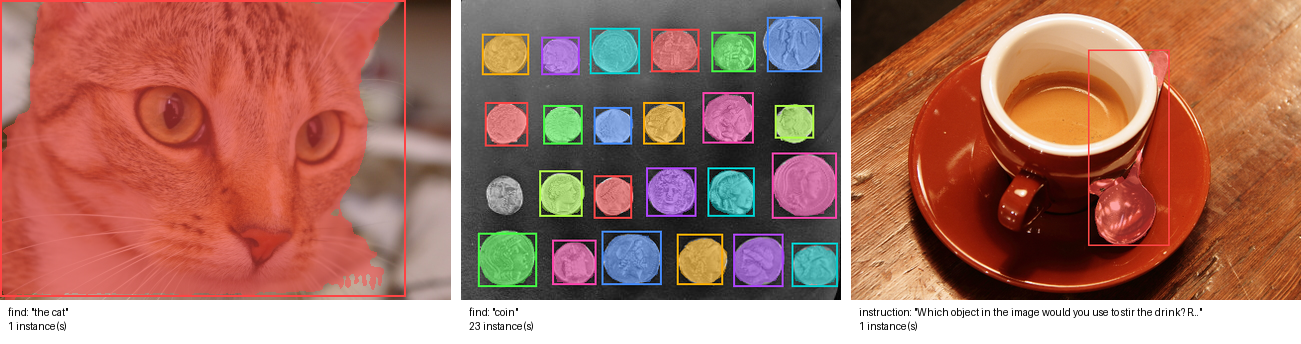
This pack's previews on scikit-image sample photos (CC0 / no known restrictions): "the cat"; "coin", 23 of the 24 coins, one mask and box each; and an instruction, answered with the spoon. RTX 5090; masks and boxes are the official code's, bit for bit.
What it does
| Node | Purpose |
| --- | --- |
| Xiaomi-Lens-0 Loader | Loads the model from models/xiaomi_lens/<name>/ onto ComfyUI's GPU (or the CPU) |
| Xiaomi-Lens-0 Segment | IMAGE + text → mask (all instances), instance_masks (one per instance), preview, text (the model's answer), boxes (JSON) |
prompt_mode=find: your query is put into the README's grounding prompt,Locate all instances in the image that match the description "<query>". Report bbox coordinates and masks.instruction: the text is sent as typed, for questions and requests ("Which part of the picture would you replace to change the season to winter? Report bbox coordinates and masks."). The model may reason first; its whole answer is intext.- Greedy decoding, as upstream's
infer.py.threshold0.5 is upstream's; 0 gives soft masks (the probabilities). - The model sees the image resized to multiples of 32 pixels (at most 8.4 megapixels, the processor's limit); its masks are
resized back to your image's size. Boxes are in pixels of your image (and in the model's 0-1000 scale) in
boxes. - Batches: every image is segmented on its own. With no instance found, the masks are empty (not an error).
instance_masksis a mask batch, one per instance in answer order (the colors ofpreviewfollow the same order).
Typical uses: Segment → Grow Mask → an inpainting sampler (replace what you described); Segment → Invert Mask → Join Image
with Alpha (cut-out, the shipped cut_out.json); instance_masks → per-object edits.
| RTX 5090 (bfloat16, SDPA decoder) | Time | VRAM peak |
| --- | --- | --- |
| One object, 0.1 – 0.3 MP photos | 1.5 – 3 s | 9.1 GB |
| One object, 1 MP / 3 MP | 1.6 s / 2.9 s | 9.5 GB / 11 GB |
| One object, 8 MP | 6 s | 15 GB |
| 23 instances (coin, 0.1 MP) | 29 s (the answer is long) | 9.1 GB |
On the CPU (24 threads, bfloat16, about 10 GB of RAM) one object in a 0.14 MP photo took 6.6 s, with the same box as on the GPU.
Measured here with the model loaded (loading takes 5–10 s). Without the optional causal-conv1d and flash-linear-attention
packages Transformers runs Qwen3.5's linear-attention layers in plain PyTorch, which is correct but slower on long answers.
How far it was checked
Windows 11, RTX 5090, ComfyUI v0.42.1; details and raw numbers in docs/VERIFICATION.md:
- Bit-identical to the official code. On six images (one object, 23 coins, a reasoning request) the pack's answers, boxes
and mask logits equal those of upstream's
infer.pysteps on the real model, byte for byte, in 6 of 6 cases, with Transformers 5.4.0 (the version upstream tested) and 5.20.1, and with both of the decoder kernels below. The official code itself gives identical bytes run to run. - Real ComfyUI queue on the RTX 5090: the three shipped workflows on ComfyUI's own
example.png; the saved masks, the previews and the cut-out's alpha equal the official output pixel for pixel, the instruction's answer is the official text. - Clean install: fresh ComfyUI v0.42.1 and Python environment,
git cloneof this repository,pip install -r requirements.txt(nothing new: ComfyUI already brings Transformers 5.x), the model downloaded withtools/download_model.py(SHA-256 verified), and the real-queue check above against that installation. - CI (GitHub Actions; Ubuntu and Windows; ComfyUI v0.38.0 and v0.42.1; Transformers 5.4.0 and the newest): a tiny checkpoint
with the real architecture and tokenizer, the pack compared with the official
infer.pyin the same process, the vendored code compared with the pinned upstream commit, ComfyUI's validation of the workflows, and a real ComfyUI queue compared with the official output pixel for pixel.
Not checked: segmentation quality itself (the pack reproduces the official outputs; it does not re-evaluate the model; see
the authors' benchmarks), flash-attn (not available on Windows; on Linux with flash-attn installed the auto settings use it as
upstream does), Linux and macOS outside CI, AMD or Apple GPUs, GPUs other than the RTX 5090.
Install
-
ComfyUI with the V3 node API (v0.38.0 or later), Python 3.10+, Transformers 5.4.0 or newer (Qwen3.5 support). A CUDA GPU is recommended: the measured VRAM peaks are 9.5 GB at 1 MP, 11 GB at 3 MP and 15 GB at 8 MP.
-
Clone this repository into
ComfyUI/custom_nodes/and install its requirement into ComfyUI's Python:git clone https://github.com/hiroki-abe-58/ComfyUI-XiaomiLens custom_nodes/ComfyUI-XiaomiLens python -m pip install -r custom_nodes/ComfyUI-XiaomiLens/requirements.txtIf your ComfyUI still has Transformers 4.x, this upgrades it to 5.x; other custom nodes that need 4.x may then break.
-
Download the model (9.2 GB). The script pins the revision and verifies every file's SHA-256:
python custom_nodes/ComfyUI-XiaomiLens/tools/download_model.py --models-dir models/xiaomi_lensResult:
models/xiaomi_lens/Xiaomi-Lens-0/with the repository's files (config.json, three.safetensorsshards, tokenizer and processor files,LICENSE, the model card). Another location works throughextra_model_paths.yamlwith the keyxiaomi_lens. -
Restart ComfyUI and open one of
workflows/gui/(they use ComfyUI's ownexample.png):segment_object.json: "the pink dress" → mask, preview, boxes;cut_out.json: "the cartoon character" → PNG with the background transparent;reasoning_segment.json: an instruction ("which part would you replace to change the season to winter?") → the grass.
Loader settings
device:auto= ComfyUI's GPU;cpuworks (slower, and the time grows with the image size and the answer length).attention(the language model and vision encoder):auto= FlashAttention-2 when flash-attn is installed and the model runs on CUDA (what upstream uses), otherwise PyTorch SDPA;eagerfor debugging.decoder_attention(the mask decoder):auto= flash-attn when installed (upstream's default), otherwise SDPA.mhais what upstream falls back to without flash-attn; it gives upstream's exact bytes there, but it holds the whole patch-by-patch attention matrix: about 2 GB for a 2 MP image and over 30 GB at 8 MP (it ran out of memory on the RTX 5090). SDPA and MHA give the same answers and boxes; their masks agree to an IoU of 0.997 or more (VERIFICATION.md). Proposed upstream as SeerRay-Lab/Xiaomi-Lens-0#3.after_run:keep on devicefor fast repeated runs,move to CPUto free about 9 GB of VRAM after each run (for workflows that then load a large image model).
Notes and limits
- The model reads the image and the text; what it finds is its own judgment (it can miss objects or merge them, as in the
authors' limitations). Reasoning answers can be long;
max_new_tokenscaps them (upstream's default 16384). - Interrupt stops generation between two tokens.
- The model was trained for English requests; other languages are untested here.
- Transformers versions change the low digits of the result: 5.4.0 and 5.20.1 gave the same answer in 4 of 6 cases and masks with an IoU of 0.975 or more (VERIFICATION.md). Within one setup the results repeat exactly.
Licenses
- This node pack's code: MIT (LICENSE).
- Vendored Xiaomi-Lens-0 code (
xiaomi_lens_comfy/vendor): Apache-2.0, Copyright 2026 Xiaomi Corporation; one line modified (NOTICE,xiaomi_lens_comfy/vendor/UPSTREAM.md). - Model (downloaded only by
tools/download_model.py): Apache-2.0 (model card), derived from Qwen3.5-4B (Apache-2.0).
Development
python -m pip install pytest ruff
python tools/download_model.py --models-dir <files> --no-weights                     # 20 MB: configuration and tokenizer
python scripts/make_tiny_model.py --source <files>/Xiaomi-Lens-0 --out <tiny>/Xiaomi-Lens-0
git clone https://github.com/SeerRay-Lab/Xiaomi-Lens-0 <upstream> && git -C <upstream> checkout 157b7bcb0b5010e81df858f5e9e4aa55a2fa9819
XL_TINY_DIR=<tiny>/Xiaomi-Lens-0 XL_UPSTREAM_DIR=<upstream> XL_COMFYUI_DIR=<ComfyUI checkout> python -m pytest tests
python scripts/ci_queue_check.py --comfyui <ComfyUI checkout> --models-dir <tiny> --upstream <upstream>         # real queue, CPU
python scripts/ci_queue_check.py --comfyui <ComfyUI checkout> --models-dir models/xiaomi_lens --upstream <upstream> --gpu   # real model
python scripts/vendor_sync.py --upstream <upstream> --check                                                     # vendored code check