
TBDub for ComfyUI
Unofficial community integration, not affiliated with the TBDub authors: redub an existing video with new speech locally in ComfyUI (TBDub V1.1 Student, 2 steps, MediaPipe face crop and paste-back), run in a separate Python environment.
Nodes (4)
ComfyUI-TBDub
Redub an existing video with new speech, locally in ComfyUI.
Unofficial community integration of TBDub (TaoLiveAIGC, Apache-2.0; paper). It is not affiliated with or endorsed by the TBDub authors. 日本語の概要: README.ja.md
TBDub is visual dubbing: you give it a video of a person and a new speech track, and it regenerates the mouth region so the lips follow the new speech, keeping the person, the pose and the background. It does not translate, synthesize speech or clone voices (bring your own speech), and it does not animate a single image.
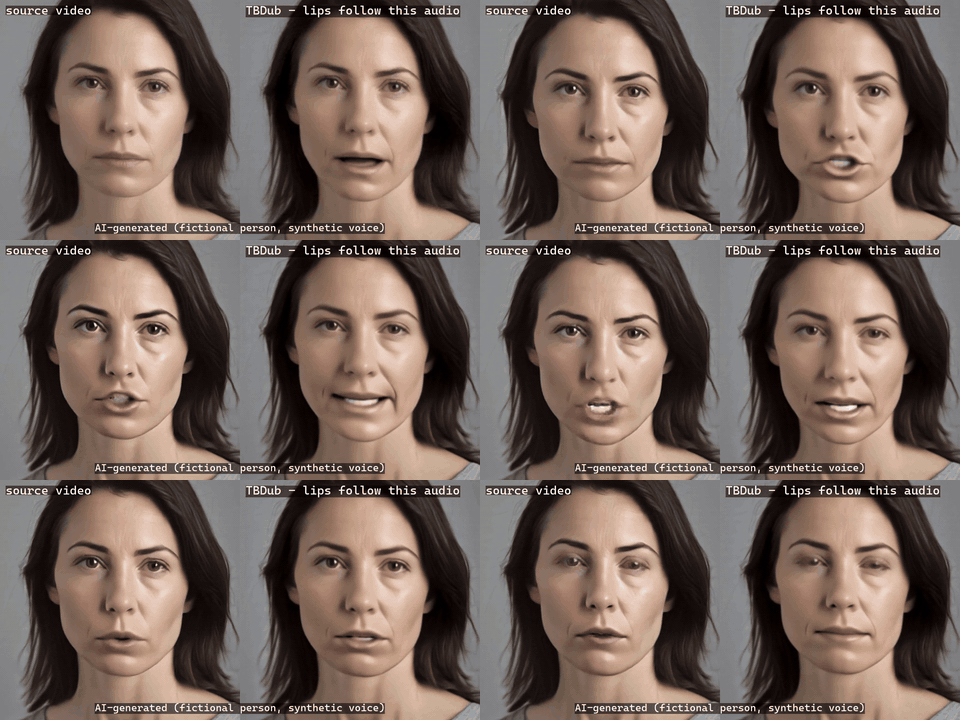
AI-generated demo (fictional person, synthetic voice; no real person). Left: the source video. Right: TBDub
driven by a new sentence (generated with memory_mode=stream + decode_mode=frame_chunks, see below). With sound:
side-by-side,
full 1280x720 result.
What you get
- TBDub Generate (video + new speech) -
VIDEO+AUDIO->VIDEO. The official V1.1 Student recipe (2 steps, sigma shift 1.0, motion from latents, first-clip pre-roll, seed + clip index) at 512x512 / 25 fps.full_frame: MediaPipe finds the face on the CPU, TBDub dubs the 512x512 crop and it is pasted back into the original frames.cropped: the input already is an aligned square face video. The output's audio is the new speech, whole (AAC); the source video's own audio is dropped. - TBDub Preprocess (face crop preview) - the official MediaPipe preprocessing only (CPU, no GPU, no model): shows the crops TBDub will dub and reports detection, interpolation and multi-face frames.
- TBDub Runtime - picks a runtime registered by the administrator, plus its memory and decode modes.
- TBDub Doctor - checks a runtime (light: versions, pinned files, model sizes, ffmpeg; deep: SHA-256 of every model file, weights vs. model classes, a real GPU kernel).
Generation runs in a separate Python environment (the "runtime") with the pinned upstream checkout and the weights; ComfyUI only starts it, one process per job, inside a Windows Job Object (or a POSIX process group). Importing the node loads no CUDA, no model and no upstream code.
Tested (v0.1.0)
| | |
| --- | --- |
| Host | Windows 11, ComfyUI v0.38.0 (CPU torch), NVIDIA RTX 5090 32 GB (SM120), 64 GB RAM |
| Runtime | native Windows venv, Python 3.10.20, torch 2.9.0+cu128, mediapipe 0.10.21 (CPU), runtime/requirements-runtime.lock.txt |
| Upstream | TaoLiveAIGC/TBDub 19e18e4ba8e2a19e6716cb38110ee2de1dae9bb3 (file hashes checked on every job) |
| Weights | TBDub V1.1 Student, Wan2.2 VAE, HuBERT large, Face Landmarker - pinned revisions in docs/SETUP.md |
| Not tested | Linux / macOS with real weights, the Teacher model, videos longer than ~10 s, memory_mode=resident and decode_mode=official end to end, an end-to-end comparison with an unpatched upstream run (see below) |
Measured on that machine with the demo above (full frame 1280x720, 5.06 s of new speech -> 126 frames,
2 clips; stream + frame_chunks; docs/results/demo_fullframe_5s_result.json):
98 s in the runtime (MediaPipe 8 s, loading 2 s, clip 1 15.1 s, clip 2 13.5 s, final decode 25.0 s), 102 s
for the ComfyUI queue item. Peak private memory of the runtime process 13.0 GiB; CUDA peak reserved 7.8 GiB.
These numbers describe one machine and one input, not a benchmark.
Memory modes and the run-time patches
On the test machine other applications already held ~70 GiB of the 93 GiB Windows commit limit, so the
upstream default (everything resident on the GPU; estimated ~20 GiB more, ~29 GiB while loading) and
--cpu-offload (estimated ~30 GiB) could not be run within the memory rule this project uses (start only if
commit + prediction stays 2 GiB under 95 % of the limit; stop the job if commit stays >= 95 % for 5 s). The
integration therefore adds explicit, documented options. The upstream files are not edited; the patches are applied
in memory at run time and listed in every job report (runtime/tbdub_patches.py,
docs/MEMORY.md). Not editing the upstream files is not the same as not changing the
computation: P4 changes the decoded output, and for P1-P3 the table states only what was checked.
| | what it does | what was checked |
| --- | --- | --- |
| P1 | reads safetensors weights with plain file reads (safetensors 0.7 maps the whole 12.6 GB file copy-on-write on Windows: +11.8 GiB commit while open) | same bytes as safetensors: every tensor of the VAE file compared; for the DiT file, the header layout and the tensors used in the runs below |
| P2 memory_mode=stream (default) | the Student DiT stays in its file; each layer's BF16 weights are read right before the layer runs (DiffSynth's own disk mode, plus two fixes for TBDub: identity key table, checkpoint buffers) | all 1241 parameters come from the checkpoint; the one DiT call that was compared (first clip, first step) was bit-identical to an independent block-by-block evaluation with plain modules; ~5.5 s per DiT call |
| P3 | MediaPipe 0.10.21 on Windows cannot open an absolute .task path; the official worker gets the same model file as bytes | same model bytes; not compared with a run on another OS |
| P4 decode_mode=frame_chunks (opt-in) | the VAE decoder's 3D convolutions run one frame per call (about half the decode memory) | changes the output; not bit-identical to the original decoder (details below) |
P4 was compared with the original decoder on the same seeded random latents at 256x256 (16x16 latents, 3 and 8 latent frames) and 320x320 (20x20 latents, 8 latent frames). On the decoder's clamped [-1, 1] output the maximum absolute difference was 0.018 / 0.023 / 0.031 (about 2.2 / 3.0 / 4.0 levels on a 0-255 scale before the uint8 conversion) and the mean 0.0007-0.0008 (about 0.1 level); roughly half of all values differed. The difference grew with the resolution, so these numbers are not a bound for 512x512. Not measured: differences after the official uint8 conversion, real-video latents, and 512x512 - a direct comparison at the full output resolution is still pending because the original decoder did not fit the host memory (commit) budget (docs/results/decode_memory_and_p4.json).
decode_mode=official (the node default) is the upstream decode. In the one full job that tried it, the runtime
process passed 20.5 GiB before the memory guard stopped it (the frame_chunks run of the same job peaked at 14.5 GiB),
so its full peak is unknown; it could not be run end to end on the test machine. memory_mode=resident is the
upstream default placement; it was not run either. The example workflow uses frame_chunks.
What the parity runs show. The direct CLI reference (tools/official_reference.py, which calls the official
inference.py main()) and the wrapper both used the same runtime patches P1-P4, including layer-wise weight
streaming and decode_mode=frame_chunks. On the same inputs they gave identical final latents and identical
pre-encode frames for a cropped 1-clip run, a cropped 2-clip run and the full-frame demo (MediaPipe boxes, latents and
all 126 pasted 1280x720 frames) - docs/results/reference_parity.json. This shows
that the wrapper reproduces that patched reference; it is not an end-to-end comparison with an unmodified upstream
run (512x512 without the patches), which was not completed.
Install
- Runtime (once, outside ComfyUI): a Python 3.10 venv with CUDA torch, the TBDub checkout at the pinned commit, the model files and ffmpeg/ffprobe. Step by step: docs/SETUP.md.
- Node: clone this repository into
ComfyUI/custom_nodes/(no extra Python packages are needed in ComfyUI's environment). - Register the runtime: copy examples/tbdub.runtimes.example.json to
ComfyUI/user/tbdub.runtimes.json(or setCOMFYUI_TBDUB_CONFIG) and fill in your absolute paths. Workflows can only name a runtime; executables and paths come from this file only. - Restart ComfyUI, run TBDub Doctor, then load workflows/api/tbdub_dub_video.json.
Use
Load Video + Load Audio -> TBDub Generate -> Save Video. Inputs and limits:
- One person, face visible. More than one face in any frame is refused (
multiple_faces=highest_scoregives the official behaviour: the most confident face per frame). No face / a face lost for > 0.4 s is refused. - 25 fps: other frame rates are converted with ffmpeg's
fps=25filter (reported), or refused withfps_policy=refuse. The source's own audio is never used. - Output length = floor(speech seconds x 25) frames (the official rule). The speech is muxed whole, so it may
run up to one frame (40 ms) past the last video frame; the official script cuts it with
-shortestinstead. - A source shorter than the speech is refused;
allow_pingpongenables the official forward/backward repeat. start_frameskips source frames; the speech always starts at 0.- Default limits (per runtime): 20 s of speech, 1920x1080, 750 source frames, 1 GiB source file.
- Cancel works between clips; otherwise (and on timeout) the whole runtime process tree is ended.
Security
The runtime runs with the rights of the ComfyUI user; this is process ownership, not a sandbox. Workflows cannot choose executables or paths, the runtime gets an allowlisted environment (no tokens), inputs are copied into a fresh job folder, nothing is downloaded at run time, and no pickle files are loaded from workflows. Details: docs/SECURITY.md.
More
docs/SETUP.md · docs/MEMORY.md · docs/TESTING.md · docs/SECURITY.md · docs/LICENSING.md
License and citation
This integration: Apache License 2.0 (LICENSE, NOTICE). TBDub code and weights: Apache License 2.0 (TaoLiveAIGC); third-party models keep their own licenses (docs/LICENSING.md). If you use TBDub, please cite the authors:
@misc{li2026tbdubproductionorientedvisualdubbing,
  title={TBDub: Production-Oriented Visual Dubbing},
  author={Bihan Li and Xinyang Li and Zeran Xu and Meiguang Jin and Junfeng Ma},
  year={2026},
  eprint={2609.06144},
  archivePrefix={arXiv},
  primaryClass={cs.CV},
  url={https://arxiv.org/abs/2609.06144},
}
Use responsibly: dub only videos you have the right to modify, and label synthetic media.