
ComfyUI-ScaleRAE
Scale-RAE text-to-image (Qwen2.5-1.5B + 2.4B DiT, WebSSL RAE) for ComfyUI: official numerics, in-process, verified on RTX 5090
Nodes (3)
Scale-RAE for ComfyUI
Text-to-image in ComfyUI with the official Scale-RAE model (ZitengWangNYU/Scale-RAE, paper arXiv:2601.16208, Scaling Text-to-Image Diffusion Transformers with Representation Autoencoders). A Qwen2.5-1.5B language model reads the prompt, a 2.4B rectified-flow DiT samples the image in the feature space of a vision encoder, and an RAE decoder turns those features into pixels. Everything runs inside the ComfyUI process; the nodes never download anything.
Unofficial. This node pack is an independent integration. It is not affiliated with or endorsed by the Scale-RAE authors (New York University), by Meta, by Alibaba (Qwen) or by Comfy Org.
日本語の概要は README.ja.md にあります。
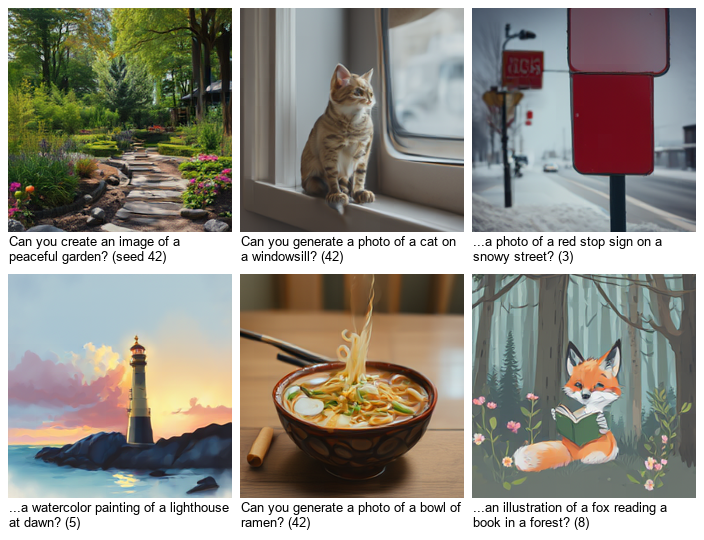
What it does
| Node | Purpose |
| --- | --- |
| Scale-RAE Loader | Picks the generator and the RAE decoder folder from models/scale_rae, the dtype, the device and a keep-loaded switch |
| Scale-RAE Text to Image | Prompt, seed, guidance, sampling steps, batch size → IMAGE (224 x 224) and a JSON report |
| Scale-RAE Unload | Frees the resident model (GPU and RAM) |
Supported model: nyu-visionx/Scale-RAE-Qwen1.5B_DiT2.4B-WebSSL with nyu-visionx/webssl300m_decoder (the WebSSL variant;
224 x 224 output). The SigLIP-2 variants of the official collection are not supported yet.
How far it was checked
Windows 11, RTX 5090 (32 GB), ComfyUI v0.38.0 (details and raw numbers in docs/VERIFICATION.md):
- Bit-identical to the official code. In the official environment (Python 3.10, torch 2.8.0, transformers 4.37.0), 7 of 7 jobs
(4 prompts, seeds 42 / 7 / 123, guidance 1 and 3, one repeat) give the same image and the same 256 x 1024 latent as the official
inference/cli.pycode path, byte for byte. The prompt template and token ids equal the official ones for 5 test prompts (English, Japanese, emoji, whitespace, special tokens). - Real ComfyUI queue: in a ComfyUI environment with torch 2.14.1 and transformers 5.20.1 the queue gives the same images as the pack's in-process run (7 of 7, also in reverse order and after reloading); against the official run in the other environment the images differ by at most 1 of 255 per pixel (PSNR 65 dB or more), which is the library versions.
- Real jobs: float32 / float16 / bfloat16, CPU, batches, the three
image_startmodes, guidance in both modes, text-only answers, interrupt, unload and keep-loaded off, all with the real weights. - Clean install: fresh ComfyUI v0.38.0, fresh Python 3.12 environment,
git cloneof this repository,pip install -r requirements.txt, the decoder downloaded withtools/download_models.py(SHA-256 verified): the seven jobs above give the same images as the development environment (7 of 7), and both shipped workflows run unchanged. - CI (GitHub Actions; Ubuntu and Windows; transformers 4.50.3 and latest; Python 3.10 and 3.12): CPU tests with a tiny random model in the official file layout, the vendored code compared byte for byte with the pinned upstream commit, the prompt ids compared with the official ones, and a real ComfyUI queue on the CPU. CI does not download the weights (about 17.6 GB).
Not checked: Linux or macOS with a GPU, AMD / Apple GPUs, GPUs with less than about 10 GB, other ComfyUI versions with the real model (the CPU tests and the real-queue check also run against ComfyUI v0.41.0 in CI), and image quality against the paper's benchmarks (the pack reproduces the official outputs; it does not re-evaluate the model).
Install
-
ComfyUI with the V3 node API (v0.38.0 was used), Python 3.10+, an NVIDIA GPU with about 18 GB of free VRAM for float32 or about 10 GB for float16 / bfloat16 (the CPU works, slowly).
-
Put this folder into
ComfyUI/custom_nodes/(or install it from the ComfyUI Manager / Comfy Registry once listed) and install its requirements into ComfyUI's Python:python -m pip install -r custom_nodes/ComfyUI-ScaleRAE/requirements.txtThat is
transformers>=4.50.3,timm,einopsandsafetensors(ComfyUI already has most of them). -
Download the generator and the decoder (about 17.6 GB together; both model cards say MIT) into
models/scale_rae/:python custom_nodes/ComfyUI-ScaleRAE/tools/download_models.py --models-dir ComfyUI/models/scale_raeThis fetches
Scale-RAE-Qwen1.5B_DiT2.4B-WebSSLandwebssl300m_decoderat the revisions this pack was verified with and checks the SHA-256 of every file (--verify-onlychecks existing folders). The Loader lists a folder only if it has the right files (config.jsonwith"model_type": "cambrian_qwen"plus the safetensors and tokenizer files, or"model_type": "vit_mae"plusmodel.pt). The WebSSL encoder is not needed and is not downloaded (see Licenses). -
Restart ComfyUI and load a workflow from
workflows/gui/(orworkflows/api/).
Using the nodes
-
Prompts. The language model is a chat model. Requests such as "Can you generate a photo of ...?", "Can you create an image of ...?" or "Generate an image of ..." make it write a short reply ("Here's the image you requested:") and start the image itself — the official path. Plain descriptions ("A field of sunflowers") make it answer with text only: 0 of 20 plain descriptions started an image, 60 of 60 requests did (20 subjects x 3 phrasings). Requests are not a guarantee: "Can you generate a close-up photo of a bowl of ramen?" was answered with text. The outcome does not depend on the seed (the text is decoded greedily).
-
image_start handles that:
auto(default) takes the official path and, after a text-only answer, starts the image right after the prompt with the same seed (the report showsimage_forced: trueand the text it skipped; this costs the time of the text, a few seconds);modelis the official behaviour only (a text-only answer is an error);forcealways starts the image right after the prompt. For request promptsforcegives images very close to the official ones (same noise, slightly different conditioning). -
guidance / cfg_mode. Guidance 1.0 (default) is the official default and what the paper's evaluation uses. In the released code a guidance above 1 has no effect (its default
cfg_intervalmakes the guidance step return the conditional prediction; upstream issue #7; fix proposed in PR #10): that iscfg_mode = official-cli.cfg_mode = standard(default) applies classifier-free guidance at every step, which makes images darker and more saturated as guidance grows: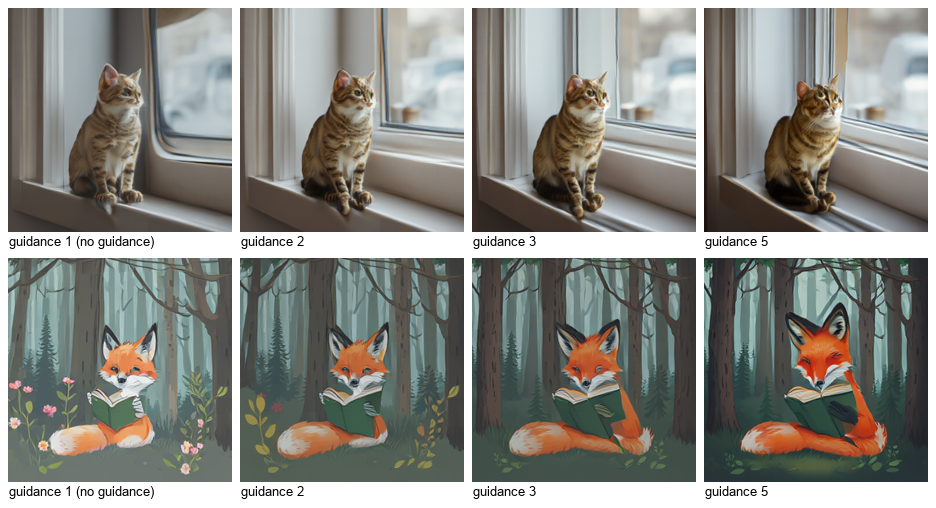
Guidance above 1 runs the DiT on two rows and takes about 1.7 times as long.
-
dtype.
float32matches the official code.float16needs about half the VRAM and stayed close to float32 (PSNR 37 to 56 dB on 7 jobs);bfloat16needs the same memory but changed images more (26 to 33 dB, and sometimes the model's short reply). The RAE decoder always runs in float32: in float16 it overflowed and every image came out as the same flat picture. The CPU always runs float32. -
seed / batch_size. Same model, prompt, settings, seed and environment give the same image. A batch uses seeds
seed,seed + 1, ...; image k of a batch equals a single run with seedseed + k. CPU and GPU draw different noise for the same seed, so their images differ. -
steps (default 50, the official and paper setting) is the number of Euler steps of the flow sampler.
-
The report (STRING output) has the seed, guidance, mode, the model's text before the image, time and peak VRAM of each image.
-
Output size is fixed at 224 x 224 by the WebSSL decoder; use an upscaler node for larger images.
Measured on this setup
RTX 5090, Intel Core Ultra 9 285K, 64 GB RAM, Windows 11, torch 2.14.1+cu130, transformers 5.20.1, 50 steps:
| dtype | load | per image, guidance 1 | per image, guidance > 1 | peak VRAM (allocated) | | --- | --- | --- | --- | --- | | float32 | 11.5 to 12 s | 2.2 to 2.8 s | 3.8 to 4.1 s | 17.4 GiB | | float16 | 11.5 s | 1.4 to 2.4 s | 2.3 to 2.4 s | 9.5 GiB | | bfloat16 | 11.5 s | 1.4 to 2.6 s | 2.3 to 2.4 s | 9.5 GiB | | float32 on the CPU | 3 s (files cached) | 52 s | not measured | — |
Loading reads the 16 GB float32 checkpoint (the files were in the OS cache; from disk it takes longer). Windows commit charge rose by about 22 GiB during loading and stayed about 17 GiB higher while the model was resident, although the process's working set was about 3 GiB; with the default pagefile settings a machine needs room for that.
Notes and limits
- Language model.
scale_rae_comfy/qwen2.pyis a plain PyTorch Qwen2 stack that reproduces the transformers 4.37 code path the official model uses (float32 RMSNorm, rotary tables, SDPA without a mask, tied embeddings). The official code needs transformers 4.37, which ComfyUI cannot use; this keeps the numerics independent of the installed transformers version. - Vendored code. The DiT head and the decoder are the official modules (
scale_rae_comfy/vendor, commitdab3800); two files have documented comment / import edits so that they import under transformers 5 and contain no environment-variable or network code (UPSTREAM.md). The test suite checks every byte against the upstream commit. - Guidance in the official CLI.
--guidance-levelof the official CLI has no effect (see above);cfg_mode = official-clireproduces that exactly,standardis what the option name suggests. - The model sometimes writes text inside the picture as garbled letters, as other image models of its size do.
Licenses
- This node pack's code: MIT (LICENSE); third-party notices in NOTICE.
scale_rae_comfy/vendor/scale_rae: from the official repository, MIT (scale_rae_comfy/vendor/LICENSE); it contains code derived from OpenAI's diffusion repositories and BAAI's EVA-02 (MIT) and from the Hugging Face ViTMAE model (Apache-2.0).- Model weights are not included: the generator and the decoder are MIT according to their model cards; the generator's
language model is fine-tuned from Qwen2.5-1.5B-Instruct. The decoder reconstructs images from the feature space of Meta's WebSSL
encoder (
facebook/webssl-dino300m-full2b-224), whose weights are CC-BY-NC-4.0. This pack neither downloads nor runs that encoder, but the model cards do not say whether its non-commercial terms extend to models trained on its features; check before any commercial use. - ComfyUI (GPL-3.0) hosts the nodes; PyTorch, transformers, timm and einops keep their own licenses.
Development
pip install pytest ruff                                   # plus ComfyUI's requirements
SCALE_RAE_COMFYUI_DIR=... SCALE_RAE_UPSTREAM_DIR=... SCALE_RAE_TOKENIZER_DIR=... python -m pytest tests
python scripts/ci_queue_check.py --comfyui <ComfyUI> --tokenizer-dir <tokenizer files>   # real queue on the CPU, tiny model
python scripts/run_jobs.py --model <generator folder> --decoder <decoder folder> --jobs jobs.json --out <dir>
python scripts/queue_jobs.py --server http://127.0.0.1:8188 --comfy-output <ComfyUI/output> --jobs jobs.json --out <dir>
python scripts/compare_runs.py <dir A> <dir B>
scripts/vendor_sync.py --upstream <checkout> rebuilds the vendored folder and its manifest from an upstream checkout (--check
only compares). The tokenizer files for the tests are the five small files listed in tests/tokenizer_files.sha256.
Citation
If you use Scale-RAE, please cite the authors (BibTeX in the upstream README, arXiv:2601.16208).