
PixRestore for ComfyUI
PixRestore-S one-step image restoration for ComfyUI: 512x512 RGB, official path reproduced bit-exactly (eager mode), pinned and hash-checked upstream files.
Nodes (3)
PixRestore for ComfyUI
Unofficial ComfyUI nodes for PixRestore-S, the released one-step model of PixRestore: Unified Image Restoration via Pixel Diffusion Transformer (Sun et al., arXiv:2608.16793). It restores noisy, blurred or JPEG-compressed 512x512 RGB images with one denoiser call, conditioned on DINOv2 features.
- Standard ComfyUI
IMAGEin and out; Loader / Restore / Unload nodes. - The official one-step path is reproduced bit-exactly: on the RTX 5090 test machine the node's 8-bit output and
the recorded intermediate tensors (input, noise, six DINOv2 layers, model output, final float) equal the unmodified
official
inference.pyrun in eager mode, for all 16 test images (12 demo inputs + 4 center-crop cases), also from a clean install. Details: docs/VERIFICATION.md. - No upstream code or weights are shipped here. A setup script downloads the released files at fixed revisions and checks each file's SHA-256; the nodes never download anything.
Restoration with this model is generative. It removes the degradation and can also invent or change fine details (texture, thin lines). The output is a plausible image, not a recovery of the true original.
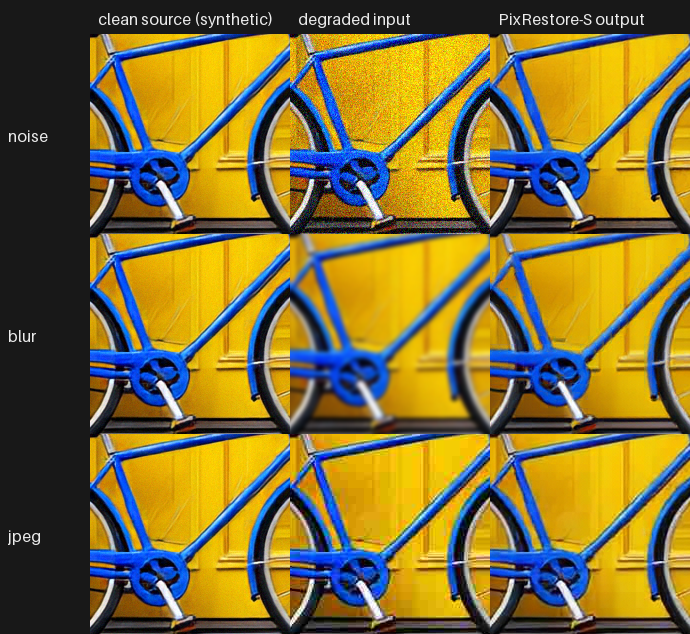
200x200 pixels at 1:1 from one demo image. Rows: Gaussian noise (sigma 25/255), Gaussian blur (radius 2), JPEG quality 15. The clean source is itself a synthetic image (see Demo).
Install
Status: v0.1.0 pre-release, tested on Windows 11 + RTX 5090 with ComfyUI v0.38.0 (CUDA GPU required).
-
Clone into
ComfyUI/custom_nodesand install the one extra dependency with ComfyUI's Python:cd ComfyUI/custom_nodes git clone https://github.com/hiroki-abe-58/ComfyUI-PixRestore python -m pip install -r ComfyUI-PixRestore/requirements.txt # timm>=0.9,<1.1 -
Download the model files (about 0.22 GB) into
ComfyUI/models/pixrestore:python ComfyUI-PixRestore/tools/setup_pixrestore.py --models-dir ../modelsIt fetches PixRestore-S
config.json+ EMA weights (Hugging Face, revisiona5fe719), DINOv2 ViT-S/14 weights, and 25 unmodified source files of PixRestore (909ca06) and DINOv2 (7764ea0), and verifies all of them. -
Restart ComfyUI. Open
workflows/gui/pixrestore_restore.json. To try it, copyworkflows/input/pixrestore_sample_512_jpeg.pngintoComfyUI/input.
Nodes
| node | what it does |
|---|---|
| PixRestore Loader | Loads pixrestore-s and DINOv2 ViT-S/14 from models/pixrestore, checks the SHA-256 of the released files (on by default). One model stays resident. |
| PixRestore Restore (512x512, 1 step) | image -> restored image + JSON report (seed, hashes, timings). seed (default 0, kept fixed) changes the result. preprocess: exact 512x512 (other sizes are refused) or center crop to 512 = the official --test-mode center_crop (short side resized to 512 with bicubic, centre 512x512 kept; the output is that 512x512 crop). A batch is processed one image at a time with seed + index, like the official script on a folder. |
| PixRestore Unload | Frees the model (GPU and RAM). |
Fixed in v0.1.0: one step, CFG 1.0, bf16 autocast as in the released config, eager PyTorch (no Triton).
How it matches the official code
- The node imports the pinned upstream
pixrestoreanddinov2packages frommodels/pixrestore/upstreamafter checking every file's hash, builds the model exactly likeinference.py(releasedconfig.json, strict weight loading) and calls the upstreamextract_layersandsample_multistep_fm(n_steps=1). - Upstream decorates several functions with
@torch.compile, which needs Triton (not available by default on Windows). The node uses the undecorated functions; this equals running the official script withTORCHDYNAMO_DISABLE=1. The as-written compiled path gives slightly different pixels: on the 12 demo inputs 11 % of 8-bit values differ, by at most 5/255 (mean 0.11/255). Both are reported in docs/VERIFICATION.md. - Seeding uses this GPU's generator inside
torch.random.fork_rng; the official TF32 / SDPA / reduced-precision settings apply only during the call (ComfyUI changes one of them globally) and are restored afterwards.
Measurements
RTX 5090, Windows 11, ComfyUI v0.38.0, one image per prompt, sequential (not a benchmark): first prompt 3.7 s including loading; afterwards about 0.11 s per prompt (median of 11), of which about 0.045 s on the GPU; peak CUDA memory allocated by the node 342 MiB; ComfyUI process at most 5.3 GiB private memory with the model loaded.
Demo
4 clean images x 3 degradations = 12 restorations, all of them shown in docs/images/grid_*.png (rows: noise, blur,
JPEG; columns: clean source, degraded input, output; downscaled to 256 px per cell). Full-size files are in the
release asset demo_images_v0.1.0.zip.
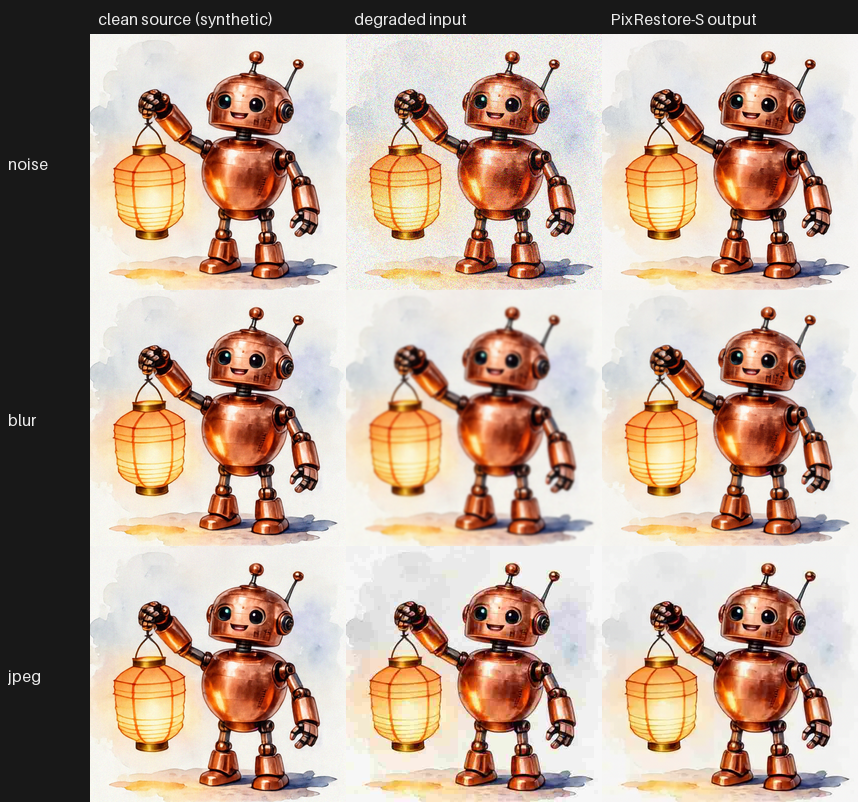
One of the four grids, chosen by the author. The others: p0, p1, p2.


- Clean sources: four of the author's own Looped-DiT generations (synthetic images, picked by a fixed rule before any restoration ran). Degradations: fixed and documented in docs/results/demo_manifest.json.
- PSNR against the clean source (full 512x512, RGB, 8-bit, no crop or shift), input -> output: noise 20.7-21.4 -> 29.7-32.4 dB, blur 23.1-29.5 -> 25.4-30.7 dB, JPEG 26.2-30.6 -> 26.9-30.9 dB. PSNR rose in all 12 cases (by 0.3-0.8 dB for JPEG). Per-image values: docs/results/demo_metrics.json.
- What you can see in the grids: the noise is removed together with fine paper/brush texture; blurred edges come back sharp with re-synthesised detail (spokes, lantern ribs) that is similar to, not identical with, the source.
- 12 synthetic examples say nothing general about restoration quality. An upstream issue (#3, opened by a user) is titled "实测效果很差" ("poor results in practice"); this repository did not evaluate that. Judge on your own images.
Limitations
- CUDA GPU only (tested: RTX 5090 on Windows). No CPU or Apple MPS mode.
- 512x512 only; larger or smaller images must be cropped/resized (or use the official center crop). No tiling.
- PixRestore-S only (not B / L / XL); one step; CFG 1.0.
- The model stays outside ComfyUI's model manager; use the Unload node to free it.
- The node imports upstream modules named
pixrestoreanddinov2; if another custom node already loaded a different module with one of these names, loading is refused with a message.
License and credits
This repository: MIT (see LICENSE). It contains no third-party code or weights; what the setup script downloads and under which terms is listed in NOTICE. In short: PixRestore's README states Apache 2.0 (its LICENSE file is missing at the pinned commit, and some files say they were adapted from DiT, LightningDiT, SiT, EVA-02 and DINOv2); the Hugging Face model card states apache-2.0; DINOv2 code and weights are Apache 2.0. Check the upstream terms for your use. Please cite the PixRestore paper if you use the model.
Japanese summary / 日本語の概要: README.ja.md