
MonarchRT for ComfyUI
Unofficial community integration, not affiliated with the MonarchRT authors: runs training-free MonarchRT attention on the public Self-Forcing (Wan2.1-T2V-1.3B) weights in a separate WSL2/Linux runtime, with a dense baseline for A/B comparison, an optional persistent worker that keeps the model and tuned kernels loaded between queue jobs, real VIDEO outputs and dispatch/timing reports.
Nodes (4)
The node you run before you blame the node
Self-Forcing video with ~90% of the attention thrown away
The node that decides where your video actually gets generated
Finding — and freeing — the 18 GB still parked on your GPU
ComfyUI-MonarchRT
Unofficial ComfyUI integration of MonarchRT (paper, blog), used training-free on the public Self-Forcing weights. Not affiliated with or endorsed by the MonarchRT authors, the Self-Forcing / CausVid authors, Alibaba (Wan) or Comfy Org.
日本語の概要: README.ja.md
MonarchRT replaces dense self-attention in video diffusion transformers with Monarch-matrix attention and ships fused Triton kernels for it. Upstream supports two ways to use it: with MonarchRT-trained checkpoints (not released, see upstream issue #1) or training-free, by switching the attention of the released dense Self-Forcing DMD checkpoint (Wan2.1-T2V-1.3B based) at inference time. This package runs the second one from ComfyUI, next to a dense baseline on the same weights, prompt, noise and seed:
- MonarchRT Runtime: pick a runtime the administrator registered (a WSL2
or Linux venv with the pinned upstream checkout and the weights) and the
backend (
persistentorone-shot, see below). Workflows cannot name executables or commands. - MonarchRT Generate (Self-Forcing T2V): 480x832, 81 frames at 16 fps,
1-4 videos per job. Attention profiles:
monarch_h2(default),monarch_h1,dense. Returns real ComfyUIVIDEOoutputs (connectSave Video) and a JSON report with the attention dispatch actually observed, forward counts, per-phase timings, memory and the worker that ran the job. - MonarchRT Worker (status / unload): shows the persistent worker or stops it and frees its GPU and RAM.
- MonarchRT Doctor: checks the runtime (upstream files against the pinned commit, model files, CUDA/Triton/flash-attn/FlashInfer, optional Monarch kernel vs reference check) and reports the worker.

Left to right: dense, monarch_h2, monarch_h1; same weights, prompt,
seed and initial noise. Reduced preview; the full-resolution side-by-side
MP4s and all 18 comparison videos are in the
v0.1.0 release.
Results (RTX 5090, WSL2, 480x832, 81 frames)
Warm runs, mean of 6 videos (3 prompts x 2 seeds) per profile, each job one process; details, cold-start costs and raw records in docs/BENCHMARKS.md.
| Profile | Generator (35 forwards) | Inference total (text encode + generator + VAE) | Whole GPU peak (nvidia-smi) |
| --- | --- | --- | --- |
| dense | 6.60 s | 10.98 s | 19.1 GB |
| monarch_h2 | 4.91 s (1.34x) | 9.47 s (1.16x) | 22.3 GB |
| monarch_h1 | 4.17 s (1.58x) | 8.72 s (1.26x) | 22.3 GB |
- The first video of every process is much slower: Triton re-runs the Monarch
autotune timing for each of the 7 KV-cache lengths (about 140 s in total;
compiled kernels are cached on disk), and the first prompt encoding reads
the 11 GB T5 file. Use
videos> 1 to amortise this. - Quality: with the same noise, Monarch videos are not close to the dense ones
pixel-wise (the autoregressive rollout diverges; PSNR 12.9 dB / SSIM 0.41
for
monarch_h2). By eye,monarch_h2gave coherent videos for all 6 prompt/seed pairs, often with less camera motion, and one video duplicated the main subject;monarch_h1was visibly weaker. This is not a quality benchmark, and there is no claim of parity with dense attention. - Correctness: every self-attention call was observed in the Monarch Triton kernel (1050 per video, 0 dense, 0 PyTorch fallback); dense -> Monarch -> dense and reversed generation orders give bit-identical files, so no cache or patch leaks between videos or profiles.
Backends: one-shot and persistent (v0.2.0)
| | one-shot | persistent |
| --- | --- | --- |
| Process | a new runtime process per queue job | one warm worker process kept between queue jobs |
| Model load, Triton autotune | every job | once per worker (autotune once per attention profile) |
| Between jobs | nothing stays loaded | the worker holds the model on the GPU until it is unloaded |
| Ends | when the job ends | after worker_idle_seconds without a job (default 300), the Worker node's unload, a runtime or code change, or when ComfyUI exits or crashes |
Measured on the reference machine (RTX 5090, WSL2, offloaded T5), each row a separate ComfyUI queue job through the HTTP API, wall time from queueing to completion:
| Job | one-shot | persistent |
| --- | --- | --- |
| monarch_h2, first job (cold) | 216 s | 265 s (start-up 29 s + first T5 read 60 s + autotune ~143 s) |
| monarch_h2, later jobs | 195 s | 10-12 s (17 s for the first warm job) |
| dense, later jobs | - | 12 s |
| first monarch_h1 job in a warm monarch_h2 worker | - | 150 s (autotune for the new kernel shapes), then 10 s |
Outputs are byte-identical between the backends and to the v0.1.0 one-shot files for the same prompt, seed and profile, including after profile switches (dense -> Monarch -> dense), Unload, cancel and crashes. While a persistent worker is idle it keeps about 18 GB of GPU memory and about 14-16 GiB of RAM in WSL2 (mostly the memory-mapped model files); use the Worker node to free them early. Details: docs/BENCHMARKS.md.
backend defaults to the runtime's backend setting (one-shot if not set),
so v0.1.0 workflows and configs keep working unchanged.
Attention profiles
| Profile | Upstream config | Monarch settings | Effective attention sparsity |
| --- | --- | --- | --- |
| monarch_h2 (default) | self_forcing_monarch_dmd.yaml | enable, num_iters=1, f_tied=1, h_reduce=2, w_reduce=1 | about 90%: the level of the paper's training-free results (appendix C.2), per the upstream reply in issue #2 |
| monarch_h1 | self_forcing_monarch_dmd.yaml as shipped | h_reduce=1 | about 95%: the repository default; per the same reply, training is what gives high quality at this level |
| dense | self_forcing_dmd.yaml | Monarch disabled | 0% (flash-attn) |
num_iters=1 is the only setting that uses the fused Triton kernel
(num_iters>1 runs a slower PyTorch path), so the profiles fix it. Cross-
attention to the text is dense in every profile. The runner counts every
self-attention call per video (30 blocks x 35 forwards = 1050) and fails the
job if any of them took a different path than the profile asks for; there is
no silent fallback from Monarch to dense.
Status
| | Scope |
| --- | --- |
| Tested (real weights) | ComfyUI v0.38.0 on Windows 11 with a WSL2 Ubuntu 24.04 runtime (torch 2.8.0+cu128, triton 3.4.0, flash-attn 2.8.3, flashinfer 0.6.3), RTX 5090 32 GB. All three profiles, 480x832x81, batch 1. Through ComfyUI's HTTP API: generation with Save Video, Doctor, cancel, timeout and runtime errors (no process left behind, GPU memory back to idle). Persistent worker (v0.2.0): 8 separate queue jobs on one worker, profile switches, Unload, idle timeout, cancel, worker crash and ComfyUI crash (idle and busy), missing checkpoint, timeout, back-to-back queueing; outputs identical to one-shot. Clean install from git archive into a differently named folder. |
| Tested (CPU CI) | Ubuntu and Windows: config and job validation, argv/environment construction, real subprocess control with a fake runtime (cancel/timeout stop the whole process tree on Linux), the persistent worker protocol and lifecycle with a fake engine (reuse, serialisation, busy/duplicate requests, cancel, timeout, crashes, parent death on Linux), node registration and validate_prompt in a real ComfyUI checkout, VIDEO outputs. |
| Untested | Linux ComfyUI hosts (posix runtimes) with real weights, other GPUs and drivers, GPUs below 32 GB, other resolutions or lengths, image-to-video, num_iters > 1, more than one ComfyUI process sharing a GPU with a persistent worker. |
| Not supported | Native Windows runtimes (no WSL2), MonarchRT-trained checkpoints (not released upstream), running the pipeline inside ComfyUI's own Python. |
Install
- Install the node: clone this repository into
ComfyUI/custom_nodes/(no Python dependencies are added to ComfyUI). - Set up a runtime and download the weights: docs/SETUP.md.
- Register the runtime in
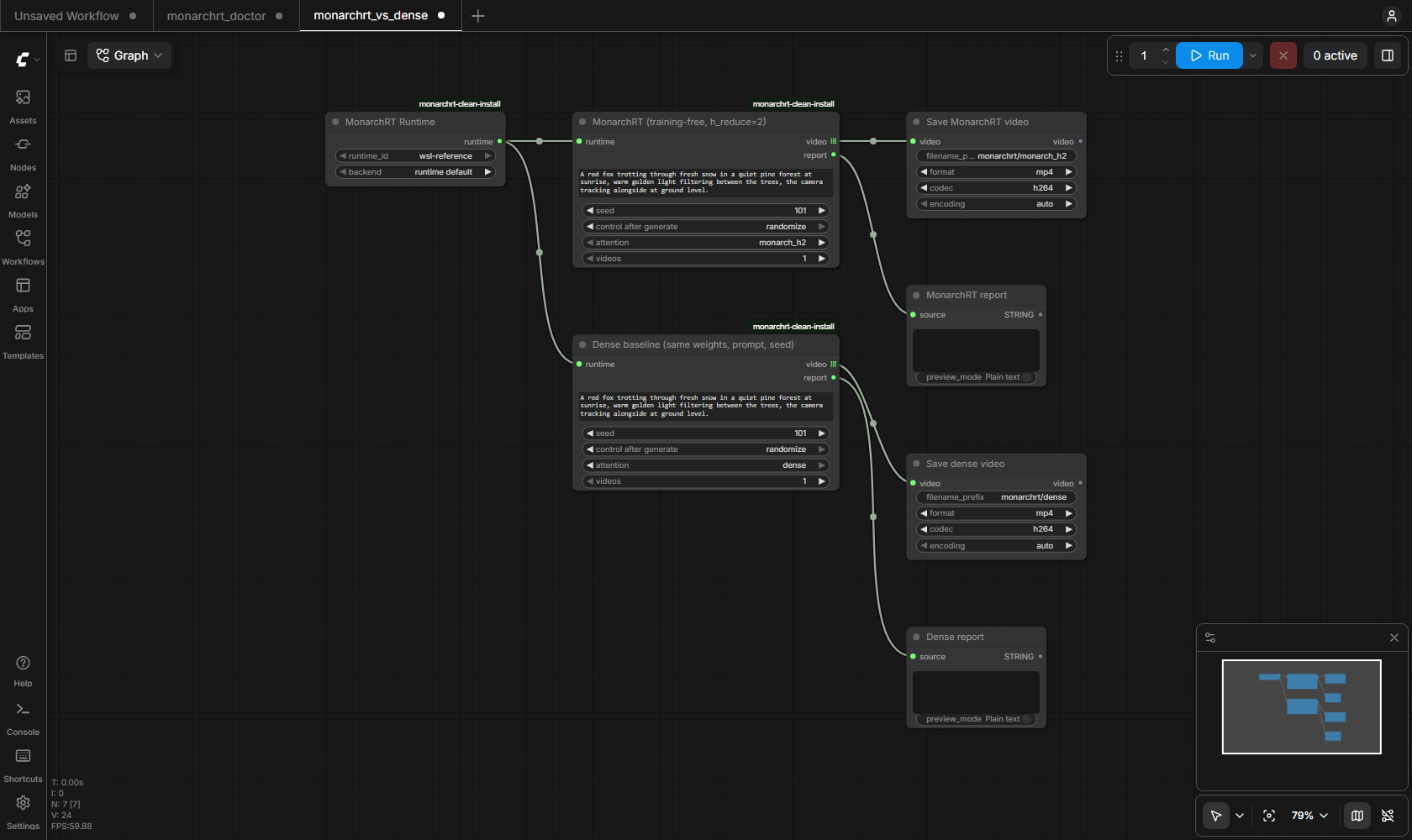
ComfyUI/user/monarchrt.runtimes.json(template: examples/monarchrt.runtimes.example.json), restart ComfyUI and run MonarchRT Doctor. - Load workflows/monarchrt_vs_dense.json, select your runtime in the Runtime node and queue it. Both Generate nodes use the same prompt and a fixed seed, so the two videos form an A/B pair.
How it works
ComfyUI writes a schema-checked job file into a fresh job folder and starts
runtime/monarchrt_job.py with the runtime's Python (wsl.exe -d <distro> --exec ... on Windows). The runner imports the pinned upstream code
unmodified and wraps it for measurement and safety:
- the upstream config is loaded and the Monarch settings of the profile are applied and asserted;
- every
torch.loadisweights_only=True; the EMA generator weights are loaded withstrict=Trueand verified; - per video,
torch.manual_seed(seed)before the initial noise[1, 21, 16, 60, 104], so dense and Monarch see the same noise and the same re-noising draws; - 21 latent frames are generated in 7 blocks of 3; each block runs 4 denoising forwards plus 1 clean-context forward that updates the KV cache (35 generator forwards per video), counted separately;
- the VAE decodes 81 RGB frames, written as H.264 MP4 at 16 fps.
Details: docs/SECURITY.md (process model, cancel and timeout), docs/TESTING.md, docs/BENCHMARKS.md, docs/LICENSING.md.
What this is not
- Not the paper's trained MonarchRT models, and not their quality or speed numbers. The upstream README's "16 FPS" refers to trained MonarchRT models with their own setup; nothing here claims 16 FPS generation. The MP4 files play at 16 fps; generation throughput is reported separately.
- No claim of quality parity with dense attention. The comparison below is a handful of prompts and seeds with simple fidelity and stability numbers, not a benchmark such as VBench.
- WSL2 is a Linux runtime on Windows, not native Windows support.
License
Apache License 2.0 for this repository. Upstream code and weights are installed separately under their own licenses; see docs/LICENSING.md.
Citation
If you use MonarchRT, cite the paper:
@misc{agarwal2026monarchrtefficientattentionrealtime,
      title={MonarchRT: Efficient Attention for Real-Time Video Generation},
      author={Krish Agarwal and Zhuoming Chen and Cheng Luo and Yongqi Chen and Haizhong Zheng and Xun Huang and Atri Rudra and Beidi Chen},
      year={2026},
      eprint={2602.12271},
      archivePrefix={arXiv},
      primaryClass={cs.CV},
      url={https://arxiv.org/abs/2602.12271},
}