
LeapTalk for ComfyUI
Unofficial community integration, not affiliated with the LeapTalk authors: turn a portrait and speech into a talking video locally in ComfyUI with the official LeapTalk weights and 1-step recipe (SoulX-FlashHead base), run in a separate Python environment.
Nodes (4)
Check the runtime before you blame the node
One portrait, one voice clip, one talking head
The boring node that decides how your talking-head jobs run
Get your VRAM back, and check if the model is still loaded
ComfyUI-LeapTalk
Turn a portrait and speech into a talking video locally in ComfyUI.
Unofficial ComfyUI integration of LeapTalk (paper, project page, weights), built on SoulX-FlashHead and wav2vec 2.0. Not affiliated with or endorsed by the LeapTalk authors, Soul AI Lab, Meta or Comfy Org.
日本語の概要: README.ja.md
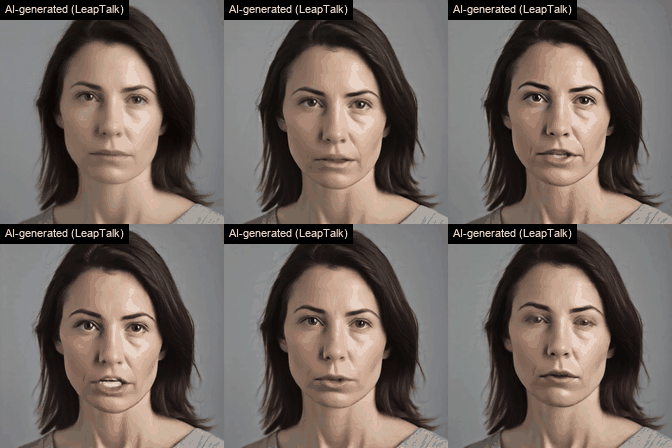
AI-generated: a fictional portrait (SDXL) and synthetic speech (Kokoro-82M) animated by LeapTalk through this node. The GIF is a reduced, silent excerpt; the MP4s with audio, the input portraits and the input speech are in the v0.1.0 release.
What you get
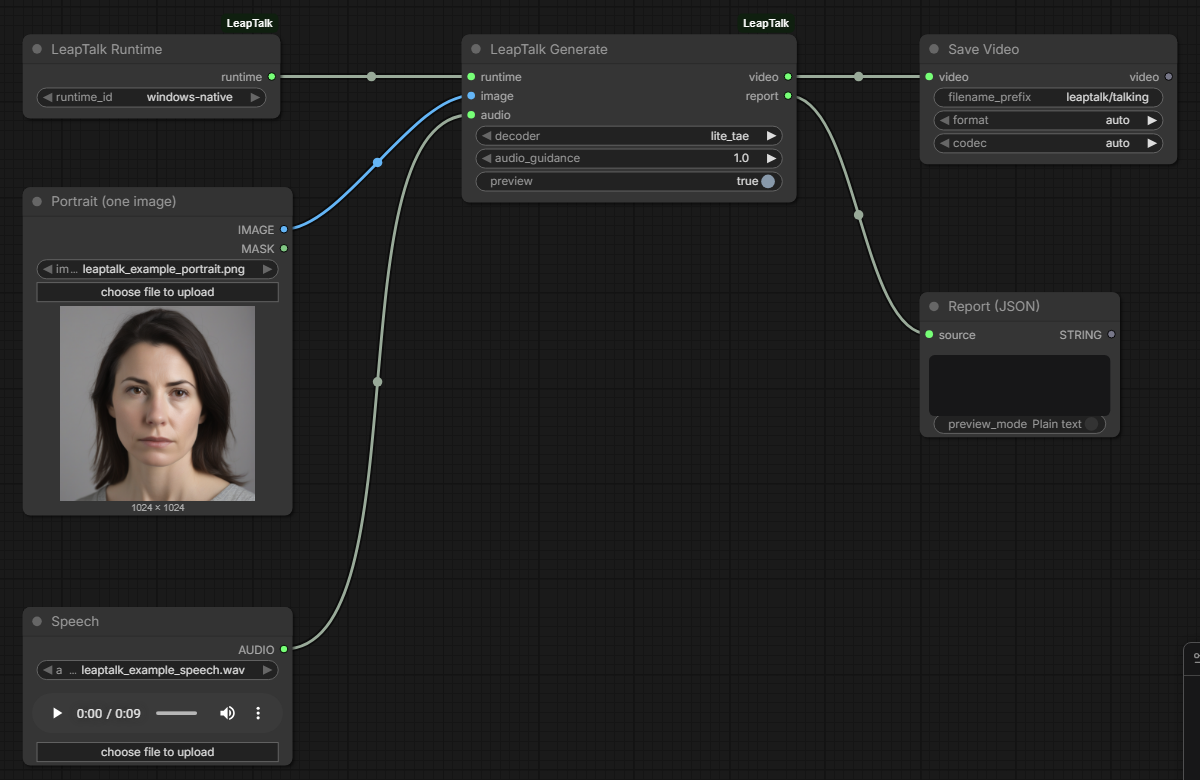
- LeapTalk Generate: one portrait (
IMAGE) + one speech clip (AUDIO) -> a 512x512, 25 fpsVIDEOwith your audio, generated chunk by chunk with the official LeapTalk recipe (1 solver step per chunk), plus a JSON report (frames, chunks, generator calls, timings, memory, which weights were applied). Previews of finished chunks appear in ComfyUI while it runs. - LeapTalk Runtime: pick a runtime the administrator registered (a separate Python environment with the LeapTalk code and weights). Workflows cannot name programs or paths.
- LeapTalk Doctor: checks the runtime (pinned upstream files, model files, CUDA, attention backend, ffmpeg) without generating.
- Persistent worker (new in v0.2, opt-in): with
backend = persistenton LeapTalk Runtime, the first job starts a worker that keeps the model loaded, and later queue jobs reuse it instead of importing and loading everything again. LeapTalk Worker shows it (status, never starts one) or frees it (unload). The old workflow and runtime configs stay one-shot.
Results (RTX 5090, Windows 11)
- Same frames as the official script: for the same portrait and speech, LeapTalk's own
inference.pyand this node produce identical 8-bit frames (234/234 and 850/850 frames, also through ComfyUI's Load Audio). The LeapTalk LoRA (480/480 tensors), audio projection and ViBT scheduler are checked on every job. - Speed, one-shot (default): a 34 s speech clip takes about 45 s from queueing to the finished video, a 9.4 s clip about 33–36 s; about 23 s of every job is starting the runtime and loading the models (mostly Python imports). Once loaded, a 28-frame chunk takes about 0.45 s (about 62 frames/s produced; playback is 25 fps).
- Speed, persistent worker (v0.2, opt-in): after the first job, further queue jobs on the loaded worker took 6.2 s for the 9.4 s clip (median of 5; v0.1.0 one-shot 36.1 s) and 17.7 s for the 34 s clip (v0.1.0 one-shot 45.5 s), with the same frames as one-shot and as the official script. The first job of a worker costs the same as a one-shot job.
- Limits of these numbers: they are medians of the jobs that completed on one machine under the
memory load it had at the time. With a high Windows commit charge the memory guard refuses or stops
Lite TAE jobs on a loaded worker: in the clean-install check of v0.2.0, 2 of 7 persistent Lite TAE
jobs ran (the first job of each worker) and the other 5 were refused before starting. A separate
series with
decoder = wan_vaepassed (5 of 5), but that is a different decoder with slower decoding and different frames, not a Lite TAE result. Loosening the guard is not the recommended fix; all attempts and outcomes: docs/BENCHMARKS.md. - Long input: a 96.5 s clip took 71 s one-shot and 47 s on a loaded worker; GPU memory does not grow with the length.
- Memory: peak CUDA 8.1 GiB allocated / 11.1 GiB reserved (Lite TAE), 6.1 / 7.6 GiB with the Wan VAE. A loaded worker keeps about 3.5 GiB of CUDA memory (about 4 GiB on the GPU) and 8.4–8.8 GiB of Windows commit charge while idle. On Windows, CUDA memory counts against the system commit charge; see docs/BENCHMARKS.md.
Details, method and limits: docs/BENCHMARKS.md.
Status
| | Scope |
| --- | --- |
| Tested (real weights) | Windows 11 + ComfyUI v0.38.0, runtime in a separate venv on the same Windows machine (Python 3.12, torch 2.7.1+cu128, PyTorch SDPA attention), RTX 5090 32 GB. Lite TAE decoder, audio guidance 1.0 (official defaults). Speech from 0.5 s to 96.5 s, mono and stereo, 16/24/48 kHz WAV. Generation through ComfyUI's HTTP API with Load Image, Load Audio, Save Video; installation from git archive into a differently named folder; Doctor; cancel, timeout, runtime errors and a killed ComfyUI process (no runtime process left, GPU memory back to idle). Persistent worker (v0.2): reuse over separate queue jobs (one Engine, LoRA merged once), portrait/speech/decoder changes, idle timeout, Unload, cancel/timeout/errors/a killed worker followed by a normal job, ComfyUI killed while the worker idles or generates. |
| Tested (CPU CI) | Ubuntu and Windows: config/job validation, audio/image hand-off, the official chunk arithmetic, process control with a fake runtime, the persistent worker protocol and lifecycle with a fake model, the memory guard with fixed measurements, node registration and execution in a real ComfyUI checkout. |
| Experimental | decoder = wan_vae (works, about 3x slower per chunk; run without torch.compile, while the official script compiles it). audio_guidance > 1 (2x generator calls; 2.0 gave visibly over-sharpened, discoloured lips in our test). |
| Not supported | WSL2 runtimes (planned; Windows-native was the tested path), macOS/Apple Silicon (porting notes), multi-GPU, live streaming to a viewer (the video is returned when the job ends), several portraits or speakers, sharing one worker between several ComfyUI processes. |
| Untested | Linux hosts with real weights (the persistent worker's Linux path is covered by CPU tests only), other GPUs, GPUs with less memory, flash-attn / SageAttention, non-English speech, speech longer than 96.5 s with real weights (max_audio_seconds allows up to 1800 s). |
Install
- Install the node: clone this repository into
ComfyUI/custom_nodes/(no Python packages are added to ComfyUI). - Create the runtime environment, check out LeapTalk at the pinned commit and download the weights at the pinned revisions: docs/SETUP.md.
- Register the runtime in
ComfyUI/user/leaptalk.runtimes.json(template: examples/leaptalk.runtimes.example.json), restart ComfyUI and run LeapTalk Doctor. - Load workflows/leaptalk_portrait_speech.json, pick your runtime, portrait and speech, and queue it.
- Optional, to keep the model loaded between jobs: load
workflows/leaptalk_persistent.json (LeapTalk Runtime with
backend = persistent). The worker keeps GPU and system memory while it is loaded, also between jobs; it unloads after 120 s without a job (worker_idle_seconds), when ComfyUI exits, or with workflows/leaptalk_worker_unload.json. Details: docs/SETUP.md.
How it works
ComfyUI writes the portrait (PNG), the speech (unchanged, as float WAV) and a schema-checked job file
into a fresh job folder and starts runtime/leaptalk_job.py with the runtime's Python. The runner
imports the pinned, unmodified LeapTalk checkout and follows the official inference.py (stream
mode):
- SoulX-FlashHead
Model_Pro+ LeapTalk LoRA (PEFT, every tensor checked, merged) + LeapTalk audio projection (strict=True,weights_only=True); - the portrait resized/center-cropped to 512x512 and encoded once as the static anchor;
- the speech resampled to 16 kHz mono for wav2vec2 exactly as the official script (
librosa.load); - per chunk: an 8 s audio window, one ViBT step from the reference-anchored source with the clamped 2-latent history, decode, color correction, history update by decoder round-trip, 28 new frames;
- frames streamed to ffmpeg (H.264), trimmed to
ceil(audio seconds x 25)frames and muxed with your original audio (AAC, no-shortest); the file is decoded back and checked before it is returned.
By default every job starts a new runtime process (one-shot); about 23 s of each job is start-up. With
backend = persistent the same code runs in a worker process that loads the models once and then takes
one job folder at a time from ComfyUI over a local pipe (no network port); everything that belongs to a
job (portrait, speech, history, events, previews, output) is recreated per job, and the worker is
replaced when the decoder, the runtime or its files change, or after any error. A memory guard refuses
to load a model or start a job when the system commit charge is too high, and stops a job (and the
worker) when commit stays at or above 95 % (defaults; docs/SETUP.md). Processes are ended if you cancel,
if a job exceeds the runtime's timeout, or if ComfyUI goes away.
Security and trust model: docs/SECURITY.md. Tests: docs/TESTING.md.
Licenses
This repository: Apache License 2.0. LeapTalk code and weights, SoulX-FlashHead and wav2vec2 are installed separately under their own terms (Apache License 2.0 as published; the Lite decoder file is the MIT-licensed TAEHV checkpoint). Component table and the demo material provenance: docs/LICENSING.md.
Use portraits and voices only with the rights and consent of the people shown and heard, and label generated videos as AI-generated.
Registry
Comfy Registry node id leaptalk (publisher hiroki-abe-58); see the release notes for the current
review state.
Citation
If you use LeapTalk, cite the paper:
@misc{zhang2026leaptalkbreakinglatencyqualitytradeoff,
      title={LeapTalk: Breaking the Latency-Quality Trade-off in Talking Head Generation},
      author={Rongxiang Zhang and Songhua Liu},
      year={2026},
      eprint={2608.00079},
      archivePrefix={arXiv},
      primaryClass={cs.CV},
      url={https://arxiv.org/abs/2608.00079},
}
and SoulX-FlashHead, which LeapTalk builds on:
@misc{yu2026soulxflashheadoracleguidedgenerationinfinite,
      title={SoulX-FlashHead: Oracle-guided Generation of Infinite Real-time Streaming Talking Heads},
      author={Tan Yu and Qian Qiao and Le Shen and Ke Zhou and Jincheng Hu and Dian Sheng and Bo Hu and Haoming Qin and Jun Gao and Changhai Zhou and Shunshun Yin and Siyuan Liu},
      year={2026},
      eprint={2602.07449},
      archivePrefix={arXiv},
      primaryClass={cs.CV},
      url={https://arxiv.org/abs/2602.07449},
}