
ComfyUI-EmbeddingGemma2
EmbeddingGemma 2 for ComfyUI: multimodal embeddings (text, images, video, audio) for similarity, ranking and search, bit-identical to the official sentence-transformers usage
Nodes (8)
The thirty-second wall, and how to live with it
Give every frame in the batch a fingerprint
Turn a list of captions into vectors you can measure
One vector per clip, thirty-two frames at a time
The node that decides whether the other seven work at all
Sort a batch by your prompt, keep the best three
Which of these captions actually fits the picture
Get the 2.5 GB back before you sample
EmbeddingGemma 2 for ComfyUI
Multimodal embeddings in ComfyUI with Google DeepMind's EmbeddingGemma 2 (google/embeddinggemma-2): text, images, video and audio are mapped into one 768-dimensional space, so they can be compared with each other. In a workflow that means, for example: pick the generated image that fits the prompt best, sort video frames by a description, label an image with the closest caption, or find which clip a text describes. Everything runs inside the ComfyUI process through sentence-transformers, the usage the model card documents; the nodes never download anything.
Unofficial. This node pack is an independent integration. It is not affiliated with or endorsed by Google / Google DeepMind, by the sentence-transformers or Transformers projects, or by Comfy Org.
日本語の概要は README.ja.md にあります。
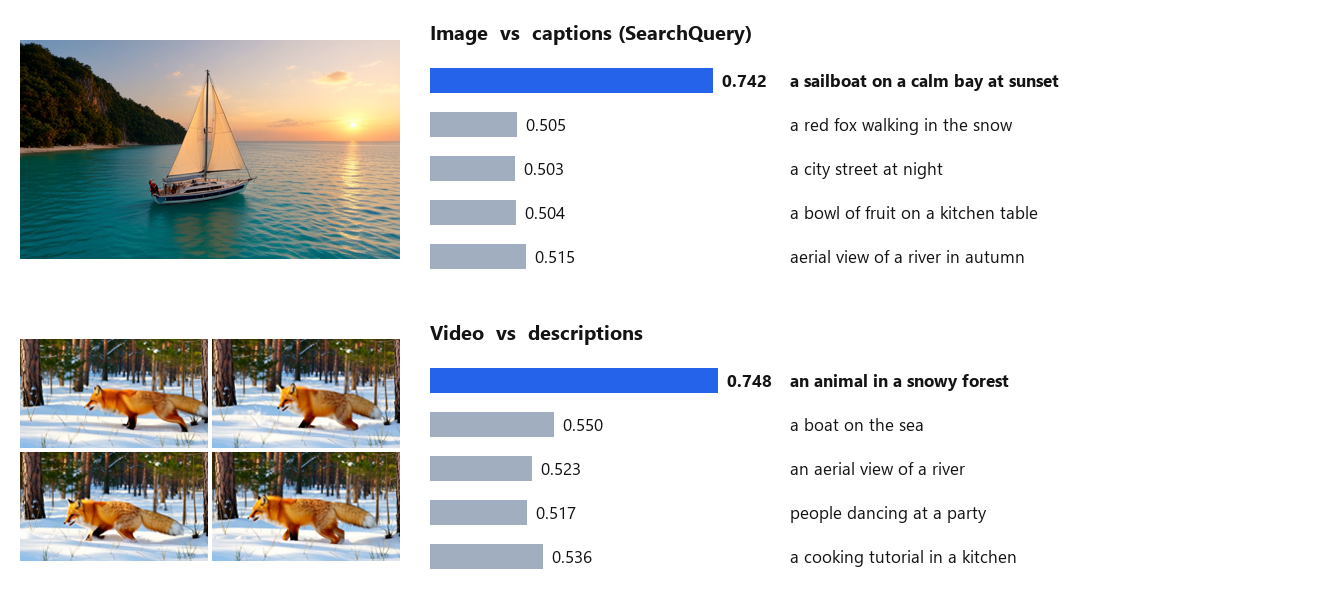
Real ComfyUI queue, shipped workflows: an image against five captions (top) and a video against five descriptions (bottom). The image and the video were generated for this repository with Self Gradient Forcing+.
What it does
| Node | Purpose |
| --- | --- |
| EmbeddingGemma 2 Loader | Model folder from models/embeddinggemma, which encoders to load (all / text + image/video / text + audio / text), dtype, device, keep loaded |
| Encode Text | One embedding per line (or for the whole text), with the task prefix the model was trained with |
| Encode Images | One embedding per image of an IMAGE batch |
| Encode Video | One embedding for a VIDEO (frames sampled at 1 per second, at most 32, as in the official processing) |
| Encode Audio | One embedding per clip of an AUDIO input (mono, 16 kHz; the first 30 s count) |
| Similarity | Cosine similarity of every query against every candidate; best label, index and score of the first query |
| Rank Images | Sorts an image batch by similarity to a query, best first, optionally keeping the top k |
| Unload | Frees the model |
Embeddings are unit-length vectors (EG2_EMBEDDINGS, with a label per item). Every encode node can shorten them to 512, 256 or 128
dimensions (Matryoshka truncation, re-normalised, as the model card describes); only vectors of the same length can be compared.
Tasks (Encode Text): queries use SearchQuery (also for searching images, video and audio with text), QuestionAnswering,
FactChecking or CodeRetrieval; texts in a collection use Document (with an optional title); comparing like with like uses
Classification, Clustering or SentenceSimilarity on both sides. Images, video and audio take no prefix.
How far it was checked
Windows 11, RTX 5090, ComfyUI v0.38.0, torch 2.14.1, transformers 5.20.1, sentence-transformers 6.1.0 (details and raw numbers in docs/VERIFICATION.md):
- Bit-identical to the official usage. The model card's usage (
SentenceTransformer(...)in bfloat16,encodewith the prompt names,truncate_dim) in a separate environment, fed directly from the files, gives exactly the same vectors as the nodes fed by ComfyUI's own Load Image / Load Video / Load Audio, in 18 of 18 cases: text in four task modes (English, Japanese, code), 256 dimensions, a titled document, 6 images of different sizes, 2 videos and 4 audio clips (16 kHz and 44.1 kHz stereo). - Real ComfyUI queue: the three shipped workflows give the same scores (all 6 decimals in the report) and the same frame order as the official usage recomputed separately.
- Video frames: ComfyUI decodes ordinary videos in floating point with its own chroma handling; the nodes encode exactly those frames. An 8-bit decode of the same file differs by about 1.3 / 255 per pixel on average, and its embedding has a cosine similarity of 0.9996 with the node's.
- Clean install: fresh ComfyUI v0.38.0, fresh Python 3.12 environment,
git clone,pip install -r requirements.txt, the model downloaded withtools/download_model.py(SHA-256 verified): the three shipped workflows give the same results as the development environment. - CPU tests and CI (GitHub Actions; Ubuntu and Windows): a tiny random model built from the official tokenizer, processor and configuration files runs the real processing on the CPU (tests compare every node with direct sentence-transformers calls), plus a real ComfyUI queue on the CPU.
Not checked: Linux or macOS with a GPU, AMD / Apple GPUs, other ComfyUI versions with the real model (the CPU tests and the real-queue check also run against ComfyUI v0.41.0 in CI), retrieval quality against the model card's benchmarks (the pack reproduces the official embeddings; it does not re-evaluate the model).
Install
-
ComfyUI with the V3 node API (v0.38.0 was used), Python 3.10+. A GPU is optional: the model has 740M parameters (2.5 GiB peak on the GPU in bfloat16 with all encoders); on the CPU it runs in float32, more slowly.
-
Clone this repository into
ComfyUI/custom_nodes/and install its requirements into ComfyUI's Python:git clone https://github.com/hiroki-abe-58/ComfyUI-EmbeddingGemma2 custom_nodes/ComfyUI-EmbeddingGemma2 python -m pip install -r custom_nodes/ComfyUI-EmbeddingGemma2/requirements.txt -
Download the model (about 1.5 GB). The script pins the revision this pack was checked with and verifies every file's SHA-256:
python custom_nodes/ComfyUI-EmbeddingGemma2/tools/download_model.py --models-dir models/embeddinggemmaThis creates
models/embeddinggemma/embeddinggemma-2/. Another location works throughextra_model_paths.yamlwith the keyembeddinggemma. -
Restart ComfyUI and open a workflow from
workflows/gui/:image_captions(labelsinput/example.png),rank_framesandvideo_search(both readinput/example.mp4; put any video there or choose another one).
Measured on this setup
RTX 5090, bfloat16, all encoders loaded, model resident (loading about 3 s): 6 texts 0.04 s, one image 0.06 s, a 5 s video 0.13 s, a 4 s audio clip 0.1 s (the first call of each kind after loading is slower). Peak GPU memory 2.5 GiB.
Notes and limits
- Video length. ComfyUI's video loader decodes every frame into memory before a node sees it (as float32: about 4.8 MB per 832 x 480 frame), although only 1 frame per second (at most 32) is used. Trim or downscale long videos first.
- Audio is averaged to mono; rates other than 16 kHz are resampled with a polyphase filter (
scipy.signal.resample_poly; the model accepts 16 kHz only, and the official usage leaves resampling to the caller). The soundtrack of aVIDEOis not used by Encode Video; take it with Get Video Components and Encode Audio. - Audio length. Only the first 30 seconds of a clip affect its embedding: the official processing (transformers 5.20.1) passes audio through the Gemma 4 audio feature extractor, whose defaults truncate at 480,000 samples (30 s at 16 kHz), so a clip yields at most 750 audio tokens (checked: a 60 s clip gives exactly the embedding of its first 30 s). The model card mentions minutes of audio; with this processing, cut longer audio into parts.
- Context. The model was trained with an 8,192-token context: an image is 280 tokens, a video frame 140 (32 frames at most), a second of audio 25. Text is not truncated by the official processing (a 12,000-word text becomes 12,003 tokens), so keep texts within the context.
- dtype.
autouses bfloat16 on GPUs that support it, otherwise float32. float16 is not offered: the model overflows in float16 (model card). - Dependencies: sentence-transformers (with scikit-learn and SciPy) and transformers 5.19 or later. sentence-transformers 6.1.0
requires
huggingface-hub<2.0, so installing the requirements into a fresh ComfyUI 0.38.0 environment moveshuggingface-hubfrom 2.2.0 to 1.33.0. ComfyUI itself ran normally with it here; check other custom nodes you use if they need 2.x.
Licenses
- This node pack: MIT (LICENSE). It contains no third-party code.
- The model (not included; downloaded only by
tools/download_model.py):google/embeddinggemma-2, Apache-2.0 according to its model card, which also says deployments must adhere to the Gemma Prohibited Use Policy. See NOTICE.
Development
python -m pip install pytest ruff
python tools/download_model.py --models-dir refs/embeddinggemma --no-weights       # official tokenizer and configs only
EG2_COMFYUI_DIR=<ComfyUI checkout> EG2_REFERENCE_FILES=refs/embeddinggemma/embeddinggemma-2 python -m pytest tests
python scripts/ci_queue_check.py --comfyui <ComfyUI checkout> --reference refs/embeddinggemma/embeddinggemma-2
python scripts/run_parity.py --comfyui <ComfyUI checkout> --model <models/embeddinggemma/embeddinggemma-2> --media <folder> --out pack.npz