
comfyui-acemusic
ACE-Step music generation nodes for ComfyUI
Nodes (15)
Genre, voice, mood, tempo, instruments
Bundle every knob into one object — the wireable version of your song's spec
Turn any audio into a jazz cover without rerecording a single note
Ask for 'a cheerful pop song' and get caption, lyrics, BPM, and key — via keywords, not magic
FlowEdit without the finicky sliders
Your song ends too soon — extend it forward or backward in one node
Caption plus lyrics in, a full song out
Generate from a conditioning object when your song spec is assembled by other nodes
Swap in an ACE-Step LoRA between the loader and the generator
Your lyrics live here, not buried in a widget you can't find
Load the 3.5B ACE-Step model once — this node is the front door to AceMusic
The bridge is bad — regenerate just that section, keep the rest
Same song, different take — variations without starting over
Duration, language, BPM, key, and the sampler knobs
It measures duration accurately and fakes the rest — for now
ComfyUI-AceMusic
English | 日本語 | 简体中文 | 繁體中文 | 한국어 | Tiếng Việt
Multilingual AI music generation nodes for ComfyUI powered by ACE-Step. Generate full songs with lyrics in 19 languages including English, Chinese, Japanese, Korean, and more.
If you find this project helpful, please give it a Star!

Highlights
- First Full-Featured ACE-Step Integration for ComfyUI - Complete implementation of all ACE-Step capabilities as ComfyUI nodes (15 nodes total)
- Modular Architecture - Separated Settings/Lyrics/Caption nodes eliminate widget ordering issues and improve workflow readability
- Cross-Platform Compatibility - Works on Windows with Python 3.13+ by using soundfile/scipy instead of problematic torchaudio backends
- HeartMuLa Interoperability - Seamlessly chain with HeartMuLa nodes for hybrid AI music workflows
- Production-Ready - Robust input validation with automatic fallbacks prevents runtime errors
Features
- Multilingual Lyrics - Generate music with vocals in 19 languages (English, Chinese, Japanese, Korean, Spanish, etc.)
- Song Structure Control - Use section markers like [Verse], [Chorus], [Bridge] to define song structure
- Style Tags - Control genre, vocal type, mood, tempo, and instruments
- 4-Minute Songs - Generate up to 240 seconds of continuous audio
- Audio Editing - Cover, Repaint, Extend, Edit, and Retake capabilities
- LoRA Support - Load fine-tuned adapters for specialized styles
- HeartMuLa Compatible - Works seamlessly with HeartMuLa nodes
Nodes
| Node | Description | |------|-------------| | Model Loader | Downloads and caches ACE-Step models | | Settings | Configure generation parameters (duration, language, BPM, etc.) | | Generator | Generate music from caption and lyrics (Text2Music) | | Lyrics Input | Dedicated node for entering lyrics with section markers | | Caption Input | Dedicated node for style/genre description | | Cover | Transform existing audio into different styles (Audio2Audio) | | Repaint | Regenerate specific sections of audio | | Retake | Create variations of existing audio | | Extend | Add new content to beginning or end of audio | | Edit | Change tags/lyrics while preserving melody (FlowEdit) | | Conditioning | Combine parameters into conditioning object | | Generator (from Cond) | Generate from conditioning object | | Load LoRA | Load fine-tuned LoRA adapters | | Understand | Measure audio duration (caption/BPM/key are placeholders*) | | Create Sample | Generate parameters via keyword heuristics* |
* Full AI-powered audio analysis and parameter generation require a future ACE-Step version. Current implementation provides accurate duration measurement and keyword-based inference as placeholders.
Installation
ComfyUI Manager (Recommended)
Search for "ComfyUI-AceMusic" and install.
Manual
cd ComfyUI/custom_nodes
git clone https://github.com/hiroki-abe-58/ComfyUI-AceMusic.git
cd ComfyUI-AceMusic
pip install -r requirements.txt
Install ACE-Step
pip install git+https://github.com/ace-step/ACE-Step.git
Models are automatically downloaded from Hugging Face on first use.
Quick Start
- Add AceMusic Model Loader node and select device (
cuda) - Add AceMusic Settings node to configure parameters
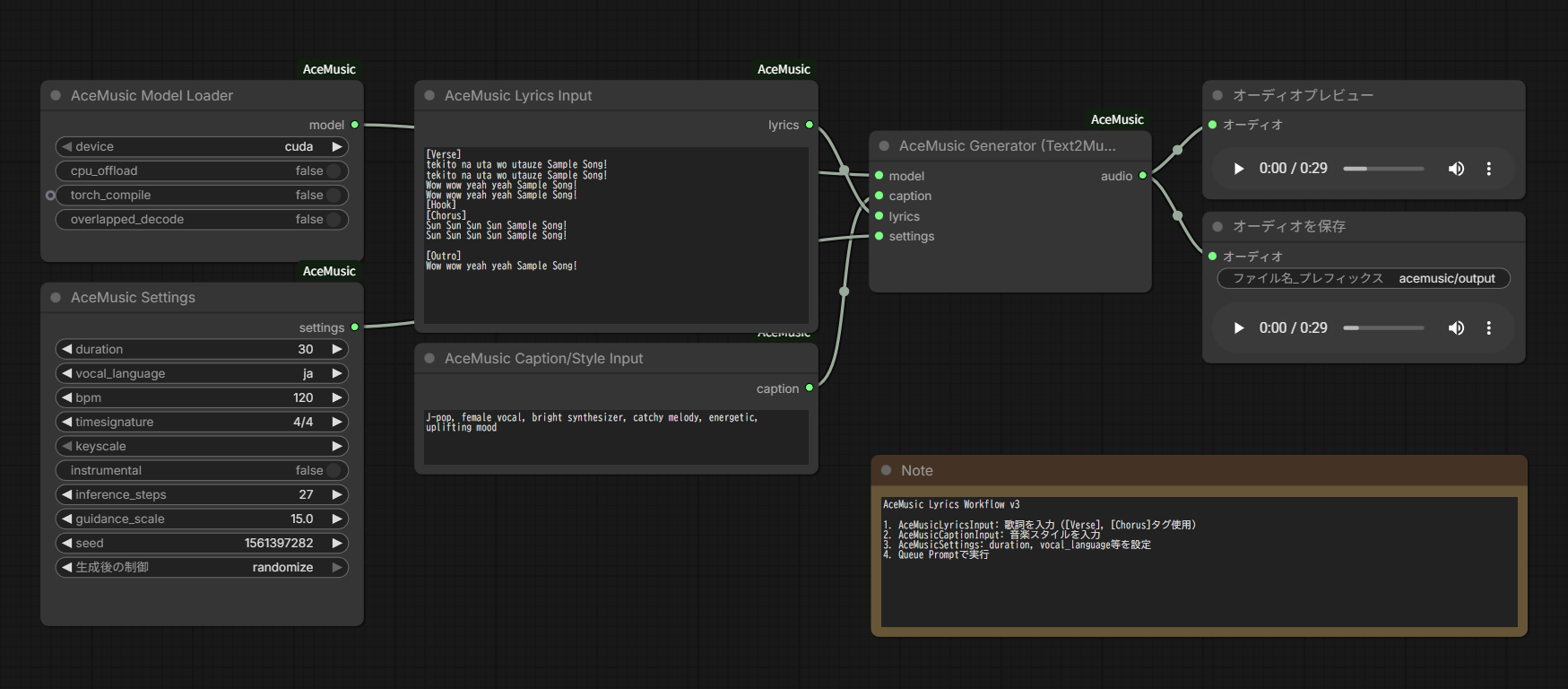
- Add AceMusic Lyrics Input node and enter lyrics:
[Verse] Walking down the empty street Thinking about you and me [Chorus] We belong together Now and forever - Add AceMusic Caption Input with style tags:
pop, female vocal, energetic - Connect all to AceMusic Generator -> Preview Audio
Load the example workflow from workflow/AceMusic_Lyrics_v3.json
Section Markers
ACE-Step supports these section markers for song structure:
| Marker | Usage | |--------|-------| | [Intro] | Opening instrumental or vocal intro | | [Verse] | Main verses | | [Pre-Chorus] | Build-up before chorus | | [Chorus] | Main hook/chorus | | [Bridge] | Contrasting section | | [Outro] | Ending section | | [Instrumental] | Non-vocal sections |
Style Tags
Combine tags in the caption to control output style:
- Genre: pop, rock, electronic, jazz, classical, hip-hop, r&b, country, folk, metal, indie, j-pop, k-pop
- Vocal: female vocal, male vocal, duet, choir, instrumental
- Mood: energetic, melancholic, uplifting, calm, aggressive, romantic, dreamy, dark
- Tempo: slow, medium, fast
- Instruments: piano, guitar, drums, synth, strings, bass, violin, saxophone
Example: j-pop, female vocal, energetic, bright synthesizer, catchy melody
Models & Hardware
Models download automatically from Hugging Face to ~/.cache/ace-step/checkpoints/
Performance
| Device | RTF (27 steps) | Time for 1 min audio | |--------|----------------|---------------------| | RTX 5090 | ~50x | ~1.2s | | RTX 4090 | 34.48x | 1.74s | | A100 | 27.27x | 2.20s | | RTX 3090 | 12.76x | 4.70s | | M2 Max | 2.27x | 26.43s |
VRAM Requirements
| Mode | VRAM | Notes | |------|------|-------| | Normal | 8GB+ | Full speed | | CPU Offload | ~4GB | Slower but works on limited VRAM |
Parameters
Settings Node
| Parameter | Default | Range | Description | |-----------|---------|-------|-------------| | duration | 30 | 5-240 | Audio length in seconds | | vocal_language | ja | 19 languages | Language for vocals | | bpm | 120 | 0-300 | Beats per minute (0 = auto) | | timesignature | 4/4 | Various | Time signature | | keyscale | (auto) | 24 keys | Musical key | | instrumental | false | bool | Generate without vocals | | inference_steps | 27 | 1-100 | Quality vs speed | | guidance_scale | 15.0 | 1-30 | Prompt adherence | | seed | -1 | int | Random seed (-1 = random) |
Supported Languages
ACE-Step supports 19 languages. Top performers:
| Language | Code | Quality | |----------|------|---------| | English | en | Excellent | | Chinese | zh | Excellent | | Japanese | ja | Excellent | | Korean | ko | Very Good | | Spanish | es | Very Good | | German | de | Good | | French | fr | Good | | Portuguese | pt | Good | | Italian | it | Good | | Russian | ru | Good |
Integration with HeartMuLa
The AUDIO type is compatible with HeartMuLa outputs:
- Use HeartMuLa-generated audio as input to AceMusic Cover
- Use HeartMuLa-generated audio as input to AceMusic Repaint
- Chain HeartMuLa and AceMusic nodes together for advanced workflows
Troubleshooting
ACE-Step installation fails (dependency version errors)
If you see errors like No matching distribution found for torchaudio==2.10.0+cu128 or matplotlib==3.10.1, the ACE-Step repository has strict version requirements that may not be available for your Python version or platform.
Solution: Clone and modify ACE-Step locally
# Clone ACE-Step repository
git clone https://github.com/ace-step/ACE-Step.git
cd ACE-Step

# Edit requirements.txt to relax version constraints
# Change exact versions (==) to minimum versions (>=)
# Example: matplotlib==3.10.1 -> matplotlib>=3.8.0

# Install with relaxed requirements
pip install -e .
Alternative: Install dependencies manually first
pip install torch torchaudio --index-url https://download.pytorch.org/whl/cu121
pip install transformers diffusers accelerate soundfile librosa
pip install git+https://github.com/ace-step/ACE-Step.git --no-deps
Models not loading / Download fails
- Check your internet connection
- Verify Hugging Face access
- Try manually downloading from https://huggingface.co/ACE-Step
Out of VRAM
- Enable
cpu_offloadin Model Loader - Reduce
duration - Close other GPU applications
Slow generation
- Enable
torch_compile(requires triton) - Use lower
inference_steps(10-15 for drafts) - Use
overlapped_decodefor long audio (>48s)
Audio quality issues
- Increase
inference_steps(50-100 for best quality) - Adjust
guidance_scale(try 10-20) - Provide more detailed captions
- Try different seeds
Windows-specific issues
- For
torchaudioerrors, ensuresoundfileis installed:pip install soundfile - For torch.compile, install triton:
pip install triton-windows
Roadmap / Planned Features
The following ACE-Step features are not yet implemented but planned for future releases:
| Feature | Status | Description | |---------|--------|-------------| | Track Separation (Stems) | Planned | Separate audio into vocal/instrumental tracks | | Multi-Track Generation | Planned | Layer generation like Suno Studio "Add Layer" | | Vocal2BGM | Planned | Auto-accompaniment from vocals | | LRC Generation | Planned | Timestamped lyric alignment |
Contributions and PRs are welcome! See Issues for discussion.
Requirements
- Python >= 3.10
- PyTorch >= 2.0.0
- ComfyUI
- ACE-Step
License
Apache 2.0
Credits
- ACE-Step - Original music generation model by ACE Studio and StepFun
- ComfyUI - Node-based UI framework
- HeartMuLa - Inspiration for node design