
ComfyUI_EasySize
A lightweight ComfyUI node for size selection and size routing with Preset, Image and Custom modes.
ComfyUI_EasySize
A lightweight ComfyUI node for reliable size selection and size routing.
ComfyUI_EasySize 始终只提供一个节点:EasySizeSimpleSetting。它通过三种模式取得尺寸,并固定输出 width、height 两个 INT。
Features
- Single node design:一个节点完成全部尺寸选择与路由
- Dynamic mode UI:根据当前模式只显示相关控件
- Preset size selection:按预设选择常用尺寸
- Image size inheritance:读取输入
IMAGE的原始宽高 - Custom resolution:手动指定宽度和高度
- Family → Ratio → Resolution:分层组织预设,比例与尺寸保持一致
Installation
ComfyUI Manager
- 打开 ComfyUI Manager。
- 进入 Custom Nodes Manager。
- 搜索
ComfyUI_EasySize并安装。 - 重启 ComfyUI。
如果暂时无法在 Manager 中搜索到本项目,请使用手动安装。
Manual installation
在 ComfyUI 的 custom_nodes 目录中执行:
cd ComfyUI/custom_nodes
git clone https://github.com/hadesybil-hub/ComfyUI_EasySize.git
完成后重启 ComfyUI。
Node
EasySizeSimpleSetting
唯一节点,包含三种互斥模式:
| Mode | 数据来源 | 输出 | |---|---|---| | Preset | Family → Ratio → Resolution | width / height | | Image | 输入 IMAGE 的原始 tensor shape | width / height | | Custom | 手动输入 width / height | width / height |
固定输出:
| 名称 | 类型 | |---|---| | width | INT | | height | INT |
Usage
Preset Mode
适用于文生图工作流:
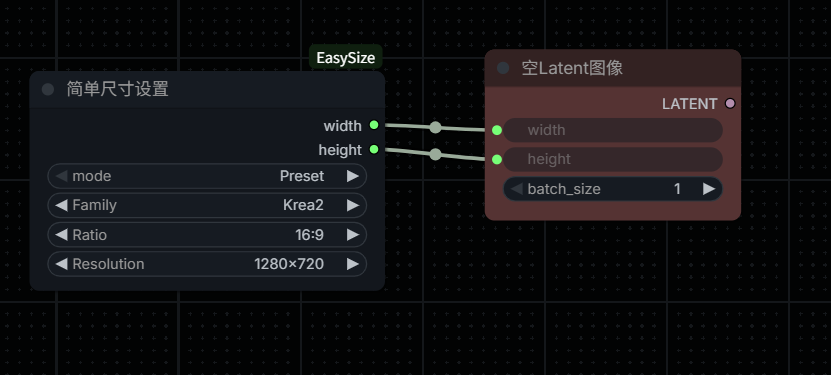
Family
  ↓
Ratio
  ↓
Resolution
  ↓
width / height
切换 Family 或 Ratio 时,后续选项会自动更新。
Image Mode
适用于需要继承输入图像尺寸的图生图工作流:
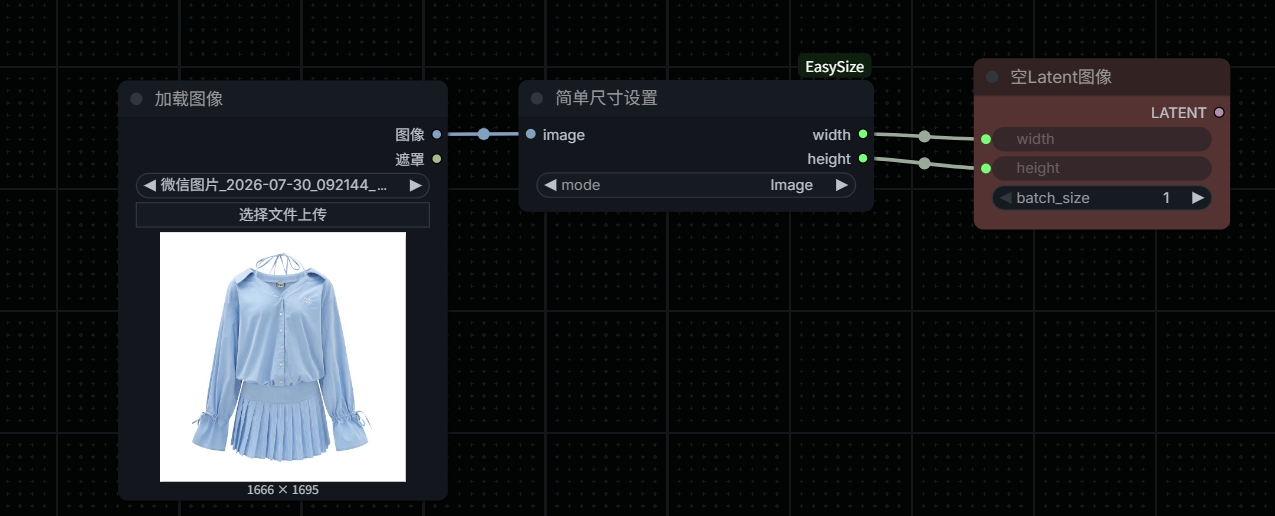
IMAGE
  ↓
EasySizeSimpleSetting
  ↓
width / height
Image Mode 只读取原始尺寸,不修改输入图片。
Custom Mode
手动填写 width、height,节点将其作为最终尺寸输出。
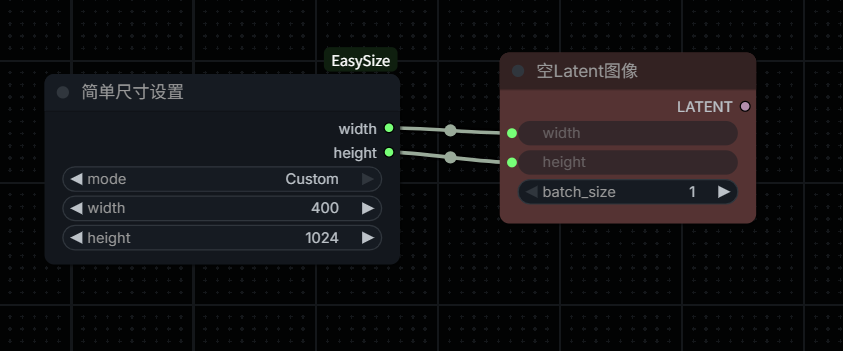
Preset System
预设使用以下层级:
Family → Ratio → Resolution
- Family 只是尺寸分类,不代表模型检测或模型绑定。
- Ratio 根据 Resolution 的宽高自动确认。
- Resolution 始终归入与其宽高一致的 Ratio。
当前包含 Common、SD1.5、SDXL、Pony、Illustrious、NoobAI、FLUX、FLUX.2、Krea、Krea2、Z-Image、Qwen Image、WAN 和 Video 等分类。
Design Philosophy
EasySize 的目标不是替代 Latent 节点,而是提供可靠、可复用的宽高输出。
它可以连接到任何接受尺寸 INT 输入的:
- Empty Latent
- 第三方 Latent 节点
- 图像工作流节点
EasySize 不负责:
- LATENT 创建
- IMAGE resize
- crop
- MASK 处理
- 模型检测
- 显存优化
License
本项目采用 MIT License。