
ComfyUI Model Preview Hover
A UI extension that shows a preview popup of the model's cover image when you hover over a model name in loaders (Checkpoint, LoRA, UNET, etc.).
ComfyUI Model Preview Hover
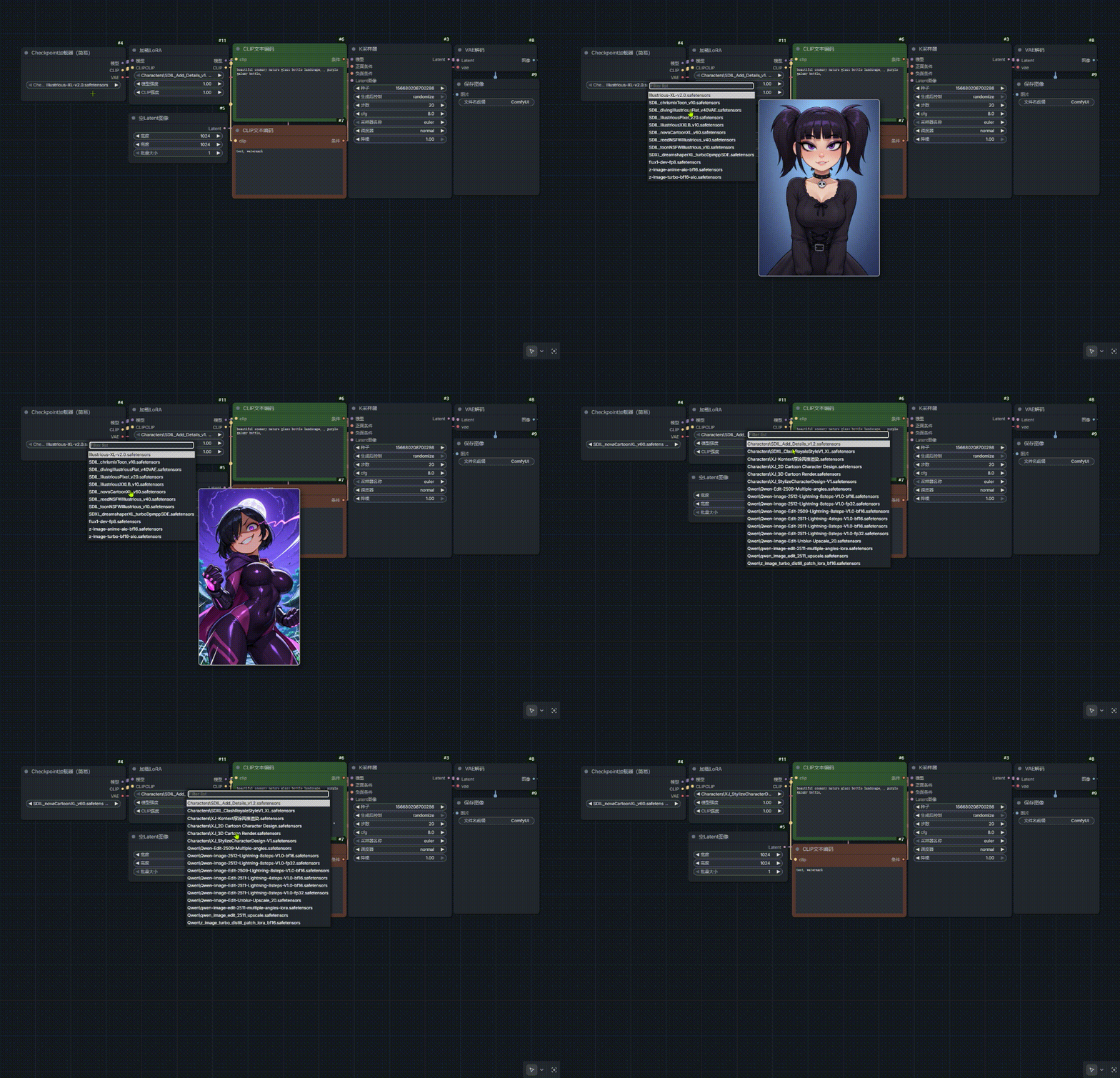 [中文说明请向下滚动 (Scroll down for Chinese version)]
📖 Feature
Automatically displays a preview popup of the model's cover image when hovering the mouse over the model name in the dropdown menu. Supported nodes: CheckpointLoader, LoRA Loader, UNETLoader, ControlNetLoader, etc.
🚀 Usage
- Ensure you have a cover image file with the same name as your model in the corresponding model folder (e.g.,
models/checkpoints/).- Supported formats:
.png,.jpg,.jpeg,.webp - Example: If your model is
flux_dev.safetensors, your preview image should be namedflux_dev.png.
- Supported formats:
- Refresh the ComfyUI webpage to apply changes.
📦 Installation
Method1:
- Navigate to your
ComfyUI/custom_nodes/directory. - Clone this repository:
git clone https://github.com/gxwprince/ComfyUI_Model_Preview.git - Restart ComfyUI.
Method2:
select "Download ZIP" file from the "code" option in the upper right corner of the homepage.
中文说明
ComfyUI Model Preview Hover (模型悬停预览插件)
📖 功能
在 Checkpoint、LoRA、UNET、ControlNet 等加载器的下拉菜单中,当鼠标悬停在模型名称上时,自动在侧边弹窗显示该模型的封面预览图。
🚀 使用方法
- 确保你的模型文件夹(如 models/checkpoints/)内有与模型同名的封面图。
- 支持格式:.png, .jpg, .jpeg, .webp
- 举例:如果模型文件名是 flux_dev.safetensors,对应的封面图应命名为 flux_dev.png。
- 刷新 ComfyUI 网页即可生效。
📦 安装
方法1:
- 进入 ComfyUI/custom_nodes/ 目录。
- 克隆本项目: code Bash git clone https://github.com/gxwprince/ComfyUI_Model_Preview.git
- 重启 ComfyUI。
方法2:
在主页右上角的“code”中选择“Download ZIP”文件
🤝 Support / 支持作者
如果你觉得这个插件好用,欢迎去我的 B 站关注一波! If you like this extension, please follow me on Bilibili!
📺 My Bilibili Channel: 点击跳转 B 站主页 (星镜AIart)