
ComfyUI-ProportionChanger
Advanced DWPose-based body proportion changer for ComfyUI
Nodes (14)
Handing your edited skeleton to SCAIL-Pose
The download-and-load node for mascot part detection
The loader for the mascot pose model that DWPose can't do
Finding the head, hands, and feet inside a mascot suit
Pose detection for characters that aren't built like people
Bridge from WanAnimate's POSEDATA to the pack's format
Paste pose data into your graph as text
Turn POSE_KEYPOINT into text you can actually look at
The canvas-fixer that stops your pose from stretching
The DWPose detector that feeds the proportion machine
Turning keypoints back into the OpenPose image your ControlNet wants
Adding in-between frames so your pose video doesn't jitter
The slider farm that stretches your character's limbs
The node that actually changes proportions
ComfyUI-ProportionChanger
日本語 README | English
Note: This README was automatically generated using Claude Code AI-assisted development tools.
This custom node is created by decomposing and porting the WanVideo UniAnimate pose detector node from kijai's ComfyUI-WanVideoWrapper. The key difference is that instead of using image inputs, it now accepts KeyPoint data as input, enabling manipulation of body types that cannot be estimated by the pose detector alone.
Additionally, the Openpose Editor node from toyxyz/ComfyUI-ultimate-openpose-editor has been similarly decomposed and ported, enabling fine-tuning of individual parts.
Features
Node Overview
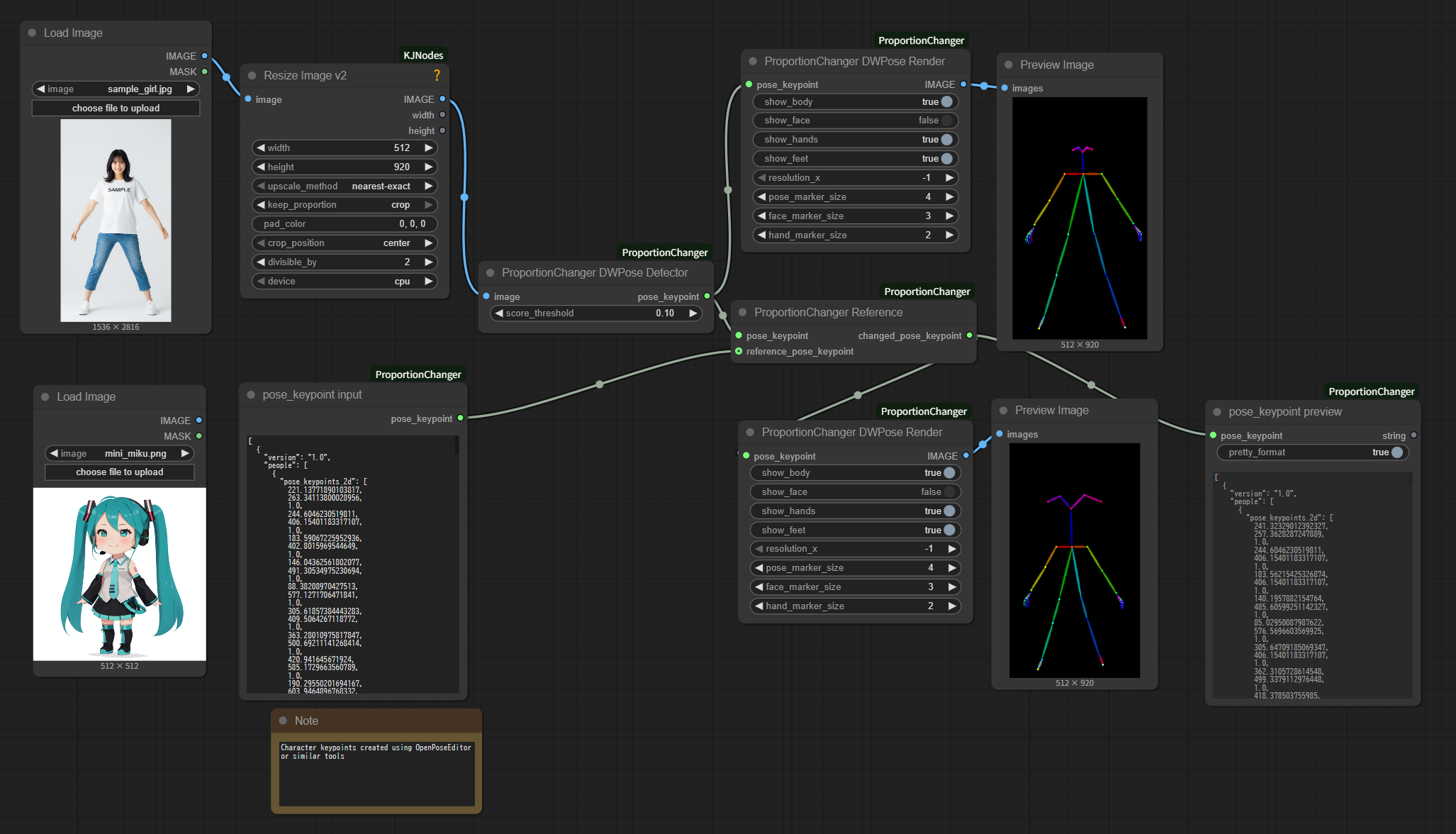
- ProportionChanger Pose Detector: Detects KeyPoints from images
- ProportionChanger Reference: Transforms proportions to reference poses
- ProportionChanger Pose Render: Converts KeyPoints to images
- ProportionChanger Params: Adjusts parameters for individual KeyPoint parts, including separate upper/lower arm, thigh/lower-leg, and feet scaling
- ProportionChanger Interpolator: Interpolates KeyPoint videos with in-betweening
- PoseData to pose_keypoint: Converts WanAnimate
POSEDATAintoPOSE_KEYPOINT - pose_keypoint resize: Resizes
POSE_KEYPOINTto a target size (pads then scales to avoid stretching when aspect differs) - pose_keypoint input: Converts JSON text to KeyPoints
- pose_keypoint preview: Converts KeyPoints to JSON
- (Down)Load Mascot Pose Model: Downloads and loads a mascot pose ONNX model from HuggingFace
- (Down)Load Mascot BBox Model: Downloads and loads a mascot bbox ONNX model from HuggingFace
- Mascot Pose Detector: Detects mascot body pose as
POSE_KEYPOINT - Mascot BBox Detector: Detects mascot part bounding boxes as
BOUNDING_BOX - pose_keypoint to SCAIL-Pose: Converts 25-point
POSE_KEYPOINTto SCAIL-Pose data
Installation
Install via ComfyUI Manager
-
Search for "ComfyUI-ProportionChanger" in ComfyUI Manager's Custom Nodes Manager and install
-
Restart ComfyUI
Manual Installation
- Clone this repository into your
custom_nodesfolder:
cd ComfyUI/custom_nodes
git clone https://github.com/grmchn/ComfyUI-ProportionChanger.git
- Install dependencies:
cd ComfyUI-ProportionChanger
pip install -r requirements.txt
- Restart ComfyUI
Usage
Basic Workflow
Please refer to example_workflows.
Converting WanAnimate POSEDATA
- Use WanAnimatePreprocess "Pose and Face Detection" to produce
POSEDATA - Feed
POSEDATA,width, andheightinto PoseData to pose_keypoint - Connect the resulting
pose_keypointto ProportionChanger Reference / Render nodes - Example workflow:
example_workflows/proportion_changer_pose_data_to_pose_keypoint.json
Converting to SCAIL-Pose
- Connect a changed
POSE_KEYPOINTto pose_keypoint to SCAIL-Pose - Use the resulting
DWPOSESwith SCAIL-Pose workflows - Example workflow:
example_workflows/proportion_changer_SCAIL_pose.json
Troubleshooting
Common Issues
- Model Loading Errors: Models should be automatically downloaded from HuggingFace. Please ensure pose models are in the correct directory.
- Incorrect body proportions after transformation with reference image: The
pose_keypointandreference_pose_keypointaspect ratios (canvas width/height) may not match. ProportionChanger Reference hasauto_resize_reference(default ON) to automatically align the reference to the pose canvas size. If needed, use pose_keypoint resize to explicitly alignwidth/height. Fine-tune individual body parts using the "ProportionChanger Params" node. - Nothing displays after transformation with reference image: The reference image's pose estimation has failed. Use OpenposeEditor or similar tools to input parameter values manually.
Mascot Pose Models
Mascot pose nodes download model artifacts from grmchn/mascot-pose-detect on HuggingFace into ComfyUI/models/mascot_body_detect. The official model package is Apache 2.0 and uses the keypoint/dinov2_vitpose_l_v2 variant by default. The previous keypoint/dinov2_vitpose_l variant remains available in the same model repository. The node code remains part of this repository, and use of the downloaded models is subject to the model package license.
Attribution and Credits
Special Thanks
License
This project is licensed under GPL 3.0 due to the combination of source materials from different licenses:
- Primary source: kijai/ComfyUI-WanVideoWrapper (Apache 2.0)
- Secondary source: toyxyz/ComfyUI-ultimate-openpose-editor (GPL 3.0)
When combining code from Apache 2.0 and GPL 3.0 licensed projects, the resulting derivative work must be distributed under GPL 3.0 according to license compatibility rules.
Copyright Notice
- Original WanVideo UniAnimate pose detector: Copyright by kijai
- ProportionChanger Params functionality: Copyright by toyxyz
- Modifications and integration: This project's contributors
See the LICENSE file for the full GPL 3.0 license terms.