
Civitai Updater
ComfyUI extension to scan local Civitai models and check for newer versions.

Civitai Updater
A ComfyUI sidebar panel that checks the models on your disk against their Civitai releases, and tells you which ones have moved on without you.
It reads what you already have — model files and their .civitai.info
sidecars — identifies each one by SHA256 hash, and lists only the models with
a newer release. No model is downloaded for you and no model file is touched:
the panel links you to the release page and gets out of the way. It only
writes .civitai.info and .preview.png sidecars next to your models.
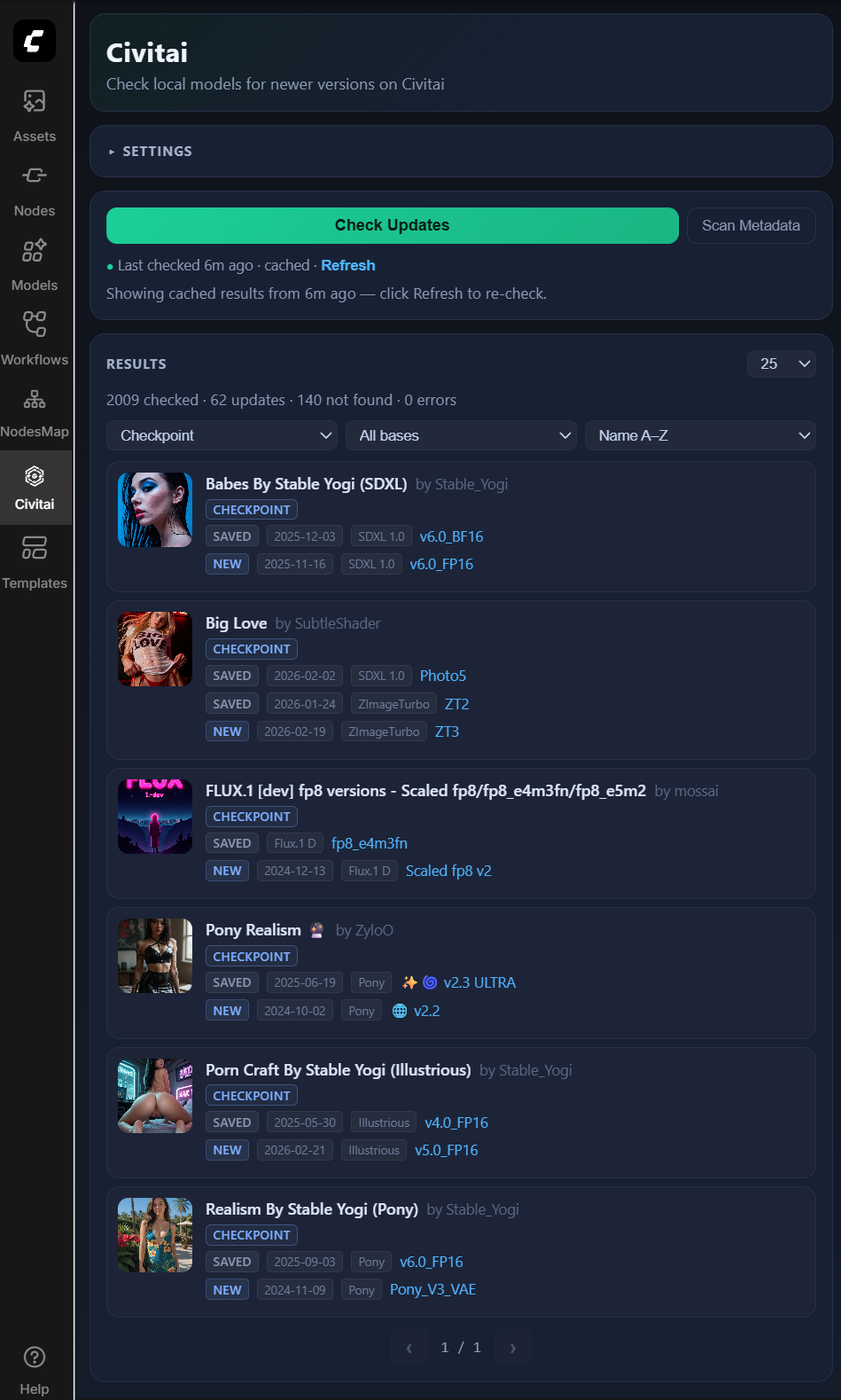
Reading the panel
Every model card is a small ledger of that model's releases. The dot on the left says where each version stands:
| Dot | Row | Meaning |
| --- | --- | --- |
| ○ | SAVED | A version you have on disk. Click the name to copy its file path. |
| ○ | METADATA | Tracked from a .civitai.info sidecar with no model weights next to it. |
| ● | NEW | Published after your newest local version. Click the name to open it on Civitai. |
| ● | HIDDEN | A new release you chose to hide. Shown only with Show hidden on. |
| ● | ERROR | Civitai could not be asked about this model, or refused (removed, needs an API key). The reason is printed under the row. |
| ◌ | NO MATCH | Civitai has no release with this file's hash: a merge, a conversion, or never uploaded. |
Red means exactly one thing: a release exists that you do not have. A quiet
card is an up-to-date card. ERROR and NO MATCH rows are amber and grey, and
they live in the Issues view, next to Updates above the list.
A new release that costs Buzz to download carries a badge:
- Buzz · 5d left (dashed): early access. It becomes free on the date in the tooltip.
- Buzz · always (solid): the release has no free date.
Civitai's public API says which releases are paid and until when, but not the price.
Base models are grouped by family, because Civitai records one per version and
the spellings multiply: Flux.1 D, Flux.2 Klein 9B and Flux.2 Klein 9B-base
all file under Flux, while every row still prints its exact base. A model
page can carry releases on several base models, so a card is filed under the
base of the release it is headlining. Unrecognised values keep their own name
instead of being swept into a catch-all.
A version counts as new when its publishedAt date (or createdAt, when
publishedAt is missing) is later than the newest local version you have of
that model — not by version number, which creators format however they like.
Installing
- Put this repo in ComfyUI's
custom_nodesfolder, or install Civitai Updater from the ComfyUI Registry. - Restart ComfyUI.
- Open Civitai in the sidebar.
Windows junction, if you keep the source elsewhere:
$src = "C:\path\to\civitai-updater"
$dst = "C:\path\to\ComfyUI\custom_nodes\civitai-updater"
New-Item -ItemType Junction -Path $dst -Target $src
Requires Python 3.9+. Pulls in requests, Pillow, and imageio-ffmpeg
(the last one only to turn video previews into thumbnails).
Using it
- Check for Updates — scans your files and compares them with Civitai. Results from the previous check stay on screen, marked provisional, and each card refreshes in place as its model is re-checked. Stopping the job keeps what it had already found.
- Fetch Missing Metadata — downloads
.civitai.infosidecars and preview images for models that are missing them. Files that already have metadata are skipped and nothing is compared for updates, so it is the cheap way to populate names, base models, and thumbnails after adding a batch of models. Tick Refetch metadata that already exists to re-pull the ones you have. - Long jobs can be paused, resumed, or stopped, and survive a page reload.
- Arrange groups the list two levels deep and sorts within it. The default is model type, then base model, sorted A–Z; sort by Furthest behind to lead with the models that have drifted the most.
- Group headers count what is waiting (
3 models · 4 new) across the whole result set, and collapse to put a type aside. A group that runs past a page break repeats its header markedcont. - Results are filterable by model type and base model, paginated (25/50/100), and any release you are not interested in can be hidden.
- Click a thumbnail to compare your local preview against the new release.
Settings
Under Settings → Civitai Updater:
- API key — optional, but some restricted resources need one.
- Cache duration — how long Check for Updates shows the saved results instead of checking again. Changing Model Scope, adding or removing model files, or clicking Refresh runs a real check inside that window.
- Timeout, retries, delay between models — for slow or rate-limited runs.
- Treat
.civitai.infoas installed — count a valid orphan sidecar as an installed version, so a model you deleted but still track keeps reporting updates. On by default. - Mature content — Show everything, Blur previews (the image only; titles stay readable so you can still tell which model it is), or Hide mature models, which removes them from results and reports how many were left out rather than quietly shrinking the list.
- Path sources — ComfyUI's own folders,
extra_model_paths.yaml, and custom roots per model type (checkpoint, LoRA, VAE, UNet, embedding).
Why civitai.red
Since Civitai split into two domains in April 2026, civitai.com serves
SFW-filtered API responses. Hash lookups for mature models come back empty
there, which showed up as models that could never be identified. This
extension talks to civitai.red, which serves the full catalogue, and links
to it as well. Set your API key if a resource still refuses to resolve.
HTTP routes
All registered on ComfyUI's PromptServer:
GET  /civitai-updater/config
POST /civitai-updater/config
POST /civitai-updater/jobs/scan
POST /civitai-updater/jobs/check-updates
GET  /civitai-updater/jobs/active
GET  /civitai-updater/jobs/{job_id}
GET  /civitai-updater/jobs/{job_id}/items?groupBy&thenBy&sort&collapsed&mature
POST /civitai-updater/jobs/{job_id}/pause | /resume | /stop
GET  /civitai-updater/last-check
POST /civitai-updater/archived-updates
POST /civitai-updater/archived-updates/restore
See wiki/API.md for parameters and responses.
Credits
Built on ideas from Stable-Diffusion-Webui-Civitai-Helper.
Model names shown in the screenshot are real, publicly listed Civitai models; the thumbnails are stand-in artwork, not their preview images.
Developed with AI assistance (GPT-5.3-Codex, Claude Opus 4.6, Claude Opus 5).
Licensed under the MIT License.