
Warp Studio
An all-in-one ComfyUI node suite that simplifies model management, streamlines workflows, and makes prompting easier.
Warp Studio
An all-in-one ComfyUI node suite that simplifies model management, streamlines workflows, and makes prompting easier.
It is WarpPipe and Civitai Updater in one package, for people who switch models a lot and like their LoRAs in the prompt.
- Prompt + LoRAs: LoRAs are tags in the text, and colours tell you what will load before you queue.
- Prompt Writer: an LLM chat behind every prompt box. Each answer is a version you can compare and send back.
- Warp / Unwarp: a whole generation in one wire.
- Warp Send / Select: switch between model groups without moving a wire.
- Save Image (Civitai): metadata Civitai reads, so an upload credits the right model and LoRAs.
- Warp Studio panel: a sidebar panel with a gallery of your LoRAs, a check for models with a newer release, and a rename into one scheme.
Install
comfy node install warp-studio
Or clone https://github.com/gregory-richard/ComfyUI-WarpStudio into ComfyUI/custom_nodes, run pip install -r requirements.txt with ComfyUI's Python, and restart. Python 3.9+. The registry installs the requirements for you.
Coming from WarpPipe or Civitai Updater
- Install Warp Studio.
- Update the old package in the Manager, or disable it there. The old and new packages must not both be active: while WarpPipe before 5.1.0 or Civitai Updater before 1.10.0 is still active, Warp Studio switches itself off, with a message, until the old one is updated or disabled.
- Restart ComfyUI. Your settings, chats, API keys, hashes and the updater's data are copied once into
ComfyUI/user/warp-studio/. The old files stay where they were.
Don't uninstall Civitai Updater until Warp Studio has started once: your updater data lives in its folder and is copied on that first start.
The nodes, the Prompt Writer and the updater work as before. Browse LoRAs now opens the Gallery in the sidebar panel instead of a pop-up, and the panel is now called Warp Studio. Settings now sit under Warp Studio in ComfyUI's settings, and the updater's groups read "Civitai Network", "Civitai General" and so on. The HTTP routes start with /warp-studio/.
Prompt + LoRAs
<img src="assets/docs/prompt-node.webp" alt="Prompt + LoRAs with sections, trigger words, a LoRA list and the AI button" width="600">The prompt goes on top, the LoRAs in the list below, one per line:
//// Subject
a red bicycle leaning on a stone wall by a lake, early morning mist
soft window light, film grain
//// Style
// a note: never reaches the model
35mm photo, muted colours <lora:old-polaroid:0.5>
<lora:film-grain-xl:0.8>
<lora:window-light:0.6>
// <lora:watercolor-wash:0.5>
| Colour | Means |
| --- | --- |
| cyan | the LoRA was found |
| red | no file by that name |
| orange | made for another base model |
| green | trigger word of a LoRA that is on (dim when it is off) |
| grey | a // note, or a LoRA switched off |
//// starts a section you can fold. / completes from your LoRA library, Tab
on a tag adds its trigger words, Ctrl+/ switches lines on and off. A second
list can feed model_2 for two-pass setups.
Prompt Writer
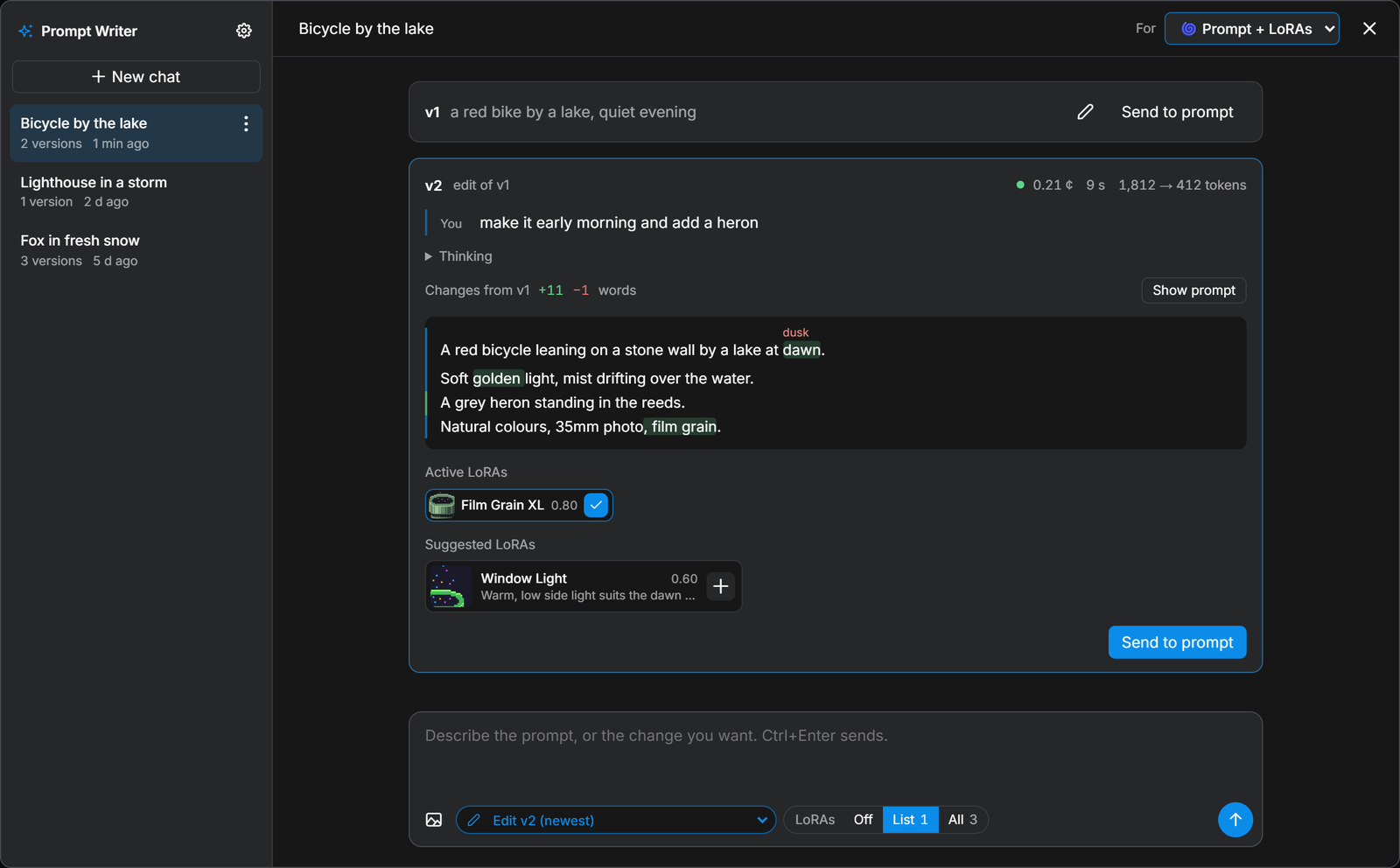
Click ✨ AI Prompt Writer above any prompt box and say what you want, with reference images if you like. Every answer becomes a version. Edit it, use it as the input for the next one, retry or recreate it, or Send to ComfyUI. Changes marks what is new and puts the word it replaced small above it, and each version's Generation info shows its request, the prompt it edited, the model and settings, the system prompt, the cost and the thinking.
- Works with NanoGPT out of the box, or any OpenAI-compatible server (LM Studio, Ollama, llama.cpp).
- The API key stays on the ComfyUI server (
user/warp-studio/llm_keys.jsonorNANOGPT_API_KEY). It never reaches the browser, a workflow or an image. - Bring your own system prompts: a folder of
.txtfiles, set under Settings → Warp Studio. - It knows your LoRAs for the connected model and can suggest some. Nothing lands in your list until you press +.
- Chats are saved in the ComfyUI user folder and keep writing after you close the pop-up.
One wire
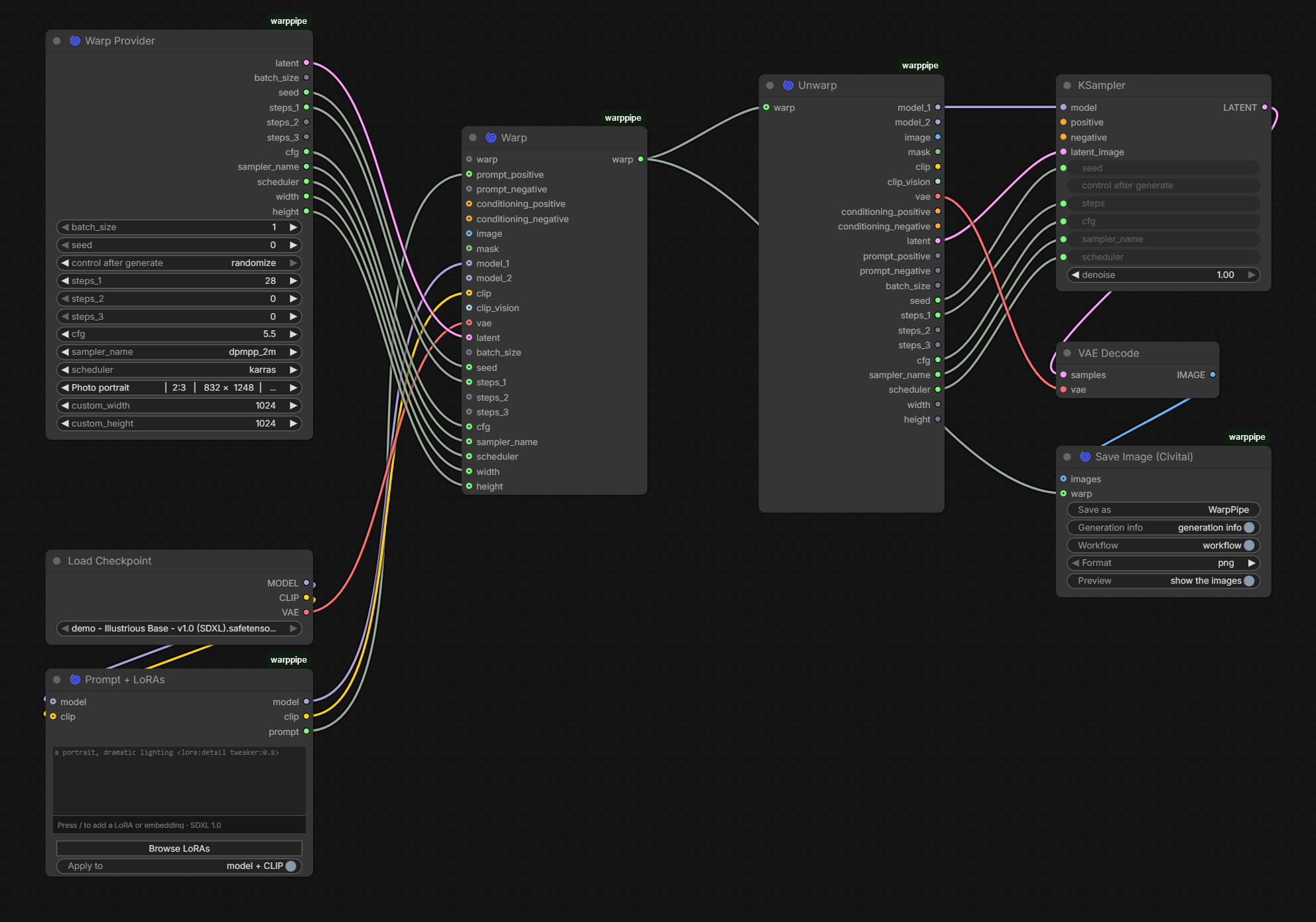
A Warp takes models, conditioning, latents, prompts and sampler settings. One link crosses the canvas, and an Unwarp gives it all back. Warps chain: one further down carries everything the first did and adds to it.
Switching model groups
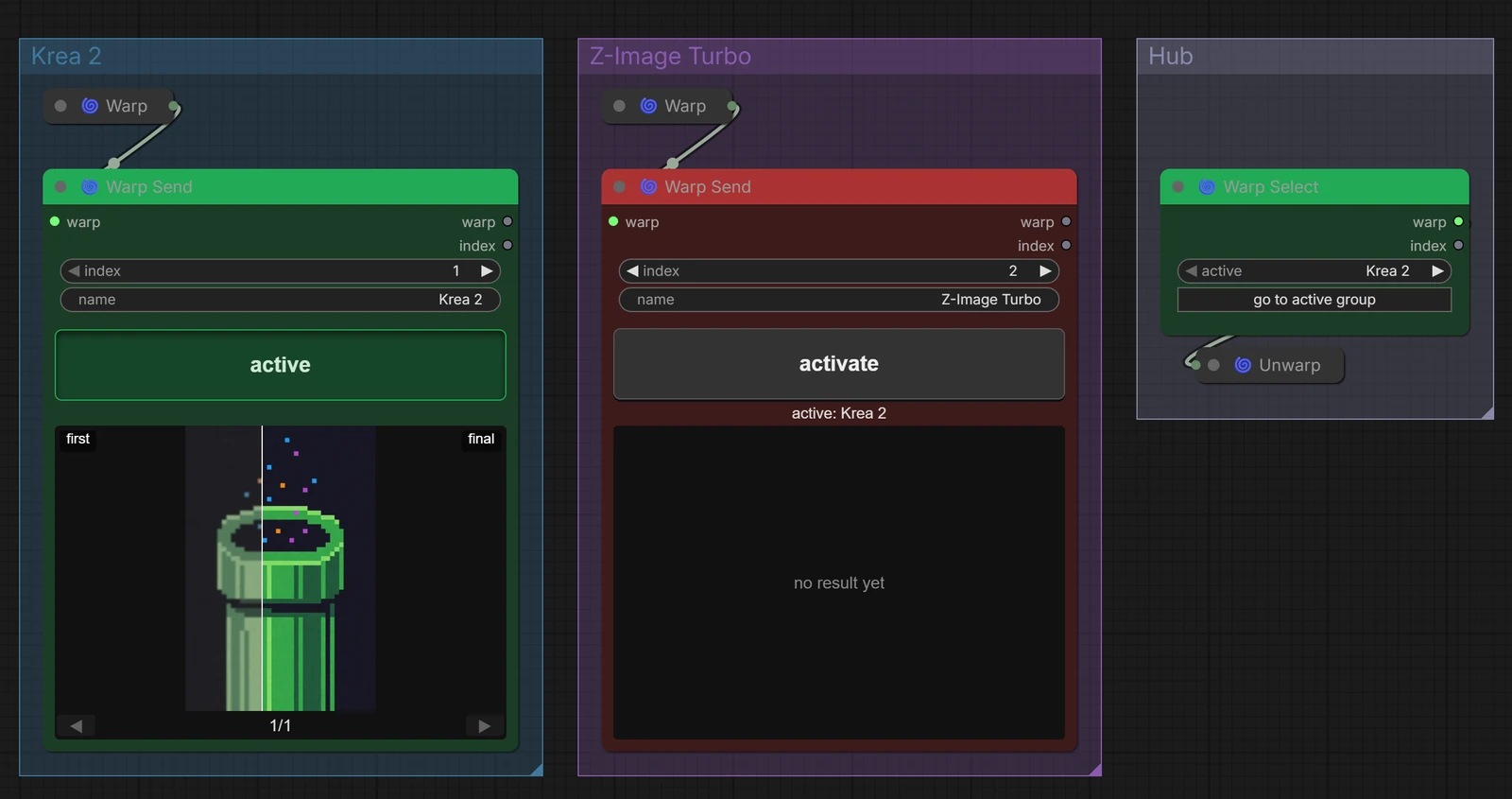
flowchart LR
  subgraph A[Krea 2]
    L1[Loaders] --> W1[Warp] --> S1[Warp Send]
  end
  subgraph B[Z-Image Turbo]
    L2[Loaders] --> W2[Warp] --> S2[Warp Send]
  end
  S1 -. active .-> SEL[Warp Select]
  S2 -. off .-> SEL
  SEL --> U[Unwarp] --> K[Sampler] --> SAVE["Save Image (Civitai)"]
Put a Warp Send at the end of each model group and one Warp Select in the shared part. Press activate on a Send, or pick it in the Select, and only that group runs. Green runs, red doesn't. If the routing is broken (nothing active, the active Send muted, two Sends with one name) the queue says so instead of running.
The active Send shows the live preview while it samples
(--preview-method auto) and a before/after slider when it is done. Right-click
any image node and Use as before image to choose what goes on the left. The
same slider exists as its own node, Warp Compare.
Save Image (Civitai)
Saves PNG or JPEG with the generation info Civitai reads. The Hashes field is
what makes an upload link the checkpoint and every LoRA:
a red bicycle by a lake, early morning mist <lora:film-grain-xl:0.8>
Steps: 30, Sampler: dpmpp_2m, Schedule type: karras, CFG scale: 5.0, Seed: 44,
Size: 1024x1024, Model hash: 4c2b8e1f0a, Model: demo-sdxl,
Lora hashes: "film-grain-xl: 3b1f0c2a9d",
Hashes: {"model":"4c2b8e1f0a","lora:film-grain-xl":"3b1f0c2a9d"}, Version: ComfyUI-WarpPipe
It also shows what it saved next to the before image, in the same slider.
Trigger words, base models and titles come from the .civitai.info files next to your models.
The Warp Studio panel (below) shows the same library as a gallery. Browse LoRAs on the node opens it.
Warp Studio panel
The Warp Studio tab in ComfyUI's sidebar holds your model library. It has a Gallery of your LoRAs, a check of your models against their Civitai releases, and a rename for your files.
Gallery
Your LoRAs as cards with their previews. Search by name, creator or version, and filter by type or base model. A line above the search says which Prompt + LoRAs node a click adds to: the selected one, or else the last one you used. Click a card and its tag is added to that node's LoRA list, on a line of its own, and the card says Added.
Not on this drive lists LoRAs whose .civitai.info is in your
LoRA folders but whose weights are not. Their cards are dimmed and can't be added
to a prompt. Download on one fetches the version its info file describes and
puts it next to that file, under the same name. On the other cards, Delete
turns into Delete? for four seconds; click again and the weights and their
info and preview go to the Recycle Bin. On a drive without a Recycle Bin, or for a file
too big for it, Windows deletes the file for good. Without send2trash, Delete is not offered.
Browse LoRAs on a Prompt + LoRAs node opens the panel on the Gallery with that node as the target.
Updates, Issues and Rename
The other tabs check the models on your disk against their Civitai releases and list the ones that have moved on without you.
It identifies each file by its SHA256 hash, reads the .civitai.info files you
already have, and writes only .civitai.info and .preview.png files next to
your models. Checking downloads no model; a download starts only when you click Download.
Three more views sit above the list:
- Updates: models with a release newer than your newest local version. A card is a ledger of that model's releases, one row per version. Red means one thing: a release exists that you do not have. A Buzz badge marks a release that costs Buzz.
- Issues: files Civitai had no release for (a merge, a conversion, a file never uploaded) or could not be asked about (removed, needs an API key). The reason is under each row.
- Rename: see below.
Each newer release has a Download button. When the version you have is on this drive, there is also Replace: it downloads the new release, checks it, and only then sends the old weights and their info and preview to the Recycle Bin. If the old weights can't be sent, nothing else of the old version is touched. On a drive without a Recycle Bin, or for a file too big for it, Windows deletes the file for good. A release that costs Buzz or is in early access shows Early access instead of the buttons.
Downloads run on the ComfyUI server, one at a time, so they carry on if you close the tab. A click while one runs says Waiting, and Cancel takes it out of the queue. A running one shows its percentage and Stop; the job bar shows the progress and ends with a line like "Done — 2 downloaded". Each file is checked against Civitai's SHA-256 before it is renamed into place, and nothing already there is overwritten. A new file gets the name the renamer would give it, in its base model's folder; when no naming model is set, it keeps Civitai's file name.
Most adult models need a Civitai API key to download. Set it under Warp Studio → Civitai Network → API Key; it is sent only to Civitai, over https.
Check for Updates scans and compares. Fetch Missing Metadata only downloads sidecars and previews for models that lack them. Both can be paused, resumed and stopped, and survive a page reload. Arrange groups the list by model type and base model and sorts it. Any release you don't want can be hidden.
The API key, cache time, extra model folders and how mature models show are in the settings, under Warp Studio in the groups that start with "Civitai".
Previews from other sources
Some models Civitai no longer serves. For those files, Fetch Missing Metadata can ask other sources, in order, and the first answer wins:
- ai-toolkit: your own trainings. Point it at the folders that hold your runs and their sample images become previews.
- Hugging Face: authors or repos you name, matched by file hash.
- civarchive: looked up by hash. Only the hash is sent.
A hit writes a preview and fills only the empty fields of the info file. It never replaces a preview you have, and never changes a file that Civitai identifies. The row says the file was found elsewhere. The sources are set under Civitai Preview Fallback in the settings; civarchive is off until you turn it on.
Renaming your library
The Rename view renames your model files after their current Civitai releases, in one scheme, all lowercase:
creator - title - version [precision] (base)
some_artist - watercolor style - v2 (sdxl)
some_studio - photo mix - v3 fp16 (sdxl)
A local text model cleans the names. ComfyUI's own Generate Text node runs it through the queue, and nothing goes to the cloud. Pick it under Civitai Rename in the settings, or let the view download one (9.75 GB).
- Start dry run lists every old name next to its new one. Nothing on disk changes.
- Review. Rows that need a look come first and start unticked: a word that is not in Civitai's text, two files with one name, a new base code. Edit any part, or Ask again. Files Civitai can't serve, named from the info the preview fallback found, start unticked too.
- Apply. The button says what it will do, as in Rename 12 · remove 2, and asks once; Apply then renames the ticked rows, together with their
.civitai.info, previews and any other file that shares the name. Extra copies go to the Recycle Bin.
The naming model gets about three in four names exactly right, so read the list.
A rename cut off by a crash can be finished or undone on the next start. Saved
workflows that use the old names will show those models as missing; re-pick
them. Every move is recorded in ComfyUI/user/warp-studio/updater/rename_log.jsonl.
What is never renamed, and the rest of the details, are in the
wiki.
Example workflow
<img src="examples/workflow_example_screenshot.png" alt="The example workflow: two model groups feeding one shared pipeline" width="820">Krea 2 and Z-Image Turbo in one workflow. The image below was made with it and has the workflow inside: drag it into ComfyUI to open it, or grab the JSON.
<img src="examples/workflow_example.png" alt="A pixel-art warp pipe made with the example workflow" width="260">All nodes
| Node | | | --- | --- | | 🌀 Warp / Unwarp | Bundle a generation into one link and unpack it again | | 🌀 Warp Provider | Latent and sampler settings, with size presets for current models | | 🌀 Prompt + LoRAs | Prompt and LoRAs in one box | | 🌀 Save Image (Civitai) | Save with metadata Civitai reads | | 🌀 Warp Send / Warp Select | Pick which model group runs | | 🌀 Warp Compare | Before/after slider | | 🌀 Scheduler Adapter for FaceDetailer | KSampler schedulers for FaceDetailer | | 🚫 Dead End | Takes anything, does nothing. Parks a branch |
The Warp Studio sidebar panel is not a node; it is described above.
Each node has its own help behind the ? in ComfyUI. Everything else, every
input and the HTTP routes are in the wiki. What changed, release by
release, is in the changelog.
Credits
Screenshots use demo LoRAs and stand-in images, not anyone's real models. The Warp Studio panel builds on ideas from Stable-Diffusion-Webui-Civitai-Helper. Developed with AI assistance (GPT-5.3-Codex, Claude Opus 4.6, Claude Opus 5). MIT License.