Janus-Pro ComfyUI Plugin
This plugin integrates the Janus-Pro multi-modal model into ComfyUI, enabling advanced image understanding and text-to-image generation capabilities. It supports both image analysis and creative image generation workflows.
Nodes (3)
Janus-Pro's generator, quirks included
Turn any image into a caption (or a ready-made SD prompt) on your own GPU
The node every Janus-Pro workflow starts with (and what it downloads)
Janus-Pro ComfyUI Plugin
This plugin integrates the Janus-Pro multi-modal model into ComfyUI, enabling advanced image understanding and text-to-image generation capabilities. It supports both image analysis and creative image generation workflows.
Janus-Pro Model Homepage: https://github.com/deepseek-ai/Janus
Features
- Multi-Modal Understanding: Analyze images and generate detailed descriptions.
- Text-to-Image Generation: Create high-quality images from text prompts.
- Flexible Configuration: Supports 1B and 7B model sizes with multiple precision options (BF16, INT8, INT4).
- ComfyUI Integration: Seamlessly integrates with ComfyUI workflows.
- Batch Processing: Generate multiple images in parallel for efficient workflows.
Installation
1. Install Dependencies
- clone to ComfyUI
custom_nodesdirectory - Ensure you have the required dependencies installed:
git clone https://github.com/greengerong/ComfyUI-JanusPro-PL.git
pip install -r requirements.txt
2. Download Models
The plugin supports the following Janus-Pro models:
deepseek-ai/Janus-Pro-1Bdeepseek-ai/Janus-Pro-7B
Models will be automatically downloaded on first use. Alternatively, you can manually download them and place them in the models/Janus-Pro directory.
Manually deploy file directories
models/Janus-Pro/
├── Janus-Pro-7B/
│   ├── config.json
│   ├── pytorch_model.bin
│   └── ...
└── Janus-Pro-1B/
    └── ...
Usage
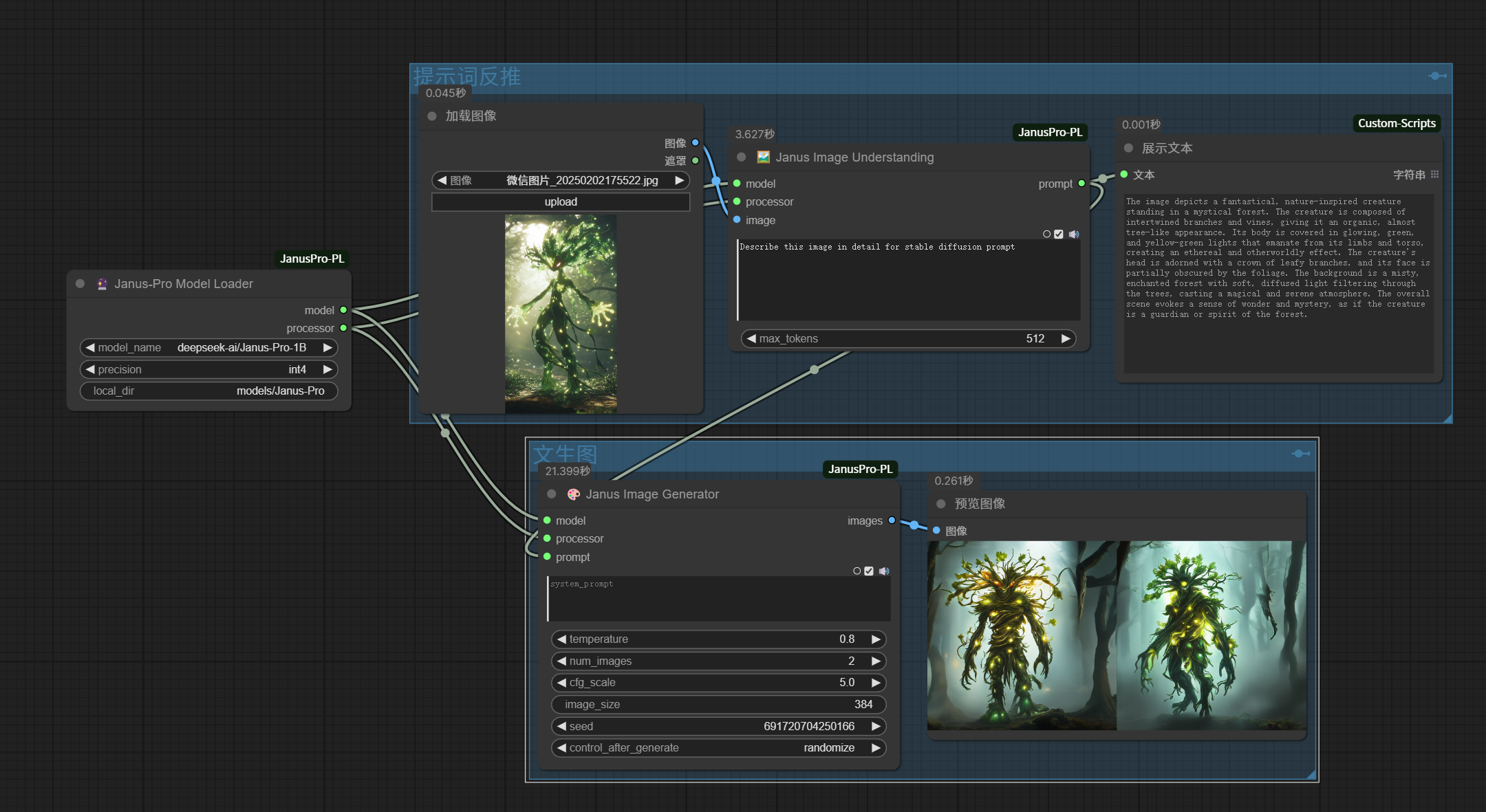
Nodes Overview
-
JanusProModelLoader
- Loads the Janus-Pro model with configurable precision and size.
- Outputs: Model, Processor.
-
JanusProImageUnderstanding
- Analyzes an input image and generates a detailed description.
- Inputs: Image, Question.
- Outputs: Text Description.
-
JanusProImageGenerator
- Generates images from text prompts using the Janus-Pro model.
- Inputs: Text Prompt, Temperature, CFG Scale, Image Size, Seed.
- Outputs: Generated Images.
Example Workflow
Below is an example workflow that combines image understanding and text-to-image generation:
Parameter Guide
JanusProModelLoader
- Model Name: Choose between
Janus-Pro-1BandJanus-Pro-7B. - Precision: Select from
BF16,INT8, orINT4. - Cache Directory: Directory to store downloaded models (default:
models/Janus-Pro).
JanusProImageUnderstanding
- Image: Input image to analyze.
- Question: Question or prompt for image analysis.
- Max Tokens: Maximum length of the generated description (default: 512).
JanusProImageGenerator
- Prompt: Text prompt for image generation.
- Temperature: Controls randomness (default: 0.8, range: 0.0-1.0).
- CFG Scale: Controls adherence to the prompt (default: 5.0, no upper limit).
- Parallel Size: Number of images to generate in parallel (default: 16).
- Image Size: Output image resolution (currently supports
384). - Seed: Random seed for reproducibility.
Performance Tips
-
For Low VRAM GPUs:
- Use the
Janus-Pro-1Bmodel. - Enable
INT4quantization. - Reduce
parallel_size.
- Use the
-
For Faster Generation:
- Use
BF16precision. - Increase
parallel_size(e.g., 16-32).
- Use
-
For High-Quality Output:
- Use
Janus-Pro-7BwithBF16precision. - Set
temperaturebetween 0.6-0.8. - Use
CFG Scalebetween 6.0-8.0.
- Use
Troubleshooting
-
CUDA Out of Memory:
- Reduce
parallel_size. - Use a smaller model (
Janus-Pro-1B). - Enable quantization (
INT8orINT4).
- Reduce
-
Model Loading Failed:
- Check your internet connection.
- Verify the model path in
models/janus_pro.
-
Low-Quality Output:
- Increase
CFG Scale. - Use more descriptive prompts.
- Adjust
temperature(lower values for more deterministic results).
- Increase
Acknowledgments
- Janus-Pro Model by DeepSeek-AI.
- ComfyUI for the amazing workflow framework.
Contact
For questions or feedback, please open an issue on GitHub or contact the maintainers.