
ComfyUI-ThinkingLLM
A multimodal ComfyUI AI node with Qwen3.5, Qwen3-VL, Qwen2.5-VL, Qwen3, and Gemma 4 integrations. Features live thinking in the terminal to see what the LLM is doing in real time.
Nodes (16)
Split one long story into four video prompts, then stitch it back together
A local LLM that actually listens
Cloud LLMs from ComfyUI — without ever putting a key in a workflow
Your node isn't frozen — it's thinking
The same Qwen node, minus the training wheels
Vision LLMs on the VRAM you actually have
Every llama.cpp dial, exposed and explained
Cheap, fast prompt enhancement on a text-only GGUF
A local LLM that writes your prompts better than you do
Steal ThinkingLLM's system prompts for any node that takes a string
Turn any audio into text your LLM can read
VRAM-Cleanup
ComfyUI-ThinkingLLM
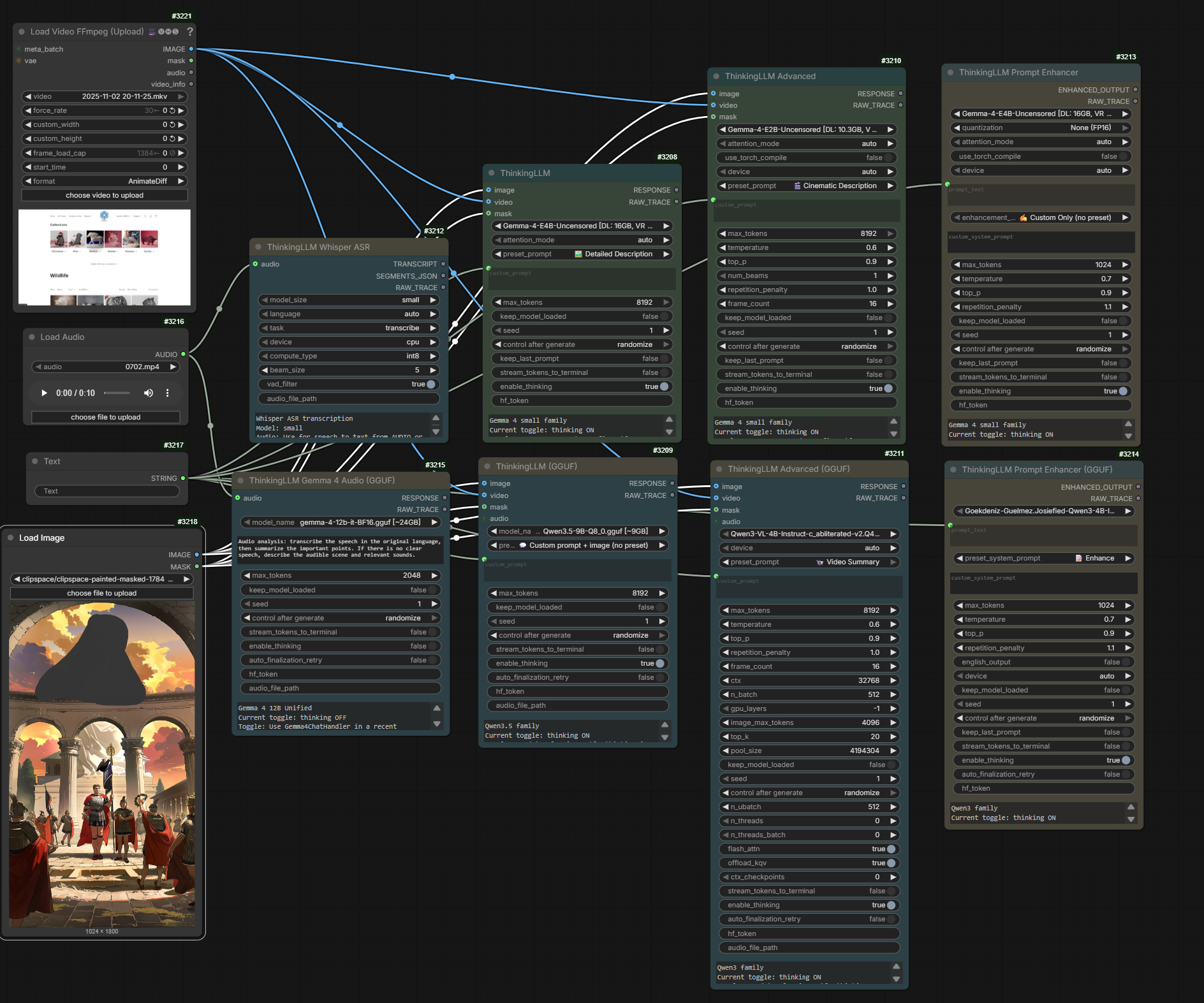
ThinkingLLM is a multimodal local-LLM node pack for ComfyUI. It provides workflows for Qwen, Gemma 4, GGUF, Whisper ASR, prompt enhancement, image/video understanding, audio analysis, local image and text decision routing, and secure OpenAI-compatible providers.
GPL-3.0 fork of Deaquay/ComfyUI-Qwen3.5-Uncensored, itself derived from huchukato/ComfyUI-QwenVL-Mod and 1038lab/ComfyUI-QwenVL. See LICENSE.
.gif)
Highlights
- Local Transformers/Hugging Face and GGUF inference
- Image and video understanding with optional mask-focused analysis
- Gemma 4 audio understanding and Whisper speech-to-text
- Prompt enhancers for image and video generation workflows
- Thinking-mode control, live terminal streaming, and a separate
RAW_TRACEoutput - Local image and text decision routing to named, lazily executed workflow branches
- Typed image and text decision fields with Boolean and bounded Integer outputs
- Curated model recommendations and preset-specific generation guidance
- Secure OpenAI-compatible API node for approved remote providers
- Existing compatible models are discovered instead of downloaded twice
Quick install
ComfyUI Manager (recommended)
- Open ComfyUI Manager → Install via Registry.
- Search for
ThinkingLLM. - Click Install and restart ComfyUI.
Manual install
cd ComfyUI/custom_nodes
git clone https://github.com/goodguy1963/ComfyUI-ThinkingLLM.git
cd ComfyUI-ThinkingLLM
pip install -r requirements.txt
For GGUF vision or Gemma 4 audio, also follow the llama.cpp backend installation guide.
The Decision Router needs native llama.cpp decision APIs that are not present in every llama-cpp-python build. Check the Decision Router runtime guide before using it; the node checks compatibility but does not replace an already installed native runtime.
Nodes at a glance
| Node | Backend | Purpose |
| --- | --- | --- |
| ThinkingLLM | Transformers / HF | Image and video understanding |
| ThinkingLLM (Advanced) | Transformers / HF | Full controls and MASK_PREVIEW |
| ThinkingLLM Prompt Enhancer | Transformers / HF | Text prompt enhancement |
| ThinkingLLM (GGUF) | llama.cpp | GGUF image and video understanding |
| ThinkingLLM (GGUF Advanced) | llama.cpp | GGUF advanced controls and MASK_PREVIEW |
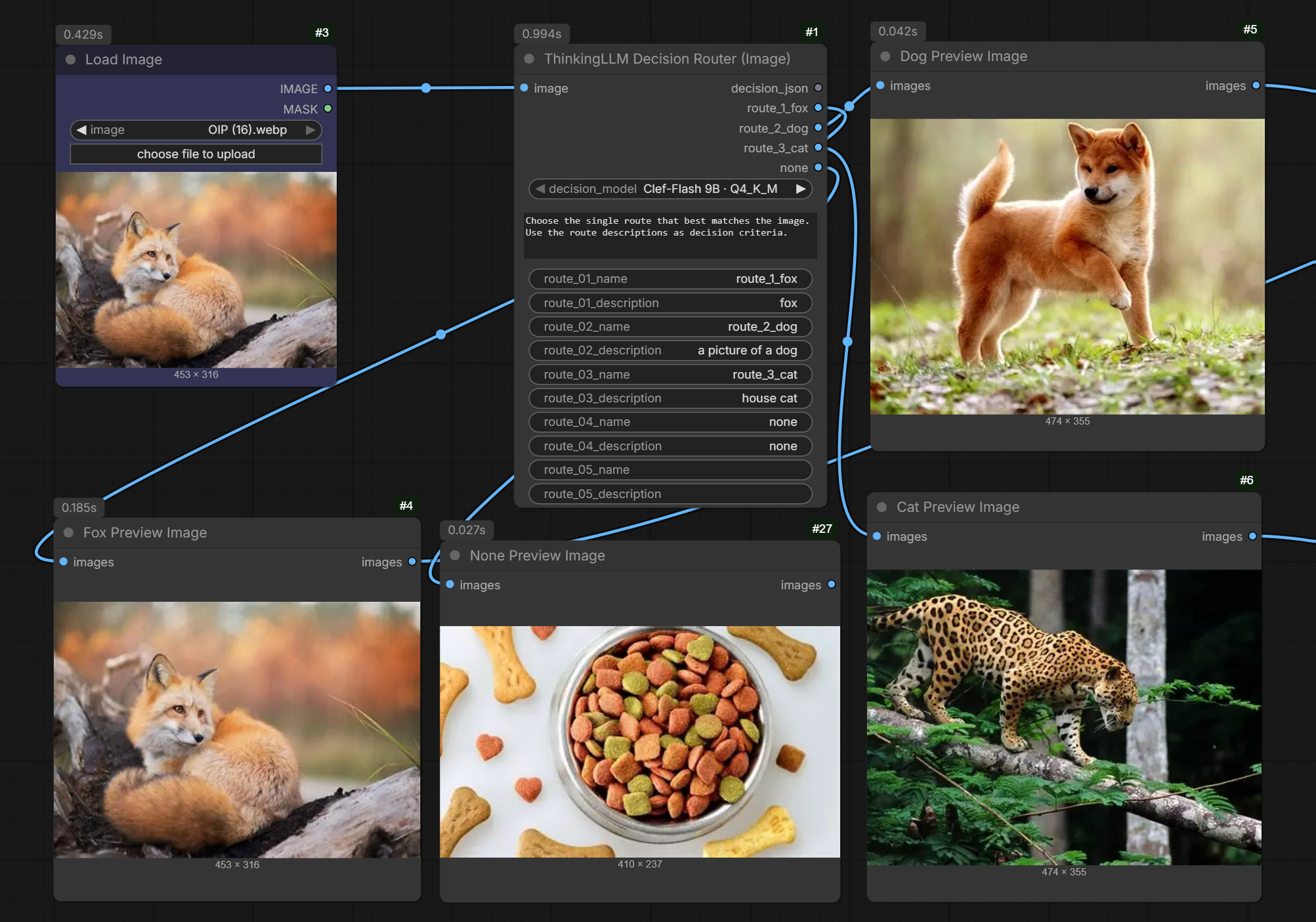
| ThinkingLLM Decision Router (Image) | llama.cpp / OpenAI / OpenRouter | Image decisions routed to named branches |
| ThinkingLLM Decision Router (Text) | llama.cpp / OpenAI / OpenRouter | Text decisions routed to named branches |
| ThinkingLLM Decision Fields (Image) | llama.cpp / OpenAI / OpenRouter | Independent Boolean questions and bounded Integer decisions from images |
| ThinkingLLM Decision Fields (Text) | llama.cpp / OpenAI / OpenRouter | Independent Boolean questions and bounded Integer decisions from text |
| ThinkingLLM Gemma 4 Audio (GGUF) | llama.cpp | Gemma 4 audio understanding |
| ThinkingLLM Whisper ASR | faster-whisper | Speech-to-text transcription |
| ThinkingLLM Prompt Enhancer (GGUF) | llama.cpp | GGUF prompt enhancement |
| ThinkingLLM System Prompt Preset | Utility | Reusable system prompts as STRING |
| ThinkingLLM API (OpenAI Compatible) | Remote API | Approved OpenAI-compatible providers |
The Transformers/HF nodes are the recommended default when you want the simplest installation. Choose GGUF when you specifically need quantized llama.cpp models or Gemma 4 audio.
Decision Router
The separate Image and Text Decision Router nodes classify their input and send each image or text item to one named route. Configure a system prompt plus route names and descriptions for any task, such as subject, document, or product classification. They offer Clef-Flash 9B, Clef 27B, and OpenJev 27B GGUFs. Model files download on first use into ComfyUI/models/LLM/GGUF; image routing also downloads the matching vision projector. Local inference runs in-process without a separate llama.cpp server. Each node exposes up to 52 configured route sockets and returns per-item decisions and normalized route probabilities on decision_json. Empty route outputs are blocked, so their downstream branches do not execute. keep_model_loaded controls whether the model stays resident between runs (off by default); include_reason optionally adds a short post-hoc explanation to each JSON decision without changing the route or scores.
You can also select the native API backend on either router. It supports OpenAI Decisions (gpt-6-luna) and OpenRouter's Decisions API; OpenRouter models are listed according to their text/image capabilities. API credentials stay in server-side profiles/environment variables rather than workflow files. See the Decision Router API guide for setup and limits.
Clef models require llama.cpp's native decision-batch APIs; OpenJev uses llama.cpp's final-position logits API. Image routing additionally requires the MTMD vision APIs; text routing does not. Each node checks the selected capabilities before downloading model weights and reports missing symbols with an installation hint. See Decision Router llama.cpp requirements for the runtime details. OpenJev is CC BY-NC 4.0 and is hidden in commercial builds; Clef models are Apache-2.0.
Decision Fields
The Image and Text Decision Fields nodes evaluate independent questions and expose up to eight BOOLEAN values and eight INT values per node. Both types of output sockets appear only as fields are configured; Boolean sockets come first, followed by Integer sockets. Boolean fields use an adjustable probability threshold (default 0.5), so separate conditions can both be true. Integer fields select from the configured range instead of parsing generated text. The range can contain at most 52 choices for compatibility with local decision heads; values outside it are clamped to the nearest bound and marked in decision_json as below_min or above_max.
Add a field by filling its name and question. Examples: is_fox / “Is a fox visibly present?” or person_count / “How many people are visible?” The model receives the shared system prompt plus each field question. Configured Boolean and Integer outputs appear dynamically and use their field names. Connected outputs remain in place if a field is cleared and return an execution blocker until it is configured again. decision_json retains the compact machine-readable results, including option probabilities and API confidence when available. The separate decision output gives a multiline summary of each item's chosen values without probability decimals. Batched values preserve input order.
For saving raw JSON as an indented .json file, ComfyUI's built-in Save Text node pretty-prints valid JSON when its format is set to json; it saves the file rather than converting the string for downstream nodes. Use the new decision output for an immediately readable workflow result.
API backends evaluate all fields for one input in a single request. Local models stay loaded once per node execution, but currently evaluate fields sequentially; multiple fields and larger image batches therefore increase inference time. Integer typing guarantees a valid bounded integer result, not counting accuracy. Test the selected model against representative labeled images before relying on counts in an automated workflow.
Start a workflow
- Add the ThinkingLLM node that matches your backend and task.
- Select a model or an already installed local model.
- Connect image, video, audio, mask, or text inputs as needed.
- Connect
RESPONSEorENHANCED_OUTPUTto a text display or downstream prompt input. - Connect
RAW_TRACEwhen you want generation diagnostics.
Useful defaults:
- Start with
enable_thinking=falsefor transcription and short direct answers. - Enable
stream_tokens_to_terminalwhen diagnosing a slow or unhelpful generation. - Resize very large images before inference to reduce context and memory pressure.
- Use the dedicated Gemma 4 Audio or Whisper node instead of assuming every multimodal model supports audio.
For explanations of thinking mode, model guidance, raw traces, audio, masks, and object-removal prompting, see Features and workflows.
Model families
ThinkingLLM includes curated entries for:
- Qwen3.8, Qwen3.5, Qwen3-VL, Qwen2.5-VL, and Qwen3
- Gemma 4 vision, text, and audio-capable GGUF variants
- Whisper
tinythroughlarge-v3anddistil-large-v3 - Local compatible Transformers checkpoints and GGUF/mmproj pairs
See Models and backends for exact families, model locations, local discovery, platform notes, and backend requirements.
Remote API node
ThinkingLLM API (OpenAI Compatible) supports approved OpenAI-compatible providers while keeping credentials on the ComfyUI server. Provider keys are not stored in workflows.
Documentation
| Topic | Guide | | --- | --- | | Thinking, streaming, traces, audio, masks, and workflow behavior | Features and workflows | | Supported models, discovery, locations, and backend selection | Models and backends | | GGUF / llama.cpp installation on Windows and Linux | llama.cpp backend installation | | Decision model runtime requirements | Decision Router llama.cpp requirements | | Native OpenAI and OpenRouter decision APIs | Decision Router API guide | | Duration-aware LTX and MiniMax H3 prompting | Duration-aware video prompts | | Video preset recommendations and rationale | Video preset settings | | OpenAI-compatible API node | API setup and security | | OpenAI-compatible image inputs | API image inputs | | Maintainer and fork notes | Maintainer notes |
Production deployment
This repository provides ComfyUI nodes, not a complete production runtime. For exposed or serverless workflows, review dependency locking, validation, secrets, cost controls, monitoring, and rollback before deployment. The ComfyUI on RunPod production-readiness checklist is a useful starting point.
Credits
- Deaquay/ComfyUI-Qwen3.5-Uncensored
- huchukato/ComfyUI-QwenVL-Mod
- 1038lab/ComfyUI-QwenVL
- Qwen Team (Alibaba Cloud)
- JamePeng/llama-cpp-python
- comfyanonymous/ComfyUI
Maintainer: goodguy1963
License
GPL-3.0. See LICENSE.