
ComfyUI-Texture-Simple
Visualize your textures inside ComfyUI
Nodes (7)
Ambient occlusion without baking — AO from a height map in one node
Pull one channel out of a packed texture — and get a mask for free
Pack ORM, RMA, or Unity HDRP channels without leaving ComfyUI
Make a texture tile without a visible seam — and get the 2×2 proof
Normals from a height map — no model download, just math
A PBR texture that won't behave? This node tells you why.
See your PBR maps lit on a 3D mesh without leaving ComfyUI
ComfyUI Texture Simple
A complete offline PBR texture-authoring and live material-validation toolkit for ComfyUI. It turns ordinary images or height maps into production-ready supporting maps, checks them, proves tiling, packs channels, and previews the result on a GPU-accelerated 3D material without leaving the graph.
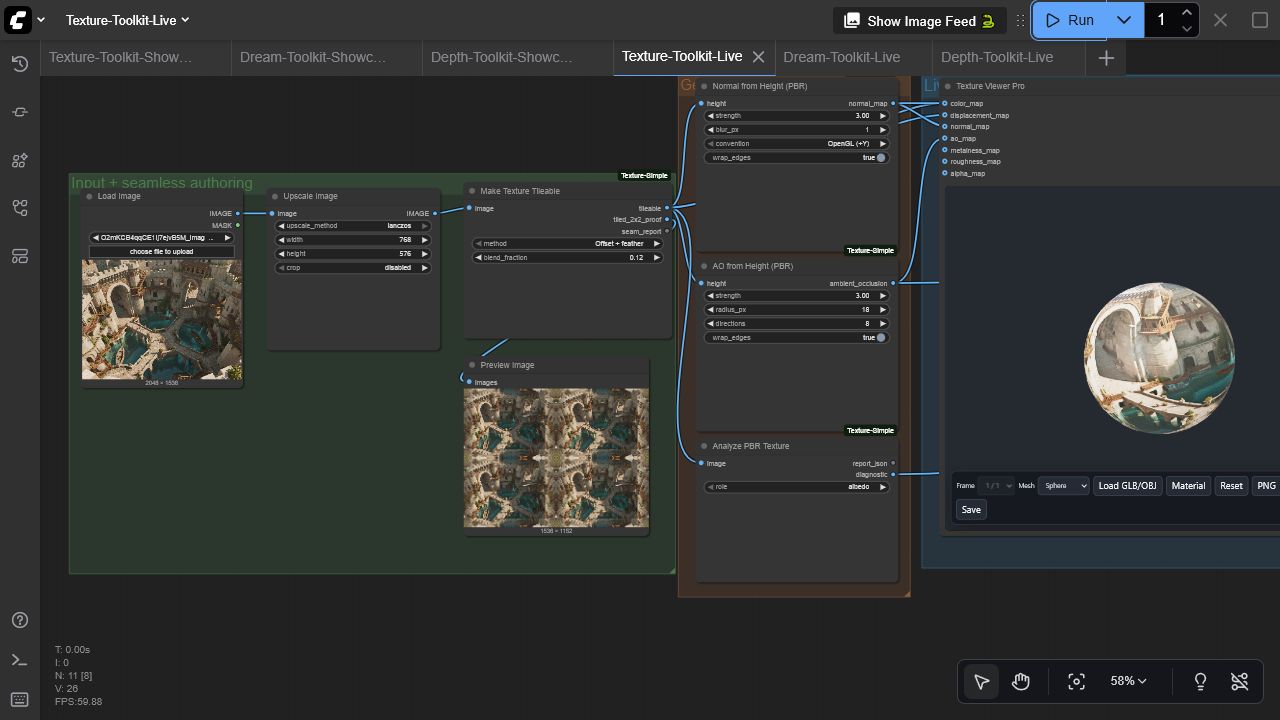
Nodes
| Node | Purpose | Outputs | | --- | --- | --- | | Texture Viewer Pro | Interactive WebGL PBR preview on primitives or a local GLB/OBJ | IMAGE passthrough + live UI | | Normal from Height (PBR) | Wrapped finite-difference normal generation with optional blur and OpenGL/DirectX convention | normal map | | AO from Height (PBR) | Fast multi-direction ambient-occlusion approximation with wrapped edges | AO map | | Make Texture Tileable | Offset-and-feather or mirrored seamless conversion | tileable map, 2×2 proof, seam report | | Pack PBR Channels | RGBA/ORM channel packing with scalar broadcasting | packed texture, manifest | | Extract Texture Channel | Extract red, green, blue, alpha, luminance, max, or average | IMAGE channel + MASK | | Analyze PBR Texture | Role-aware range, clipping, seam, and normal-quality checks | JSON report + diagnostic image |
Viewer highlights
- Sphere, cube, torus, plane, multi-object showcase, and local GLB/OBJ loading
- Color, displacement, normal, AO, metalness, roughness, and alpha inputs
- Per-map inspection, repeat controls, wireframe, ACES/Neutral/Linear tone mapping, exposure, and IBL
- Batch selection with single-image broadcasting
- PNG capture and GLB, GLTF, or OBJ export
- Lazy/offscreen rendering, bounded device pixel ratio, stale-load cancellation, texture disposal, and WebGL context recovery
- Local pinned Three.js r185 assets; no runtime CDN or telemetry
Install
Install with ComfyUI Manager, or clone manually:
cd ComfyUI/custom_nodes
git clone https://github.com/gokayfem/ComfyUI-Texture-Simple.git
python -m pip install -r ComfyUI-Texture-Simple/requirements.txt
Restart ComfyUI. The nodes are under visualization/3D and texture/PBR.
Start with the live example
Load examples/workflows/Texture-Toolkit-Live.json, choose an image in Load Image, and queue it. The graph creates a seamless texture, normal map, AO map, diagnostics, and a live 3D material. An API-format counterpart is in examples/api/texture_toolkit_api.json; replace its image filename with one from your ComfyUI input directory.
For a typical PBR pipeline:
- Scale/crop the source to the intended working resolution.
- Make it tileable and inspect the 2×2 proof.
- Generate normal and AO maps from a suitable height map.
- Analyze every map using the correct role.
- Pack ORM channels when targeting glTF engines.
- Connect the maps to Texture Viewer Pro and tune the live material.
Compatibility and performance
- Python 3.10+; tested in CI on Linux, Windows, and macOS
- Real ComfyUI test: ComfyUI 0.3.60, frontend 1.26.13, Windows, NVIDIA RTX 3090
- NVIDIA, AMD/ROCm, Apple Silicon, Intel, and CPU-only ComfyUI installations are supported: authoring nodes use NumPy/Pillow on the CPU, while the interactive preview uses the browser's WebGL implementation
- Images remain local. Browser-loaded meshes are processed in memory and are never uploaded
- Viewer displacement is intentionally conservative by default so arbitrary inputs remain stable
Development
python -m pip install -r requirements.txt pytest build
python -m compileall -q .
pytest -q
python -m build
node --check web/viewer_extension_3_0.js
node --check web/js/threeVisualizer.mjs
The vendored Three.js files are MIT licensed; see web/vendor/THREE-LICENSE.txt. Security and privacy details are in SECURITY.md.
If ComfyUI Texture Simple supports your work, GitHub provides ready-to-copy APA and BibTeX entries via Cite this repository.
@software{Aydogan_ComfyUI_Texture_Simple_2026,
  author  = {Aydoğan, Gökay},
  title   = {ComfyUI Texture Simple},
  version = {3.0.0},
  year    = {2026},
  url     = {https://github.com/gokayfem/ComfyUI-Texture-Simple}
}
Acknowledgements
Thanks to MrForExample and the ComfyUI community for the original viewer patterns and feedback.