
ComfyUI-Dream-Interpreter
Tell your dream and it interprets it and puts you inside your dream
Nodes (8)
Drag a virtual camera through your 360° panorama
Actually save your dream notes from inside ComfyUI
Turn a 360° panorama into a tiny floating planet
Tag your dream text without a language model
Kill the seam on your 360° image
The 5-second health check for your panorama
A prompt builder that never calls an API
The fanciest way to look at a panorama in ComfyUI
ComfyUI Dream Interpreter
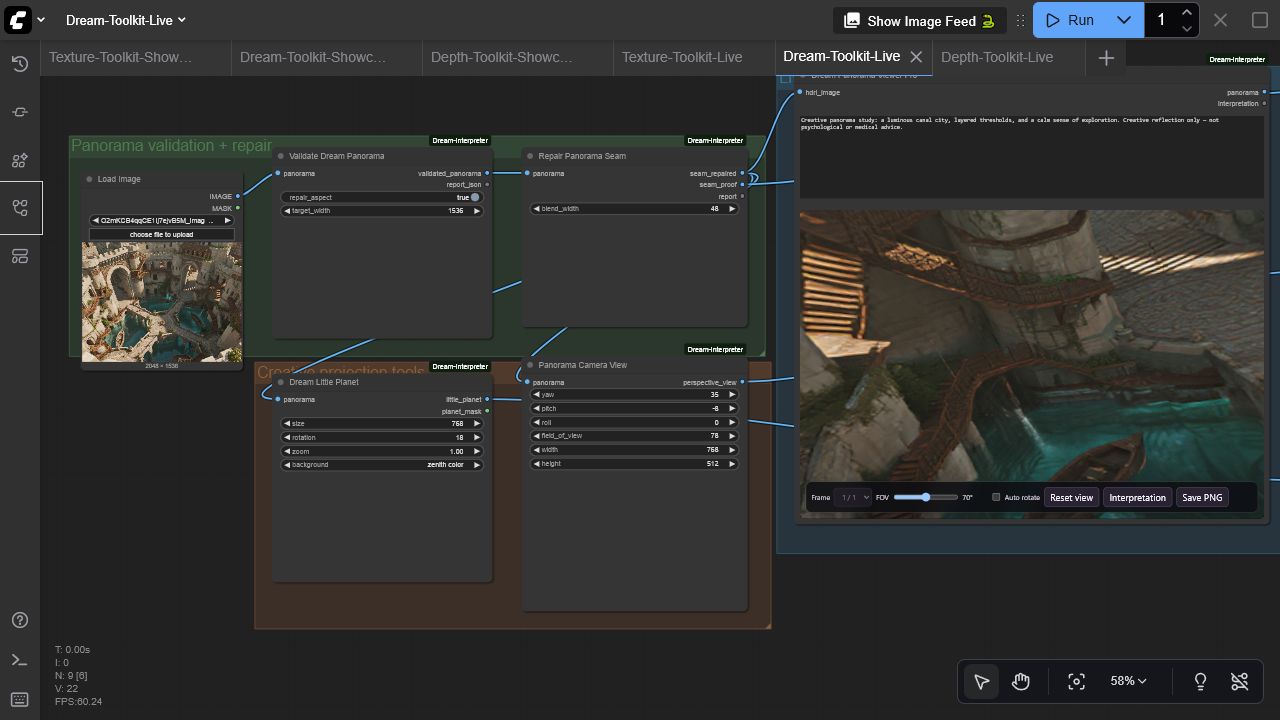
An offline panorama, creative-reflection, and visual-journaling toolkit for ComfyUI. It validates and repairs equirectangular images, creates camera views and little planets, explores panoramas interactively, and structures creative notes without making psychological or medical claims.
Nodes
| Node | Purpose | Outputs | | --- | --- | --- | | Dream Panorama Viewer Pro | Interactive 360° WebGL panorama with interpretation panel | panorama + interpretation passthrough | | Validate Dream Panorama | Inspect 2:1 geometry and optionally repair resolution/aspect | panorama + JSON report | | Repair Panorama Seam | Blend the equirectangular wrap seam and provide a magnified proof | repaired panorama, proof, report | | Panorama Camera View | Deterministic equirectangular-to-perspective projection | IMAGE | | Dream Little Planet | Stereographic little-planet projection | IMAGE + MASK | | Dream Prompt Builder | Create a panorama/image prompt, negative prompt, and structured brief | strings/JSON | | Dream Motif Tags | Deterministic descriptive motif extraction | tags + JSON report | | Dream Journal Entry | Build Markdown/JSON journal records and optionally save under ComfyUI output | text, JSON, saved path |
Viewer highlights
- Smooth orbit, zoom, adjustable field of view, optional auto-rotation, and reset
- Batch panorama selector and per-run interpretation panel
- PNG capture
- Reduced-motion support, lazy/offscreen rendering, stale-load cancellation, texture disposal, and WebGL context recovery
- Local pinned Three.js r185 assets with no CDN dependency or telemetry
Install
Install with ComfyUI Manager, or clone manually:
cd ComfyUI/custom_nodes
git clone https://github.com/gokayfem/ComfyUI-Dream-Interpreter.git
python -m pip install -r ComfyUI-Dream-Interpreter/requirements.txt
Restart ComfyUI. Nodes are under visualization/3D and dream/panorama.
Start with the live example
Load examples/workflows/Dream-Toolkit-Live.json, choose an image, and queue it. The graph validates the panorama, repairs its seam, renders a perspective camera view and little planet, and opens the live 360° viewer. The API-format version is examples/api/dream_toolkit_api.json.
For best panorama results, begin with a true 2:1 equirectangular image. Validate Dream Panorama can repair dimensions, but it cannot invent missing 360° scene content.
Responsible use
The text utilities are creative organization tools. Motif labels are descriptive keyword matches, not diagnoses or authoritative interpretations. The included prompt/report outputs explicitly preserve this non-clinical boundary. Journal saving is confined to the active ComfyUI output directory and rejects path traversal.
Compatibility and performance
- Python 3.10+; tested in CI on Linux, Windows, and macOS
- Real ComfyUI test: ComfyUI 0.3.60, frontend 1.26.13, Windows, NVIDIA RTX 3090
- Projection and text utilities are deterministic CPU operations; the panorama preview uses the browser's WebGL implementation and works independently of CUDA/ROCm/MPS
- No runtime network requests; images and journal data remain local
Development
python -m pip install -r requirements.txt pytest build
python -m compileall -q .
pytest -q
python -m build
node --check web/viewer_extension_3_0.js
node --check web/js/threeVisualizer.mjs
The vendored Three.js files are MIT licensed; see web/vendor/THREE-LICENSE.txt. See SECURITY.md for privacy and disclosure guidance.
If ComfyUI Dream Interpreter supports your work, GitHub provides ready-to-copy APA and BibTeX entries via Cite this repository.
@software{Aydogan_ComfyUI_Dream_Interpreter_2026,
  author  = {Aydoğan, Gökay},
  title   = {ComfyUI Dream Interpreter},
  version = {3.0.0},
  year    = {2026},
  url     = {https://github.com/gokayfem/ComfyUI-Dream-Interpreter}
}
Acknowledgements
The original viewer was inspired by ComfyUI-Flowty-TripoSR.