
ComfyUI-image-profile
ComfyUI node for managing latent resolution and steps profiles
Nodes (1)
ComfyUI Image Profile Node
ComfyUI custom node for managing multiple reusable image profiles with custom resolution and step settings directly inside one node UI.
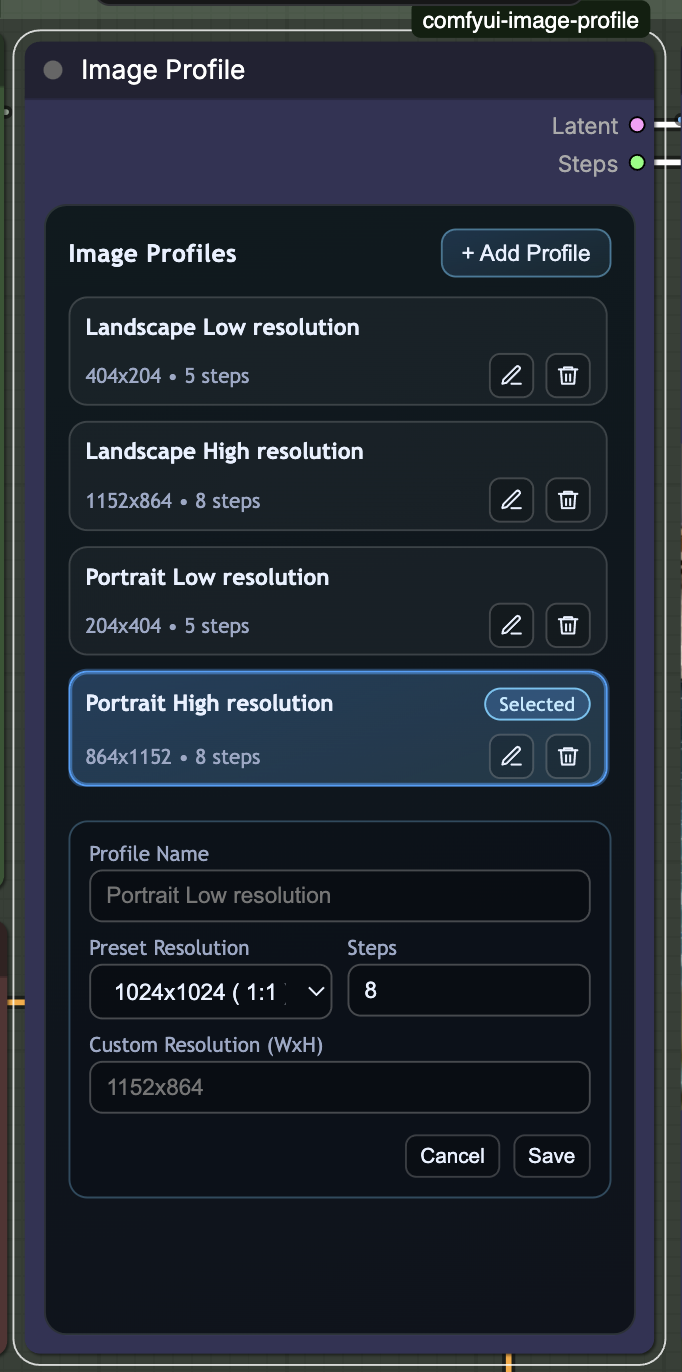
Great helper for content creators who want to generate fast drafts at small image sizes first (faster generation), then switch to HD profiles once composition and prompt direction are validated.
This node is handy because it avoids complex workflow setup for multiple image configurations and avoids repeatedly keying in width, height, and steps by hand.
Node
- Image Profile
- Outputs:
Latent(LATENT)Steps(INT)
- Find it in the category:
Latent/Profile - Create as much as image profile your want. Set size and set
- Drag-and-drop reorder
- Includes resolution presets plus custom
WxHinput
- Outputs:
Default profiles
Node start with 4 presets (that you can delete)
-
Landscape Low resolution->404x204,5steps -
Landscape High resolution->1152x864,8steps -
Portrait Low resolution->204x404,5steps -
Portrait High resolution->864x1152,8steps
How to install?
- Put this folder in
ComfyUI/custom_nodes/comfyui-image-profile - Restart ComfyUI
- Add node
Image Profilefrom categoryLatent/Profile