
OpenCV
all top-level standalone functions of OpenCV Python cv2 auto-generated from the type definitions
Nodes (637)
OpenCV absdiff_0
OpenCV absdiff_1
OpenCV accumulate_0
OpenCV accumulate_1
OpenCV accumulateProduct_0
OpenCV accumulateProduct_1
OpenCV accumulateSquare_0
OpenCV accumulateSquare_1
OpenCV accumulateWeighted_0
OpenCV accumulateWeighted_1
OpenCV adaptiveThreshold_0
OpenCV adaptiveThreshold_1
OpenCV add_0
OpenCV add_1
A text node that draws in place and returns nothing — skip it
Blend two images with weights — OpenCV addWeighted_0
OpenCV addWeighted_1
OpenCV applyColorMap_0
OpenCV applyColorMap_1
OpenCV applyColorMap_2
Give your grayscale a paint job with a custom OpenCV colormap
Turn jagged contour edges into clean polygons with Douglas-Peucker
ApproxPolyDP_1 — the identical twin of the polygon simplifier
Force a contour into exactly N sides
The identical twin of the N-sided polygon fitter
The perimeter node that every contour recipe starts with
ArcLength_1 — the duplicate perimeter node you can ignore
Draw annotated arrows on your outputs with OpenCV
The twin of the arrow-drawing node (yes, they're identical)
BatchDistance_0 — the nearest-neighbor distance node nobody expects
BatchDistance_1 — the duplicate nearest-neighbor node (skip this page)
Smooth skin and noise without smearing the edges
BilateralFilter_1 — the identical twin of the edge-preserving blur
The AND node for images and masks
The twin AND node — same intersection, second badge
The one-input node that flips pixels
The twin invert node — same flip, same badge number energy
The union node
The twin OR node — same union, second badge
XOR — the mask node for 'where do these differ'
OpenCV bitwise_xor_1
BlendLinear is the per-pixel version of alpha you didn't know you wanted
The twin of blendLinear_0 — same blend, second overload
OpenCV blur_0 and when to actually use it
The same box blur, a second overload, zero drama
The OpenCV helper node you'll almost certainly never use
Get the tight rectangle around any point set
The same box math, the redundant twin
The general blur where normalize is the switch
The redundant twin of the general box filter
Turn a rotated rectangle into four drawable corners
Same rotated-rect corners, duplicate overload
Numpy-style array stretching, with the pack's rough edges showing
The same numpy-style stretch, second overload, same rough edges
The mathiest node in the pack, and that's fine
Covariance math, identical twin edition
Farneback is the real deal, and it's rough
The duplicate overload of dense flow
Track feature points with PyrLK
The twin of sparse flow tracking
Your camera's FOV and focal length, solved in-graph instead of by hand
The identical twin of the FOV node — and why that's normal for this pack
A real-time tracker that mostly wants a live video feed
CamShift_1 — the duplicate tracker node, and why the pack is full of these
Canny edge detection in ComfyUI — the ControlNet preprocessor you can tune by hand
Canny_1 — the same edge detector, same nodes, different number
The overload for when you've already done the Sobel
Canny_3 — the gradient-based Canny, and its identical twin, explained
Gradient magnitude and direction in one shot — the cartToPolar node
CartToPolar_1 — the twin of the vector-to-angle node (there's no difference)
Is it a chessboard? The gatekeeper of camera-calibration frame selection
CheckChessboard_1 — the twin boolean, still just asking 'is it a chessboard?'
Does your CPU actually have AVX2?
Catch out-of-bounds arrays before they wreck your pipeline
CheckRange_1 — the duplicate debug node that still catches bad array values
Draw a circle on your image — OpenCV's drawing node in ComfyUI
Circle_1 — the same drawing node, same BGR traps, different number
Clip a line to a rectangle and keep only the part that fits — pure geometry
Recolor a masked region without repainting it — OpenCV's colorChange effect
ColorChange_1 — the twin recolor node with the same three multipliers
Turn 'where do these images differ' into an actual mask (OpenCV compare_0)
Compare_0's identical twin — and the reason both exist
One number that says 'these two images have the same color feel' (OpenCV compareHist_0)
CompareHist_0's twin — same node, second overload slot
The OpenCV node that isn't about images at all (completeSymm_0)
CompleteSymm_0's twin — the symmetrizer, duplicated
Compose two rotations and translations (composeRT_0)
ComposeRT_0, again — the overload slot you can ignore
Stereo geometry without leaving the graph (computeCorrespondEpilines_0)
ComputeCorrespondEpilines_0, duplicated
A single number that says 'these two images are this aligned' (OpenCV computeECC_0)
ComputeECC_0's twin — same alignment score, second slot
Count the blobs in your mask (OpenCV connectedComponents_0)
ConnectedComponents_0's twin — same blob counter, spare slot
Faster blob counting when your mask has ten thousand pieces (connectedComponentsWithAlgorithm_0)
The algorithm-picking blob counter, duplicated (connectedComponentsWithAlgorithm_1)
Per-blob sizes, boxes, and centroids (connectedComponentsWithStats_0)
The stats workhorse, duplicated (connectedComponentsWithStats_1)
Blob stats plus a pick-your-algorithm knob (connectedComponentsWithStatsWithAlgorithm_0)
The kitchen-sink blob node, duplicated (connectedComponentsWithStatsWithAlgorithm_1)
ContourArea without leaving the graph
ContourArea_0 or contourArea_1? Honestly, either
Halving your arrays with convertFp16 — but not your images
ConvertFp16_1 — the twin nobody needs to distinguish
Remap map plumbing, for the geometry nerds
ConvertMaps_1 — the second overload, the same map converter
The projective-geometry errand
ConvertPointsFromHomogeneous_1 — the other overload, same math
ConvertPointsToHomogeneous, explained
ConvertPointsToHomogeneous_1 — same node, one suffix over
ConvertScaleAbs
ConvertScaleAbs_1 — the identical twin of the pack's best node
Rubber-band outlines with convexHull — the shape-analysis workhorse
ConvexHull_1 — the second copy of the rubber-band outline node
The finger-valley detector, now in your graph
ConvexityDefects_1 — the twin, and the finger-valley caveat
CopyMakeBorder
CopyMakeBorder_1 — the padding twin with the same string trap
Mask-aware copying, the compositing glue you're missing
CopyTo_1 — the mask-copy node, suffix and all
CornerEigenValsAndVecs_0
CornerEigenValsAndVecs_1 — the identical twin nobody explains
CornerHarris_0 — the classic corner detector, raw and honest
CornerHarris_1 — same Harris detector, but let's talk about the k knob
CornerMinEigenVal_0 — the Shi-Tomasi corner score, the one goodFeaturesToTrack trusts
CornerMinEigenVal_1 — the twin, and why the min eigenvalue beats Harris
CornerSubPix_0 — make your corners sub-pixel precise (yes, really)
CornerSubPix_1 — the twin, and a worked example of the string inputs
CorrectMatches_0 — enforce the epipolar constraint on your point pairs
CorrectMatches_1 — the twin, plus how to get the F matrix it needs
CountNonZero_0 — the tiny node that answers 'how much mask is there?'
CountNonZero_1 — the twin, and the mask-coverage trick worth stealing
CreateHanningWindow_0 — a frequency-domain window, for the DFT crowd
CreateHanningWindow_1 — the twin, and the anti-leakage habit
CubeRoot_0 — a single math function wearing a node costume
CurrentUIFramework_0 — a node that tells you which GUI OpenCV thinks it has
CV_16FC_0 — a type-constant calculator, and the code it saves you
CV_16SC_0 — the signed 16-bit type constant, decoded
CV_16UC_0 — the unsigned 16-bit type constant, in one node
CV_32FC_0 — the type constant you'll actually need (float32)
A Node That Just Calculates an INT — and Why That's Not Useless
The Type-Code Calculator for OpenCV's Float Images
The Type Code Nobody Asks For (Until They Need It)
The Type Code Behind Every Normal Image
The Generic Type-Code Builder (and the Formula Behind All Those CV_* Nodes)
The Node That Makes This Pack Usable (BGR, Gray, and Everything Between)
The Twin That's Identical to cvtColor_0 (Just Pick One)
For When Your Image Comes in Two Stacked Planes
The Overload Twin of the Two-Plane Converter
The Discrete Cosine Transform, or How JPEG-Thinking Leaks Into ComfyUI
The Identical Twin of the DCT Node (Frequency Work, Either Way)
The Grayscale Conversion That Respects Color Contrast
The Twin of the Contrast-Preserving Decolorization Node
Extracting Camera Motion From an Essential Matrix
The Twin for Camera-Motion Decomposition
Pulling Camera Intrinsics, Pose, and Euler Angles Out of a Projection Matrix
The Twin That Splits a Camera Matrix Into Seven Outputs
Turning Raw Bayer Sensor Data Into a Real Color Image
The Twin of the Raw-Sensor Demosaicing Node
The Node That Closes Windows That Were Never Open
The node that closes a window you can't open
Detail enhancement that doesn't blow out your edges
The twin of detailEnhance_0 — and it's identical
A matrix math node in an image pack — probably not yours
The duplicate determinant node — and why that's normal here
Fourier transforms in ComfyUI — the deep end, done properly
The second overload, same Fourier transform
Grow your masks with OpenCV's dilate
Dilate_1 is dilate_0 with a different suffix — grow your masks anyway
Draws text on an OpenCV window you probably don't have
A status-bar writer for a window that isn't there
Turn a hard mask into a soft one with OpenCV's distance transform
The identical twin of the mask-feathering node
Which background is each mask pixel closest to?
The twin of the WithLabels distance transform — pick either
Flat-field correction and ratio masks
Same per-pixel division, no difference
Invert an image by a constant, cleanly
The twin of the scalar division node
Frequency-domain division — the inverse filter's best friend
The frequency-domain division node almost nobody needs (but it's here)
The OpenCV node with nothing to wire (and no reason to use it)
See your camera-calibration corners in green (or red)
The other chessboard-corner drawer — and why it's identical
Draw a 3D axis frame onto a photo — the pose checker
DrawFrameAxes, take two — same pose, same axes, no difference
Put a dot, cross, or diamond on the image — without leaving the cv2 pipeline
DrawMarker, second overload — same markers, still BGR
Smooth skin or flatten colors without killing the edges
The edge-preserving filter, second overload — and the two knobs that matter
Pure math, zero pixels, and that's fine
The second eigen overload — symmetric matrices only, same answer
The even nerdier eigenvalue node — for matrices with no manners
EigenNonSymmetric, overload two — same math, still no pixels
Draw an ellipse (or just an arc) with literal coordinates
Ellipse, overload two — same arcs, same literal gotchas
Draw a rotated bounding box as an ellipse — the detection visualizer
The RotatedRect ellipse, overload two — same box, same BGR
A real similarity metric, with setup work
Earth Mover's Distance, overload two — same metric, same setup cost
The fastest way to fix a flat, washed-out image in ComfyUI
EqualizeHist_1 is the same node as _0 — here's why it exists
The mask-cleanup move that removes tiny white specks
Erode_1 — the identical twin of erode_0, minus the confusion
The node that finds the transform between two sets of matching points
EstimateAffine2D_1 — a byte-identical twin, so just use _0
3D point-set alignment in ComfyUI — niche, but here's how it works
EstimateAffine3D_1 — the twin you can safely ignore
Rigid 3D alignment with a scale factor — estimateAffine3D_2 explained
EstimateAffine3D_3 — the twin of _2, same rigid alignment, same output
The 2D transform for rotation + scale + shift — no shear allowed
EstimateAffinePartial2D_1 — identical twin, use _0 instead
Measuring focus sharpness of a calibration board — yes, in ComfyUI
EstimateChessboardSharpness_1 — the duplicate you can ignore
Pure 3D translation between point sets — the simplest alignment node
EstimateTranslation3D_1 — the twin, and it's identical
The exponential node — a math utility, not an image effect
Exp_1 — the identical twin of the exponential node
Pull one color channel out of an image — the split trick that matters
ExtractChannel_1 — the twin, same channel-picking, no difference
The OpenCV node that isn't even about images — and the (y, x) trap that waits in it
FastNlMeansDenoising_0
The twin nobody can tell apart (and why that's fine)
FastNlMeansDenoisingColored_0
The other twin, and it's a short story
FillConvexPoly_0 and the literal-string color gotcha
Same drawing node, second overload, zero differences
Run any convolution kernel you can dream up
The second overload of the general convolution
Cleaning the snow out of a disparity map
The twin for disparity cleanup, identical in every way that matters
Subpixel corner refinement for calibration work
The second overload, identical to the first
The classic checkerboard detector, straight from OpenCV
The twin of the classic checkerboard detector
The checkerboard detector that's actually good
The twin of the good checkerboard detector
Robust checkerboard corners, plus a quality score for each
The twin that adds the same quality scores
Recover camera motion between two views, the hard way
Find how two camera views relate — cv2.findEssentialMat without the pain
Essential matrix when you only know the focal length
FindEssentialMat_2's identical twin — just pick one
Essential matrix for two different calibrated cameras
FindEssentialMat_4, the duplicate you can safely ignore
Relate two camera views with zero calibration — the fundamental matrix
FindFundamentalMat_0's twin — same matrix, different sticker
The older, simpler fundamental matrix — no maxIters knob
FindFundamentalMat_2's twin — the no-frills fundamental matrix
Perspective warp without calibration — findHomography
FindHomography_0's twin — perspective warp, pick your sticker
Where is your mask actually white? findNonZero finds out
FindNonZero's twin — a point list, either way
Align images that drifted — and get a goodness score while you're at it
FindTransformECC_0's twin — same alignment, same score
Image alignment with optional mask — the friendlier ECC variant
FindTransformECC_2's twin — optional mask, identical math
Fit an ellipse to your blob in one step
FitEllipse_0's twin — same ellipse, either name
The careful ellipse fitter — fitEllipseAMS when outliers lurk
The OpenCV ellipse fitter that answers in a string
Fastest ellipse fit in the pack, and it talks in strings
FitEllipseDirect_1 is the same node as fitEllipseDirect_0. Really.
Find the direction in a streak of points
Yes, fitLine_1 is the same as fitLine_0. Here's why that happens
Mirror or flip an image with one integer
The duplicate flip node, and what it says about this pack
Flip an image around a named axis, not a magic number
Same axis flip, second stub
The flood fill node that speaks in tuples and strings
The same paint bucket, second stub
A proper Gaussian blur without touching the diffusion model
GaussianBlur_1 is GaussianBlur_0 with a different badge
Generalized matrix multiply for people doing math in ComfyUI
Matrix multiply, duplicate edition
Compute a 2×3 affine matrix from three point pairs
The affine transform solver, and its identical twin
Show me your OpenCV
One string that tells you what your CPU can do
A stopwatch that counts CPU ticks, because OpenCV says so
This Node Answers a Question Nobody Asks (and That's Fine)
The Boring Half of Undistorting Your Photos
The Twin of getDefaultNewCameraMatrix — They're the Same Node
Build Your Own Edge-Detection Filters
The Same Edge-Kernel Generator, Under a Second Name
The Node That Sizes Text So Captions Don't Overflow Your Image
The Fiddliest Filter in This Pack, and Worth It
The 1D Gaussian Blur Kernel — Blur's Building Block
The Node That Names Your CPU's Feature Flags
Find Out How Loud OpenCV Is Being Right Now
How Many CPUs Does OpenCV See? (It's Not Always What You Think)
How Many Threads Is OpenCV Actually Using Right Now?
The Fast-FFT Size Calculator for Frequency-Domain Work
The Node That Makes Undistortion Actually Work
The Undistortion Helper's Identical Twin
The One Node in This Pack You'll Actually Build Workflows Around
The Perspective Homography Node, Duplicated for Your Convenience (Not Really)
Crop With Sub-Pixel Precision, Not Pixel Luck
Sub-Pixel Cropping, Take Two (Literally the Same Node)
Rotate and Zoom Anything, the Affine Way
The kernel factory you didn't know you needed
Measure your captions before you draw them
It outputs a number. It is not useful. That's fine.
OpenCV's stopwatch, frozen mid-tick
The other half of OpenCV's stopwatch
A slider you cannot see, on a window that doesn't exist
The stereo node whose partners don't ship in the pack
The single digit that tells you which OpenCV era you're on
The version number that actually changes under you
The build number nobody asked for
The one version node you'll actually remember
Window geometry for a window that's never opened
Reading window properties you can't create
The corner detector that's quietly one of the pack's best nodes
The identical twin of the corner detector
Corner detection with a mask and a blur you control
The duplicate twin, with one honest difference
Corners, with a receipt showing how good each one is
The quality variant's exact duplicate
Interactive foreground cutout, before SAM existed
Cutting a subject out of a photo, 1990s-style, with OpenCV grabCut
Is there anything in this image?
The second copy of OpenCV's 'is anything nonzero?' check
Before you load that file, ask OpenCV if it can read it at all
Ask OpenCV whether it can save to a filename, before you try
The node with no inputs that will almost certainly say 'False'
Finding every coin in the photo, the OpenCV way
The duplicate copy of circle detection you can just ignore
Finding straight lines in a photo with a 60-year-old voting trick
The identical twin of HoughLines — same votes, same lines
Finite segments, not infinite lines
The duplicate of the line-segment detector — use either one
Finding lines in a scatter of points, not an image
The second copy of 'find lines in a point cloud' — same niche
Hough lines that tell you how confident the detector was
The duplicate of 'Hough lines with confidence scores'
Seven numbers that describe a shape no matter how you flip it
The duplicate shape-fingerprint node — same seven numbers
The inverse DCT node
The duplicate inverse-DCT node — same transform, same dragons
The inverse Fourier transform, for when you actually work in frequency space
Idft_1 — the identical twin of idft_0, and that's fine
Synthesize lighting changes with a mask — the data-augmentation trick
Same relighting node as _0, because OpenCV listed the overload twice
The one node that lets every other OpenCV node see your image
How many images are hiding in that file? A tiny but real utility
Decode an image from bytes instead of a path — the fileless loader
Imdecode_1 — same byte-decoder as _0, numbered because OpenCV overloaded it
Load an image from any path on the server, the way cv2 does
The imread with a dst you should ignore — here's why it exists
Imread_2 — the second twin with a dst, and you still don't need it
The node that pops a window on the server — and why that's a trap
Imshow_1 — another copy of the same debug window node
Imshow_2 — the third identical debug window, for completeness
The inverse-rectification map builder for when you need to undo the undo
InitInverseRectificationMap_1 — the same inverse-map builder, one more time
Camera calibration's map builder — only reach for this if you have calibration data
InitUndistortRectifyMap_1 — the identical twin of the calibration map builder
The fast, deterministic way to remove text, dust, and watermarks
Inpaint_1 — the same classical inpaint, because OpenCV listed it twice
Keep only the pixels inside a color range
The identical twin of the color-mask node
Swap one channel into an image
The duplicate overload, minus the surprises
The summed-area table nobody looks at
Same summed-area table, second overload
The summed-area table, plus squared sums
The duplicate with the variance trick inside
The full triple — sum, squared sum, and tilted
The tilted-table twin nobody should overthink
How much do these two polygons overlap?
The geometry twin, same overlap math
Matrix inverse, NOT inverted colors
The same matrix inverse, minus the confusion
Undo a warp with one matrix
The same undo-matrix, second overload
One boolean about your contour
The boolean twin nobody needs to fear
Clustering and color quantization, the raw way
The duplicate clustering node, strings and all
OpenCV Laplacian_0 for line art and sharpening
OpenCV Laplacian_1 — the duplicate edge detector (and why it exists)
Draw an annotation line without touching a single pixel of your workflow
OpenCV line_1 — yes, it's the same as line_0, here's how to use the line drawer anyway
Unwrap a circular image into a straight line
OpenCV linearPolar_1 — the polar unwrap node, minus the mystery
The natural-log transform nobody puts in their workflow (until they need it)
OpenCV log_1 — the other natural-log node, and the story behind the duplicate
The foveal transform that turns rotation and zoom into shifts
OpenCV logPolar_1 — same foveal transform, different overload number
Apply a lookup table for instant color grading and stylization
OpenCV LUT_1 — the duplicate lookup-table node, and how to actually feed it a LUT
Combine Sobel X and Y gradients into a real edge map
OpenCV magnitude_1 — gradient magnitude, the duplicate you can ignore
A statistical distance that outputs a number, not an image
OpenCV Mahalanobis_1 — the same statistical-distance node, minus the duplicate confusion
Compare two contours and get a similarity score
OpenCV matchShapes_1 — the duplicate contour-similarity scorer, and how to use the score
Find a small image inside a big one, no model required
OpenCV matchTemplate_1 — the duplicate pattern finder, and the five methods decoded
The matrix-derivative node that has no idea it's in a diffusion tool
The twin of the matrix-derivative node (they're the same)
The 'brighter pixel wins' node
The identical twin of OpenCV's brighter-pixel node
How bright is your image, actually? OpenCV mean_0
The average-pixel node's other overload
The 1990s tracker hiding in your node list
The same object tracker, other overload
Brightness and contrast as actual numbers
The image-statistics node that returns arrays, not strings
The noise killer Gaussian blur can't be
Smoothing without the halo
The 'darker pixel wins' compositing trick
The identical twin of the darker-pixel-wins node
Find the angle of anything
The rotated-bounding-box twin
The smallest circle that holds a blob
The circle-measuring node's twin
The triangle that squeezes your points
The tightest triangle around your points
Find the darkest and brightest pixel in your image in one pass
MinMaxLoc_1 is minMaxLoc_0's identical twin — pick the _0, here's why they both exist
Get the area, centroid, and orientation of any detected shape
The duplicate you can ignore, and the same stringified stats
Kill specks, fill holes, and extract edges
MorphologyEx_1 — the same mask cleaner, and the story behind every _0/_1 pair
Honestly, you can skip this one — moveWindow_0 is auto-gen cruft
Multiply two Fourier spectra — the pack's deepest rabbit hole
MulSpectrums_1 — frequency-domain multiply, the duplicate edition
Per-pixel multiply with saturation — gain, dimming, and blend without the math pitfalls
Multiply_1 — the saturating multiply twin (identical, just numbered differently)
XᵀX, for the rare ComfyUI workflow that needs linear algebra
MulTransposed_1 — the Gram-matrix node's identical twin
A window creator with nothing to put in the window
L1, L2, and infinity norms as a single number
Norm_1 — identical to norm_0, the single-array norm twin
How different are two images? The L2/L1 distance, as one number
Norm_3 — identical to norm_2, the two-image distance twin
Stretch any flat image to full range — the fix for everything that looks black
Normalize_1 — the range-stretch twin (and the required-dst gotcha)
Turning nparrays back into images
Patch broken pixels before they poison your tensor
PatchNaNs_1 is patchNaNs_0's identical twin — here's why they're both here
Reconstructing data (and images) from a few components
The other half of the PCA round-trip (and a compression trick)
The node that learns the PCA model everything else depends on
Identical twin of PCACompute_0 — grab either and move on
'keep enough components to explain X% of the variance'
Like PCACompute, but it also tells you how much each axis matters
Same as PCACompute2_0, because OpenCV declares everything twice
Eigenvalues plus a variance target — the 'just keep the good stuff' PCA
Retained-variance PCA with eigenvalues, UMat twin edition
The retained-variance PCA learner, UMat twin edition
Squeezing high-dimensional data (or images) into a few numbers
The duplicate that's identical to PCAProject_0 (and why that's fine)
Turning photos into pencil drawings, no model required
The identical twin — and why this node is the one that breaks installs
Warping points through a homography (not pixels — points)
The UMat twin of the point-warping node
The angle of every vector in a field — where flow, gradients, and orientation live
Turn an (x, y) vector field into a direction map with OpenCV phase_1
How far did the frame move? Sub-pixel shift detection with OpenCV phaseCorrelate_0
PhaseCorrelate_1 — the twin, the response value, and when this node is actually worth it
Is that point inside the region? Hit-testing with OpenCV pointPolygonTest_0
PointPolygonTest_1 — the literal-syntax trap and how to hit-test without losing an hour
Converting flow magnitude and angle with OpenCV polarToCart_0
PolarToCart_1 — the honest truth about this node and when it earns its place
OpenCV pollKey_0 — the most useless node in this pack, and why it exists
OpenCV pow_0 and the per-pixel exponent
Pow_1 — the same exponent math, minus the mystery (and what power values actually do)
OpenCV preCornerDetect_0 and the corner-response map
PreCornerDetect_1 — what that float map is actually for, and why your image looks like static
Projecting world points onto an image with OpenCV projectPoints_0
ProjectPoints_1 — should you actually install the camera-calibration dragon?
How damaged is that image really? Measuring quality with OpenCV PSNR_0
PSNR_1 — a honest before/after metric for your upscale and denoise passes
Watermarks, labels, and annotations with OpenCV putText_0
PutText_1 — fonts, anti-aliasing, and the color trap that gets everyone
Downscaling with OpenCV pyrDown_0
PyrDown_1 — build a real image pyramid without leaving your graph
Flatten an image into poster-like color blobs with OpenCV mean shift
The duplicate of the mean-shift flattening node — and why that's fine
Double the resolution with OpenCV's pyramid upsampler
An identical twin that needs no intro
Fill an image with Gaussian noise, OpenCV-style
The Gaussian-noise node's identical twin
Scramble a picture into static with OpenCV randShuffle
It's the same node
Uniform random noise over a canvas, the raw OpenCV way
The uniform-noise node's doppelgänger
Load a .flo optical-flow file straight into your graph
Recover camera rotation and translation from two photos
The exact twin of the two-camera pose node
Decompose an essential matrix into rotation and translation
The twin of the essential-matrix pose node
Recover pose with just focal length and principal point
The twin of the focal-length pose node
Recover pose AND the 3D points behind your matches
The twin of the pose-plus-triangulation node
Draw boxes on an image — the BGR gotcha included
Draw rectangles on images in ComfyUI — the OpenCV way
Draw a box from x, y, width, height — rectangle_2 vs rectangle_1
Rectangle_3 — the rectangle node you'll never notice
How much do two boxes overlap? rectangleIntersectionArea_0
Sum, average, or max a whole row or column at once — reduce_0
Reduce_1 — the same column/row reduction, twice for free
Find the brightest row or column — reduceArgMax_0
ReduceArgMax_1 — the argmax twin nobody needs to pick between
Locate the darkest scanline with reduceArgMin_0
ReduceArgMin_1 — the duplicate you can safely ignore
Bend any image any way you like — remap_0 is the master warp
Remap_1 — the same warp, second copy
Tile one image into a grid — repeat_0 builds your contact sheet
Repeat_1 — the tiling node, once more with feeling
Turn a disparity map into 3D points — reprojectImageTo3D_0
ReprojectImageTo3D_1 — the stereo-depth duplicate
Exact, fast resizing with real OpenCV interpolation — resize_0
Resize_1 — the resize twin you can skip
ResizeWindow_0 — the node that resizes a window that doesn't exist
ResizeWindow_1 — the other phantom-window resizer
Flip a 3D rotation between vector and matrix mid-workflow
Your twin, but the UMat one
90-degree flips, instant and lossless
The same 90-degree flips, UMat edition
Do two rotated boxes actually overlap?
The overlap test, UMat twin
Split a camera matrix into rotation and shear
The same 3x3 decomposition, UMat edition
The geometer's outlier detector
The same geometric distance, UMat wrapper
The two-image blend you'll actually use
The blend, UMat twin edition
Sobel's sharper little brother for gradient edges
The sharper gradient, UMat edition
Paste a subject in and nobody sees the seam
Poisson blending, UMat overload
Click and drag a region mid-workflow
The named-window ROI picker, UMat edition
The ROI picker that skips the window name
Default-window ROI picker, UMat edition
OpenCV's separable filter in ComfyUI
SepFilter2D_1 is a duplicate — here's the deal with the _0/_1 numbering
Make a clean identity matrix without leaving ComfyUI
The duplicate identity-matrix node, and why the pack has twins
Make OpenCV shut up, or make it talk
The global cap on OpenCV's CPU threads
Make OpenCV's randomness reproducible
A GUI slider control, deep inside a headless server
The other end of the slider you're probably not using
Moving a slider that lives in a window nobody opens
The node that's a no-op on stock OpenCV
The debugging switch that turns off OpenCV's fast paths
Fullscreen and friends on a window that may not exist
Renaming an OpenCV pop-up you probably don't have
The classic edge detector, now inside your ComfyUI graph
Same edge detector, second overload — use it the same way
Solve a linear system inside your ComfyUI graph
The duplicate linear-solver node (and what it solves)
Real roots of a cubic equation, because sometimes the graph needs math
The twin cubic-root node and the 'not every nparray is an image' trap
A linear programming solver, as a ComfyUI node. Yes, really.
SolveLP_1 — the same LP solver, one overload over
The cleaner solveLP — same solver, fewer required knobs
SolveLP_3 — the duplicate of the duplicate, and that's fine
Solve the camera pose from 3D-to-2D point matches, inside ComfyUI
SolvePnP_1 — the same pose solver, from the duplicate overload
SolvePnP with RANSAC — pose estimation that shrugs off bad matches
SolvePnPRansac_1 — the RANSAC pose solver's duplicate twin
Polish a rough camera pose with Levenberg-Marquardt
SolvePnPRefineLM_1 — the refinement twin, generated twice
Virtual Visual Servoing, with a lambda knob
SolvePnPRefineVVS_1 — the virtual-servoing refiner's duplicate
A polynomial root finder in ComfyUI, because OpenCV ships one
SolvePoly_1 — the root finder's identical twin
Pixel-sort a photo inside ComfyUI — the glitch art node
Sort_1 — the pixel-sorter's duplicate overload
Sort values, keep the indices — sortIdx is the permutation node
SortIdx_1 — the permutation node's duplicate twin
Both image derivatives in one pass — spatialGradient for edge maps
SpatialGradient_1 — the Scharr derivative node's twin
Squared pixels, boxed up — the local-variance building block
The other sqrBoxFilter — no, really, it's the same node
Square roots, pixel by pixel — finish the variance recipe
Sqrt_1 — the twin that's identical, and why that's fine
Photoshop's stack blur, fast enough for big soft glows
Stack blur, take two — identical, and that's the point
The node that starts a window thread and nothing else
Calibrated stereo rectification — for the 0.1% doing real 3D
StereoRectify, the second overload — same camera math
Stereo rectification without calibration — just feature matches
The other uncalibrated rectifier — it's the same homography math
Painterly stylization that's actually deterministic
Stylization, twin edition — painterly, deterministic, same node
Saturated subtraction — the difference operator that won't wrap
Subtract_1 — same saturating diff, second overload
Adds up every pixel, returns a string — a stats oddity
SumElems_1 — the duplicate that returns a string scalar
SVD back-substitution — linear algebra for the workflow masochist
SVBackSubst_1 — same SVD solve, second overload
Singular value decomposition, if you ever need to factor a matrix
Singular value decomposition is now a ComfyUI node. Yes, really.
Make your seamless-clone composites stop looking pasted
TextureFlattening_1 — the same flattening, with a second number
Threshold
Threshold_1 — a second mask maker that's the same mask maker
The node that returns a string instead of an image
Trace_1 — a math utility wearing an OpenCV costume
Color-grade any image with one matrix multiply
Transform_1 — the same per-pixel matrix node, one number later
The node that flips your array on its diagonal
Transpose_1 — the mirror image of the mirror node
From two cameras to a point cloud, inside a ComfyUI graph
TriangulatePoints_1 — the stereo twin with the same point to make
Straighten real-camera lens distortion before it hits the sampler
Undistort_1 — the second overload of the lens-fix node
When your 'image' is actually a grid of points
UndistortImagePoints_1 — the points-image twin, for calibration completists
Fix distorted keypoints, not pixels — the math twin of undistort
UndistortPoints_1 — the keypoint-correction twin you can swap freely
The same lens math, with an iteration budget
Fix the geometry of your points, not your pixels
A status light for a hardware acceleration you almost certainly don't have
Is OpenCV actually using its fast paths?
The quality gate for stereo depth maps
Same stereo validator, second overload — same inputs, same caveats
The keyboard-wait node that mostly just blocks your graph
WaitKey, but with extended key codes — same ComfyUI caveats apply
The node that rotates, shifts, and skews your images with a 2×3 matrix
The second warpAffine overload — pick either, it's the same matrix math
Straighten any photo of a screen, sign, or page with a 3×3 homography
WarpPerspective, take two — the overloads are twins, so just use one
The polar remap node
The second polar warp overload — same vortex, same flags, pick one
Split touching objects into separate mattes with marker-based segmentation
The twin of the segmentation node — identical inputs, no wrong choice
Export your optical flow to .flo so real video tools can use it
The second .flo writer overload — same file format, same two inputs
OpenCV-ComfyUI
Custom nodes for ComfyUI that implement all top-level standalone functions of OpenCV Python cv2, auto-generated from their type definitions.
Quickstart
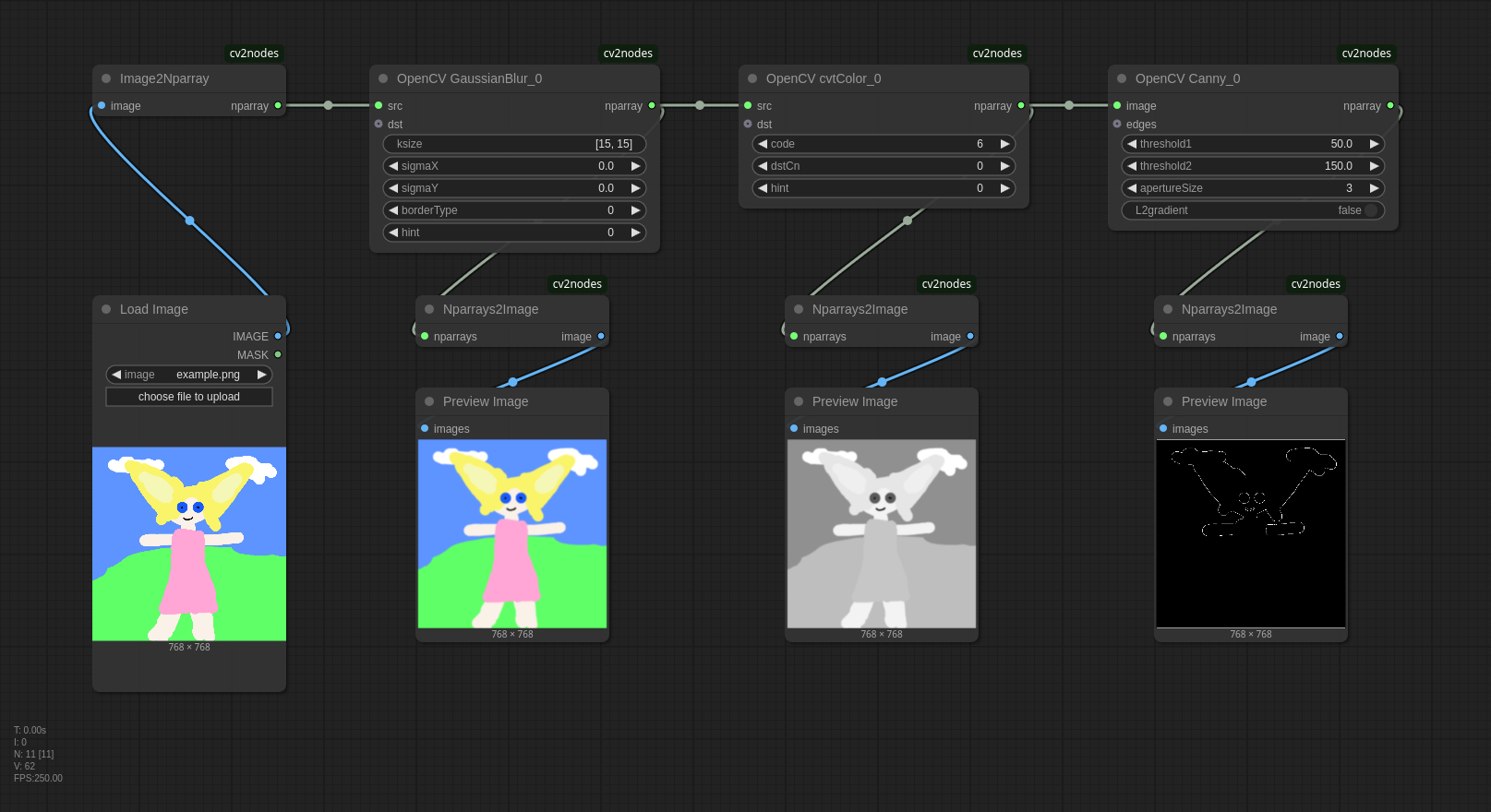
- Install OpenCV:
pip install opencv-python-contrib - Convert between Comfy image and OpenCV nparray using:
Image2NparrayNparrays2Image
- Avoid the optional out-parameters (usually called
dst). - Convert color channels with
cvtColor. Use:6forBGR2GRAY8forGRAY2BGR
- Use literal strings for composite parameters (e.g.,
[3, 3]forksize).
These nodes are auto-generated from source and so they are ugly and complex to use. Expect dragons!
Please leave some feedback! If I see the project being used I will develop it further.
Documentation
For function references, see the official OpenCV documentation, start with Image processing filters.
Installation
You probably already have OpenCV already installed via some other custom node, otherwise install with:
pip install opencv-python-contrib
If you get:
Cannot import name 'guidedFilter' from 'cv2.ximgproc'
you likely have conflicting packages. It's a known source of problems, see solution.
Image Representation
| Feature | ComfyUI IMAGE | OpenCV images |
|------------------|-----------------------------------------|---------------------------------------|
| Type | torch tensor | numpy ndarray |
| Shape | (batch, height, width, channels) | (height, width, channels) |
| Color Format | Always RGB, never RGBA | Mostly BGR or grayscale |
| Value Range | 0.0..1.0 | 0..255 |
| Data Type | np.float32 | np.uint8 |
You have to use cvtColor to convert between them. Common enums for color conversion:
BGR2BGRA  =  0
RGB2RGBA  =  0
BGRA2BGR  =  1
RGBA2RGB  =  1
BGR2RGBA  =  2
RGB2BGRA  =  2
RGBA2BGR  =  3
BGRA2RGB  =  3
BGR2RGB   =  4
RGB2BGR   =  4
BGRA2RGBA =  5
RGBA2BGRA =  5
BGR2GRAY  =  6
RGB2GRAY  =  7
GRAY2BGR  =  8
GRAY2RGB  =  8
GRAY2BGRA =  9
GRAY2RGBA =  9
BGRA2GRAY = 10
RGBA2GRAY = 11
(we should use COMBO for them, I know)
Troubleshooting
invalid syntax (<unknown>, line 0)
- Some of the input parameters require composite types and they are implemented using
ast.parse()to convert from Python literal strings to objects, but the syntax you used is wrong (e.g. forSizeuse(30, 40)).
Image2Nparray
Only images with batch_size==1 are supported! batch_size=2
- Use the
ImageFromBatchnode (length=1) to select your image and create a image withbatch_size=1.
error: (-215:Assertion failed) img.type() == CV_8UC1 in function
- The function requires a grayscale image. Convert it with
cvtColor(code=6) first.
Nparrays2Image
'NoneType' object has no attribute 'shape'
- Not every return type of
nparrayis actually an image. Some are just a 1-dimensional array of floats, but you are using it as an image. Check the OpenCV documentation. Please also note that the OpenCV nodes were auto-generated and not every function is useful within ComfyUI without further processing.
Development
Image batches
Comfy IMAGE is actually a batch of images, usually with just one, but we have to handle the case with multiple images:
- We could iterate over the batch and call the OpenCV function for each image, but then we have to collect the output in lists as well. This works as long as the output is just a image, not a tuple. If it is tuple (e.g.
(nparray, int)) either the user has to select the list index everytime or we treat all inputs as lists too. - We could always use batch index 0 but this may be surprising behaviour for the user.
- We could just support batch_size=1. I settled with this for now because it's easier.
Image versus nparray
For handling Comfy image versus OpenCV nparray we have the following choices:
- Always use Comfy
IMAGEfor input and output- fails for functions requiring grayscale images (like
Canny), because we always convert from RGB to BGR to RGB. - we could convert to the required type automatically, but I don't have annotations telling me which function requires which type.
- type conversions in OpenCV is supposed to be more intentional and there can be multiple correct types.
- fails for functions requiring grayscale images (like
- Provide both
IMAGEandnparrayas input and output- the automatic conversion issue above partely applies here and usage would become surprising (
IMAGEis always RGB,nparrayis whatever the function outputs) - providing both inputs is ambigious (Maybe Comfy supports multiple types for one parameters, I don't know)
- the automatic conversion issue above partely applies here and usage would become surprising (
- Provide conversion nodes and only use
nparray- I settled with this because it more closly matches the OpenCV style were
cvtColorconversions are intentional anyway.
- I settled with this because it more closly matches the OpenCV style were
Parsing OpenCV
Function definitions were extracted using ast.parse() on venv/lib/python3.11/site-packages/cv2/__init__.pyi. This includes only top-level standalone functions - not classes or anything hidden in sub-modules.
Attemps to use inspect.signature(cv2.MedianBlur) or inspect.getmembers(cv2.MedianBlur) failed due to missing type annotations (ValueError: no signature found for builtin <built-in function MedianBlur>). OpenCV functions are implemented as C++ extensions, and they do not have Python type annotations (__annotations__). Unlike pure Python functions, built-in functions and extension functions do not store signature metadata in a way that Python's reflection tools can access directly.
Most functions are overloaded and they were numbered.
Types
I then analyzed how many different types and paramter names are used (see analyze_functions) to filter out complicated or unsupported functions for now. You can find the infos in cv2.tsv.
- 776 functions in total.
- Parameters use:
- simple types:
int, float, str, bool, - composite types (exhaustivly:
Moments, Point, Point2d, Point2f, Rect, Rect2d, RotatedRect, Scalar, Size, TermCriteria), - and images
- simple types:
- Images are represented with the following types:
UMatcv2.typing.MatLikecv2.typing.MatLike | NoneandUMat | Noneusually used fordst, but somedstare notNone. used as src only inreprojectImageTo3D.cv2.cuda.GpuMatbut only used inimshownumpy.ndarraybut only used as return type in all variants ofimencode
- Return types include:
- Simple types
- Composite types (
Size, Rectetc.) - many tuples with all types above
_typing.Sequencewhich is not supported yet_typing.Callablewhich is not supported yet- many class types (like
Tonemapetc.), which are not supported yet
After filtering out all unsupported types there were 635 functions left.
For the composite types we could:
- provide extra widgets to construct them (todo),
- split them up in their simple types so
Rectwould becomeRect_0_int_0, Rect_0_int_1, Rect_0_int_2, Rect_0_3(ugly) - or use
STRINGand parse them withast.literal_eval(). This is what I used.
Out parameters
OpenCV often modifies input images in-place with call-by-reference out-parameters, but this does not align with ComfyUI's paradigm. Example:
def medianBlur(src: cv2.typing.MatLike, ksize: int, dst: cv2.typing.MatLike | None = ...) -> cv2.typing.MatLike: ...
Most of them are defined as cv2.typing.MatLike | None or UMat | None but that's no always the case. Some are not None:
def normalize(src: cv2.typing.MatLike, dst: cv2.typing.MatLike, alpha: float = ..., beta: float = ..., norm_type: int = ..., dtype: int = ..., mask: cv2.typing.MatLike | None = ...) -> cv2.typing.MatLike: ...
I considered some alternative approaches:
- We could assume the first image is always the input image but we cannot assume the second parameter is always an out-parameter because some functions use multiple input images.
- We cannot derive the out-parameter from the return type (assuming the out-parameter is always used as a return), because return types are sometimes tuples with multiple images.
- The position of the out-parameter is inconsistent, sometimes followed by another input image.
- We cannot derive the out-parameter from the parameter name alone. There are 167 unique parameters names (skipping the first one) and the naming is inconsistent.
- I don't know of any strictly typed OpenCV definition file which would of course be the best choise. We can of course parse the original sources, headers or C++ sources and derive: out-parameters, value ranges, allowed channel types etc. and construct this definition file, but that's another story.
I just included them as optional inputs for now if the type includes None.
Classes
Ignored for now. Classes don't really fit the ComfyUI style but they would be possible if we pass around chained instances for every method call.
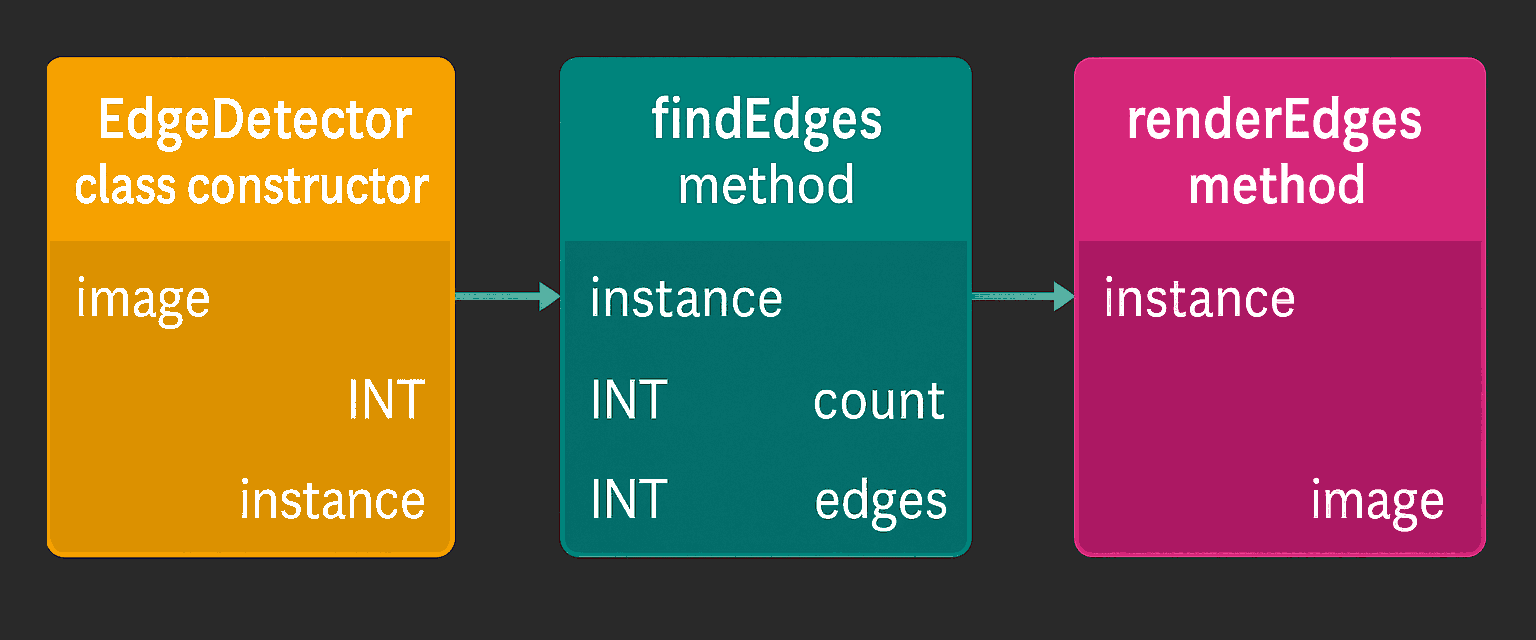
Todo
- Widgets for composite types instead of literals
- More convenience functions like enums for
cvtColor,Preview Nparraynode etc. - Support image batches with batch_size > 1
- Parse doxygen docs and include them as help-strings
- Automatic conversion between channels
- Provide utility nodes for common patterns (like convert Hough lines to image)
- Parse C++ code for value ranges and detect out-parameters
- Better handling of out-parameters (or removal)
- Blacklist functions which don't make sense in ComfyUI (like return type None)
- Categorize nodes and keep the namespace clean
- Generate custom nodes for classes too
I'm happy to take any contributions! :)