
radiance
Radiance is a 32-bit color space collection of nodes for ComfyUI.
Nodes (80)
ACES 2.0 output transforms, done properly
Moving images in and out of ARRI Wide Gamut 4
The Radiance universal color space switcher
DaVinci Wide Gamut conversion
Color correction with the order a colorist actually uses
Stop eyeballing the viewer, bake the grade into the pixels
The 'Pro Viewer' you see in old workflows is just the Radiance Viewer wearing a coat
The viewer that finally shows you what your floats actually are
Five one-knob HDR operations, without the node farm
Turn a flat image into an HDRI you can light a scene with
The honest version
Merge exposures into one HDR frame
Read your image's dynamic range in stops
Pulling detail out of the shadows and highlights — without clipping anything
The one node that makes float output actually watchable
Get your image out of 8-bit jail
A reroute that finally tells you what the wire is carrying
A real upscaler collection — with the HDR mode most upscalers are missing
Replay the exact grade you saved — on any shot, any time
Going from float to 8-bit without the banding
Eight blend modes that don't crush your HDR values
A camera-and-lens dropdown that writes your prompt for you
A prompt builder that knows whether you're on Flux or SDXL
Deliberately making your images look compressed
A ControlNet apply node with a Union mode picker built in
Stick a spy in your workflow that doesn't change a thing
Edge-preserving denoise that actually handles HDR
Depth Anything V2 depth maps, without the controlnet_aux dance
Cinematic defocus from a depth map, bokeh shape and all
One node that reads video, image sequences, and EXR
Read footage like a VFX shot, not a web image
Deliver EXR, ProRes, or H.265 straight out of ComfyUI
The save node that speaks EXR and ProRes
Reading the invisible signature baked into your frames
The QC gate that can refuse to pass unsigned renders
Stamp your renders with an invisible, lossless signature
Downscale without destroying the float range
See your exposure in a 7-zone false color overlay
Film grain that doesn't look like a noise filter
Measure the flicker in your AI video before you try to fix it
A gate that actually blocks a branch — Radiance Gate for when a switch isn't enough
Radiance Color Matrix — the 3x3 math behind every 'make it look like this' filter
Radiance Grade — a real Lift/Gamma/Gain node so you stop faking color work with img2img
Radiance Grade Match — color match your AI frame to a reference in one step
Radiance Highlight Synthesis — fake the roll-off that flat white skies deserve
Radiance Load Image — a loader that keeps your mask separate from your pixels
Radiance Log Curve Decode — turn ARRI/Sony log footage into linear, properly
Radiance Log Curve Encode — the other half of speaking a camera's language
Radiance LoRA Stack — five LoRAs in one node so your graph stops looking like a fire escape
Radiance LUT Apply — drop a real .cube LUT into ComfyUI and stop hand-tuning grades
Radiance LUT Blend — stop choosing between looks, blend two of them
Radiance Metadata Overlay — burn the slate into the frame like you're delivering dailies
Radiance Motion Blur — the post pass that makes AI video stop looking like stop-motion
Radiance Mux — flip between four inputs without touching a wire
Radiance Note — the sticky note your 40-node graph has been begging for
Radiance Nuke Bridge — send a frame to Nuke's Viewer without leaving ComfyUI
Radiance CDL Transform — the on-set grade format your shots actually arrive in
Radiance OCIO Color Transform — speak ACES without leaving ComfyUI
Radiance OCIO Display/View — the last node your color-managed frame sees
Radiance Pro Upscale — clean vectorized upscaling when you don't want a model rewriting your image
The automated check that catches what your eyeballs miss
Turn a QC verdict into a JSON, CSV, or HTML file you can hand to a pipeline
A reroute that labels itself, so you can finally read your own workflow
One dropdown that sets your resolution, latent channels, and even video length
Add the skew, wobble, and flash bands that make a still read as phone footage
The sampler that replaces your KSampler, CFG++ hacks, and video samplers in one node
Save real 32-bit EXR from ComfyUI — the format your VFX pipeline actually wants
Save Radiance HDR (.hdr) — the RGBE format for compact float images
Workflow presets that wire your color pipeline in one dropdown
Stop squinting at JSON strings in the node graph
Kill the flicker that makes AI video look fake
One loader for Flux, SDXL, WAN, HunyuanVideo — and it picks the architecture itself
Upscale to an exact target size without cropping, stretching, or blowing up VRAM
VAE decode that won't OOM at 4K and won't clamp your HDR highlights
VAE encode that survives 4K, float images, and a round-trip
The vectorscope that shows you hue and saturation instead of guessing at them
A waveform monitor inside ComfyUI, so you can actually see the exposure
Fix a cast with a Kelvin number, not a guess
The node that treats your whole workflow as a saveable project
A 16-bit PNG save that stops banding in your gradients
◎ Radiance v2.3.3 — Professional VFX & HDR Suite for ComfyUI




Radiance is a professional, VFX-grade 32-bit float color science suite for ComfyUI. Built for film colorists and VFX artists who require absolute precision in their AI-assisted workflows.
Installation · Getting Started · Node Reference · Quick Start · Viewer Shortcuts · Documentation · Support
</div>◎ What's New - v2.3.3
[!IMPORTANT] 32-Bit Scene-Linear Engine
Radiance preserves full IEEE 754 floating-point precision across the entire chain. Zero banding. Zero data loss.
- Smart Overwrite Protection —
Radiance WriteandEXR Savenow feature automated index detection to prevent accidental file destruction. - Universal Digital Cinema I/O — Consolidated Video, Image Sequence, and Single Image handling into a high-performance unified pipeline.
- Robust Pipeline Validation — Enhanced null-safety and input checking for high-load production environments.
- Terminal HUD & Live REPL — Nuke-style Python interaction directly inside the viewer for real-time data inspection.
- Interactive Mask Editor — Non-destructive brush masking in
◎ Radiance Load Image. - ◎ Radiance Grade Match — Shot-to-shot color statistics transfer using CIE L*a*b* mean/std math.
<a name="getting-started"></a>◎ Getting Started
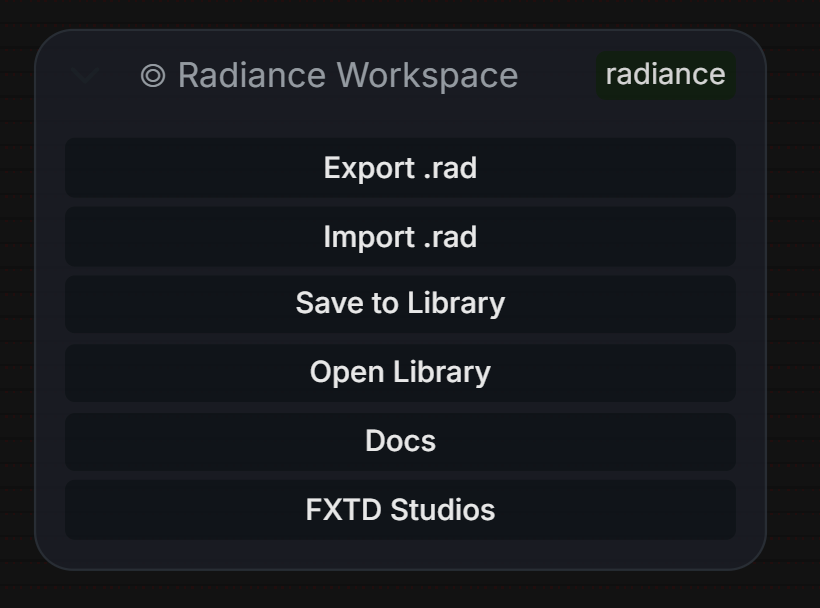
The Radiance Workspace node is the command center for your production. It handles project paths, versioning, and state management, ensuring that all 32-bit data is tracked correctly across your workflow.
- Add the Workspace Node: Right-click > Radiance > Project > Radiance Workspace.
- Set your Project Path: Point it to your production directory.
- Connect to Viewer: Link the
workspaceoutput to the Radiance Viewer to enable live telemetry and Python REPL.
<a name="node-reference"></a>◎ Node Reference (79 Professional Nodes)
The suite is organized into 11 specialized production zones to mirror industry-standard VFX software topology.
<details> <summary><b>◎ Project, Metadata & DNA (8 Nodes)</b></summary>| Node | Description | | :--- | :--- | | Radiance Workspace | Local Project, Shot & Version management with secure .rad v2 containers | | Radiance Manager | Cinematic Prompt Studio with 30+ Camera/Lens profiles | | Radiance DNA Reader/Writer | Extraction and injection of cinematic metadata | | Radiance DNA Validator | SHA256 integrity and version checking for workflow files | | Radiance Metadata Overlay | Custom burned-in metadata (Project, Shot, Resolution) |
</details> <details> <summary><b>◎ Production I/O & Loaders (10 Nodes)</b></summary>| Node | Description | | :--- | :--- | | Radiance Read / Write | Universal 32-bit I/O with auto-increment and high-bitrate support (H.265 10-bit, ProRes) | | Radiance Unified Loader | Smart model loader (Flux/SDXL) with precision auto-detection | | Radiance LoRA Stack | Multi-layer LoRA management in a single node | | Radiance CLIP Slot | Specialized CLIP conditioning slots for multi-prompt chains | | Radiance Image & Mask | Professional loader with non-destructive mask layering |
</details> <details> <summary><b>◎ HDR Imaging & Color Science (23 Nodes)</b></summary>| Node | Description | | :--- | :--- | | OCIO Color Transform | Industry-standard OpenColorIO v2.2 integration | | ACES 2.0 Output | Professional ACES 2.0 Display/View transforms | | Log Curve Decode/Encode | Precise curves for LogC3/C4, S-Log3, REDLog, etc. | | HDR Tone Map / Expand | Advanced dynamic range recovery and tonemapping | | Radiance VAE Encode/Decode | 16-bit precision VAE processing for high-fidelity latents | | Radiance LUT Apply/Blend | GPU-accelerated 33³ LUT processing with smooth blending | | Wide Gamut Utilities | DaVinci and ARRI Wide Gamut color space primitives |
</details> <details> <summary><b>◎ VFX Grading & Analysis (15 Nodes)</b></summary>| Node | Description | | :--- | :--- | | Radiance Grade | 32-bit Lift/Gamma/Gain/Offset with cinematic presets | | Radiance Grade Match | CIE L*a*b* mean/std statistics transfer for shot matching | | Apply Grade Info | Replay saved grade JSON strings onto new shots with strength control | | Radiance Waveform | GPU-accelerated RGB Parade / Luma / Overlay | | Radiance Vectorscope | Phase-accurate hue/sat monitoring with Skin Tone line | | Radiance False Color | IRE-calibrated 7-zone exposure mapping | | Radiance QC Pro | Automated technical QC (Gamut, Clip, Banding) |
</details> <details> <summary><b>◎ AI Vision & Temporal (15 Nodes)</b></summary>| Node | Description | | :--- | :--- | | Radiance Sampler Pro | High-end sampling (Flux/WAN) with AYS and Dynamic Guidance | | Radiance Resolution | Advanced resolution selection with 8-pixel alignment | | Depth Anything V2 | Professional monocular depth estimation | | Radiance Temporal Smooth| Motion-aware EMA flicker reduction for AI video | | Radiance Pro Upscale | Vectorized kernel upscaling (Lanczos/Mitchell/Catmull-Rom) |
</details><a name="quick-start"></a>◎ Quick Start Workflows
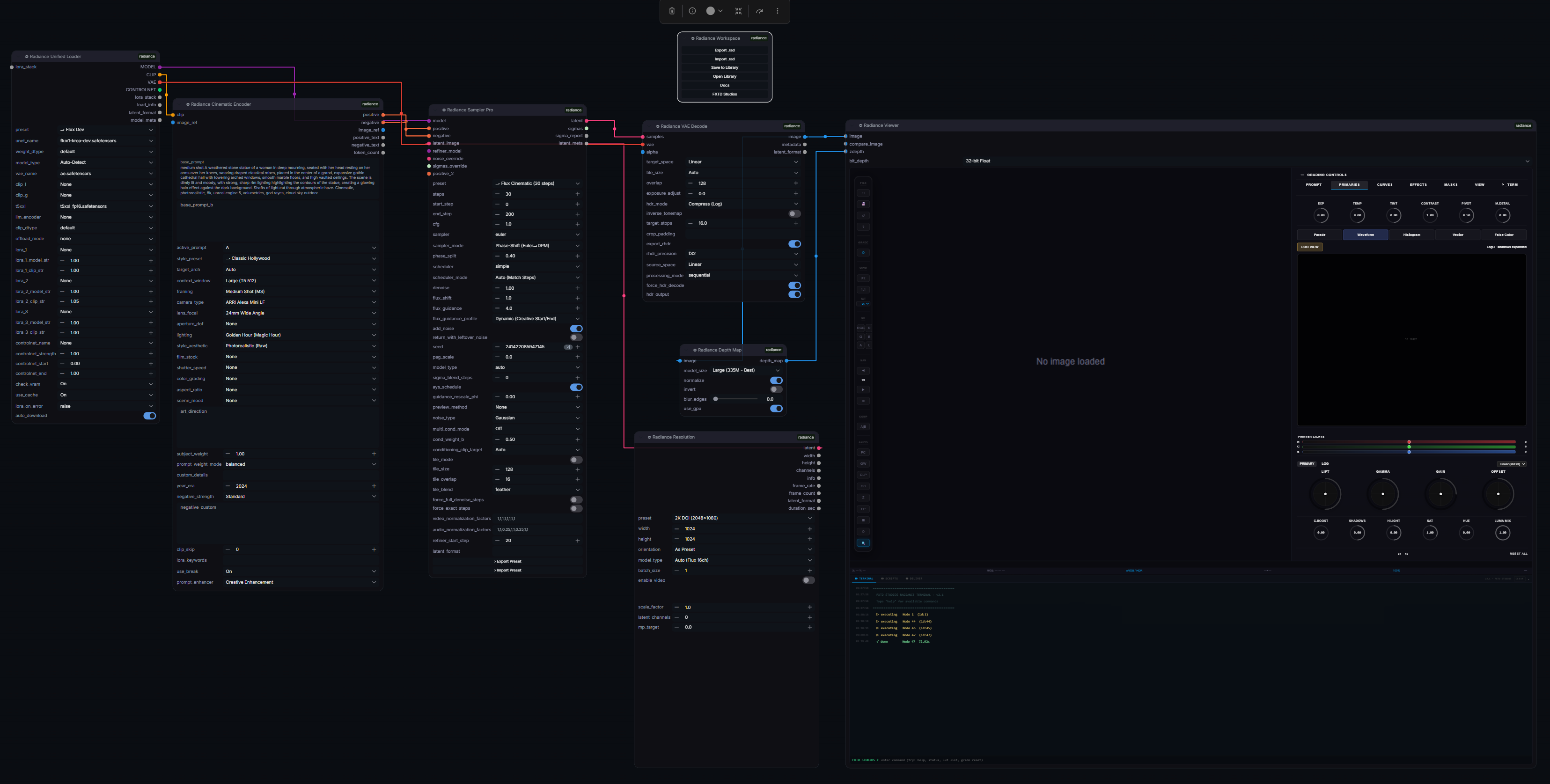
<a name="installation"></a>◎ Installation
Option 1: ComfyUI Manager
- Open ComfyUI Manager
- Search for Radiance
- Click Install
Option 2: Manual (Git)
cd ComfyUI/custom_nodes
git clone https://github.com/fxtdstudios/radiance.git
cd radiance
pip install -r requirements_windows.txt  # Or linux/mac_silicon
[!TIP] Linux/macOS Users: Ensure you have
libopenexr-devinstalled via your package manager before running the requirements install.
◎ Troubleshooting
ComfyUI Manager Security Level
If ComfyUI Manager refuses to install Radiance because only the default channel is allowed, install manually with Git:
cd ComfyUI/custom_nodes
git clone https://github.com/fxtdstudios/radiance.git
cd radiance
pip install -r requirements.txt
Restart ComfyUI after installation. If you use a platform-specific requirements file, choose requirements_windows.txt, requirements_linux.txt, or requirements_mac_silicon.txt.
Dependency Conflicts
Radiance avoids strict upper version caps where possible so ComfyUI and other custom nodes can resolve shared packages. If another extension conflicts, reinstall Radiance dependencies last, then restart ComfyUI.
EXR / HDR Saving
Use ◎ Radiance Write, ◎ Radiance Save EXR, or ◎ Save Image 16-bit for managed outputs. Radiance writes non-overwriting filenames and reports saved files to ComfyUI history so API users can discover generated outputs from prompt history.
For EXR support, Radiance sets OPENCV_IO_ENABLE_OPENEXR=1 at import time, but the Python EXR packages must still be installed. On Linux, install the system OpenEXR development package before pip install -r requirements_linux.txt.
Viewer Export
The viewer preview is interactive. To bake the result, run the workflow first, open the Radiance Viewer controls, then use the delivery/export controls. Grain, bloom, halation, diffusion, and denoise are baked by the delivery path; purely interactive display/navigation overlays are not part of the source image.
32-Bit HDR Expectations
Radiance preserves 32-bit float values when upstream data contains them. It cannot recover highlight or shadow detail that was already clipped in an 8-bit source image. For true HDR workflows, start from EXR/HDR, scene-linear, or float outputs where possible.
Viewer And Lens Controls
◎ Radiance Viewer is the current viewer node. Legacy workflows that reference the older Pro Viewer name are mapped to the current viewer. Lens effects are in the Viewer Lens tab; use 32-bit mode for the widest HDR preview range and use the Strong Preview preset when tuning bloom, halation, and anamorphic streaks.
Old Workflows
Use the .rad workflows in the workflows/ folder for current node layouts. Very old JSON workflows may contain stale widget order or renamed nodes and should be rebuilt or imported through the current Radiance Workspace tools.
<a name="viewer-shortcuts"></a>◎ Professional Keyboard Shortcuts
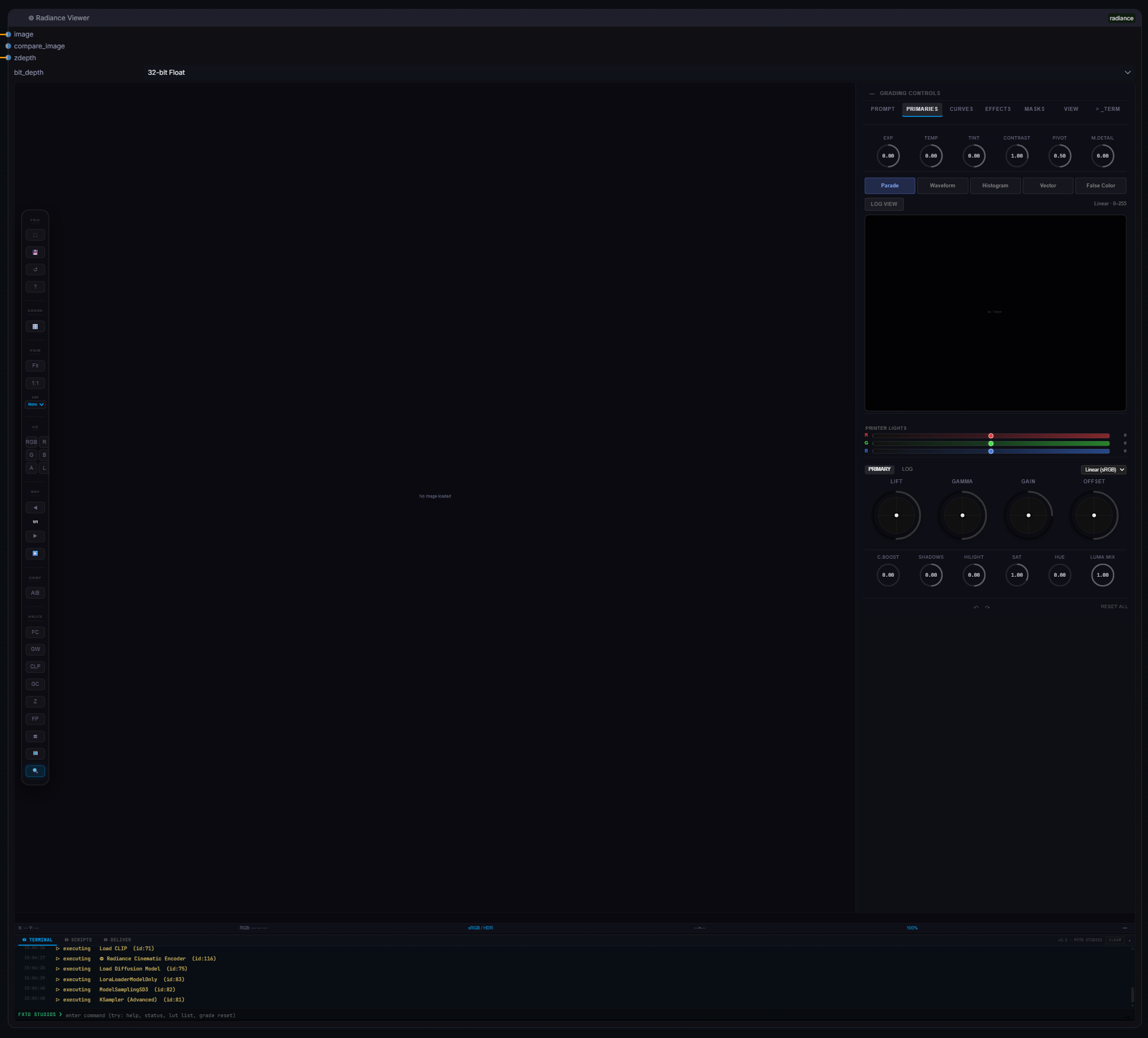
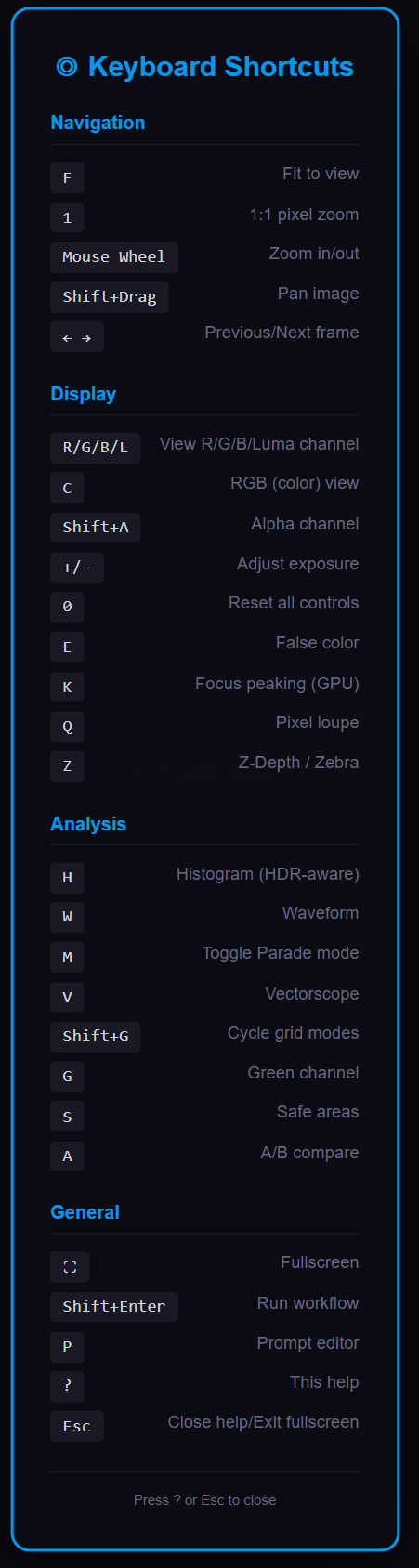
Radiance is designed for a keyboard-driven VFX workflow. Use these shortcuts to monitor, grade, and navigate your shots with industry-standard precision.
◎ Navigation & Playback
| Key | Action | | :--- | :--- | | Space | Toggle Playback | | ← / → | Previous / Next Frame | | F | Fit to View | | 1 | 1:1 Pixel Zoom | | Shift + Drag | Pan Image | | Esc | Exit Fullscreen / Close Panels |
◎ Channel Monitoring
| Key | Action | | :--- | :--- | | C | RGB (Color) View | | R | Red Channel | | G | Green Channel | | B | Blue Channel | | L | Luma Channel | | Shift + A | Alpha Channel |
◎ Analysis & Scopes
| Key | Action | | :--- | :--- | | W | Toggle Waveform (HDR-Aware) | | M | Toggle Waveform Parade Mode | | V | Toggle Vectorscope (w/ Skin Tone Line) | | S | Cycle Safe Area Overlays | | Shift + G | Cycle Grid Modes | | A | Cycle A|B Compare Modes |
◎ Community & Support
Radiance is backed by a professional team of VFX Technical Directors. Engage with us through our official channels:
◎ Official Discord Server
- Production Workflows: Access exclusive
.radtemplates and cinema-grade JSON presets. - Direct Engineer Support: Real-time troubleshooting and feature requests.
- Showcase: share your work and get feedback from industry veterans.
- Beta Access: Test experimental HDR and temporal nodes before public release.
◎ Technical Resources
- Documentation: radiance.fxtd.org
- Issue Tracker: GitHub Issues
- Official Site: fxtd.org
◎ License & Credits
- License: GPL-3.0
- Authors: Created by the FXTD Studios team.
- Technology: Built on OpenColorIO v2.2, OpenEXR, and Colour-Science.
- Special Thanks: The ComfyUI community for pushing the boundaries of AI generation.
◎ References
- Reinhard, E., Ashikhmin, M., Gooch, B., Shirley, P. Color Transfer between Images. IEEE CGA, 2001.
- Hable, J. Filmic Tonemapping Operators. GDC 2010.
- Hill, S. HDR Color in Call of Duty. SIGGRAPH 2014.
- Academy of Motion Picture Arts and Sciences. ACES 2.0 Reference Rendering Transform. 2024.
- Sobotka, T. AgX: A Minimal Color Transform. Blender Institute, 2023.
- Magnor, M. et al. Digital Video Processing for Engineers. Morgan & Claypool, 2012.
- OpenColorIO Contributors. OpenColorIO v2 Architecture. ASWF, 2023.
- Colour-Science for Python. https://www.colour-science.org/. 2024.
- Narkowicz, K. ACES Filmic Tone Mapping Curve. Blog, 2016.
- ITU-R BT.1203. Subjective Picture Quality Assessment for Digital Cable Television Systems. ITU, 1994.