
ComfyUI-RelayAPI
ComfyUI custom nodes for AI video/image generation via API relay stations (supports Grok, Veo, Gemini)
Nodes (6)
The Sticky Note Your Relay API Workflow Didn't Know It Needed
The Control Center That Makes Every Relay Node Work
Closed Image Models, Dropped Straight Into Your Graph
Suno Tracks, Generated Inside ComfyUI
An LLM That Lives in Your Graph (and Runs in Someone Else's Cloud)
Grok and Veo Video, Straight From Your ComfyUI Queue
ComfyUI-relayapi
ComfyUI 自定义节点包,用于通过中转站 API 调用文本、图像、视频和音乐生成服务。
节点
| 节点 | 用途 | | --- | --- | | Relay API Settings | 统一配置任务类型、平台、API 格式、中转站地址、模型和密钥 | | Relay Text Generator | 文本生成和多图视觉理解 | | Relay Image Generator | 文生图和图像编辑 | | Relay Video Generator | Grok / Veo 视频生成 | | Relay Sound Generator | Suno 音乐生成 |
安装
放到 ComfyUI 的 custom_nodes 目录:
ComfyUI/custom_nodes/ComfyUI-relayapi/
重启 ComfyUI 后,在 RelayAPI 分类下使用节点。
Relay API Settings
Settings 节点通过 info 输出把配置传给下游生成节点。
| 参数 | 说明 |
| --- | --- |
| task_type | image / video / sound / text |
| platform | 随任务类型切换 |
| api_format | 使用端点路径命名,随任务类型和平台切换 |
| api_base | 中转站地址 |
| model | 当前平台和格式可用的模型 |
| apikey | API Key,本地保存并在界面遮盖显示 |
| custom_api_base | 输入新地址添加;输入 delete:地址 删除 |
| custom_model | 输入新模型添加;输入 delete:模型名 删除 |
内置地址:
https://www.runninghub.cn
https://llm.runninghub.ai
https://yunwu.ai
https://ai.t8star.cn
https://api.bltcy.ai
注意:API Key 要和 api_base 对应。
API 格式
api_format 现在直接用端点路径命名,避免把中转站接口误解成官方原生格式。
| 任务 | 格式 |
| --- | --- |
| image | runninghub-/openapi/v2 / v1beta/models / v1/images / v1/chat/completions |
| video | runninghub-/openapi/v2 / v1/video / v1/videos / v2/videos |
| sound | runninghub-/openapi/v2 / suno/submit |
| text | runninghub-/v1 / v1beta/models / v1/chat/completions |
端点名只决定 URL;具体 payload 仍由对应的生成节点按文本、图像、视频、音乐任务分别拼装。
RunningHub
选择 runninghub-/openapi/v2(图像/视频/音乐)或 runninghub-/v1(文本)api_format 后,模型列表会切换为 RunningHub 对应模型。
图像/视频/音乐走 RunningHub 异步提交+轮询逻辑(/openapi/v2/ 端点),文本走标准 v1/chat/completions(base_url 自动指向 https://llm.runninghub.ai)。
| 任务 | platform | RH 模型 |
| --- | --- | --- |
| image | banana-pro | rhart-image-n-pro / rhart-image-n-pro-official |
| image | banana-2 | rhart-image-n-g31-flash / rhart-image-n-g31-flash-official |
| image | gpt-image2 | rhart-image-g-2 / rhart-image-g-2-official |
| video | Grok | rhart-video-g |
| video | Veo | rhart-video-v3.1-fast |
| sound | Suno | rhart-audio-suno-v5.5 |
| text | GeminiText / OpenaiText | anthropic/claude-opus-4.6 / openai/gpt-5.5 / google/gemini-3.1-pro-preview 等 |
图片上传使用 /openapi/v2/media/upload/binary,查询使用 POST /openapi/v2/query。
文本
平台:
| platform | api_format | 模型 |
| --- | --- | --- |
| GeminiText | v1beta/models | gemini-3.1-flash-lite-preview / gemini-3-flash-preview / gemini-3.1-pro-preview |
| GeminiText | v1/chat/completions | gemini-3.1-flash-lite-preview / gemini-3-flash-preview / gemini-3.1-pro-preview |
| GeminiText | runninghub-/v1 | anthropic/claude-opus-4.6 / openai/gpt-5.5 / google/gemini-3.1-pro-preview 等 |
| OpenaiText | v1/chat/completions | claude-opus-4-6 / grok-4.1,以及用户自定义模型 |
| OpenaiText | runninghub-/v1 | 同 GeminiText RH 模型 |
OpenaiText 只允许 v1/chat/completions 或 runninghub-/v1。
输入:
| 参数 | 说明 |
| --- | --- |
| prompt | 文本提示词 |
| image1 ~ image8 | 可选图片输入 |
| seed | 只用于 ComfyUI 重跑控制,不会传给 API |
输出:
| 输出 | 说明 |
| --- | --- |
| text | 提取后的纯文本结果 |
| response | 精简 JSON,只保留 code、text、platform、api_format、model、耗时、用量等字段 |
response 不输出 Gemini 原始 candidates 和 thoughtSignature,避免展示节点被长串内容卡住。
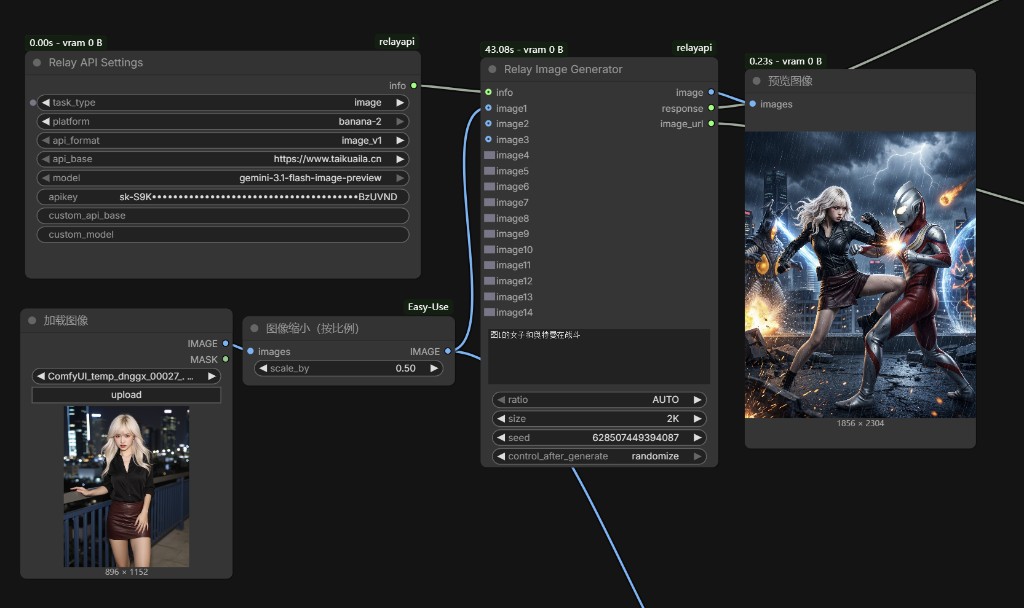
图像
平台和模型:
| platform | api_format | 模型 |
| --- | --- | --- |
| banana-pro | runninghub-/openapi/v2 | rhart-image-n-pro / rhart-image-n-pro-official |
| banana-pro | v1beta/models | gemini-3-pro-image-preview |
| banana-pro | v1/images | nano-banana-pro |
| banana-pro | v1/chat/completions | gemini-3-pro-image-preview |
| banana-2 | runninghub-/openapi/v2 | rhart-image-n-g31-flash / rhart-image-n-g31-flash-official |
| banana-2 | v1beta/models | gemini-3.1-flash-image-preview |
| banana-2 | v1/chat/completions | gemini-3.1-flash-image-preview |
| gpt-image2 | runninghub-/openapi/v2 | rhart-image-g-2 / rhart-image-g-2-official |
| gpt-image2 | v1/images | gpt-image-2 |
图像接口:
| api_format | 端点 |
| --- | --- |
| v1beta/models | /v1beta/models/{model}:generateContent |
| v1/images | /v1/images/generations 或 /v1/images/edits |
| v1/chat/completions | /v1/chat/completions |
输入:
| 参数 | 说明 |
| --- | --- |
| prompt | 文生图提示词或编辑指令 |
| ratio | 画面比例 |
| size | 1K / 2K / 4K |
| image1 ~ image16 | 可选参考图或编辑图 |
| quality / moderation | 主要用于 gpt-image2 |
| seed | 只用于 ComfyUI 重跑控制,不会传给 API |
格式说明:
| api_format | 行为 |
| --- | --- |
| v1beta/models | 使用 Gemini generationConfig.imageConfig,结构化传入 ratio 和 size |
| v1/images | 使用图像接口字段;gpt-image2 会把 ratio + size 换算成具体像素尺寸,例如 2K + 1:1 发送为 2048x2048 |
| v1/chat/completions | 不稳定识别结构化 size 字段;节点不会传 size 和 seed,当 ratio 不是 auto 时,会把比例要求自动拼进提示词 |
v1/chat/completions 自动拼接示例:
请生成宽高比为 21:9 的图片,严格保持这个画面比例。
输出:
| 输出 | 说明 |
| --- | --- |
| image | 生成图片 |
| response | 精简结果 JSON,大段 base64 会被省略 |
| image_url | 图片 URL,若接口返回 |
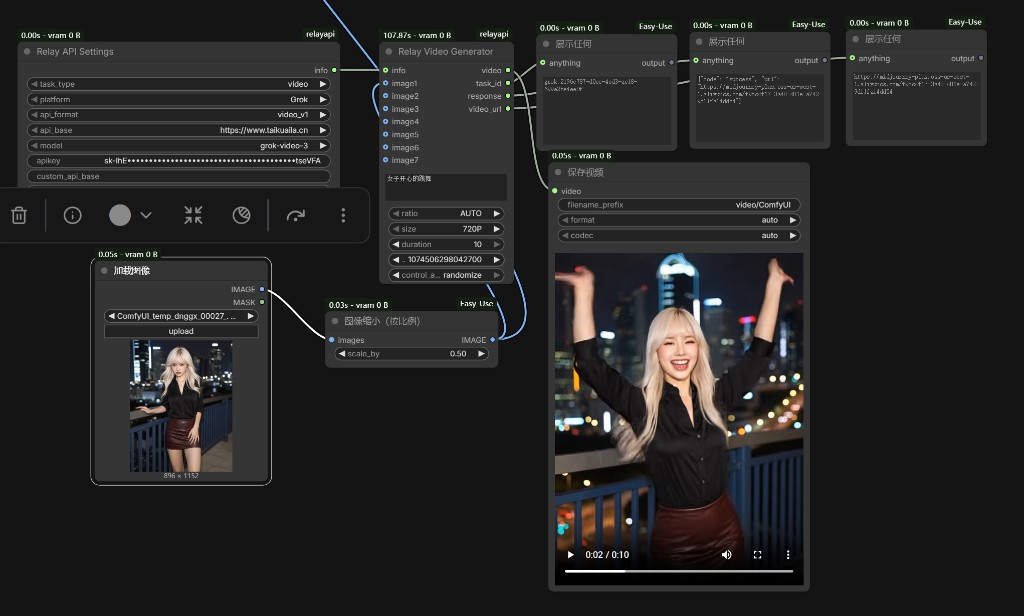
视频
平台:
| platform | 说明 | | --- | --- | | Grok | Grok 视频 | | Veo | Veo 视频 |
格式区别:
| api_format | 主要用途 | 创建 | 查询 |
| --- | --- | --- | --- |
| v1/video | V1 视频接口 | /v1/video/create | /v1/video/query?id={task_id} |
| v1/videos | OpenAI 视频格式 V1 接口 | /v1/videos | /v1/videos/{task_id} |
| v2/videos | BLT/柏拉图一类 V2 接口 | /v2/videos/generations | /v2/videos/generations/{task_id} |
v1/videos 如查询完成但没有直接返回视频 URL,会继续尝试:
/v1/videos/{task_id}/content
模型:
| platform | api_format | 模型 |
| --- | --- | --- |
| Grok | runninghub-/openapi/v2 | rhart-video-g |
| Grok | v1/video / v1/videos / v2/videos | grok-video-3 / grok-videos |
| Veo | runninghub-/openapi/v2 | rhart-video-v3.1-fast |
| Veo | v1/video / v1/videos / v2/videos | veo3.1 / veo3.1-fast / veo_3_1-lite / veo_3_1-lite-4K / veo_3_1-fast-4K |
Grok 参数:
| 参数 | 支持值 |
| --- | --- |
| size | 720P / 1080P |
| duration | 6 / 10 / 15 / 30 |
| ratio | auto / 16:9 / 9:16 / 1:1 / 4:3 / 3:4 / 3:2 / 2:3 |
Veo 参数:
| 参数 | 支持值 |
| --- | --- |
| size | 720P / 1080P。4K 由 *-4K 模型名决定,不再作为 size=4K 传入 |
| duration | 4 / 6 / 8 |
| ratio | 16:9 / 9:16 |
| enhance_prompt | true / false |
| enable_HD | true / false |
输出:
| 输出 | 说明 |
| --- | --- |
| video | 下载到本地临时目录后加载的视频 |
| task_id | 任务 ID |
| response | 精简结果 JSON,包含 URL、平台、格式和脱敏后的请求 payload |
| video_url | 视频 URL |
视频 response 中的图片 base64 会被省略成长度提示,避免展示节点卡死。
声音
Suno 格式:
runninghub-/openapi/v2
suno/submit
端点:
| api_format | 提交 | 查询 |
| --- | --- | --- |
| runninghub-/openapi/v2 | POST /openapi/v2/rhart-audio/suno-v5.5/single 或 custom | POST /openapi/v2/query |
| suno/submit | POST /suno/submit/music | GET /suno/fetch/{task_id} |
版本映射:
| 版本 | mv |
| --- | --- |
| V3 | chirp-v3.0 |
| V3.5 | chirp-v3.5 |
| V4 | chirp-v4 |
| V4.5 | chirp-auk |
| V4.5+ | chirp-bluejay |
| V5 | chirp-crow |
| V5.5 | chirp-fenix |
输入:
| 参数 | 说明 |
| --- | --- |
| generation_mode | 描述模式或歌词定制模式 |
| title / tags / prompt | 歌曲标题、风格和提示词 |
| make_instrumental | 是否纯音乐 |
| negative_tags | 不想要的风格 |
| continue_clip_id / continue_at | 续写参数 |
| seed | 只用于 ComfyUI 重跑控制,不会传给 API |
Suno 接口可能一次返回两首歌。当前节点的 audio 输出只取一个最佳 clip;完整列表仍在 response.query 里。
错误处理
节点失败时,response 输出:
{"code": "error", "message": "错误详情"}
如果接口返回空内容或非 JSON,视频节点会显示具体接口、HTTP 状态码和返回内容片段,方便判断是 key、base_url、端点还是服务端问题。
常见问题:
| 现象 | 原因 |
| --- | --- |
| Expecting value: line 1 column 1 | 接口返回空内容或非 JSON。通常是 api_base 和 key 混用,或端点不匹配 |
| PUBLIC_ERROR_UNSAFE_GENERATION | 视频生成被安全过滤 |
| Grok 选择 1080P 但结果仍为 720 | 请求已传 resolution: 1080p,若结果仍低分辨率,通常是中转站或模型通道忽略该档位 |
| 当前分组上游负载已饱和 | 中转站当前分组上游拥堵,换 key/分组或稍后重试 |
配置文件
本地配置保存到:
relay_config.json
保存内容包括:
- 自定义中转站地址
- 自定义模型
- 节点级 API Key 和 base_url
不要把含真实 API Key 的 relay_config.json 提交到公开仓库。