
Qwen3-TTS - Voice Synthesis & Cloning
ComfyUI custom nodes for speech synthesis, voice cloning, and voice design based on Qwen3-TTS
Nodes (9)
The Qwen3-TTS node that just works
Multi-role dialogue in one node
LoadSpeaker
The index card file for your dialogue cast
Stop re-extracting the same voice every run
Fine-tune your own voice with the experimental one
Clone a voice from a ten-second clip
Extract a voice once, reuse it everywhere
Invent a voice from a sentence
ComfyUI-Qwen-TTS
English | 中文版
⚠️ CRITICAL: transformers Version Requirement
Qwen3-TTS works on transformers 4.57.3 and transformers >= 5 (v5.0+ compatibility is provided by
tools/transformers5_shim.py, applied automatically on import). On transformers < 5 the shims are no-ops, so the 4.57.3 path is unchanged:pip install transformers==4.57.3 # v4 path (shims inactive) # or pip install "transformers>=5.0" # v5 path (shims applied)
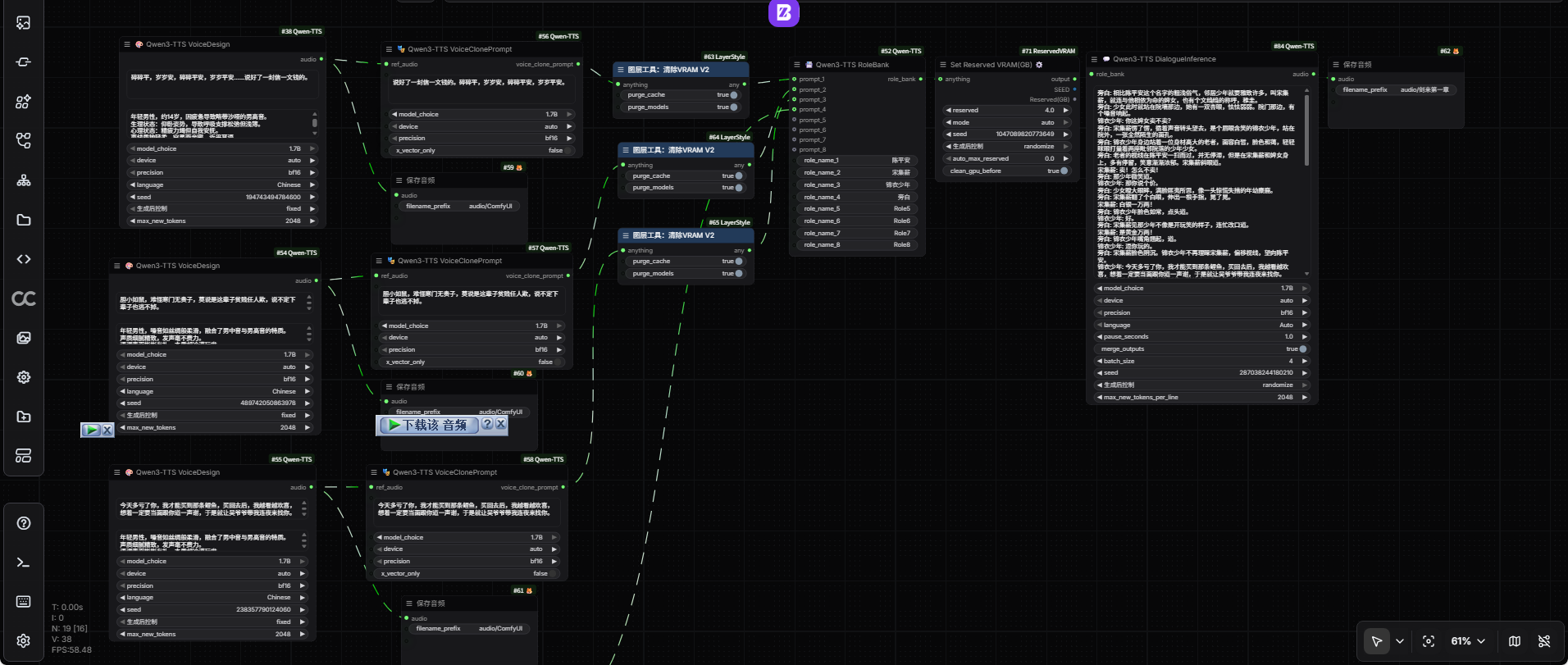
ComfyUI custom nodes for speech synthesis, voice cloning, and voice design, based on the open-source Qwen3-TTS project by the Alibaba Qwen team.
📋 Changelog
- 2026-04-12 (v1.0.7): Removed
QwenTTSConfigNodedue to voice inconsistency; fixed MPS precision bug & CustomVoice channel mismatch; code cleanup (update.md) - 2026-02-04: Added
extra_model_paths.yamlsupport (update.md) - 2026-01-29: Feature Update: Support for loading custom fine-tuned models & speakers (update.md)
- Note: Fine-tuning is currently experimental; zero-shot cloning is recommended for best results.
- 2026-01-27: UI Optimization: Sleek LoadSpeaker UI; fixed PyTorch 2.6+ compatibility (update.md)
- 2026-01-26: Functional Update: New voice persistence system (SaveVoice / LoadSpeaker) (update.md)
- 2026-01-24: Added attention mechanism selection & model memory management features (update.md)
- 2026-01-24: Added generation parameters (top_p, top_k, temperature, repetition_penalty) to all TTS nodes (update.md)
- 2026-01-23: Dependency compatibility & Mac (MPS) support, New nodes: VoiceClonePromptNode, DialogueInferenceNode (update.md)
Online Workflows
- Qwen3-TTS Multi-Role Multi-Round Dialogue Generation Workflow:
- Qwen3-TTS 3-in-1 (Clone, Design, Custom) Workflow:
Key Features
- 🎵 Speech Synthesis: High-quality text-to-speech conversion.
- 🎭 Voice Cloning: Zero-shot voice cloning from short reference audio.
- 🎨 Voice Design: Create custom voice characteristics based on natural language descriptions.
- 🚀 Efficient Inference: Supports both 12Hz and 25Hz speech tokenizer architectures.
- 🎯 Multilingual: Native support for 10 languages (Chinese, English, Japanese, Korean, German, French, Russian, Portuguese, Spanish, and Italian).
- ⚡ Integrated Loading: No separate loader nodes required; model loading is managed on-demand with global caching.
- ⏱️ Ultra-Low Latency: Supports high-fidelity speech reconstruction with low-latency streaming.
- 🧠 Attention Mechanism Selection: Choose from multiple attention implementations (sage_attn, flash_attn, sdpa, eager) with auto-detection and graceful fallback.
- 💾 Memory Management: Optional model unloading after generation to free GPU memory for users with limited VRAM.
Nodes List
1. Qwen3-TTS Voice Design (VoiceDesignNode)
Generate unique voices based on text descriptions.
- Inputs:
text: Target text to synthesize.instruct: Description of the voice (e.g., "A gentle female voice with a high pitch").model_choice: Currently locked to 1.7B for VoiceDesign features.attention: Attention mechanism (auto, sage_attn, flash_attn, sdpa, eager).unload_model_after_generate: Unload model from memory after generation to free GPU memory.
- Capabilities: Best for creating "imaginary" voices or specific character archetypes.
2. Qwen3-TTS Voice Clone (VoiceCloneNode)
Clone a voice from a reference audio clip.
- Inputs:
ref_audio: A short (5-15s) audio clip to clone.ref_text: Text spoken in theref_audio(helps improve quality).target_text: The new text you want the cloned voice to say.model_choice: Choose between 0.6B (fast) or 1.7B (high quality).attention: Attention mechanism (auto, sage_attn, flash_attn, sdpa, eager).unload_model_after_generate: Unload model from memory after generation to free GPU memory.
3. Qwen3-TTS Custom Voice (CustomVoiceNode)
Standard TTS using preset speakers.
- Inputs:
text: Target text.speaker: Selection from preset voices (Aiden, Eric, Serena, etc.).instruct: Optional style instructions.attention: Attention mechanism (auto, sage_attn, flash_attn, sdpa, eager).unload_model_after_generate: Unload model from memory after generation to free GPU memory.
4. Qwen3-TTS Role Bank (RoleBankNode) [New]
Collect and manage multiple voice prompts for dialogue generation.
- Inputs:
- Up to 8 roles, each with:
role_name_N: Name of the role (e.g., "Alice", "Bob", "Narrator")prompt_N: Voice clone prompt fromVoiceClonePromptNode
- Up to 8 roles, each with:
- Capabilities: Create named voice registry for use in
DialogueInferenceNode. Supports up to 8 different voices per bank.
5. Qwen3-TTS Voice Clone Prompt (VoiceClonePromptNode) [New]
Extract and reuse voice features from reference audio.
- Inputs:
ref_audio: A short (5-15s) audio clip to extract features from.ref_text: Text spoken in theref_audio(highly recommended for better quality).model_choice: Choose between 0.6B (fast) or 1.7B (high quality).attention: Attention mechanism (auto, sage_attn, flash_attn, sdpa, eager).unload_model_after_generate: Unload model from memory after generation to free GPU memory.
- Capabilities: Extract a "prompt item" once and use it multiple times across different
VoiceCloneNodeinstances for faster and more consistent generation.
6. Qwen3-TTS Multi-role Dialogue (DialogueInferenceNode) [New]
Synthesize complex dialogues with multiple speakers.
- Inputs:
script: Dialogue script in format "RoleName: Text".role_bank: Role bank fromRoleBankNodecontaining voice prompts.model_choice: Choose between 0.6B (fast) or 1.7B (high quality).attention: Attention mechanism (auto, sage_attn, flash_attn, sdpa, eager).unload_model_after_generate: Unload model from memory after generation to free GPU memory.pause_seconds: Silence duration between sentences.merge_outputs: Merge all dialogue segments into a single long audio.batch_size: Number of lines to process in parallel (larger = faster but more VRAM).
- Capabilities: Handles multi-role speech synthesis in a single node, ideal for audiobook narration or roleplay scenarios.
7. Qwen3-TTS Load Speaker (LoadSpeakerNode) [New]
Load saved voice features and metadata with zero configuration.
- Capabilities: Enables a "Select & Play" experience by auto-loading pre-computed features and metadata.
8. Qwen3-TTS Save Voice (SaveVoiceNode) [New]
Persist extracted voice features and metadata to disk for future use.
- Capabilities: Build a permanent voice library for reuse via
LoadSpeakerNode.
Attention Mechanisms
All nodes support multiple attention implementations with automatic detection and graceful fallback:
| Mechanism | Description | Speed | Installation |
|-----------|-------------|-------|--------------|
| sage_attn | SAGE attention implementation | ⚡⚡⚡ Fastest | pip install sageattention |
| flash_attn | Flash Attention 2 | ⚡⚡ Fast | pip install flash_attention |
| sdpa | Scaled Dot Product Attention (PyTorch built-in) | ⚡ Medium | Built-in (no installation) |
| eager | Standard attention (fallback) | 🐢 Slowest | Built-in (no installation) |
| auto | Automatically selects best available option | Varies | N/A |
Auto-Detection Priority
When attention: "auto" is selected, the system checks in this order:
- sage_attn → If installed, use SAGE attention (fastest)
- flash_attn → If installed, use Flash Attention 2
- sdpa → Always available (PyTorch built-in)
- eager → Always available (fallback, slowest)
The selected mechanism is logged to the console for transparency.
Graceful Fallback
If you select an attention mechanism that's not available:
- Falls back to
sdpa(if available) - Falls back to
eager(as last resort) - Logs the fallback decision with a warning message
Older NVIDIA GPUs / missing CUDA kernels
For pre-Ampere GPUs such as the GTX 1080 Ti (compute capability 6.1), the loader
uses eager attention and changes bf16 to fp32, including when device is
auto. This conservative compatibility mode also overrides explicitly selected
accelerated attention. FP32 uses more VRAM; the 0.6B model may be preferable.
Before downloading or loading weights on CUDA, a small kernel checks the runtime.
no kernel image is available for execution on the device or invalid device function indicates that a CUDA kernel cannot run on the GPU. The error now
includes the GPU, PyTorch/CUDA versions and compiled architectures, and stops
instead of retrying the same CUDA configuration as an attention fallback.
Install a matching PyTorch/torchaudio build (and compatible CUDA extensions) that
supports your GPU in ComfyUI's Python environment, then restart ComfyUI.
Changing attention cannot add missing kernels to a PyTorch build. Alternatively,
select device=cpu, precision=fp32, attention=eager (slower, requires system RAM).
A successful small-kernel check does not guarantee support for every model kernel.
Model Caching
- Models are cached with attention-specific keys
- Changing attention mechanism automatically clears cache and reloads model
- Same model with different attention mechanisms coexists in cache
Memory Management
Model Unloading After Generation
The unload_model_after_generate toggle is available on all nodes:
- Enabled: Clears model cache, GPU memory, and runs garbage collection after generation
- Disabled: Model remains in cache for faster subsequent generations (default)
When to use:
- ✅ Enable if you have limited VRAM (< 8GB)
- ✅ Enable if you need to run multiple different models sequentially
- ✅ Enable if you're done with generation and want to free memory
- ❌ Disable if you're generating multiple clips with the same model (faster)
Console Output:
🗑️ [Qwen3-TTS] Unloading 1 cached model(s)...
✅ [Qwen3-TTS] Model cache and GPU memory cleared
Installation
Ensure you have the required dependencies:
pip install torch torchaudio transformers librosa accelerate
Model Directory Structure
ComfyUI-Qwen-TTS automatically searches for models in the following priority:
ComfyUI/
├── models/
│   └── qwen-tts/
│       ├── Qwen/Qwen3-TTS-12Hz-1.7B-Base/
│       ├── Qwen/Qwen3-TTS-12Hz-0.6B-Base/
│       ├── Qwen/Qwen3-TTS-12Hz-1.7B-VoiceDesign/
│       ├── Qwen/Qwen3-TTS-Tokenizer-12Hz/
│       └── voices/ (Saved presets .wav/.qvp)
Note: You can also use extra_model_paths.yaml to define a custom model path:
qwen-tts: D:\MyModels\Qwen
Tips for Best Results
Audio Quality
- Cloning: Use clean, noise-free reference audio (5-15 seconds).
- Reference Text: Providing text spoken in reference audio significantly improves quality.
- Language: Select the correct language for best pronunciation and prosody.
Performance & Memory
- VRAM: Use
bf16precision to save significant memory with minimal quality loss. - Attention: Use
attention: "auto"for automatic selection of fastest available mechanism. - Model Unloading: Enable
unload_model_after_generateif you have limited VRAM (< 8GB) or need to run multiple different models. - Local Models: Pre-download weights to
models/qwen-tts/to prioritize local loading and avoid HuggingFace timeouts.
Attention Mechanisms
- Best Performance: Install
sage_attnorflash_attnfor 2-3x speedup over sdpa. - Compatibility: Use
sdpa(default) for maximum compatibility - no installation required. - Low VRAM: Use
eagerwith smaller models (0.6B) if other mechanisms cause OOM errors.
Dialogue Generation
- Batch Size: Increase
batch_sizefor faster generation (more VRAM usage). - Pauses: Adjust
pause_secondsto control timing between dialogue segments. - Merge: Enable
merge_outputsfor continuous dialogue; disable for separate clips.
Acknowledgments
- Qwen3-TTS: Official open-source repository by Alibaba Qwen team.
License
- This project is licensed under the Apache License 2.0.
- Model weights are subject to the Qwen3-TTS License Agreement.