
ComfyUI Extension
ComfyUI Browser Load Image
Enhanced Load Image/Video nodes for ComfyUI with visual thumbnail browser, hover preview, draggable/resizable/maximizable modal
flashcol/ComfyUI_BrowserLoadImage
Nodes3
On cloudLocal install
Categoryimage, video
Stars3
Updated3 months ago
Nodes (3)
Readme
ComfyUI Browser Load Image
Enhanced Load Image / Video nodes for ComfyUI with a visual browser interface.


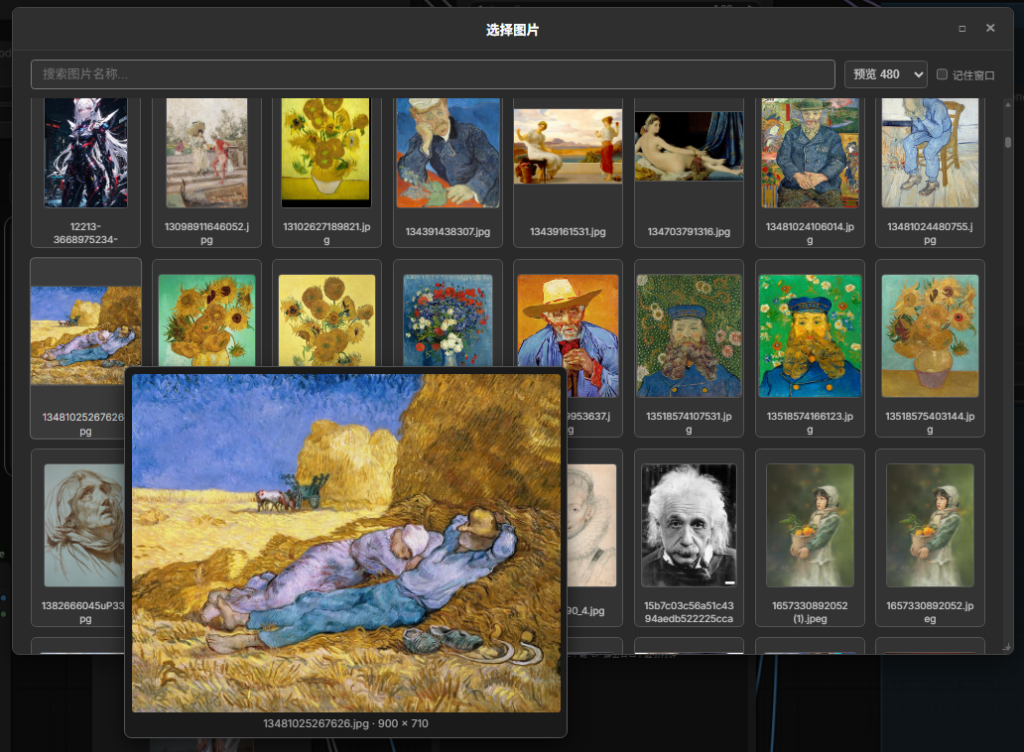
✨ Features
- Visual Media Browser — Browse and select images/videos from the input folder with a thumbnail grid modal
- Hover Preview — Hover over any thumbnail to see a large preview with filename and original dimensions
- Configurable Preview Size — Choose preview size from dropdown (320 / 480 / 640 / 768 / 1024)
- Draggable Modal — Drag the title bar to reposition the modal
- Resizable Modal — Drag the bottom-right corner to resize (min 400×300)
- Maximize Button — Click □ to toggle fullscreen
- Remember Layout — Check "记住窗口" to persist your preferred window position and size
- Search & Filter — Real-time search to quickly find files by name
- Keyboard Navigation — Arrow keys, PageUp/Down, Home/End for scrolling; ESC to close
📦 Included Nodes
| Node | Description | Output | |------|-------------|--------| | Browser Load Image | Load images with visual browser | IMAGE, MASK | | Browser Load Video to Image | Convert video to image sequence | IMAGE, INT, INT | | Browser Load Video | Load video (standard VIDEO type) | VIDEO |
🔧 Installation
Option 1: ComfyUI Manager (Recommended)
Search for ComfyUI_BrowserLoadImage in ComfyUI Manager and install.
Option 2: Manual Installation
cd ComfyUI/custom_nodes
git clone https://github.com/flashcol/ComfyUI_BrowserLoadImage.git
cd ComfyUI_BrowserLoadImage
pip install -r requirements.txt
Restart ComfyUI after installation.
Dependencies
- Image node: No extra dependencies (uses PIL/Pillow included with ComfyUI)
- Video nodes: Requires
opencv-python(pip install opencv-python)
🖱️ Usage
- Add a Browser Load Image node to your workflow
- Click the "浏览图片" (Browse Images) button
- Browse, search, and click a thumbnail to select it
- The selected file is set as the node's input
📁 Project Structure
ComfyUI_BrowserLoadImage/
├── __init__.py              # Plugin entry point
├── nodes/
│   ├── utils.py             # Shared utilities
│   ├── browser_load_image.py
│   ├── browser_load_video.py
│   └── browser_load_video_standard.py
├── web/
│   ├── js/browserLoadImage.js   # Frontend extension
│   └── css/browserLoadImage.css # Stylesheet reference
├── config/settings.py       # Constants
└── tests/test_nodes.py      # Unit tests
🧪 Running Tests
cd ComfyUI/custom_nodes/ComfyUI_BrowserLoadImage
python -m pytest tests/ -v