
ComfyUI Flamin Galah
ComfyUI nodes that turn filmmaker-style fields and images into MiniMax H3 T2VA/I2VA prompts via local Ollama or the xAI Grok API.
Nodes (4)
The one node in the pack that needs a key — and the only one that writes the frame-lock line
Point it at a still, get a shot paragraph back — no cloud, no key
MiniMax H3 wants a three-field prompt, not a paragraph
Make ComfyUI turn the PC off when the queue drains
ComfyUI Flamin Galah
Director-style prompt building for MiniMax H3, powered by local Ollama models or the xAI Grok API.
Turn scene directions or a reference image into structured video prompts, including visual descriptions, soundscapes, and music guidance. All three nodes are geared towards MiniMax H3
Every node returns one STRING output named h3_prompt. This pack builds prompts; it does not generate images or videos, install MiniMax models, or submit video-generation jobs.
Repository · Ollama · xAI API documentation
Nodes at a glance
Prompt nodes appear under Add Node → prompt → Flamin Galah. The shutdown node appears under Add Node → System.
| Node | Input workflow | Provider | Output |
| --- | --- | --- | --- |
| Flamin Galah Prompt Director (Ollama) | Scene fields; optional first-frame image | Ollama | H3-style T2VA or I2VA prompt |
| Flamin Galah Image Prompt Builder (Ollama) | Optional image_1, optional image_2, plus scene directions | Ollama | I2V or I2I from one image, Ref2VA from both, or T2VA with no image |
| Flamin Galah Image Prompt Builder (Grok) | Optional image_1, optional image_2, plus scene directions | xAI Grok API | I2VA from either image, Ref2VA from both, or T2VA with no image |
| Flamin Galah Shutdown | Pass-through trigger; enabled toggle; action; delay | Local (Windows) | Pass-through trigger (optional shutdown/reboot) |
T2VA means the pack's text-to-video-with-audio prompt mode. I2VA means its image-to-video-with-audio prompt mode. These labels describe prompt text, not generation performed by the nodes.
Installation
Install the supplied ZIP
- Extract the ZIP.
- Place the included
ComfyUI-Flamin-Galahfolder insideComfyUI/custom_nodes/. - If updating an existing installation, back it up and replace that folder. Do not keep two active copies of this pack in
custom_nodes. - Fully restart ComfyUI, then reload its browser interface.
- Add the nodes from prompt → Flamin Galah.
The resulting layout should be:
ComfyUI/
└── custom_nodes/
    └── ComfyUI-Flamin-Galah/
        ├── __init__.py
        ├── nodes/
        └── web/
Avoid an extra nested ComfyUI-Flamin-Galah/ComfyUI-Flamin-Galah/ folder.
Clone the upstream repository
cd ComfyUI/custom_nodes
git clone https://github.com/flamin-galah/ComfyUI-Flamin-Galah.git
The upstream repository may still use earlier node titles. Use the supplied ZIP to install this renamed build.
Requirements
- A working ComfyUI installation.
torch,numpy, andPillow, normally included with ComfyUI.- Ollama with installed models for the two local nodes, or an xAI API key for the Grok node.
There are no additional Python dependencies declared by the pack.
Ollama setup
The Prompt Director and Image Prompt Builder (Ollama) call Ollama's /api/chat endpoint. The default server is http://localhost:11434.
-
Install and start Ollama.
-
Pull a text-writing model, for example:
ollama pull llama3.2 -
For image input, also pull a vision-capable model, for example:
ollama pull qwen2.5vlAlternatives include
llavaandllama3.2-vision. You only need one suitable vision model, not all three. -
Start or restart ComfyUI after the models are available.
-
Explicitly select a vision model for
vision_modeland a writer model forollama_modelorprompt_model.
The correct official Qwen tag is qwen2.5vl, not qwen2.5-vl. See the Qwen2.5-VL library page. The Llama 3.2 library page describes the text-only writer example.
Model suitability, resource requirements, and response quality depend on the model you select. For adult-themed creative requests, choose an appropriate model and follow its applicable terms; support is not guaranteed by this pack.
Model dropdowns and remote servers
The dropdowns are populated from GET /api/tags when ComfyUI requests the node's input schema. Current discovery uses the default localhost server; it does not use the custom ollama_url widget value.
Installed model names are sorted alphabetically and are not filtered by vision capability. The first selected model may therefore be unsuitable for image input. Restarting ComfyUI is the simplest way to refresh the choices after starting Ollama or pulling a model.
Changing ollama_url changes the destination of generation requests. A remote URL sends prompt and image data to that server; the workflow is only local when the configured server is local.
Grok setup
Flamin Galah Image Prompt Builder (Grok) uses this endpoint by default:
https://api.x.ai/v1/chat/completions
Provide a key through an environment variable in the process that launches ComfyUI:
# Linux / macOS shell
export XAI_API_KEY="YOUR_XAI_API_KEY"
# Windows PowerShell
$env:XAI_API_KEY = "YOUR_XAI_API_KEY"
GROK_API_KEY is also supported. Alternatively, enter the key in the node's api_key widget; a non-empty widget value takes precedence over the environment variables.
Environment variables are preferable for shareable workflows. The key widget is a normal visible string field. Check saved workflow files for secrets before sharing them.
The current dropdown contains grok-4.7, grok-4.6, grok-4.5, grok-4, and grok-2-vision-1212, with grok-4.7 selected by default. This is a hard-coded list, not live account discovery. Model availability and image support depend on the provider and your account; consult the current model catalog.
Privacy: the Grok node uploads the first image in the batch and sends prompt text to the configured endpoint. A custom
grok_urlalso receives the bearer API key. Use a trusted HTTPS endpoint, and inspect endpoint settings in workflows received from others. Provider usage charges may apply.
Node reference
Flamin Galah Prompt Director (Ollama)
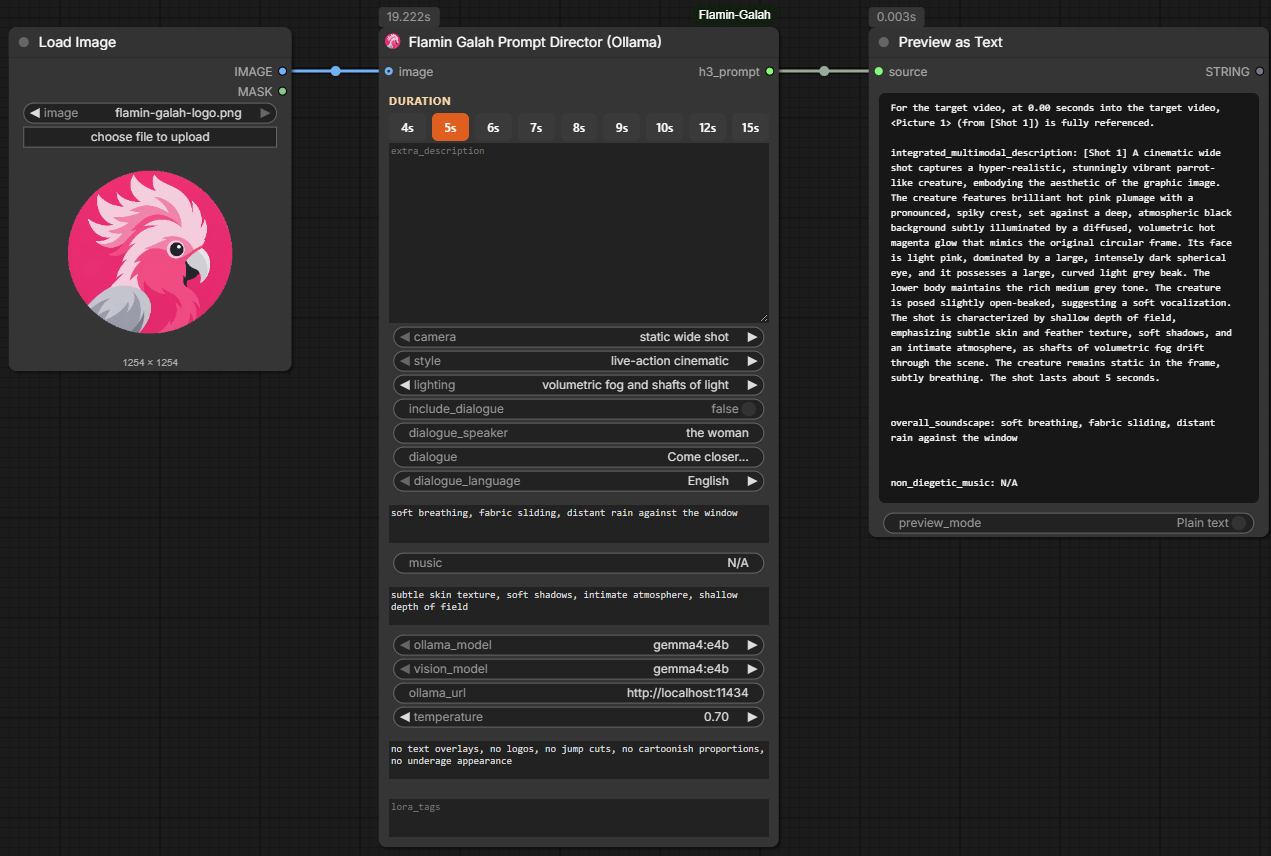
Builds a prompt from scene directions and filmmaker-style controls using Ollama.
- Without an image: writes a T2VA-style prompt.
- With an image: asks a vision model to describe frame 0, then asks a writer model to develop the requested scene as an I2VA-style prompt.
- Output:
h3_prompt(STRING).
Main widgets
| Widget | Purpose |
| --- | --- |
| extra_description | Subject, scene, action, and continuation. Multiline editor; the frontend requests a taller editor for this node. |
| camera | Camera angle or motion preset, such as static wide shot, slow push-in, orbit, handheld, or pan. |
| style | Visual style preset, including live-action, photorealistic, glamour, anime, cyberpunk, or documentary. |
| lighting | Lighting preset, including candlelight, neon, golden hour, moonlight, or chiaroscuro. |
| duration_seconds | Desired duration written into the prompt, not a video-generator setting. Backend range: 4–15 seconds. |
| include_dialogue | Enables insertion of the supplied dialogue. |
| dialogue_speaker | Speaker label. |
| dialogue | Exact line to insert; leading and trailing whitespace is trimmed. |
| dialogue_language | Language tag. Selecting other inserts an unlabelled <d>…</d> tag. |
| soundscape | Desired diegetic audio, such as ambience, breathing, fabric movement, or footsteps. |
| music | Non-diegetic score guidance. Use N/A for no score. |
| extra_details | Additional texture, atmosphere, depth of field, or scene details. |
| ollama_model | Text-writing model. |
The duration pills offer 4, 5, 6, 7, 8, 9, 10, 12, and 15 seconds. Verify the final text: current cleanup does not replace a different duration already written by the model.
Optional inputs
| Input | Purpose |
| --- | --- |
| image | Connecting an IMAGE enables image-based prompting. Only batch item 0 is used. |
| vision_model | Model used to describe the connected image; select a vision-capable model. |
| ollama_url | Server URL; defaults to http://localhost:11434. |
| temperature | Generation temperature; defaults to 0.7. |
| negative_notes | Guidance supplied to the writer, not a separate output field. |
| lora_tags | Appends a LoRA tag: section after the prompt when populated. |
The writer is instructed to preserve the reference image, describe camera motion, separate visuals from audio, and avoid inventing dialogue. These are model instructions, not a guarantee that every response satisfies every rule.
If the writer fails, this node returns a structured text fallback and logs the failure. If image description fails, it currently continues without a reliable image-description anchor. Check the ComfyUI console and review the result before using it downstream.
Flamin Galah Image Prompt Builder (Ollama)
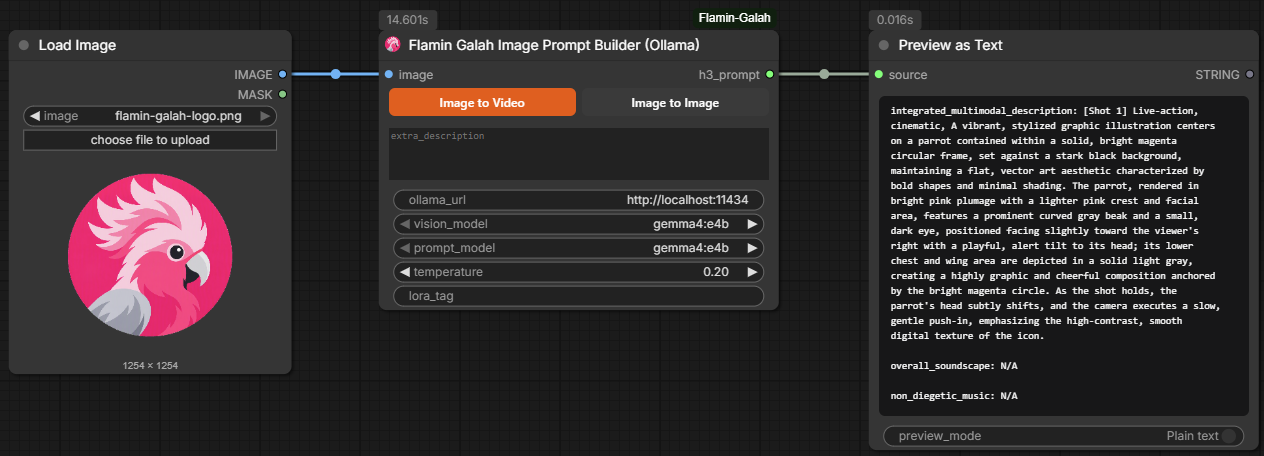
Starts from a still image and uses separate Ollama vision and writing passes. It does not accept video input.
- The vision model describes the first image in the batch.
- The writer combines that description with
extra_description. - In Image to Video mode, a third call writes the soundscape. Image to Image mode skips this call.
| Input | Purpose |
| --- | --- |
| image | Required IMAGE; only batch item 0 is used. |
| output_mode | Image to Video or Image to Image. |
| extra_description | Additional action, camera direction, or continuation; empty by default. |
| vision_model | Vision-capable Ollama model. |
| prompt_model | Ollama writer model. |
| temperature | Defaults to 0.2. |
| ollama_url | Defaults to http://localhost:11434. |
| lora_tag | Optional text appended as a LoRA tag: section. |
Image to Video output: starts with For the target video, at 0.00 seconds into the target video, <Picture 1> (from [Shot 1]) is fully referenced., followed by one blank line and the three H3 fields. The formatter adds the reference line and a [Shot 1] prefix. It does not inject a live-action style. non_diegetic_music is written from the shot unless the user asks for no music.
Image to Image output: a plain prompt paragraph rather than the three video fields. It still uses the output socket named h3_prompt.
The video writer is instructed to establish the image's exact opening style, composition, appearance, pose, lighting, and spatial relationships before developing the requested action. Changes belong after frame 0. overall_soundscape: N/A is reserved for explicitly requested complete silence; a quiet or static image alone is not a silence request. Empty video descriptions or soundscapes raise an error rather than silently creating an incomplete prompt.
This node downsizes the image sent to vision to a maximum side of 1024 pixels and encodes it as JPEG. The Prompt Director and Grok node currently use full-resolution PNGs instead.
Flamin Galah Image Prompt Builder (Grok)
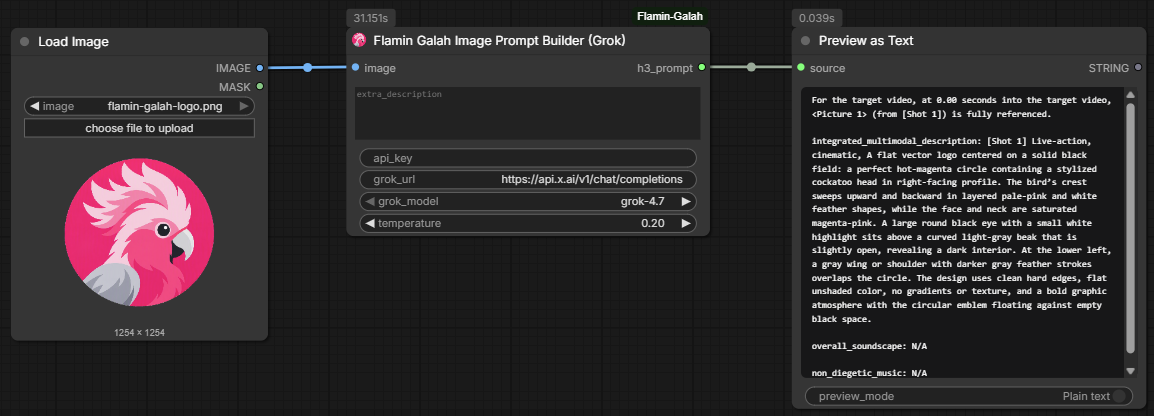
Uses the configured xAI-compatible API rather than Ollama.
- With either
image_1orimage_2connected, describes that still, then rewrites it whenextra_descriptionis non-empty. - With both
image_1andimage_2connected, writes an official H3 full-reference prompt. The two stills are subject references, not first and last frames. - With no image, writes a T2VA shot from
extra_description. Text-only mode requires that field. - One-image and text-only paths generate a soundscape and a non-diegetic music line. Music is
N/Aonly when the user asks for no music. - Returns an I2VA block for one image, a six-section Ref2VA block for two images, or a T2VA block when no image is connected.
| Input | Purpose |
| --- | --- |
| image_1 | Optional IMAGE. Alone, an I2VA still. With image_2, the Picture 1 subject source. Only batch item 0 is used. |
| image_2 | Optional IMAGE. Alone, an I2VA still. With image_1, the Picture 2 subject source. Only batch item 0 is used. |
| extra_description | Additional action, camera direction, or continuation; empty by default. |
| api_key | Optional widget key; otherwise resolved from the environment. |
| grok_url | API endpoint; use only a trusted destination. |
| grok_model | Model selected from the bundled list. |
| temperature | Defaults to 0.2. |
A run makes two model calls, or three when extra directions are supplied. The original image is attached to the first call; later calls use text derived from the description. API failures raise errors rather than using the Prompt Director's structured fallback.
Flamin Galah Shutdown

Pass-through node for the end of a workflow (for example after a video save). When enabled is on, it issues a Windows shutdown or reboot command after the given delay. When off, it does nothing and simply passes the trigger through.
| Input | Purpose |
| --- | --- |
| trigger | Any input. Passed through unchanged. Used so the node can sit after another node (for example Save Video). |
| enabled | Boolean toggle. Default false. When off, the node does nothing. |
| action | shutdown or reboot. |
| delay_seconds | Delay before the action. 10 to 86400, default 60. |
- Windows only. Requires the process to have permission to run
shutdown. - Appears under Add Node → System.
- To cancel a pending shutdown or reboot, open a Command Prompt and run:
shutdown -a
Prompt structure and examples
The video-oriented paths use these fields:
integrated_multimodal_description: [Shot 1] ...

overall_soundscape: ...

non_diegetic_music: ...
Text-based video prompt
integrated_multimodal_description: [Shot 1] Live-action cinematic. A woman in a red coat stands beside a rain-streaked window and slowly turns towards the room. The camera makes a gentle push-in. Warm practical lighting contrasts with the cool blue street outside. The shot lasts about 5 seconds.

overall_soundscape: Rain taps against the glass. Fabric rustles as she turns. Quiet room tone continues underneath.

non_diegetic_music: N/A
Image-based video prompt
The Prompt Director's image path and the Grok node prepend:
For the target video, at 0.00 seconds into the target video, <Picture 1> (from [Shot 1]) is fully referenced.

integrated_multimodal_description: [Shot 1] The scene begins from the supplied still, preserving the subject, clothing, composition, and lighting. The subject slowly turns towards the camera as it moves forward.

overall_soundscape: Soft fabric movement and quiet room ambience.

non_diegetic_music: Sparse piano notes at a slow tempo, joined by a soft sustained pad that fades at the end.
Two-image output uses MiniMax H3 full-reference sections, not bracketed production headings. Character stills are cited inside <Subject 1> and <Subject 2>; standalone <Picture N> lines are reserved for concrete frame anchors.
subject_definitions:
<Subject 1> is the primary subject shown in Picture 1, with that still's face, hair, clothing, and distinctive features.
<Subject 2> is the secondary subject shown in Picture 2, with that still's face, hair, clothing, and distinctive features.

summary:
[reference generation] <Subject 1> and <Subject 2> meet in the requested scene while both identities stay intact.

retention_analysis:
<Subject 1> (appears in [Shot 1]): fully_preserved - identity, facial features, clothing, and visual characteristics from Picture 1 are retained.
<Subject 2> (appears in [Shot 1]): fully_preserved - identity, facial features, clothing, and visual characteristics from Picture 2 are retained.

detailed_description:
[Shot 1] ...

overall_soundscape:
...

non_diegetic_music:
...
Ollama Image Prompt Builder video output
The local Image Prompt Builder uses MiniMax's official I2VA opening line in Image to Video mode. The <Picture 1> marker identifies the actual first frame. The opening visual style and composition must come from that image, not an unconditional live-action preset.
For the target video, at 0.00 seconds into the target video, <Picture 1> (from [Shot 1]) is fully referenced.

integrated_multimodal_description: [Shot 1] 2D vector illustration. The pink cockatoo logo shown in <Picture 1> begins in the same profile, with its pale crest, magenta circular backdrop, black background, palette, and composition preserved. After the opening frame, the crest gently bobs and the bird makes a slight head tilt. The camera pushes in with small amplitude at slow speed while the graphic style remains consistent.

overall_soundscape: Soft feather rustling accompanies the crest movement over a faint airy background.

non_diegetic_music: A light mallet pattern at a moderate tempo, thinning out as the push-in ends.
These examples illustrate the pack's intended format. See MiniMax's official base prompt guide, especially sections 2.1, 3.1, 4.1, and 4.6, and the ComfyUI H3 prompt guide. Image to Image mode remains a plain paragraph with no first-frame line. Populated LoRA fields append an extra section, so leave them blank if your downstream consumer expects only the reference line and three fields. Model-generated content still needs review against the actual image; correct structure alone does not guarantee visual fidelity.
Example workflows
Text-based video prompting
Flamin Galah Prompt Director (Ollama) → h3_prompt → your MiniMax H3 prompt consumer
Image-based prompting with the director
Load Image → Flamin Galah Prompt Director (Ollama) [image input] → h3_prompt
Local image-to-video prompting
Load Image → Flamin Galah Image Prompt Builder (Ollama)
             output_mode = Image to Video
             → h3_prompt
Local image-to-image prompting
Load Image → Flamin Galah Image Prompt Builder (Ollama)
             output_mode = Image to Image
             → h3_prompt
Cloud image-to-video prompting
Load Image → Flamin Galah Image Prompt Builder (Grok) → h3_prompt
h3_prompt is text. Wire it into the appropriate text/prompt input in your generation workflow, and provide the original image separately wherever that downstream workflow requires it.
Node Python filenames
| Node | Module filename |
| --- | --- |
| Flamin Galah Prompt Director (Ollama) | node_prompt_director_ollama.py |
| Flamin Galah Image Prompt Builder (Ollama) | node_image_prompt_builder_ollama.py |
| Flamin Galah Image Prompt Builder (Grok) | node_image_prompt_builder_grok.py |
| Flamin Galah Shutdown | node_shutdown.py |
nodes/__init__.py remains the package initializer and imports these three modules. When updating, replace the complete plugin folder rather than merging old and new module files.
Existing-workflow compatibility
This build retains the visible-name and filename updates and aligns the local Image Prompt Builder's Image to Video header and instructions with MiniMax's first-frame guide. Internal IDs, class names, category, input/output schemas, and generation pipeline remain unchanged. Image to Image prompting and formatting, the Prompt Director, and the Grok node are unchanged.
| Earlier title | Current title | Unchanged internal ID |
| --- | --- | --- |
| Flamin Galah NSFW Prompt Generator | Flamin Galah Prompt Director (Ollama) | FlaminGalahNSFWPromptGenerator |
| Flamin Galah Image Describer | Flamin Galah Image Prompt Builder (Ollama) | FlaminGalahImageDescriber |
| Flamin Galah Grok Image Describer | Flamin Galah Image Prompt Builder (Grok) | FlaminGalahGrokImageDescriber |
Existing workflows retain their node references. Saved or manually customized canvas titles may retain older text; edit the title or add a fresh node if you want the new label. For workflows from versions with different widget schemas or output names, back up the workflow and add a fresh node if needed.
The local video header now includes the required <Picture 1> marker, source-image style is no longer overridden by the formatter, and video-only writing instructions explicitly anchor frame 0 before continuation. Other implementation issues identified during review are unchanged.
Troubleshooting and current limitations
| Symptom | What to check |
| --- | --- |
| Nodes do not appear | Confirm the folder location, fully restart ComfyUI, and inspect startup logs for import errors. |
| Old names remain | Reload the frontend. Saved custom titles may remain; edit them or add a fresh node. |
| Ollama dropdown shows a placeholder | Start Ollama, pull a model, and restart ComfyUI. Discovery currently queries localhost. |
| Model cannot process an image | Select an installed vision model, such as qwen2.5vl, llava, or llama3.2-vision. Text-only models are not suitable for the vision pass. |
| Cannot reach Ollama | Check ollama_url, whether the server is running, and network/firewall settings. |
| Grok authentication or model error | Check the environment seen by ComfyUI, widget key, trusted endpoint, and model access. |
| Wrong duration in the returned prompt | Correct the text before use. Current cleanup can retain the model's duration instead of the selected value. |
| Unexpected dialogue remains | Review the text manually. Cleanup currently removes language-labelled dialogue tags but not every unlabelled tag or natural-language line. |
| Output contains Markdown or unexpected text | Inspect and clean it before use. Formatting validation is not exhaustive; the local image node can also accept reasoning text if final content is empty. |
| Image-based director result does not match the still | Check console warnings: the node can continue after a vision failure without an image-description anchor. |
| Local video output has no first-frame line | Install the updated node_image_prompt_builder_ollama.py, restart ComfyUI, select Image to Video, and rerun the node. Image to Image intentionally has no header. |
| Local video output changes an illustration into live-action | Install the first-frame conformance update and rerun. The video formatter does not inject a live-action prefix; also verify the selected models describe and preserve the source style. |
| Local video soundscape is N/A without a silence request | Rerun or correct the generated soundscape. The writer is instructed to reserve N/A for explicitly requested complete silence, but the model's semantic choice is not independently validated. |
| Strict parser rejects the output | Leave LoRA fields blank and check for code fences or extra sections. |
| Large images fail on the cloud path | Resize the input before sending it. Full-resolution PNG uploads are not currently size-checked by the node. |
| Extra-description editor is not enlarged | The frontend's taller-editor adjustment currently applies to Prompt Director only. |
Repository layout
ComfyUI-Flamin-Galah/
├── __init__.py
├── LICENSE
├── README.md
├── pyproject.toml
├── docs/
│   ├── flamin-galah-logo.png
│   ├── prompt_director_ollama.png
│   ├── image_prompt_builder_ollama.png
│   ├── image_prompt_builder_grok.png
│   └── shutdown_node.png
├── nodes/
│   ├── __init__.py
│   ├── node_prompt_director_ollama.py
│   ├── node_image_prompt_builder_ollama.py
│   ├── node_image_prompt_builder_grok.py
│   └── node_shutdown.py
└── web/
    ├── flamin_galah.js
    ├── shutdown_toggle.js
    └── flamin-galah-logo.png
The node Python filenames follow node_<purpose>_<provider>.py. Screenshot asset filenames now describe each node and its provider. Internal node IDs remain unchanged for saved-workflow compatibility. The frontend supplies branding, output-mode pills for the local image node, duration pills for the director, and the director's taller scene-description editor.
License
MIT © 2026 flamin-galah. See LICENSE.