
SameFace
Measure and repair face drift after an image edit: RAFT optical flow inside a Grounded SAM 2 face mask, and a smooth warp that moves the features back.
SameFace
Measure and repair face drift in ComfyUI, for old-photo restoration and face edits.
Restore an old photo, colourise it, or ask an edit model for new hair or a new background, and the face often comes back slightly different: an eye a little higher, the jaw a little wider, the nose moved. Today's edit models are good enough that each change is too small to see, yet together they are why the result stops looking quite like the same person. SameFace measures that drift point by point across the face, shows where it is, and moves the face back.
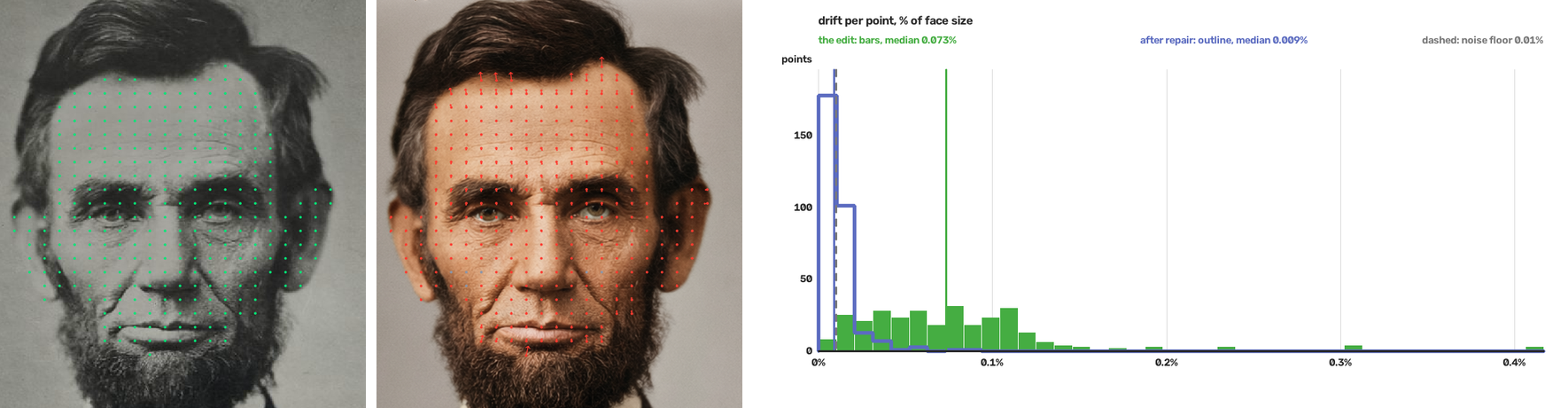
Lincoln, 1863, restored and colourised by an edit model. The edit moved the face by 0.073% of its size. After SameFace's repair, 0.009%: below the noise floor, so what is left cannot be told from the measurement's own noise.
Demo video: (link to come)
What it is for
- Old-photo restoration and colourisation. Check that the restored face is still the same person's, see where it changed, and put it back.
- Face edits. New hair, background, lighting or clothes, and the same face.
- Comparing edit models and workflows. One figure per pair, on the same scale for every model, down to drift far too small for the eye - with the pictures to show where it is.
Quick start
- Install (below) and restart ComfyUI.
- Open
example_workflows/sameface_simple.json, and copy the two Lincoln pictures fromexample_workflows/input/intoComfyUI/input/. - Run. The first Simple measures and repairs; the second measures the repair, for a slider of what is left. Then load your own original into Before and the edited picture into After.
The sliders are ComfyUI's Compare Images, which shows its slider with Modern Node Design (Nodes 2.0) turned on (Settings → Comfy → Nodes 2.0); rgthree's Image Comparer works in its place. Each example has a note saying so.
SameFace Simple shows the figures on the node and gives:
| Output | |
|---|---|
| before_view, after_view | into Compare Images for a slider: the measured points, with arrows (ten times their length) to where each point should be |
| repaired | the edit with its face moved back; everything else, and the framing, as the edit left them |
| shift_map | where on the face it drifted: grey within the noise, darker green for more |
| histogram | how far the points drifted, the edit as bars and the repair as an outline: the one further left drifted less |
| median, repaired_median | the figures, % of face size |
It measures the surest face on each side. Turn repair off to only measure.
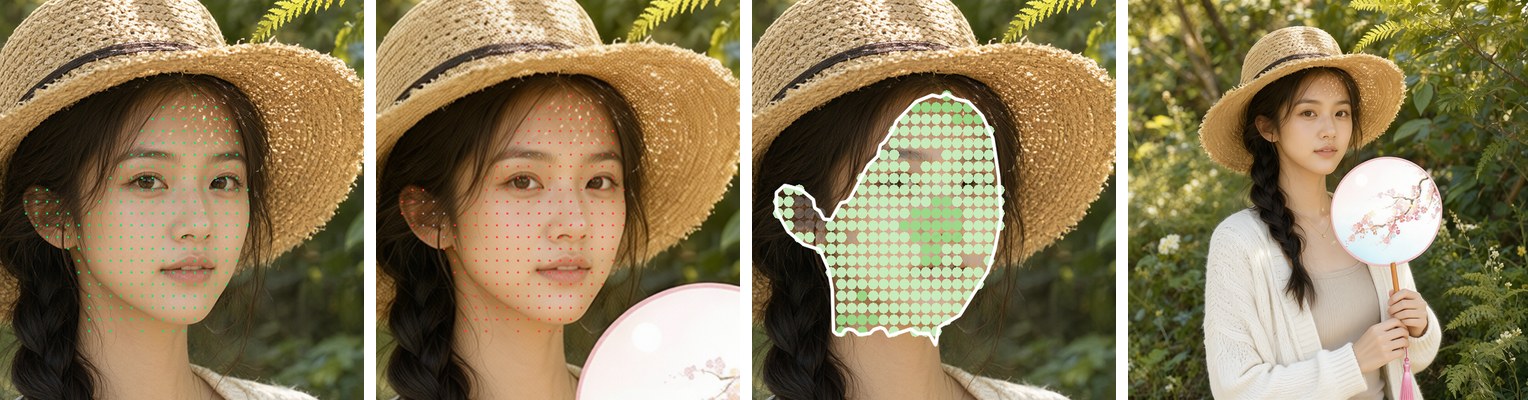
An edit that put a fan in her hand moved the face by 0.032%; repaired,
0.013%. Left to right: before_view, after_view, shift_map, repaired.
The advanced nodes
Every step on its own node with all its settings, for choosing one face among several, measuring the whole head, or drawing your own plots. All are in The nodes.
example_workflows/sameface_advanced.json, with its two pictures in
example_workflows/input/, is a family photo edited onto a museum backdrop: Face Mask chooses the mother's head on each side, Measure
measures it, Repair moves it back, and a second Measure measures the repair -
0.211% to 0.019% after the affine fit - with a view, a shift map and a
histogram of each.
| Node | |
|---|---|
| SameFace Measure | runs the models and gives the figures and drift, which the others read |
| SameFace Face Mask | one person's face or head, for Measure's mask inputs |
| SameFace Repair | moves the edit's face back, keeping its framing or lining it up with the before |
| SameFace View | the before and after with the points and a mesh, for a slider |
| SameFace Shift Map | the before with each point coloured by its drift |
| SameFace Drift Histogram | how far the points drifted, after each fit |
| SameFace Drift Zones | the face as a grid, each cell's median drift |
How it works
- The face. Grounding DINO finds it from the word "face", with the ears; SAM 2 outlines it.
- Every point of it. RAFT optical flow follows each pixel of the before face into the edit and back. A point that does not return to where it started is dropped, so texture the edit rewrote is not mistaken for movement. A second pass, with the two faces lined up first, keeps the framing out of the figures.
- The drift. The move, scale and turn of the whole face are fitted and taken out; what is left at each point is drift, in % of the face's size.
- The repair. A smooth warp through the measured points, eased to nothing beyond the face, moves each feature back. The repaired image is then measured again: only a fresh measurement says what the repair left.
The noise floor is 0.01% of face size: the drift the measurement gives a face against a resized, recompressed copy of itself, which has no true drift. It is re-measured by a tool in this repo, on your own faces if you like. The method, the fits and the limits are in How it measures.
Open weights
No training, no API, nothing leaves the machine. The models download on first use, about 1.8 GB, pinned to fixed revisions:
| Model | Used for | Licence | |---|---|---| | Grounding DINO (base) | finding the face, ears and head from words | Apache-2.0 | | SAM 2.1 (Hiera large) | outlining them | Apache-2.0 | | RAFT (large, torchvision) | the optical flow | BSD-3-Clause |
Install
Clone into ComfyUI/custom_nodes/ and install the requirements into
ComfyUI's environment:
cd ComfyUI/custom_nodes
git clone https://github.com/fixed-42/comfyui-sameface
pip install -r comfyui-sameface/requirements.txt
Restart ComfyUI; the nodes are under SameFace.
Tests
Everything but the models themselves is tested without a GPU - the masks, the sampling, the fits, the warp, the pictures, Simple and the noise floor's rule:
python -m pytest
tests/test_models.py checks which detections the face masker counts, with
the models stood in for; it needs torch, so it is skipped without it. Run it
with ComfyUI's own Python to include it.
Licence
Apache-2.0.
The pictures: Lincoln by Alexander Gardner, 1863 (Library of Congress, LC-DIG-ppmsca-19301), and the family from the Farm Security Administration/ Office of War Information collection (Library of Congress), both in the public domain; the edits of them, and the portrait with the fan, were made for this project with local models.