
Remote Text Encoder
Run ComfyUI's text encoder on a second PC (or a second GPU) and send the conditioning over the network, so the GPU that renders never loads the encoder.
comfyui-remote-text-encoder
Offload the text encoder to another GPU: on a different machine, or a second GPU in the same box.
Text encoders take a large chunk of VRAM. Modern image models come with ever larger text encoders (Qwen-Image, Flux.2, Krea 2, Z-Image), and video models even more (MiniMax H3's encoder alone is 15 GB). This node pack helps people who have an older GPU somewhere at home: run ComfyUI on that PC as a text encoder server, and your main ComfyUI on the other box renders without ever loading the encoder.
- Results match a local
CLIPLoaderexactly when both PCs have the same kind of GPU (and differ by about 1-2 of 255 per pixel across GPU generations). - The model's own encode nodes keep working unchanged (
CLIPTextEncodeand the model-specific ones): only the loader is swapped. - Encoders load on demand on the server; the ones you use all the time can be kept loaded.
How it works
PC-B: ComfyUI (serving, --listen)                          PC-A: ComfyUI (renders)
  this pack ─ starts ─► encoder server (child, its GPU)       Remote CLIP Loader (server_url = http://pc-b:8188)
  /remote_te/server/* ── forwarded to it ◄─────────────────     ──CLIP──► the model's own encode node
  Remote Encoder Status: keep models, pick types               ──CLIP──► Remote Locate
PC-B's ComfyUI starts a small encoder server as a separate process on the GPU you choose, and shares its API through
ComfyUI's own port: nothing else to open or configure. On PC-A, Remote CLIP Loader outputs a stand-in CLIP. When an
encode node calls tokenize and encode, the text goes to PC-B, which runs ComfyUI's real tokenize + encode on its
loaded model and sends the conditioning back.
One PC with two GPUs works the same way: see One PC with two GPUs.
Requirements
- A recent ComfyUI on both PCs (tested with 0.44) and the same version of this pack on both.
- PC-B: an NVIDIA GPU, and ComfyUI started with
--listenso PC-A can reach it. - Both PCs on the same local network (there is no authentication: don't expose PC-B to the internet).
- Tested on Linux. Windows is planned for the next release.
Install
On both PCs, clone the whole repository into ComfyUI's custom_nodes and restart ComfyUI:
cd ComfyUI/custom_nodes
git clone https://github.com/fixed-42/comfyui-remote-text-encoder
ComfyUI Manager: in a couple of days.
Start the server (PC-B)
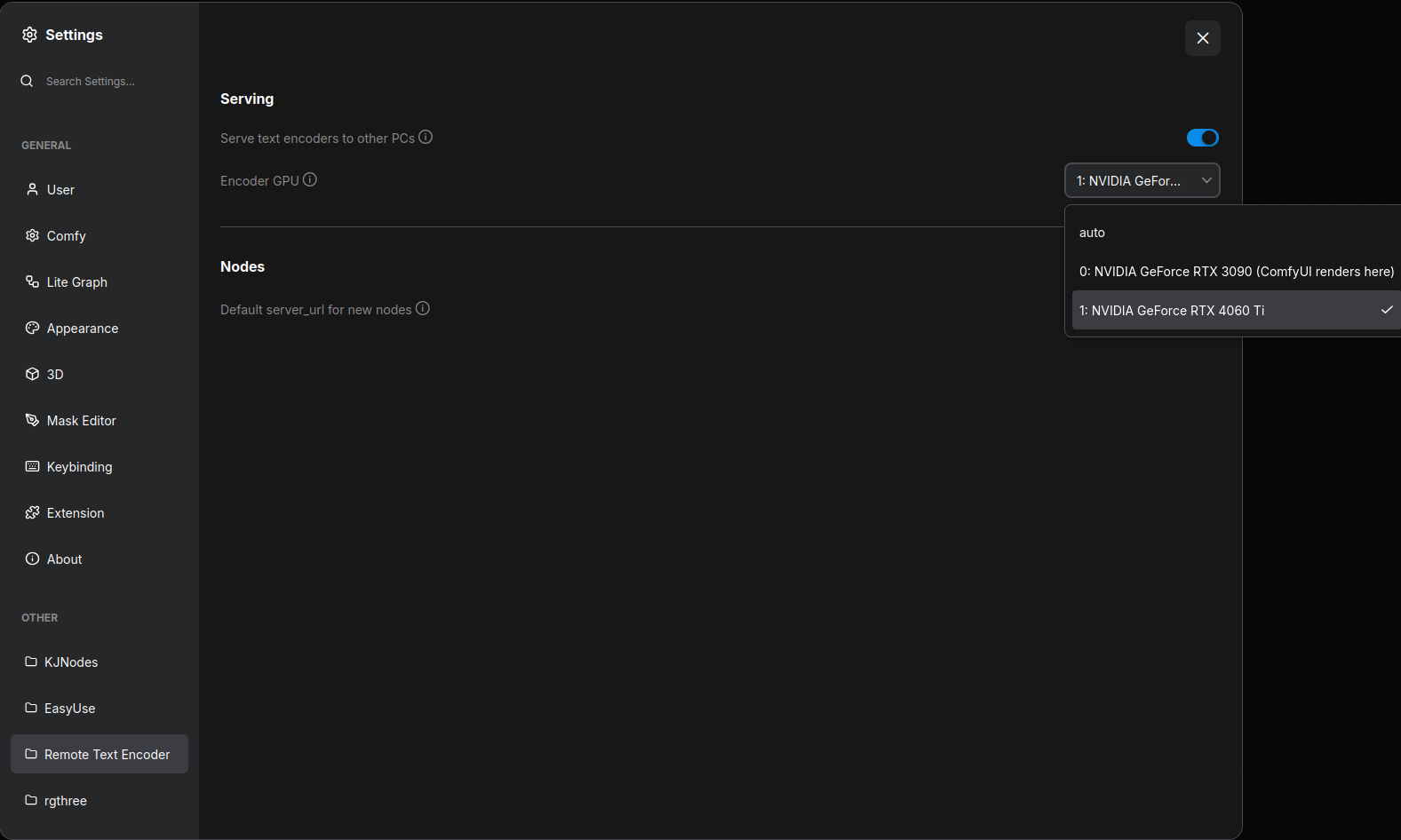
Method 1; Use the settings
Settings > Remote Text Encoder: turn on Serve text encoders to other PCs and pick the Encoder GPU. auto
picks a card ComfyUI doesn't render on. The server starts, stops and moves at once, no restart needed.
Method 2; Start with environment variables
| Variable | Meaning |
|---|---|
| REMOTE_TE_SERVE=1 | serve at startup (overrides the setting) |
| REMOTE_TE_GPU=1 | the encoder GPU: a CUDA device number (as --cuda-device counts), a UUID, or part of the name (4060) |
| REMOTE_TE_LOG=debug | log every request in ComfyUI's console |
REMOTE_TE_SERVE=1 REMOTE_TE_GPU=1 python main.py --listen
Remote Encoder Status on PC-B: keep models, pick types
Add a Remote Encoder Status node on PC-B with server_url = local:
- keep: tick it and click Apply to keep a model loaded (pin it). Other models load when a workflow asks for them and make room for each other.
- type: how the file is loaded, as in
CLIPLoader. It is detected from the file; for a file it doesn't know ("pick a type"), choose one and click Apply. PC-B remembers it, and Remote CLIP Loader offers it first. - extra: what the file can do besides encoding, checked in the background after startup:
text gen(ComfyUI's Generate Text on a Remote CLIP, e.g. for prompt enhancement) andvision(reads images: Remote Locate).
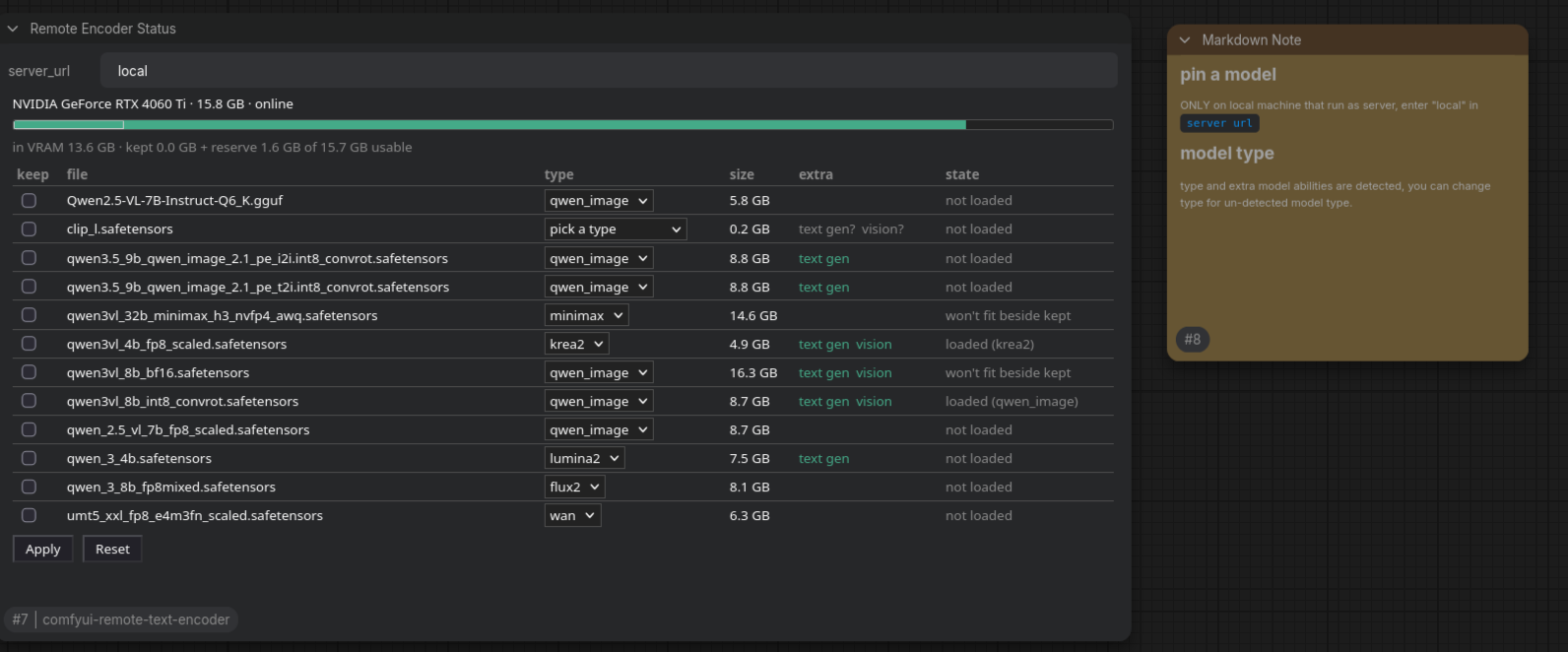
Kept models and picked types are changed only on PC-B, and saved in ComfyUI/user/remote_te/.
How to use (PC-A)
- Replace
Load CLIP(CLIPLoader) with Remote CLIP Loader. - Set
server_urlto PC-B's ComfyUI, e.g.http://pc-b:8188(its name or IP address), orlocalon the serving PC itself. A default for new nodes can be set in Settings > Remote Text Encoder. - Pick the
model(PC-B's encoder files;(kept)/(loaded)show what's ready) and thetype. - Connect its
CLIPto the model's usual encode node.
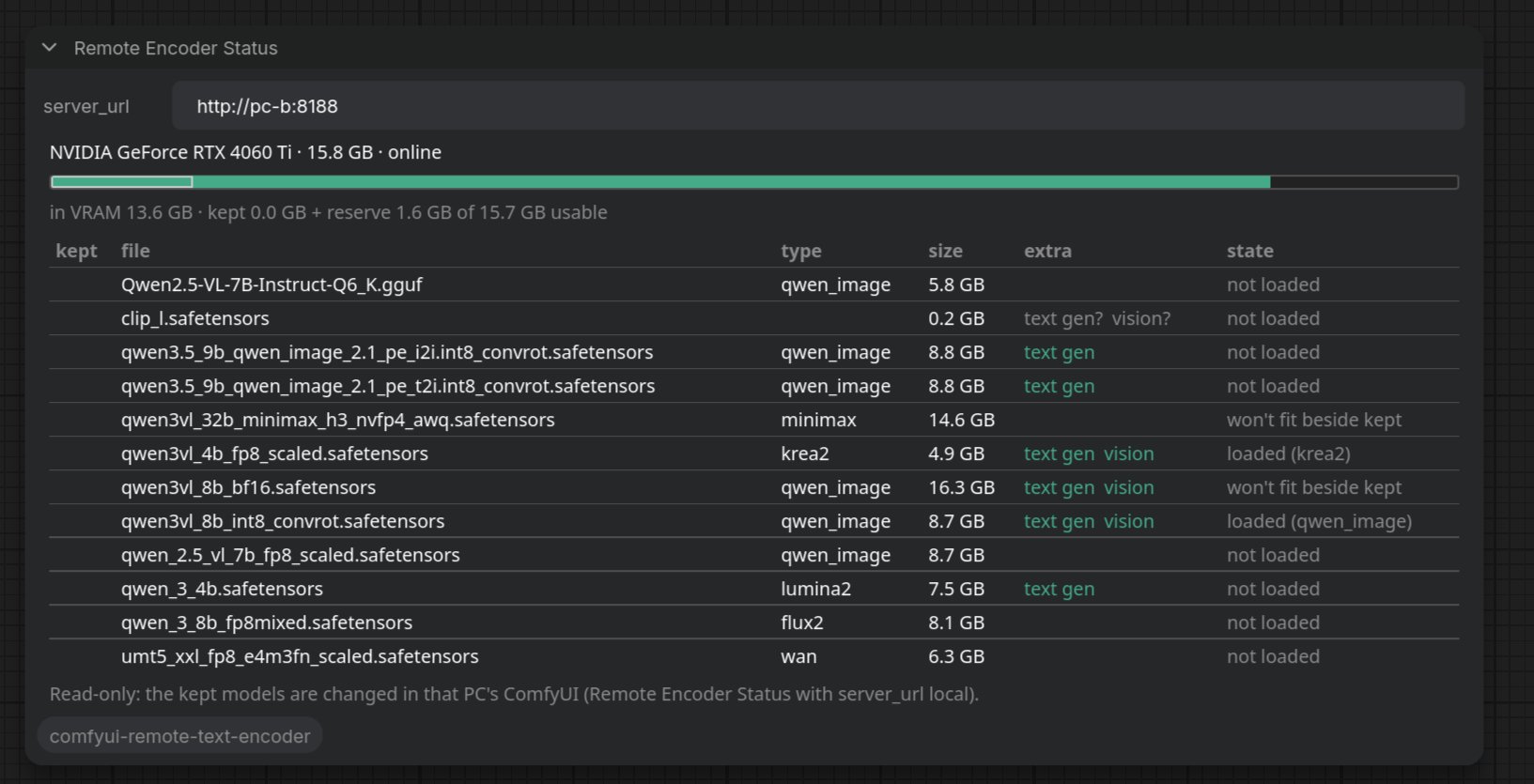
A Remote Encoder Status node on PC-A shows what PC-B has (read-only):
Sample workflows in sample_workflows/:
remote_te_demo_k2.json: Krea 2 with Remote CLIP Loader (a switch goes back to a localCLIPLoader), and Generate Text refining the prompt on PC-B.remote_te_locate_sample.json: Remote Locate makes a mask fromimg/group_photo.png.
One PC with two GPUs
The same ComfyUI renders on one card and encodes on the other:
- Install the pack once.
- Settings > Remote Text Encoder: turn on serving and set Encoder GPU to the card ComfyUI doesn't render on
(the menu marks the render card).
--listenis only needed if other PCs should use it too. - In your workflows, set Remote CLIP Loader's
server_urltolocal.
Extra
- Remote Locate finds something in an image with a vision encoder (
qwen3vl_4b,qwen3vl_8b) and outputs a mask and bounding boxes (for SAM3 Detect, DrawBBoxes, CropByBBoxes). Feed the mask into your inpainting or edit workflow, whichever CLIP loader (local or remote) that workflow uses. Sample:sample_workflows/remote_te_locate_sample.jsonwithsample_workflows/img/group_photo.png. - Generate Text: ComfyUI's own Generate Text node runs on a Remote CLIP for files with
text gen, e.g. to enhance a prompt on PC-B.
Troubleshooting
this ComfyUI does not serve text encoders: turn on serving on PC-B (Settings, orREMOTE_TE_SERVE=1; mind the spelling) and start it with--listen.server.py, gpus.py not found: only thecomfyui_remote_tesubfolder was installed; clone the whole repository.- A version warning on PC-A: install the same version of this pack on both PCs.
- The encoder server's log: ComfyUI's console on PC-B (
[remote_te server]) andComfyUI/user/remote_te/server.log.
License
GPL-3.0, like ComfyUI. Made for the GPU poor: free for everyone. If you use it commercially, please consider getting in touch or sponsoring.