
FL PenguinVL
FL PenguinVL - Vision-Language Model nodes for ComfyUI. Query images and videos with natural language using Tencent's Penguin-VL (2B/8B). Supports OCR, document analysis, visual QA, dense captioning, and more.
Nodes (4)
One prompt, a whole batch of images, answers for each
Ask an image anything, in plain English, on your own GPU
Loading Penguin-VL
Ask a clip what happened — no video decoding required
FL PenguinVL
Vision-language model nodes for ComfyUI using Tencent's Penguin-VL. Query images and videos with natural language for captioning, OCR, document analysis, visual QA, and more.


Features
- Image Captioning - Describe images with natural language prompts
- Video Understanding - Analyze video frames with uniform sampling (up to 128 frames)
- Batch Processing - Query each image in a batch independently
- Multiple Model Sizes - 2B (~6GB VRAM) and 8B (~18GB VRAM) variants
- 4-Bit Quantization - Optional quantization for reduced VRAM usage
- Input Resize Control - Configurable long-side resize for optimal VLM accuracy
- System Prompts - Set context and persona for model responses
Nodes
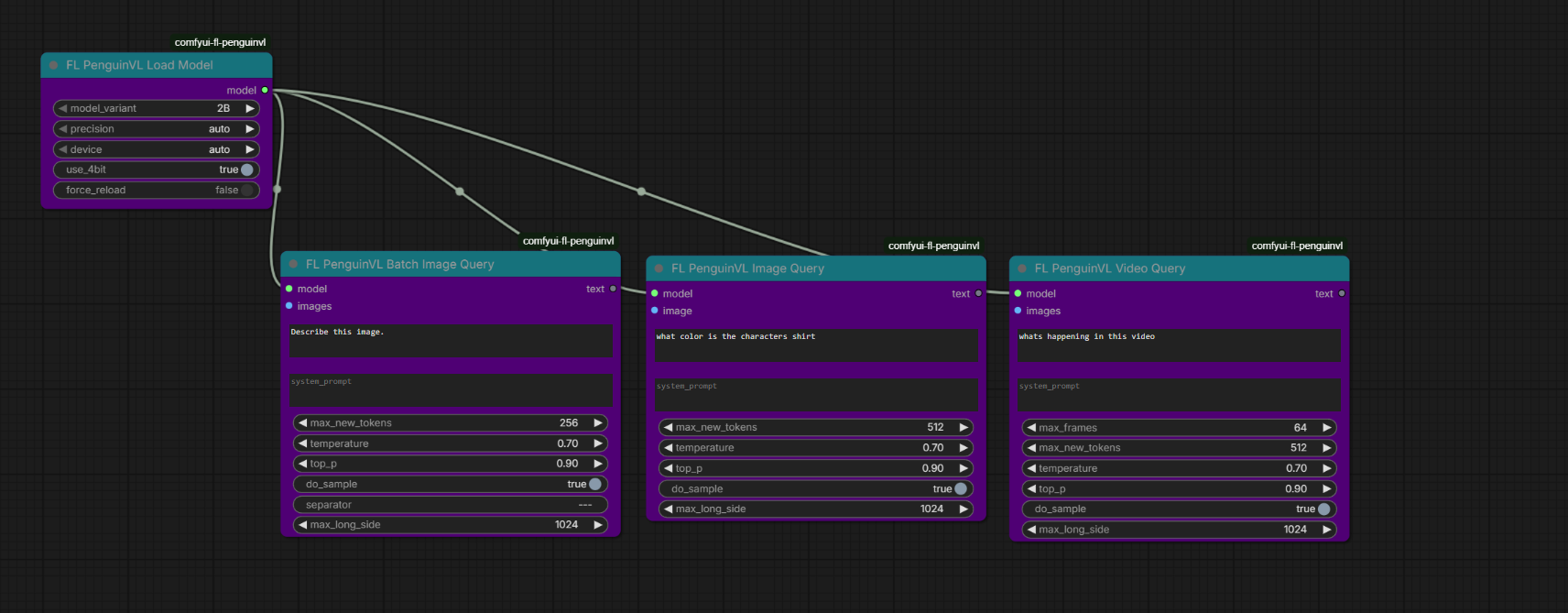
| Node | Description | |------|-------------| | FL PenguinVL Load Model | Downloads and caches Penguin-VL from HuggingFace | | FL PenguinVL Image Query | Query a single image with a text prompt | | FL PenguinVL Video Query | Query video frames with uniform sampling | | FL PenguinVL Batch Image Query | Query each image in a batch independently |
Installation
ComfyUI Manager
Search for "FL PenguinVL" and install.
Manual
cd ComfyUI/custom_nodes
git clone https://github.com/filliptm/comfyui-fl-penguinvl.git
cd comfyui-fl-penguinvl
pip install -r requirements.txt
Quick Start
- Add FL PenguinVL Load Model and select a model variant (2B or 8B)
- Connect to any query node (Image Query, Video Query, or Batch Image Query)
- Provide an image or image batch and a text prompt
- Run the workflow
An example workflow is included in the workflow folder.
Models
| Model | VRAM (bf16) | Notes | |-------|-------------|-------| | Penguin-VL-2B | ~6 GB | Fast, good for most tasks | | Penguin-VL-8B | ~18 GB | Higher quality, more detailed responses |
Models download automatically from HuggingFace on first use to ComfyUI/models/penguin_vl/.
Requirements
- Python 3.10+
- 8GB VRAM minimum (2B model in bf16)
- NVIDIA GPU with bf16 support recommended
Tips
- Input resolution matters - The
max_long_sideparameter (default 512) resizes input images for optimal VLM accuracy. Larger images don't always produce better results. - Video frames - The Video Query node uniformly samples frames from your batch. 16 frames is a good default; the model supports up to 128.
- Deterministic output - Set
do_sampleto False for greedy decoding (same output every time). - System prompts - Use system prompts to guide output format (e.g., "Respond with only a comma-separated list of tags").
License
Apache-2.0