
FL HeartMuLa
FL HeartMuLa - Multilingual AI music generation nodes for ComfyUI. Generate full songs with lyrics using the HeartMuLa model family. Supports English, Chinese, Japanese, Korean, and Spanish with song structure control via section markers and style tags.
Nodes (6)
Where you actually write the song
Turning token soup into an actual song
The 6 GB door to AI songs in ComfyUI
The slow node that turns your lyrics into audio tokens
Dropdowns for your style tags, so you stop typo-ing 'melancholic'
Steal the lyrics from any song, then remix it with AI
FL HeartMuLa
Multilingual AI music generation nodes for ComfyUI powered by the HeartMuLa model family. Generate full songs with lyrics in English, Chinese, Japanese, Korean, and Spanish.


Features
- Multilingual Lyrics - Generate music with vocals in English, Chinese, Japanese, Korean, and Spanish
- Song Structure Control - Use section markers like [Verse], [Chorus], [Bridge] to define song structure
- Style Tags - Control genre, vocal type, mood, tempo, and instruments
- 4-Minute Songs - Generate up to 240 seconds of continuous audio
- Zero-Shot Generation - No fine-tuning required, just provide lyrics and tags
- Modular Pipeline - Separate nodes for conditioning, sampling, and decoding
Nodes
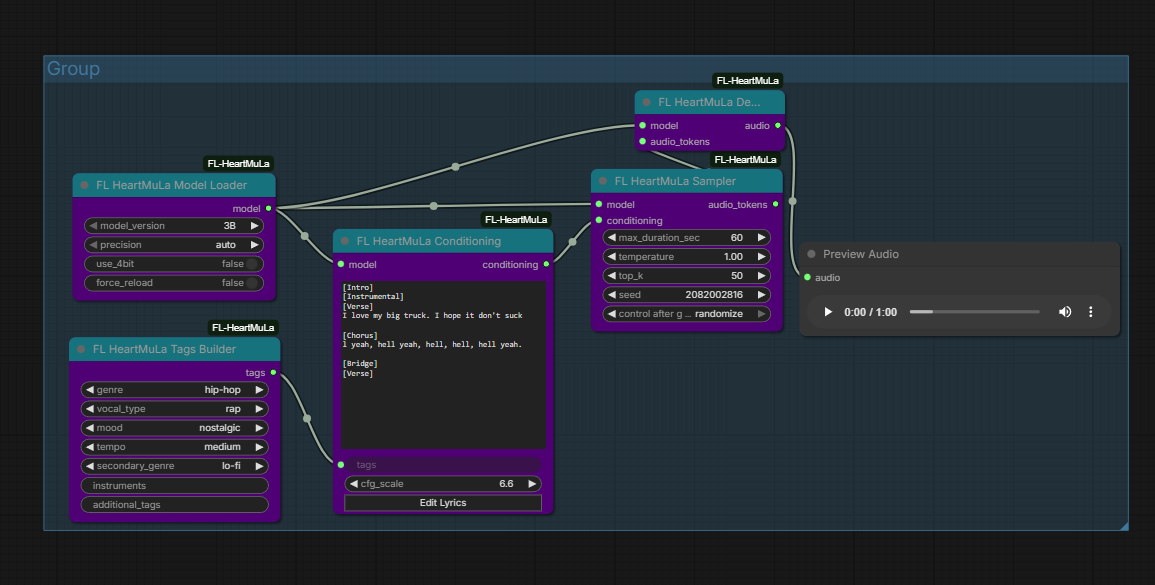
| Node | Description | |------|-------------| | Model Loader | Downloads and caches HeartMuLa models | | Conditioning | Tokenize lyrics and tags into model conditioning | | Sampler | Generate audio tokens with CFG and temperature control | | Decode | Convert audio tokens to waveform using HeartCodec | | Tags Builder | Build style tags with genre, vocal, mood selection | | Transcribe | Extract lyrics from existing audio |
Installation
ComfyUI Manager
Search for "FL HeartMuLa" and install.
Manual
cd ComfyUI/custom_nodes
git clone https://github.com/filliptm/ComfyUI_FL-HeartMuLa.git
cd ComfyUI_FL-HeartMuLa
pip install -r requirements.txt
Quick Start
- Add FL HeartMuLa Model Loader and select
3Bmodel - Connect to FL HeartMuLa Conditioning node
- Enter lyrics with section markers:
[Verse] Walking down the empty street Thinking about you and me [Chorus] We belong together Now and forever - Add style tags:
pop, female vocal, energetic - Connect to Sampler → Decode → Preview Audio
Section Markers
HeartMuLa supports these official section markers:
| Marker | Usage |
|--------|-------|
| [Intro] | Opening instrumental or vocal intro |
| [Verse] | Main verses |
| [Prechorus] | Build-up before chorus |
| [Chorus] | Main hook/chorus |
| [Bridge] | Contrasting section |
| [Outro] | Ending section |
| [Instrumental] | Non-vocal sections |
Style Tags
Combine tags to control the output style:
- Genre: pop, rock, electronic, jazz, classical, hip-hop, r&b, country, folk, metal, indie
- Vocal: female vocal, male vocal, duet, choir, instrumental
- Mood: energetic, melancholic, uplifting, calm, aggressive, romantic, dreamy, dark
- Tempo: slow, medium, fast
- Instruments: piano, guitar, drums, synth, strings, etc.
Example: indie rock, male vocal, melancholic, slow, acoustic guitar
Models
| Model | Size | VRAM (fp16) | VRAM (4-bit) | Notes | |-------|------|-------------|--------------|-------| | 3B | ~6GB | ~12GB | ~6GB | Released, recommended | | 7B | ~14GB | ~24GB | ~12GB | Coming soon |
Models download automatically on first use to ComfyUI/models/heartmula/.
Memory Modes
The Model Loader includes a memory_mode option to optimize for different VRAM configurations:
| Mode | Description | Use Case |
|------|-------------|----------|
| auto | Auto-detect based on available VRAM | Recommended default |
| normal | Full speed, no memory optimizations | 16GB+ VRAM |
| low | Moderate memory savings | 10-16GB VRAM |
| ultra | Aggressive memory cleanup | 8-10GB VRAM |
Requirements
- Python 3.10+
- 16GB RAM minimum (32GB+ recommended)
Supported Platforms
| Platform | Device | Notes | |----------|--------|-------| | NVIDIA GPU | CUDA | 12GB+ VRAM (or 6GB with 4-bit quantization) | | Apple Silicon | MPS | M1/M2/M3/M4 Macs supported | | CPU | CPU | Slow fallback option |
Platform Notes
- NVIDIA: CUDA 12.1+ recommended. 4-bit quantization available via bitsandbytes
- Apple Silicon: Uses Metal Performance Shaders (MPS). 4-bit quantization not available (CUDA only)
- CPU: Works but very slow, not recommended for generation
Parameters
Sampler Settings
| Parameter | Default | Range | Description |
|-----------|---------|-------|-------------|
| max_duration_sec | 60 | 10-240 | Maximum audio length |
| temperature | 1.0 | 0.1-2.0 | Sampling randomness |
| top_k | 50 | 1-500 | Top-k token filtering |
| cfg_scale | 1.5 | 1.0-10.0 | Classifier-free guidance |
| seed | -1 | -1 to 2^31 | Random seed (-1 = random) |
Credits
- HeartMuLa/HeartLib - Original model and codebase
- HeartMuLa/HeartCodec - Neural audio codec
License
Apache 2.0