
ComfyUI-FL-YuE2
YuE2 music generation, piano roll editing, and joint AR/NAR LoRA training for ComfyUI
Nodes (18)
The one node that decides what your YuE2 audio adapter actually learns
The node that stops and makes you listen
Run the adapter you trained, without the dataset
Your songs aren't a dataset yet — FL YuE2's Dataset Maker is the bouncer
64 channels of latent in, 48 kHz stereo out
Captioning a music dataset by hand is miserable — this node pays Google to do it
Two LoRAs, one node, and a KL leash
The five-second node that decides if your trained adapter does anything
It stops every 200 steps and renders you a sample
The 7.8 GB gate in front of every song
Matching filename stems is the entire trick
FL YuE2 · Compose writes the sheet music first — and that's the whole trick
The boring node that makes the training run possible
Turning your songs into tokens the trainer can actually eat
Max_duration is a ceiling, and your seed isn't on this node
The editor that stops YuE2 being a slot machine
Twelve dials, and the three that actually change your LoRA
Two dropdowns with one option each, and why that's fine
FL YuE2 for ComfyUI
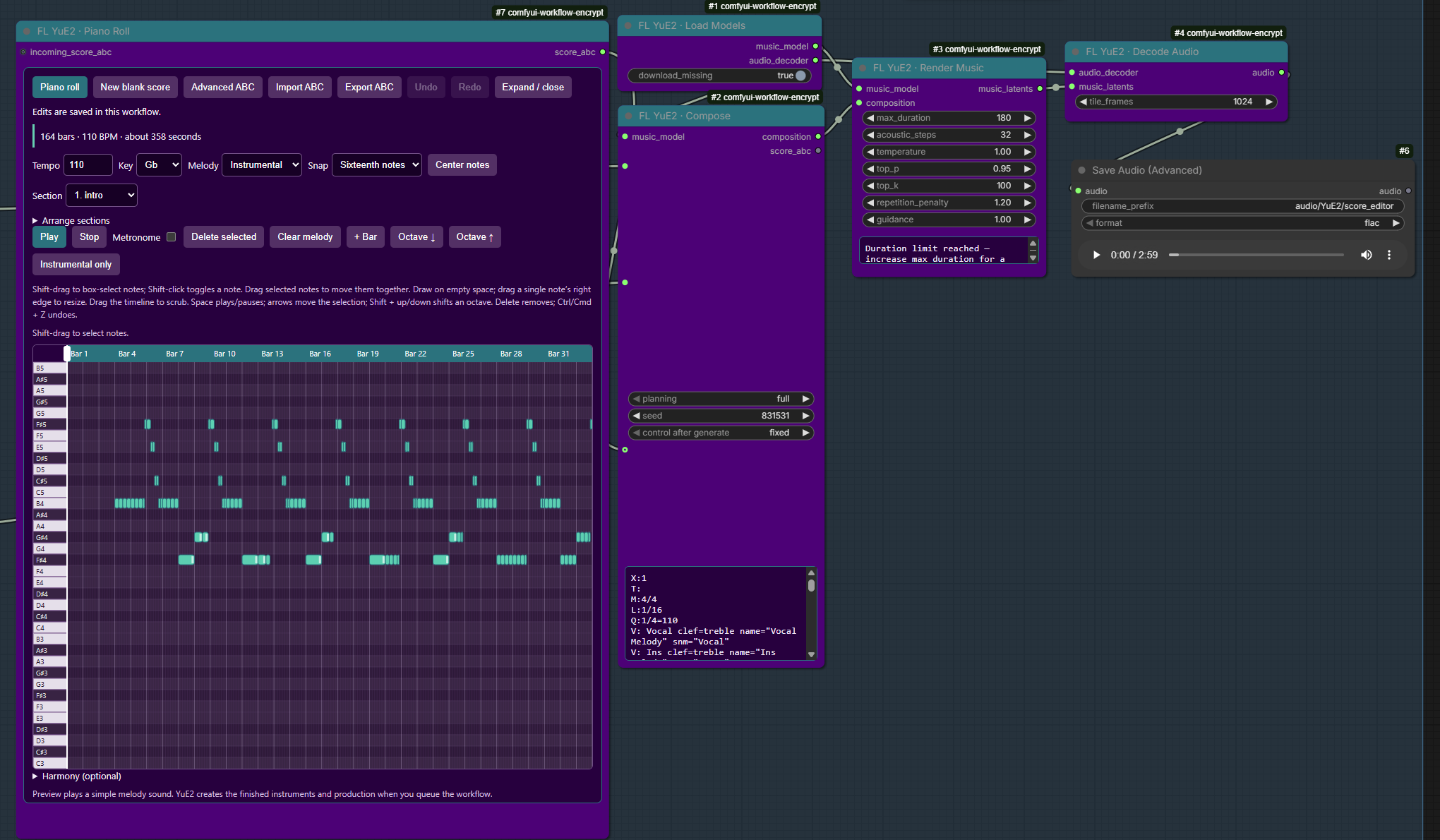
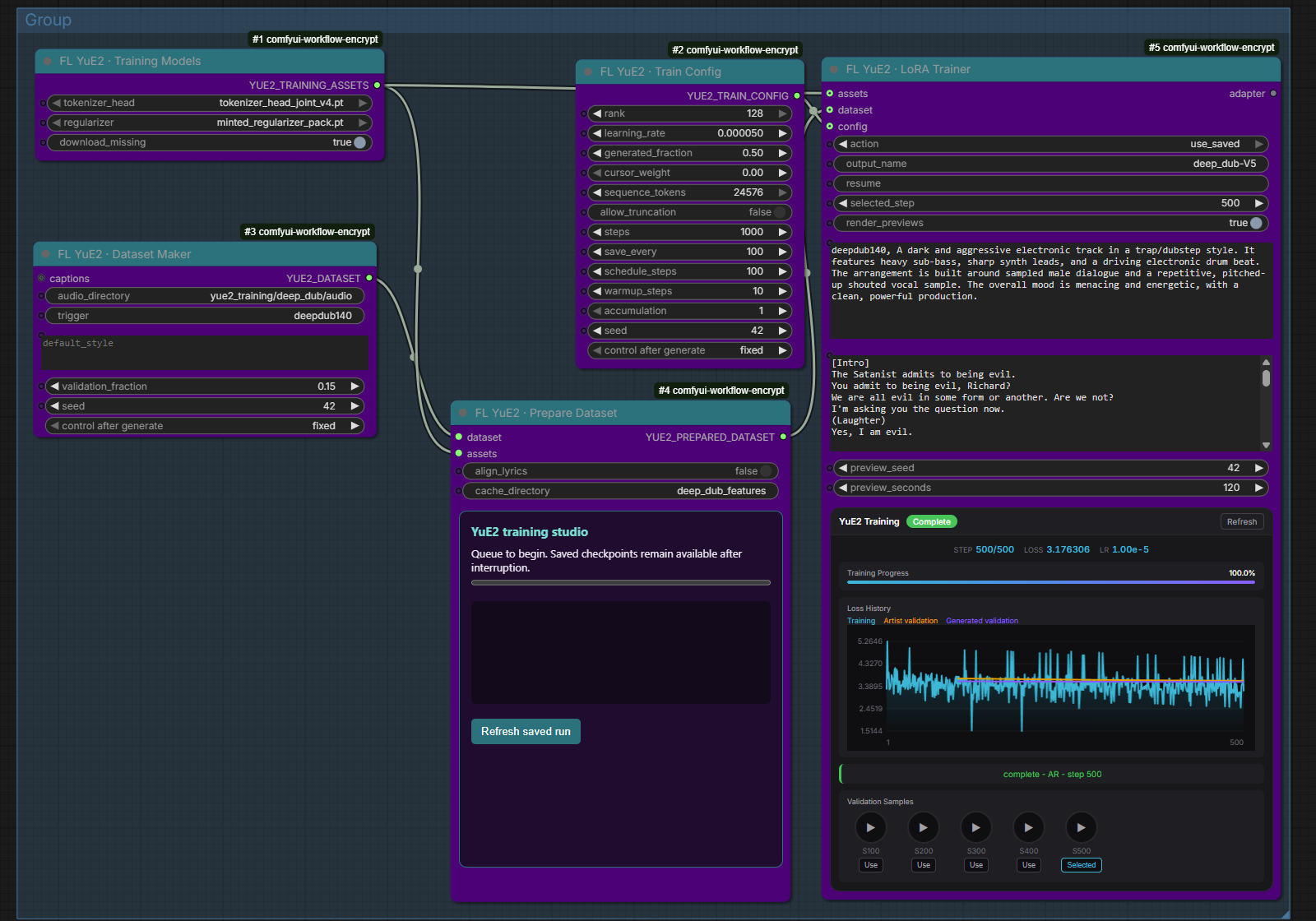



Compose songs from lyrics and style, build or import an ABC score, and render 48 kHz stereo audio with YuE2-3B. Generate music and train legacy AR or joint AR/NAR LoRAs with reviewed datasets and checkpoint previews. The nodes work with ComfyUI's standard audio preview, saving, and processing nodes.
Install
Install ComfyUI-FL-YuE2 through ComfyUI Manager, or install manually:
cd ComfyUI/custom_nodes
git clone https://github.com/filliptm/ComfyUI-FL-YuE2.git
cd ComfyUI-FL-YuE2
python -m pip install -r requirements.txt
Use the Python environment that runs ComfyUI, then restart ComfyUI. This pack uses ComfyUI's existing Torch installation; it does not install the upstream YuE2 package or downgrade Torch.
Requires a current ComfyUI with Comfy Kitchen's split-half RMS/RoPE operation and an NVIDIA GPU supporting BF16. Validated on Windows/Python 3.12/Torch 2.11 with an RTX PRO 6000 Blackwell. Other devices and 24 GB configurations have not been validated for this integration.
The first queued Load Models node downloads approximately 7.8 GB:
ComfyUI/models/yue2/YuE2-3B/
ComfyUI/models/yue2/YuE2-Vae/
Downloads resume after an interrupted transfer and verify the weight manifest. Nothing downloads at startup. Turn off download_missing for offline use. An external model root can be registered as yue2 through extra_model_paths.yaml; existing installed models are searched before downloading. Model weights, configuration, tokenizer, and license files are required; an empty directory is not an installation.
Start a song
Drag the included score editor workflow onto ComfyUI. It connects Piano Roll → Compose → Render Music → Decode Audio → Preview/Save, with a shared model loader. The eight-bar instrumental score is editable, lyrics are blank, planning is full, and rendering has a 45-second upper limit. Files go under output/audio/YuE2/. The screenshots above show real ComfyUI workflows. The training screenshot displays an existing saved AR run.
- Load Models provides the music model and separate audio decoder.
- Compose accepts musical style, lyrics, planning mode, and seed. Describe genre, instruments, language, vocal character, mood, and tempo. Use
[Verse]and[Chorus]lyric sections separated by blank lines. - Render Music generates music tokens and acoustic latents.
max_durationis an upper bound, not a requested exact length.acoustic_steps=32matches the released midpoint solver. - Decode Audio returns ordinary ComfyUI
AUDIO. Smallertile_framesreduces decoder memory use.
full planning writes melody and chords; melody leaves accompaniment freer; off skips the symbolic score. Default guidance is 1.0 for score-conditioned generation; upstream recommends 1.01 for direct generation. Other sampling defaults match the release.
The Compose node displays generated ABC. Connect core Preview as Text to its score output to compose without rendering audio. Disconnect the supplied score to generate a new score from style and lyrics. An unchanged composition retains its exact token prefix through the composition socket.
Supplying a score requires full or melody. Interactive generation remains score-conditioned rather than audio-to-audio. Training preparation can optionally use pinned SheetSage2 to create missing .abc.txt targets for the joint score recipe; SheetSage2 is CC BY-NC 4.0.
The output is a stereo mix. Use an existing audio-separation node for stems. Editing a composition generates a new recording; it does not preserve unchanged regions of an earlier waveform.
For instrumental prompts, leave lyrics blank and describe the instrumentation in style. full generates melody and chords; melody generates a melody score. Only off skips planning. A supplied ABC score bypasses score generation and retains the selected full or melody instruction. Blank lyrics never override your planning choice.
Score editor
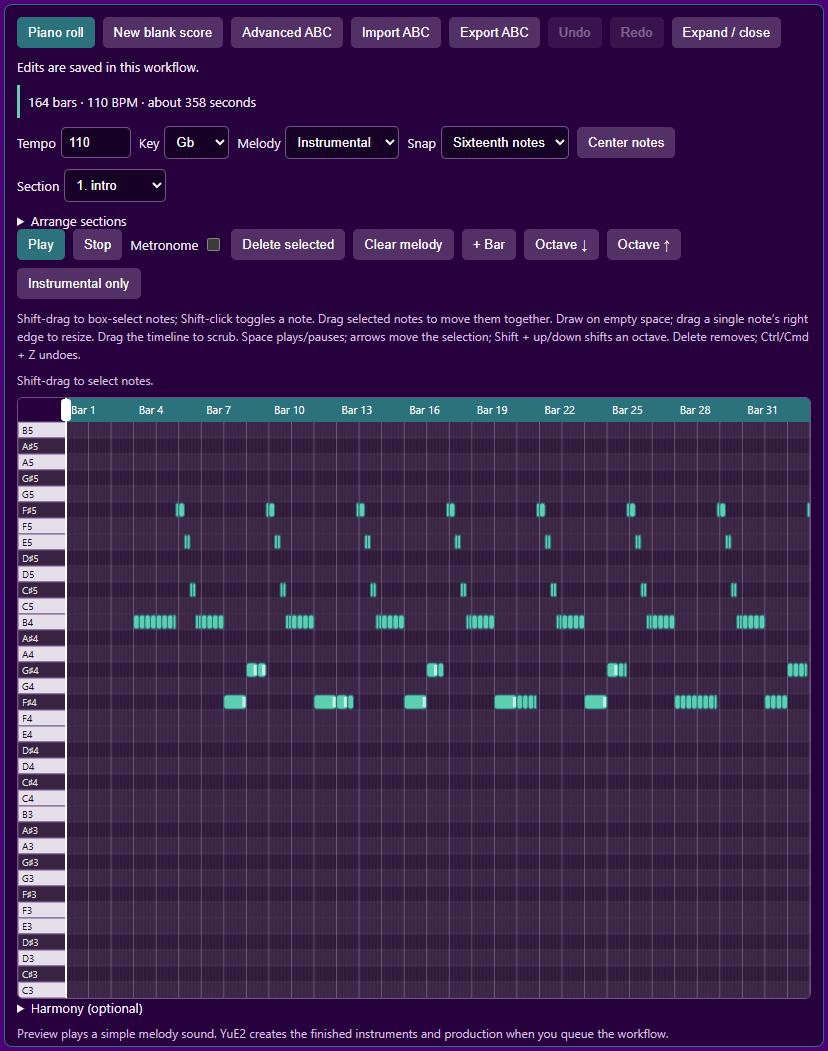
Open example_workflows/score_editor_to_song.json for the eight-bar instrumental example. Piano Roll outputs a STRING connected to Compose's score_abc input; use full planning and blank lyrics for this example.
- Piano roll: click empty space to add a note, drag it to move pitch/time, and drag its white right-edge handle to change length. Right-click or select and press Delete to remove it. Snap uses familiar quarter/eighth/sixteenth-note values; gaps become rests automatically.
- Multiple notes: hold Shift and drag a box to add notes to the selection; Shift-click toggles individual notes. Selected notes have white borders and a dashed group outline. Drag any selected note to move the group with its timing, durations and pitch intervals intact. Arrow keys and Delete affect the whole selection. Overlapping moves are rejected together; Undo restores the edit. Selection applies to the displayed melody track.
- Choose Instrumental or Sung melody, select the section, and edit notes visually. Instrumental only clears the sung melody while retaining chords. New blank score starts four empty bars. Undo/Redo restores visual edits.
- Harmony (optional) holds the per-bar chord controls and starts collapsed. Chords remain in the score while hidden. Imported changes within a bar and slash chords are preserved; advanced edits remain available in ABC.
- Add bars, duplicate/reorder/remove sections, and set tempo. Sustained notes crossing section boundaries must be shortened before structural edits. Changing Key transposes both melodies and chord roots/bass notes by the same shortest interval. Timing and melodic intervals stay intact. Switching major/minor does not rewrite the melody into a different mode. Out-of-range transpositions are rejected rather than clipping notes.
- Play / Pause previews the selected section/voice through a simple browser synthesizer. It does not load YuE2 or preview its final production. Metronome adds beat clicks with a bar-start accent; it is preview-only and is not sent to YuE2.
- Import/export ABC or open Advanced ABC for meter changes and specialist notation. The existing workflow stores the score in the same STRING widget, and existing connections continue to work. Imports with key/meter changes stay in the advanced view.
- Edits are validated locally, including monophonic overlap checks, before replacing the saved score. Export and node execution also validate. Audio adherence remains generative.
This is a MIDI-style piano roll backed by YuE2 ABC, with two monophonic melodies and a separate chord lane. MIDI-file import/export and audio transcription are not included. Instrument choices and sound design remain in Compose's style prompt. The upstream parser is structural validation; a rejection may mean unsupported native notation rather than invalid general ABC.
Navigation and audition: Expand / close opens a larger editor; Escape closes it when the editor is focused. Click or drag empty space to draw; drag an existing note to move it and hear each pitch change. Center notes centers the pitch range. Arrow keys move the selected note by a semitone or snap step; Shift + up/down moves an octave. Drag the timeline or playhead to scrub continuously. Space plays/pauses from the current position; Stop rewinds to the section start. Scrubbing during playback resumes at the new position when released. Section arrangement controls are under Arrange sections.
The canvas node grows to fit its controls and the full piano height, including opened arrangement controls and wrapped chord cards. Its minimum height follows the content. The timeline always fits the current section; there are no tool or editor-zoom menus. Wheel zoom and middle-drag pan still control the ComfyUI canvas over the node. The expanded window remains limited to the browser viewport and can scroll on smaller screens.
Edit generated scores: connect Compose's score_abc output to Piano Roll's optional incoming_score_abc input, then queue to load the score. Edit it directly while connected. Re-queuing with unchanged upstream ABC retains and outputs your edits; changed upstream ABC loads a new score. The score and its source fingerprint are saved in the workflow. Disconnecting retains the current edited score. Restart ComfyUI and refresh the browser when upgrading to this behavior.
For generated-score editing, connect Compose → Piano Roll → a second Compose → Render → Decode. The second Compose uses the supplied score without generating another score. Keep its style and lyrics consistent with the first Compose. To inspect before spending time rendering, mute the downstream Render/Decode/audio output nodes, queue the Piano Roll, edit the score, then re-enable rendering. Queueing the entire chain does not pause automatically for edits. Never feed the editor back into the same Compose node that supplies its input.
Interaction choices follow the navigation, drawing, preview and editing patterns documented in Ableton's MIDI editor and FL Studio's piano roll, adapted to the score controls YuE2 supports.
Troubleshooting
- Ending cut short: increase
max_duration. The node reports when the token limit is reached. - Score token limit: Compose uses a fixed 12,000-token score budget. If the score does not finish, it closes the score token sequence and continues using the partial score in the selected planning mode. The node reports the cutoff; the final score phrase may be incomplete.
- Out of memory: reduce duration or decoder tile size, close other GPU workloads, and retry. The pack uses ComfyUI model management and does not change global CUDA memory limits.
- Corrupt checkpoint: remove only the file named in the error, enable downloads, and queue again. Partial transfers are retained for resumption.
- Node missing: restart ComfyUI and inspect the startup import error. No other FL pack is required.
- Editor validation unavailable: restart ComfyUI after installing this version, then refresh the browser. The editor uses the pack's local
/fl_yue2/score/validateendpoint.
Training
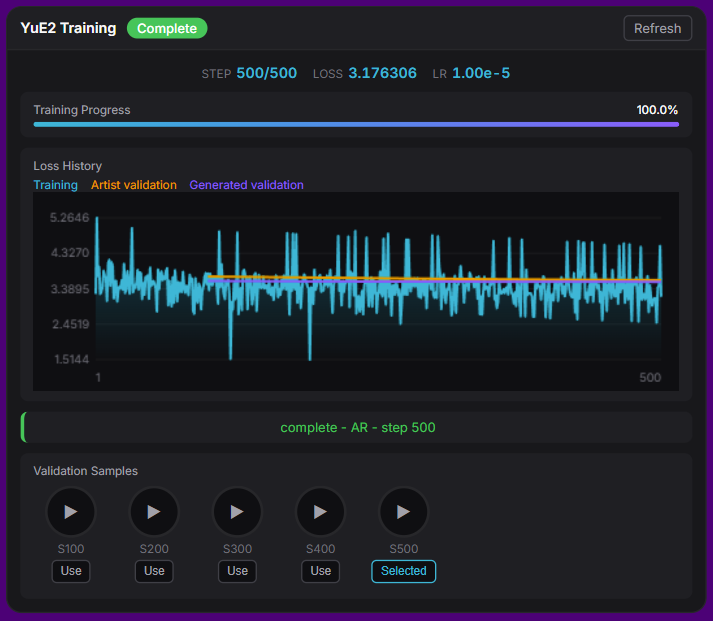
See training guide for Gemini music captions, legacy AR training, the joint AR/NAR score recipe, resume, and checkpoint playback. Training assets download into ComfyUI model folders when queued with download_missing enabled; Python training dependencies are installed separately.
Use Training Studio with your own recordings and captions. It contains the legacy Train Config; replace that node with Joint Score Train Config to use the AI Toolkit-style recipe, then select score planning in Prepare Dataset and either provide .abc.txt sidecars or enable SheetSage2 transcription. The legacy config's experimental train_acoustic option learns an acoustic companion alongside the AR LoRA. Joint training always trains AR and NAR adapters together. Previews and Load LoRA select both weights automatically, while generation remains text-only. Install the optional training dependencies in ComfyUI's Python environment:
python -m pip install -r requirements-training.txt
Queuing train with blank resume starts fresh and overwrites the named run and its checkpoints/previews. Change the output name to keep an earlier run, or set resume=resume.pt to continue it.
Generated captions are accepted automatically and remain editable. The captioner panel can process the full folder or test one random track without changing dataset sidecars. With previews enabled, a step-0 baseline renders before training starts, followed by a sample at each checkpoint. A separate inference progress bar tracks sample generation before training resumes. Use selects a saved checkpoint for inference without retraining. See the joint-recipe smoke benchmark for measured runtime, memory, and held-out losses.
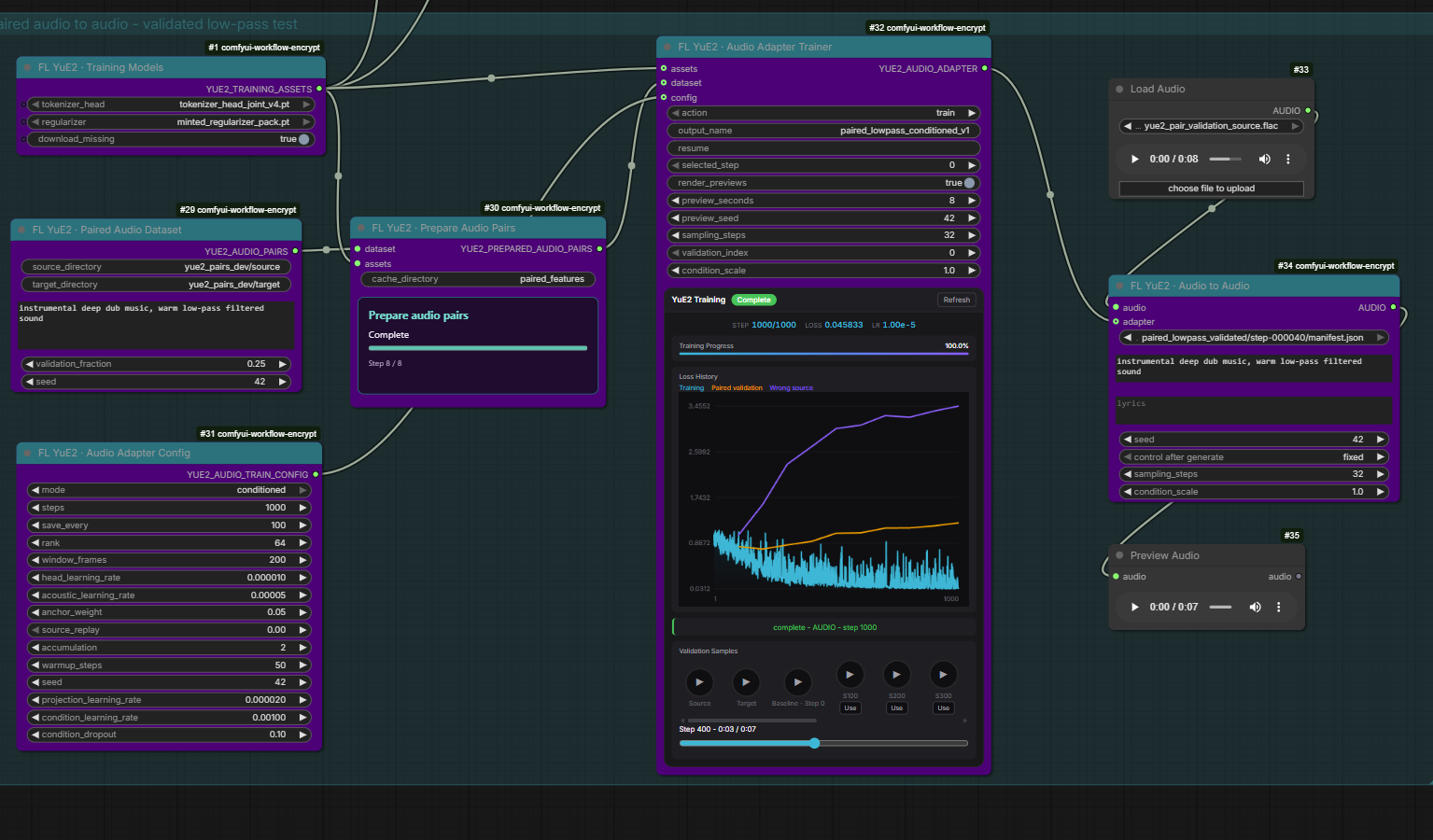
Paired audio-to-audio adapters have a separate training guide. Train from aligned source/target recordings with continuous source-audio conditioning, acoustic LoRAs, or source encoder head adaptation. The trainer compares source, target, step-0 baseline and saved checkpoints with playable validation samples. The screenshot below shows the real conditioned low-pass training run.
Development and validation
Python implementation lives in yue2/, including yue2/training/. The root __init__.py registers the nodes; browser widgets live in web/ and supporting documentation in docs/. Example graphs remain in example_workflows/.
From the ComfyUI root:
.\venv\Scripts\python.exe -m pytest custom_nodes/ComfyUI-FL-YuE2/tests --rootdir=. --import-mode=importlib -q
See validation notes for the tested environment, generated results, and remaining limitations. Inference and training examples are in example_workflows/. Changing the version in pyproject.toml on main triggers registry publishing through .github/workflows/publish.yml; maintainers can also run it manually.
Attribution and licenses
Adapted from YuE2, commit 92a73cc7652fcc1f937855e4b765e0a0edd7ff2e. Source code is Apache 2.0. Model weights are CC BY-NC 4.0, separately from the source license. Preserve LICENSE, MODEL_LICENSE, and THIRD_PARTY_NOTICES.md when redistributing.
Pinned checkpoints: YuE2-3B 1a96eca688d6ae5d7f0feb88573fec89920fcd19; YuE2-Vae 95535e72a97bc0f09b8ada125d26b4009428c0e8.