
FL Voxtral TTS
ComfyUI nodes for Mistral Voxtral-4B TTS with direct PyTorch inference. Supports 20 preset voices across 9 languages on CUDA, MPS, and CPU.
Nodes (2)
FL Voxtral TTS
ComfyUI nodes for Mistral's Voxtral-4B text-to-speech model with direct PyTorch inference. Supports 20 preset voices across 9 languages on CUDA, MPS, and CPU.


Note: Voxtral-4B does not currently provide a speaker embedding model, so voice cloning is not supported. Generation is limited to the 20 preset voices included with the model. If Mistral releases an embedding model in the future, voice cloning support will be added.
Features
- Direct PyTorch Inference - Full local TTS pipeline, no external servers required
- 20 Preset Voices - Male and female voices across 9 languages
- Flow Matching - Modern generative architecture for high-quality 24 kHz audio
- Tunable Generation - Exposed CFG, noise scale, and Euler step parameters
- Reproducible Output - Seed control for deterministic generation
- Cross-Platform - CUDA, Apple MPS, and CPU support with automatic device detection
Nodes
| Node | Description | |------|-------------| | Model Loader | Downloads and caches the Voxtral-4B model from HuggingFace with configurable device and dtype | | Generate | Synthesize speech from text with voice selection and generation parameters |
Installation
ComfyUI Manager
Search for "FL Voxtral TTS" and install.
Manual
cd ComfyUI/custom_nodes
git clone https://github.com/filliptm/ComfyUI-FL-VoxtralTTS.git
cd ComfyUI-FL-VoxtralTTS
pip install -r requirements.txt
Quick Start
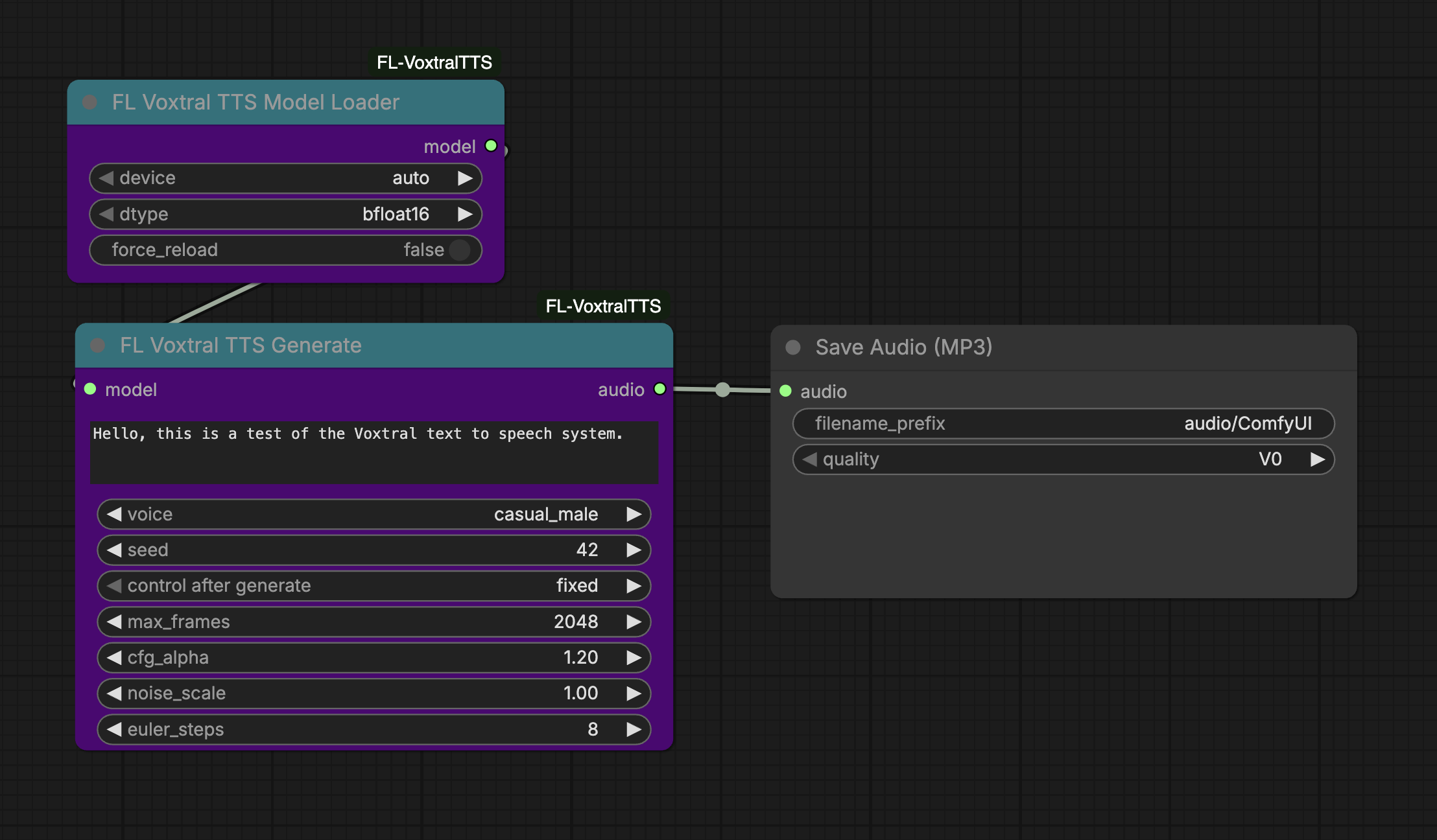
- Add FL Voxtral TTS Model Loader and select your device/dtype
- Connect to FL Voxtral TTS Generate
- Enter your text, pick a voice, and queue the prompt
- Connect the audio output to a Save Audio node
Models
| Model | Parameters | Output | |-------|------------|--------| | Voxtral-4B-TTS-2603 | 4B | 24 kHz mono audio |
The model downloads automatically on first use to ComfyUI/models/tts/VoxtralTTS/.
Voices
| Voice | Language | Gender | |-------|----------|--------| | casual_female | English | Female | | casual_male | English | Male | | cheerful_female | English | Female | | neutral_female | English | Female | | neutral_male | English | Male | | fr_female | French | Female | | fr_male | French | Male | | es_female | Spanish | Female | | es_male | Spanish | Male | | de_female | German | Female | | de_male | German | Male | | it_female | Italian | Female | | it_male | Italian | Male | | pt_female | Portuguese | Female | | pt_male | Portuguese | Male | | nl_female | Dutch | Female | | nl_male | Dutch | Male | | ar_male | Arabic | Male | | hi_female | Hindi | Female | | hi_male | Hindi | Male |
Generation Parameters
| Parameter | Default | Range | Description | |-----------|---------|-------|-------------| | cfg_alpha | 1.2 | 0.0 - 3.0 | Classifier-free guidance strength for voice consistency | | noise_scale | 1.0 | 0.0 - 2.0 | Initial noise magnitude for flow matching | | euler_steps | 8 | 2 - 32 | Euler ODE solver steps (higher = better quality, slower) | | max_frames | 2048 | 128 - 4096 | Maximum audio frames to generate | | seed | -1 | -1+ | Random seed for reproducibility (-1 for random) |
Requirements
- Python 3.9+
- 16GB RAM minimum
- NVIDIA GPU with 12GB+ VRAM recommended (CPU and Mac MPS supported)
License
Apache 2.0