
ComfyUI-FL-VoxCPM
VoxCPM TTS for ComfyUI - Text-to-speech with voice cloning, voice design, V2 support, and LoRA training
Nodes (8)
Trim reference audio before you clone a voice — it matters more than you think
The two-minute dataset builder for VoxCPM voice LoRAs
Train a voice LoRA inside ComfyUI, with a live loss chart and audio samples
V1 LoRA training settings — what actually moves the needle
Free transcriptions, because your cloned voice needs to know what was said
Fast, accurate local TTS with voice cloning — the one people forget about
The V2 training config that ships with sane OpenBMB defaults
Design a voice from a sentence, clone one from a clip — one node, five modes
FL VoxCPM
Text-to-speech nodes for ComfyUI powered by OpenBMB's VoxCPM model family. Features V1 and V2 models, voice cloning, voice design from text descriptions, LoRA fine-tuning with real-time training dashboard, and audio utility nodes.


Features
- VoxCPM V2 - 2B parameter model, 48kHz studio-quality audio, 30 languages
- VoxCPM V1.5 - 44.1kHz high-fidelity TTS with 800M parameters
- Voice Design - Create custom voices from natural language descriptions (V2)
- Voice Cloning - Clone any voice from a short audio reference
- Controllable Cloning - Clone a voice and modify its style/emotion (V2)
- Ultimate Cloning - Maximum fidelity cloning with reference + continuation audio (V2)
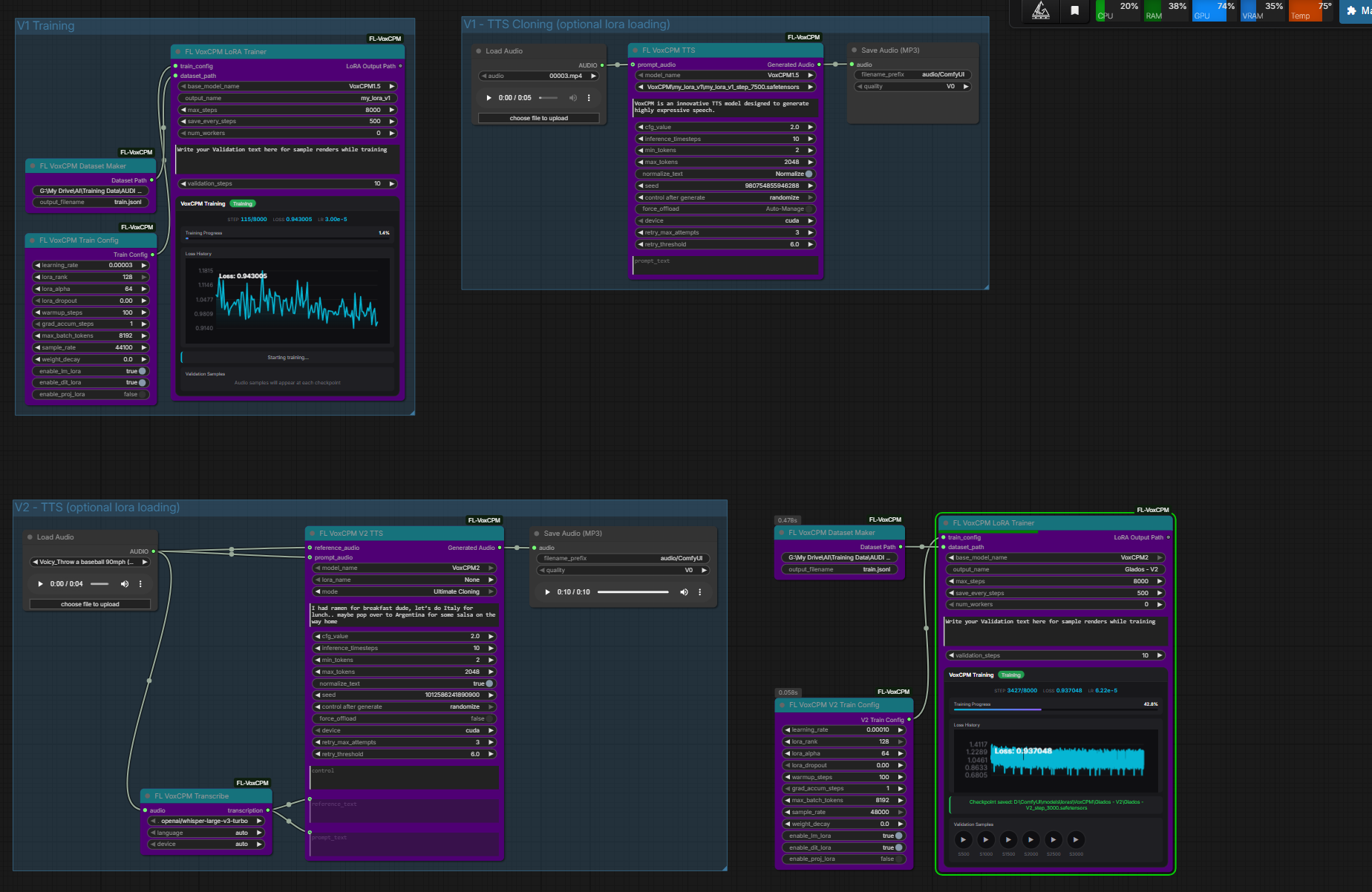
- LoRA Training - Fine-tune custom voices with real-time dashboard (loss chart, progress, validation audio)
- Auto Transcription - Built-in Whisper integration for generating reference text
- Audio Crop - Trim audio to specific time ranges
Nodes
| Node | Description | |------|-------------| | FL VoxCPM TTS | V1/V1.5 text-to-speech with optional voice cloning and LoRA | | FL VoxCPM V2 TTS | V2 TTS with Voice Design, Voice Cloning, Controllable Cloning, and Ultimate Cloning modes | | FL VoxCPM Train Config | V1 training hyperparameters (learning rate, LoRA rank, etc.) | | FL VoxCPM V2 Train Config | V2 training hyperparameters (48kHz defaults, rank 32, alpha 32) | | FL VoxCPM Dataset Maker | Create training dataset from audio + transcript files | | FL VoxCPM LoRA Trainer | Unified trainer for V1 and V2 with real-time dashboard and validation audio | | FL VoxCPM Transcribe | Transcribe audio to text using Whisper (useful for prompt_text / reference_text) | | FL VoxCPM Audio Crop | Trim audio to specific start/end times |
Installation
ComfyUI Manager
Search for "FL VoxCPM" and install.
Manual
cd ComfyUI/custom_nodes
git clone https://github.com/filliptm/ComfyUI-FL-VoxCPM.git
cd ComfyUI-FL-VoxCPM
pip install -r requirements.txt
Quick Start
V2 Voice Design (No Reference Audio Needed)
- Add FL VoxCPM V2 TTS node
- Set mode to Voice Design
- Enter voice description in
control(e.g. "young woman, warm and gentle voice") - Enter target text, queue prompt
V2 Voice Cloning
- Add FL VoxCPM V2 TTS + Load Audio nodes
- Set mode to Voice Cloning
- Connect reference audio to
reference_audio - Enter target text, queue prompt
V1 Text-to-Speech
- Add FL VoxCPM TTS node
- Enter text, queue prompt
- Model downloads automatically on first run
V1 Voice Cloning
- Add FL VoxCPM TTS + Load Audio nodes
- Connect reference audio to
prompt_audio - Use FL VoxCPM Transcribe to generate transcript, or enter it manually in
prompt_text - Enter target text, queue prompt
LoRA Training
- Prepare folder with
.wav/.mp3/.flacfiles + matching.txttranscripts - FL VoxCPM Dataset Maker -> FL VoxCPM Train Config (or V2) -> FL VoxCPM LoRA Trainer
- Set
validation_textto hear samples at each checkpoint - Monitor training in the real-time dashboard (loss chart, progress bar, audio samples)
- LoRA saves to
ComfyUI/models/loras/VoxCPM/
Models
| Model | Parameters | Sample Rate | Languages | Notes | |-------|-----------|-------------|-----------|-------| | VoxCPM2 | 2B | 48kHz | 30 | Recommended - Voice Design, Controllable Cloning | | VoxCPM1.5 | 800M | 44.1kHz | 2 | Stable, high quality | | VoxCPM-0.5B | 500M | 16kHz | 2 | Legacy, lightweight |
Models auto-download from HuggingFace to ComfyUI/models/tts/VoxCPM/ on first use.
V2 Modes
| Mode | Required Inputs | Description |
|------|----------------|-------------|
| Voice Design | text + control | Generate speech from a voice description - no audio needed |
| Voice Cloning | text + reference_audio | Clone a voice from reference audio |
| Controllable Cloning | text + reference_audio + control | Clone a voice and modify its style/emotion |
| Ultimate Cloning | text + reference_audio + reference_text + prompt_audio + prompt_text | Maximum fidelity with full context |
Key Parameters
- cfg_value (2.0) - Guidance scale. Higher = closer to reference voice, lower = more natural
- inference_timesteps (10) - Diffusion steps. More = better quality, slower
- lora_name - Select trained LoRA from dropdown (auto-detects rank)
- control (V2 only) - Natural language voice description for design/style control
Dataset Format (Training)
audio_folder/
  sample1.wav
  sample1.txt    # contains transcript of sample1.wav
  sample2.mp3
  sample2.txt
  ...
Supported audio formats: .wav, .mp3, .flac
Requirements
- Python 3.9+
- 16GB RAM minimum (32GB+ recommended for training)
- NVIDIA GPU with 12GB+ VRAM recommended (CPU and Mac MPS supported for V1 inference)
- V2 model requires ~10GB VRAM for inference, ~20GB for training
License
Apache-2.0 - Based on OpenBMB/VoxCPM