
ComfyUI-FL-RelayVSR
RelayVSR 4x real-world video super-resolution for ComfyUI, with automatic checkpoint download
FL RelayVSR
4x real-world video super-resolution for ComfyUI, powered by RelayVSR. A one-step Wan model generates sparse reference keyframes and a compact Flash decoder upscales every frame against them.



Features
- 4x video upscaling - Any
IMAGEframe batch in, exactly 4x the resolution out; single images work too - Automatic model download - The loader fetches the pinned checkpoints from Hugging Face on first run
- ComfyUI memory management - The model loads and offloads through ComfyUI's model manager, freeing other models when VRAM is needed
- Arbitrary input sizes - Frames are padded to the model grid internally and cropped back
- Progress and cancel - Per-frame progress bar; Cancel stops between frames
Nodes
| Node | Description | |------|-------------| | FL RelayVSR Model Loader | Downloads (if needed) and loads the Wan reference model and Flash decoder | | FL RelayVSR Upscale 4x | Upscales an ordered video frame batch 4x |
Installation
cd ComfyUI/custom_nodes
git clone https://github.com/filliptm/ComfyUI-FL-RelayVSR.git
cd ComfyUI-FL-RelayVSR
pip install -r requirements.txt
The Wan and Flash attention kernels are written in Triton. Linux PyTorch ships with Triton; on Windows install the triton-windows build that matches your PyTorch version.
Models
On first execution, FL RelayVSR Model Loader downloads these files from kopper/RelayVSR into ComfyUI/models/RelayVSR:
| File | Size |
|------|------|
| wan.safetensors | 10.1 GB |
| flash.safetensors | 128 MB |
Disable download_if_missing to require files you placed there yourself. No network request happens when both files are present.
Quick Start
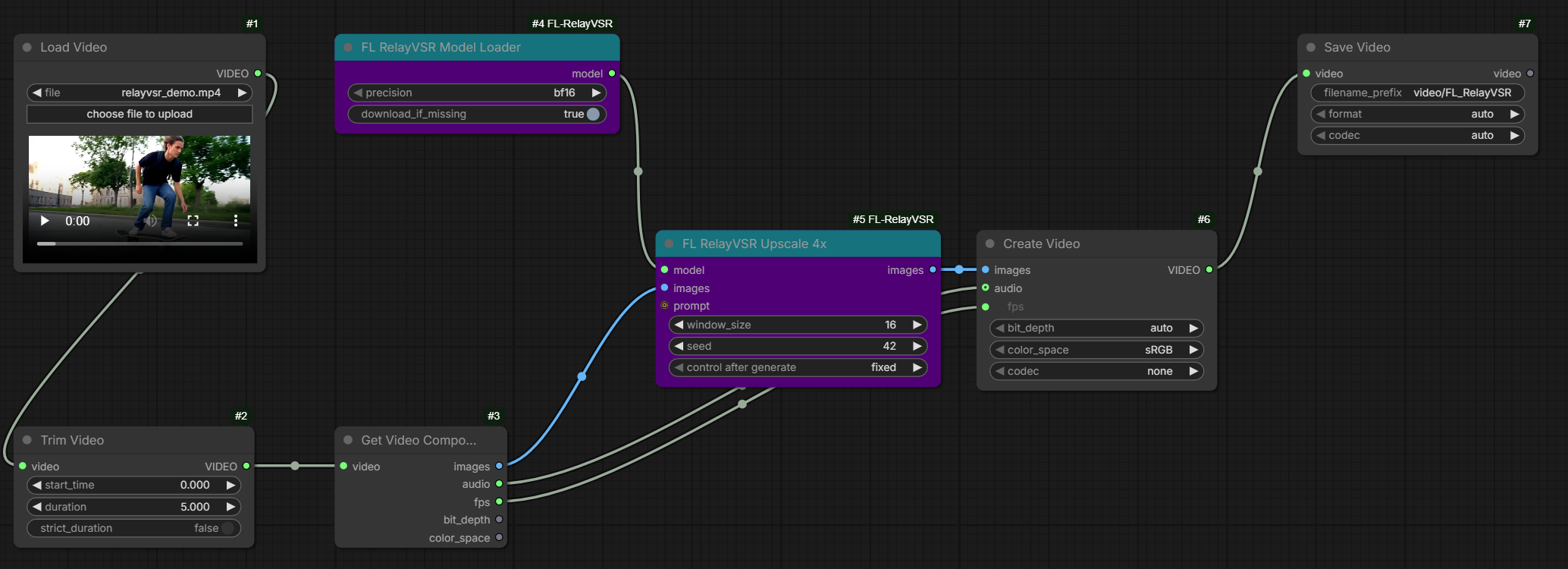
- Load the example workflow
examples/relayvsr_video_upscale.json. - Pick a video in Load Video and set the Trim Video duration (0 = whole clip).
- Queue. Frames go through Get Video Components -> FL RelayVSR Upscale 4x -> Create Video, which keeps the source FPS and audio.
Settings
window_size(default 16): a Wan reference keyframe everywindow_size - 1frames. Larger is faster; smaller tracks the references more closely.seed: noise seed for the one-step Wan keyframes. Fixed by default so reruns are cached.precision:bf16by default; usefp16on GPUs without bf16.prompt(optional, experimental): replaces the built-in Wan prompt with CLIP Text Encode conditioning from the Wan umT5-XXL text encoder (CLIPLoader typewan). The effect is subtle: in testing it changed only fine edges and texture (about 2/255 mean difference).
Performance
Measured on an RTX PRO 6000 Blackwell (bf16):
- 624x360 to 2496x1440: about 13 FPS once warm, 15.5 GB peak VRAM (9.4 GB of weights plus about 1.8 KB per output pixel).
- 960x540 to 3840x2160: 273 frames in about 79 s end to end, including video decode and encode.
- The first run in a fresh Python environment also compiles the Triton kernels.
Upscaled frames are held in system RAM as a float32 IMAGE batch, which is about 43 MB per 2496x1440 frame. Trim or split long clips.
Requirements
- NVIDIA GPU with CUDA and Triton
- 16 GB+ VRAM for ~1080p output
- Python 3.11+
Credits
- RelayVSR by Xijun Wang, Xin Li, Zirui Lang, Suhang Yao, Haoran Li and Zhibo Chen (paper)
- The inference code in
vendor/refvsr_inferenceis vendored from upstream; seevendor/README.md
License
Apache-2.0, matching the upstream RelayVSR code. Model weights are distributed by their authors on Hugging Face under their own terms.