
ComfyUI-FL-RTXVSR
NVIDIA RTX Video Super Resolution, denoise, and deblur for ComfyUI images and video frame batches
Nodes (3)
FL RTX VSR
NVIDIA RTX Video Super Resolution, denoise, and deblur nodes for ComfyUI images and video frame batches.


Features
- Image and video support - Process one image or an entire ComfyUI
IMAGEframe batch with the same nodes - RTX Video Super Resolution - Upscale clean or compressed sources at 1.5x, 2x, 3x, or 4x
- Source-aware quality modes - Standard modes restore compressed material; High Bitrate modes preserve clean and generated detail
- Denoise and deblur - Apply NVIDIA VFX restoration without changing resolution
- CUDA frame transfer - Uses DLPack to keep frame exchange between PyTorch and NVIDIA VFX on the GPU
- Automatic runtime setup - Downloads and verifies the pinned NVIDIA runtime only when the loader executes
- Arbitrary input sizes - Handles the native runtime's row-alignment requirement internally and returns the exact requested dimensions
Nodes
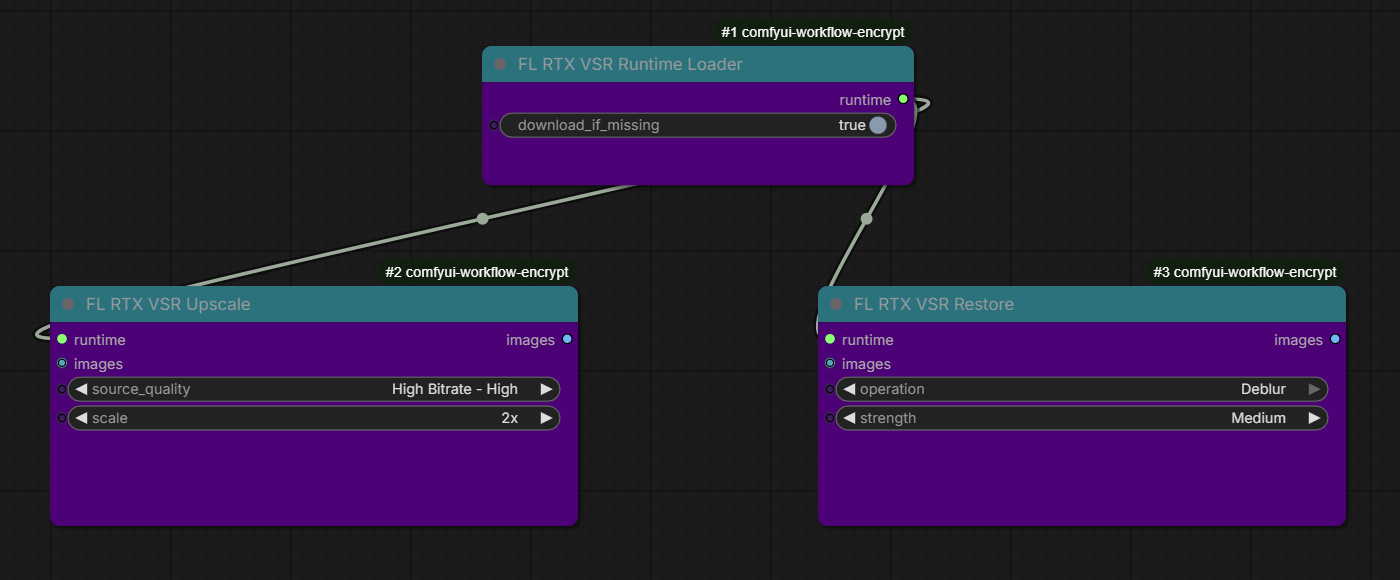
| Node | Description | |------|-------------| | FL RTX VSR Runtime Loader | Downloads, verifies, and loads the pinned NVIDIA VFX runtime | | FL RTX VSR Upscale | Upscales an image or video frame batch with standard or clean-source VSR models | | FL RTX VSR Restore | Applies same-resolution NVIDIA denoise or deblur |
Installation
ComfyUI Manager
Search for ComfyUI-FL-RTXVSR in ComfyUI Manager and install it.
Manual installation
cd ComfyUI/custom_nodes
git clone https://github.com/filliptm/ComfyUI-FL-RTXVSR.git
Restart ComfyUI after installation.
Quick Start
- Add FL RTX VSR Runtime Loader.
- Connect its
runtimeoutput to FL RTX VSR Upscale or FL RTX VSR Restore. - Connect an image or decoded video
IMAGEbatch. - For video, connect the returned frames to your usual video-combine node to preserve the workflow's frame rate and audio path.
- Queue the workflow. The first loader execution downloads the runtime when it is not already installed.
An example image workflow is included at examples/rtx_vsr_upscale.json.
Recommended Settings
- Start with High Bitrate - High for generated, lossless, ProRes, or lightly compressed sources.
- Use High Bitrate - Ultra when maximum detail matters more than processing time.
- Use Standard - High or Standard - Ultra for visibly compressed sources. Standard modes also suppress compression artifacts and may soften already-clean detail.
- Denoise and deblur preserve the input dimensions and can be run before upscaling when restoration is needed.
Requirements
- 64-bit Windows 10 or newer
- NVIDIA GeForce RTX 20 series or newer, or NVIDIA RTX professional GPU
- Current NVIDIA driver
- Python 3.12 or newer
- About 1 GiB of disk space for the NVIDIA VFX runtime
Runtime Download
On first execution, FL RTX VSR Runtime Loader downloads the pinned nvidia-vfx 0.1.0.1 Windows wheel directly from NVIDIA's package index, verifies its SHA-256 checksum, and extracts it to:
ComfyUI/models/rtx_vsr/nvidia-vfx/0.1.0.1
No network request occurs when the loader is not executed or when a valid runtime is already installed. Disable download_if_missing to require a pre-existing runtime.
The NVIDIA package is approximately 468 MiB compressed and is governed by NVIDIA's proprietary license. This repository does not redistribute NVIDIA binaries.
Credits
License
This node pack is released under the MIT License. NVIDIA VFX is separately licensed by NVIDIA; see THIRD_PARTY_NOTICES.md.