
FL PixelGen
FL PixelGen - Pixel-space diffusion text-to-image generation and LoRA training nodes for ComfyUI
Nodes (6)
Live pixel-space sampling with a progress bar that actually shows the image forming
This LoRA loader doesn't browse your loras folder — it takes a raw path and merges the weights itself
This loader is the whole workflow's front door
This node loads the Qwen3 LLM that PixelGen actually listens to
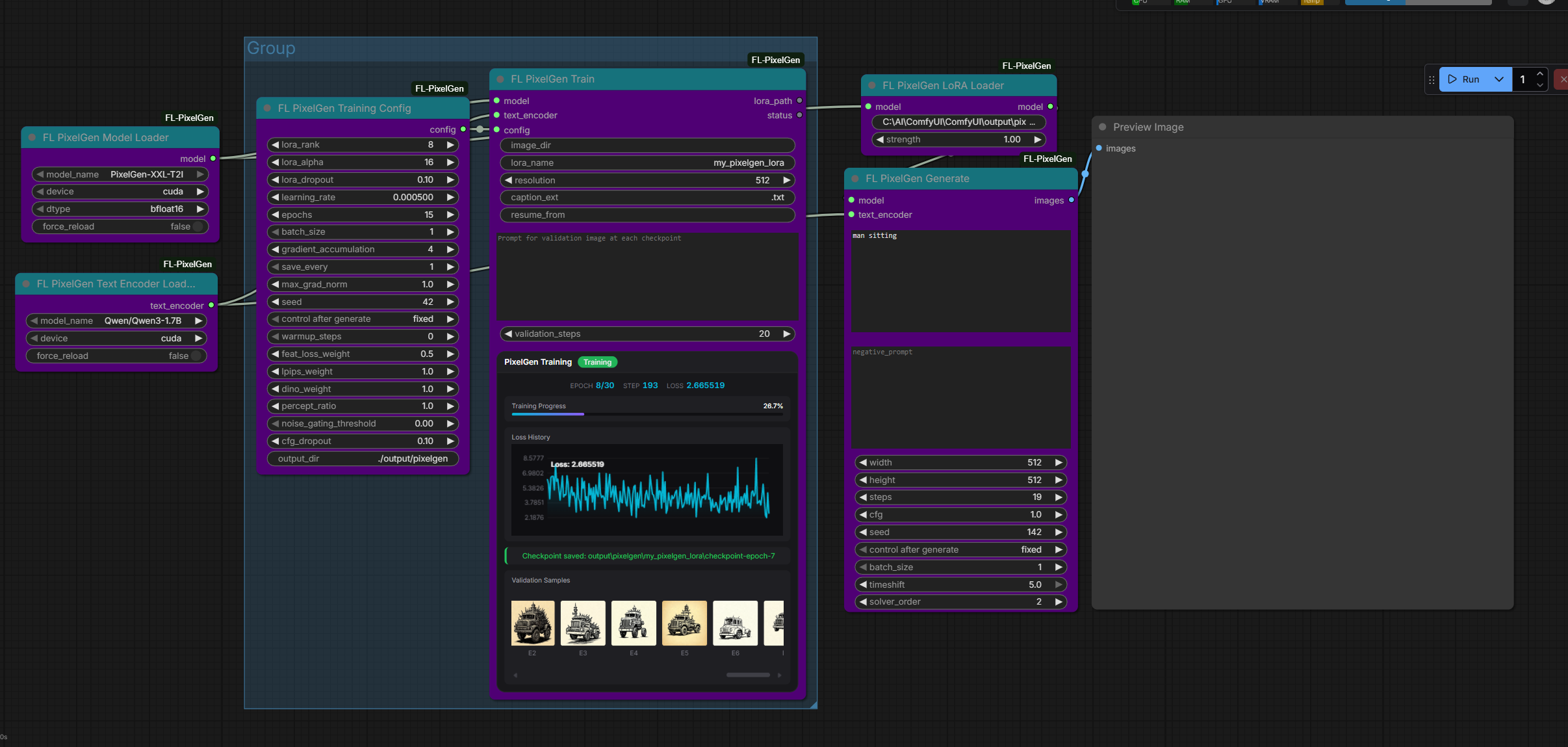
Real LoRA training inside the node graph, with a live loss chart and validation samples in the widget
The config bundle that decides whether your LoRA trains or cooks
FL PixelGen
Pixel-space diffusion text-to-image generation and LoRA training nodes for ComfyUI, powered by PixelGen. Generate high-quality images directly in pixel space using a JiT transformer denoiser with Qwen3 text conditioning and flow matching sampling — entirely within ComfyUI's node graph.



Features
- Pixel-Space Diffusion — Generates images directly in pixel space, no VAE decoding needed
- Live Sampling Preview — See the image form step-by-step during generation
- REPA LoRA Training — 4-component loss (flow matching + cosine alignment + LPIPS + DINO) with noise gating
- Real-Time Training UI — Live loss chart, progress bar, validation samples, and lightbox preview via WebSocket widget
- Qwen3 Text Encoder — Uses Qwen3-1.7B for text conditioning, auto-downloaded from HuggingFace
- Auto Model Download — Denoiser and text encoder models download automatically from HuggingFace on first use
Nodes
| Node | Category | Description | |------|----------|-------------| | FL PixelGen Model Loader | Loaders | Load the PixelGen denoiser model from checkpoint | | FL PixelGen Text Encoder Loader | Loaders | Load a Qwen3 text encoder for conditioning | | FL PixelGen Generate | Generation | Generate images from text using pixel-space diffusion | | FL PixelGen LoRA Loader | Loaders | Load and apply a trained LoRA adapter for inference | | FL PixelGen Training Config | Training | Configure LoRA training hyperparameters and REPA loss weights | | FL PixelGen Train | Training | Run REPA LoRA training with real-time progress widget |
Installation
Manual
cd ComfyUI/custom_nodes
git clone https://github.com/filliptm/ComfyUI-FL-PixelGen.git
cd ComfyUI-FL-PixelGen
pip install -r requirements.txt
The training widget JS is included in js/ and requires no build step.
Quick Start
Inference Pipeline
- Load Model — Add
FL PixelGen Model Loaderand selectPixelGen-XXL-T2I - Load Text Encoder — Add
FL PixelGen Text Encoder Loaderand select a Qwen3 variant - Generate — Connect both to
FL PixelGen Generate, enter a prompt, and execute
Training Pipeline
- Load Model + Text Encoder — Same loader nodes as inference
- Configure — Set LoRA rank, learning rate, epochs, and REPA loss weights in
FL PixelGen Training Config - Train — Connect model, text_encoder, and config to
FL PixelGen Trainwith your image directory - Validate — Set a validation prompt to see sample outputs during training
Using Trained LoRAs
Connect a trained LoRA checkpoint to FL PixelGen LoRA Loader between the model loader and generate nodes. Adjust strength to control the effect.
Node Details
FL PixelGen Model Loader
Loads the PixelGen denoiser from a local checkpoint or HuggingFace.
| Input | Type | Default | Notes |
|-------|------|---------|-------|
| model_name | Dropdown | PixelGen-XXL-T2I | Auto-downloads from HF |
| device | Dropdown | cuda | cuda / cpu |
| dtype | Dropdown | bfloat16 | bfloat16 / float32 |
| force_reload | BOOLEAN | False | Bypass model cache |
Output: PIXELGEN_MODEL
FL PixelGen Text Encoder Loader
Loads the Qwen3-1.7B language model as the text encoder for conditioning.
| Input | Type | Default | Notes |
|-------|------|---------|-------|
| model_name | Dropdown | Qwen/Qwen3-1.7B | Auto-downloads from HF |
| device | Dropdown | cuda | cuda / cpu |
| force_reload | BOOLEAN | False | Bypass encoder cache |
Output: PIXELGEN_TEXT_ENCODER
FL PixelGen Generate
Generates images from text prompts using flow matching with the AdamLM solver. Provides live step-by-step preview during sampling.
| Input | Type | Default | Notes |
|-------|------|---------|-------|
| model | PIXELGEN_MODEL | — | From Model Loader |
| text_encoder | PIXELGEN_TEXT_ENCODER | — | From Text Encoder Loader |
| prompt | STRING | — | Text prompt (multiline) |
| negative_prompt | STRING | (empty) | Negative prompt (multiline) |
| width | INT | 512 | 128–1024 (step 32) |
| height | INT | 512 | 128–1024 (step 32) |
| steps | INT | 25 | 1–100 |
| cfg | FLOAT | 4.0 | 0.1–10.0 |
| seed | INT | 0 | — |
| batch_size | INT | 1 | 1–4 |
| timeshift | FLOAT | 3.0 | 0.1–5.0 |
| solver_order | INT | 2 | 1–4 |
Output: IMAGE — standard ComfyUI image tensor
FL PixelGen LoRA Loader
Loads and applies a trained LoRA adapter to the denoiser for inference. Automatically resolves checkpoint directory structures.
| Input | Type | Default | Notes |
|-------|------|---------|-------|
| model | PIXELGEN_MODEL | — | From Model Loader |
| lora_path | STRING | — | Path to LoRA checkpoint (folder or .safetensors) |
| strength | FLOAT | 1.0 | 0.0–2.0 |
Output: PIXELGEN_MODEL — model with LoRA weights applied
FL PixelGen Training Config
| Parameter | Default | Range | |-----------|---------|-------| | LoRA Rank | 8 | 1–128 | | LoRA Alpha | 16 | 1–256 | | LoRA Dropout | 0.1 | 0–0.5 | | Learning Rate | 1e-4 | 1e-6 – 1e-2 | | Max Epochs | 100 | 1–10000 | | Batch Size | 1 | 1–8 | | Gradient Accumulation | 4 | 1–32 | | Save Every N Epochs | 10 | 1–1000 | | Max Grad Norm | 1.0 | 0.1–10.0 | | Seed | 42 | — | | REPA Losses | | | | Feature Loss Weight | 0.5 | 0–10.0 | | LPIPS Weight | 1.0 | 0–10.0 | | DINO Weight | 1.0 | 0–10.0 | | Perceptual Ratio | 1.0 | 0–10.0 | | Noise Gating Threshold | 0.0 | 0–1.0 | | CFG Dropout | 0.1 | 0–1.0 |
Output: PIXELGEN_TRAINING_CONFIG
Target modules: qkv_x, kv_y, proj, w12, w3, qkv
FL PixelGen Train
Runs the REPA LoRA training loop with 4-component loss: MSE(v_pred, v_target) + feature_alignment + LPIPS + DINO.
| Input | Type | Default | Notes |
|-------|------|---------|-------|
| model | PIXELGEN_MODEL | — | From Model Loader |
| text_encoder | PIXELGEN_TEXT_ENCODER | — | From Text Encoder Loader |
| config | PIXELGEN_TRAINING_CONFIG | — | From Training Config |
| image_dir | STRING | — | Path to images with .txt caption sidecars |
| lora_name | STRING | my_pixelgen_lora | Subfolder name for outputs |
| resolution | INT | 512 | 128–1024 (step 32) |
| caption_ext | STRING | .txt | Caption file extension |
| resume_from | STRING | (empty) | Path to checkpoint to resume |
| validation_prompt | STRING | (empty) | Generate samples during training |
| validation_steps | INT | 20 | 5–50 |
Outputs: LoRA path, status message
The training widget displays a live loss chart, epoch progress, and validation sample carousel with fullscreen lightbox preview via WebSocket (pixelgen.training.progress).
Dataset Format
Place images and matching text captions in a folder:
my_dataset/
├── image_001.png
├── image_001.txt    # "A photo of a sunset over the ocean"
├── image_002.jpg
├── image_002.txt    # "A portrait of a woman in a red dress"
└── ...
Supported image formats: .png, .jpg, .jpeg, .webp, .bmp
Requirements
- Python 3.10+
- NVIDIA GPU with 12GB+ VRAM (bf16 training)
- PyTorch 2.0+
- PEFT (Parameter-Efficient Fine-Tuning)
- Transformers (for Qwen3 text encoder)
License
Apache-2.0