
ComfyUI-FL-PRXPixel
Photoroom PRXPixel text-to-image nodes for ComfyUI with live previews and patch-grid controls
Nodes (2)
FL PRXPixel
Text-to-image custom nodes for ComfyUI powered by Photoroom's PRXPixel model.



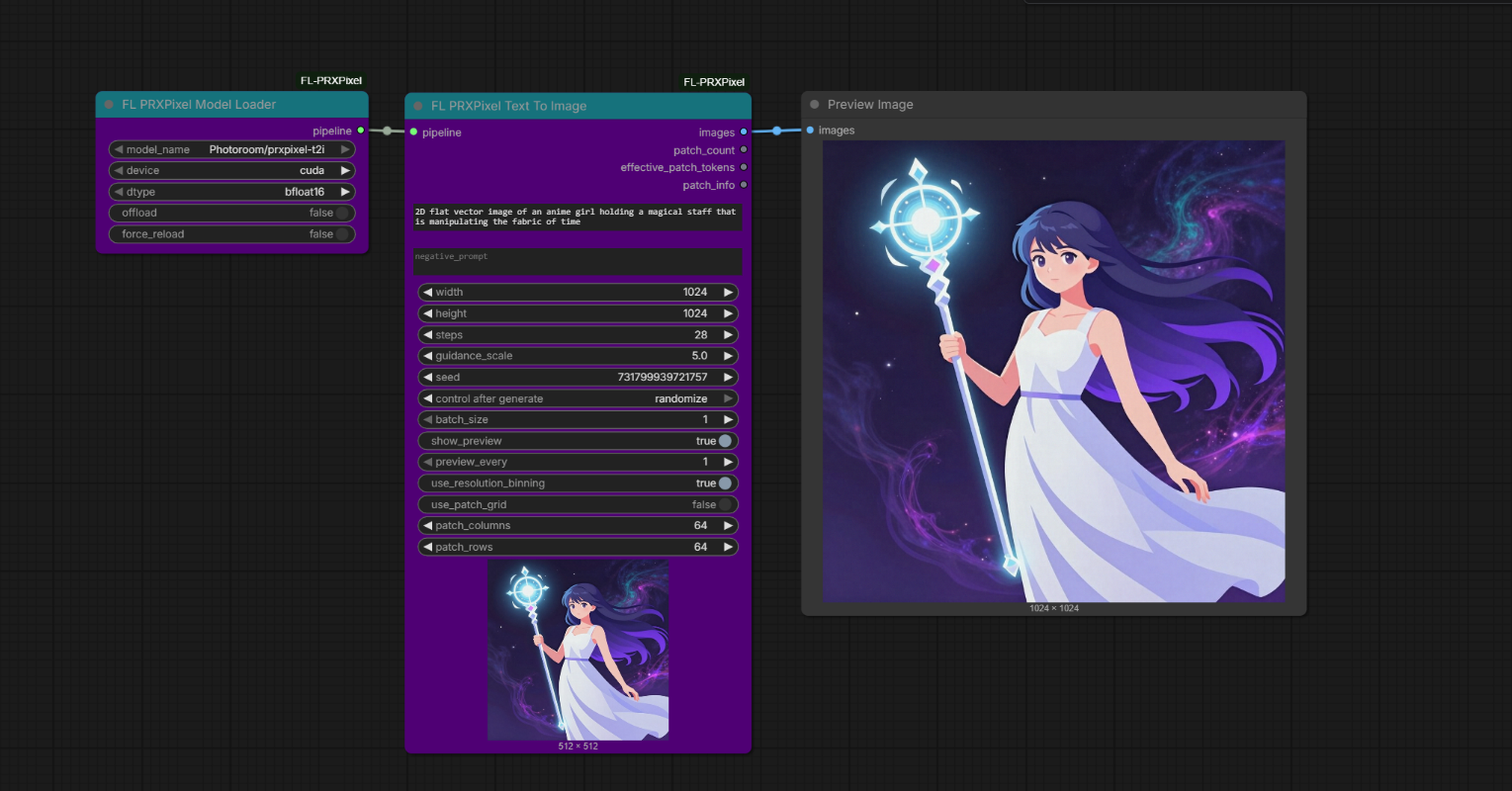
PRXPixel is a pixel-space diffusion model. It generates RGB images directly, without a VAE decode step, and this node pack exposes the model as a simple ComfyUI text-to-image workflow.
Features
- Text-to-image generation with
Photoroom/prxpixel-t2i - Direct ComfyUI
IMAGEoutput without a VAE node - Live denoising previews on the generation node
- Patch-count outputs for inspecting the internal denoising grid
- Optional patch-grid controls for directly changing patch columns and rows
- Resolution controls up to
4096x4096 - Automatic model loading through Diffusers and Hugging Face cache
Nodes
| Node | Description | |------|-------------| | FL PRXPixel Model Loader | Loads and caches the PRXPixel Diffusers pipeline. | | FL PRXPixel Text To Image | Generates images from prompts, exposes patch metrics, and can show live diffusion previews. |
Installation
ComfyUI Manager
After this pack is available in the Comfy Registry, install ComfyUI-FL-PRXPixel from ComfyUI Manager.
Manual Install
Clone this repository into your ComfyUI custom_nodes folder:
cd custom_nodes
git clone https://github.com/filliptm/ComfyUI-FL-PRXPixel.git
cd ComfyUI-FL-PRXPixel
python -m pip install -r requirements.txt
Restart ComfyUI after installation.
Example Workflow
An example ComfyUI workflow is included at:
example workflow/PRXpixel.json
Quick Start
- Add
FL PRXPixel Model Loader. - Add
FL PRXPixel Text To Image. - Connect the
pipelineoutput to the generation node. - Enter a prompt and queue the workflow.
The default generation settings follow the model card baseline: 1024x1024, 28 steps, guidance scale 5.0, and bfloat16.
Model
| Model | Type | Notes |
|-------|------|-------|
| Photoroom/prxpixel-t2i | Pixel-space text-to-image diffusion | Generates RGB images directly. Native examples use 1024x1024, Qwen3-VL text encoding, and FlowMatch Euler scheduling. |
This node pack currently targets text-to-image only. Image-to-image, inpainting, ControlNet, and LoRA workflows are not implemented.
Key Parameters
| Parameter | Description |
|-----------|-------------|
| prompt | Positive text prompt. |
| negative_prompt | Optional negative prompt. |
| width, height | Requested output size, up to 4096x4096. |
| steps | Number of denoising steps. |
| guidance_scale | Classifier-free guidance strength. |
| seed | Generation seed. |
| use_resolution_binning | Lets the pipeline choose an internal supported resolution bin. |
| use_patch_grid | Uses patch columns and rows to define the internal image size. |
| patch_columns, patch_rows | Direct patch-grid controls. Each patch is currently 16x16 pixels. |
| show_preview | Sends intermediate denoising frames to the ComfyUI node preview. |
| preview_every | Controls how often live preview frames are emitted. |
Patch Grid
PRXPixel uses fixed-size 16x16 patches internally. When use_patch_grid is enabled, the node derives the working resolution from patch dimensions:
width = patch_columns * 16
height = patch_rows * 16
patch_count = patch_columns * patch_rows
The generation node also returns:
patch_count: internal patch grid size after optional resolution binning.effective_patch_tokens:patch_count * batch_size * cfg_multiplier.patch_info: requested/internal resolution and patch grid summary.
Verification
Standalone model smoke test:
venv\Scripts\python.exe custom_nodes\ComfyUI-FL-PRXPixel\tests\prxpixel_standalone_smoke.py
ComfyUI API end-to-end test, with ComfyUI running on port 8188:
venv\Scripts\python.exe custom_nodes\ComfyUI-FL-PRXPixel\tests\prxpixel_comfy_api_e2e.py
Requirements
- Python
>=3.10 - ComfyUI
- CUDA GPU with bf16 support strongly recommended
- Hugging Face model cache space for the PRXPixel weights, roughly
17.5 GB
The current PRXPixel model card references a Diffusers development branch. This pack installs the matching public Space wheel:
https://huggingface.co/spaces/Photoroom/PRX-Pixel/resolve/main/diffusers-0.39.0.dev0-py3-none-any.whl
License
Apache-2.0