
FL FishSpeech
FL FishSpeech - AI Text-to-Speech & Voice Cloning for ComfyUI. High-quality 44.1kHz speech synthesis with zero-shot voice cloning using OpenAudio S1-mini (Fish Audio). Features DualAR Transformer, DAC codec, emotion control tags, and built-in Whisper transcription.
Nodes (6)
The 8 GB doorway to every other FishSpeech node
One clean clip, and the voice is yours
The free transcript generator that feeds your voice clone
The actual text-to-speech, with mood tags you'll actually use
Turn codebook tokens back into sound
See the audio as numbers instead of sound
FL FishSpeech
AI text-to-speech and voice cloning nodes for ComfyUI powered by OpenAudio S1-mini (Fish Audio). High-quality 44.1kHz speech synthesis with zero-shot voice cloning from a single reference clip.


Features
- Voice Cloning - Clone any voice from a single reference audio clip (5-30 seconds)
- High-Quality Audio - 44.1kHz output via DAC neural codec
- DualAR Transformer - 860M parameter model for natural-sounding speech
- Emotion Control - Inline tags like
[laugh],[whispers],[angry]for expressive speech - Whisper Transcription - Built-in transcription node for generating reference text
- Per-Token Progress - Real-time progress bar tracking during generation
- torch.compile Support - Optional JIT compilation for faster inference
Nodes
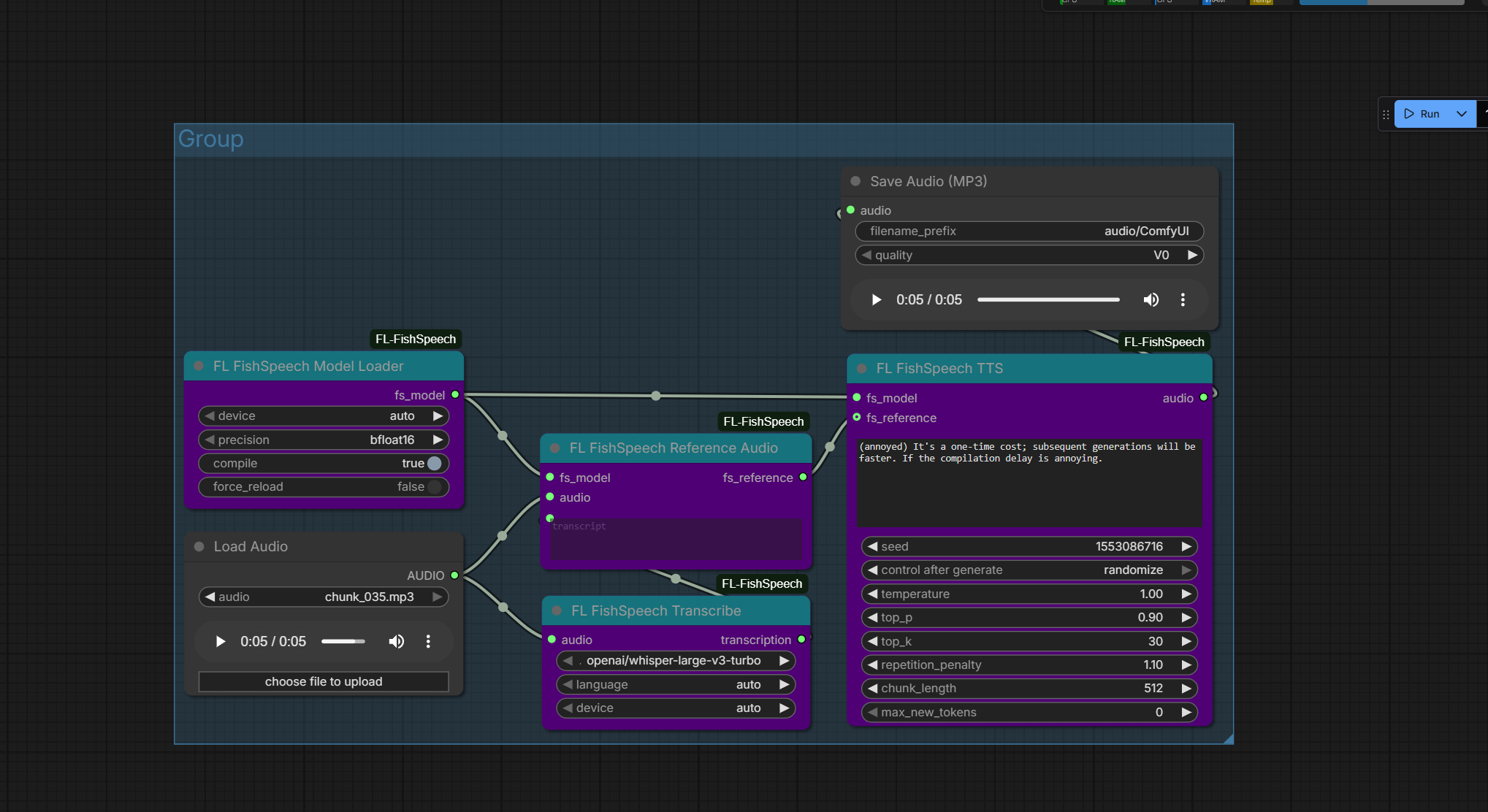
| Node | Description | |------|-------------| | Model Loader | Load OpenAudio S1-mini transformer + DAC codec | | Reference Audio | Encode reference audio + transcript for voice cloning | | TTS | Generate speech from text with optional voice cloning | | VQ Encode | Encode audio to VQ codes (discrete audio representation) | | VQ Decode | Decode VQ codes back to audio waveform | | Transcribe | Transcribe audio to text using Whisper |
Installation
ComfyUI Manager
Search for "FL FishSpeech" and install.
Manual
cd ComfyUI
git clone https://github.com/fishaudio/fish-speech.git
git -C fish-speech checkout befe4001745417f8c42131739d862b8a6fdbd15a
git clone https://github.com/filliptm/ComfyUI-FL-FishSpeech.git custom_nodes/ComfyUI-FL-FishSpeech
pip install -r custom_nodes/ComfyUI-FL-FishSpeech/requirements.txt
Quick Start
- Add FL FishSpeech Model Loader — models download automatically on first use
- For voice cloning:
- Load a reference audio clip (5-30 seconds of clear speech)
- Connect to FL FishSpeech Transcribe to get the transcript
- Connect both audio and transcript to FL FishSpeech Reference Audio
- Add FL FishSpeech TTS node
- Connect the model and optional reference
- Enter your text
- Connect output to Preview Audio or Save Audio
Basic TTS (No Cloning)
Model Loader → TTS → Preview Audio
Voice Cloning Pipeline
Model Loader ─────────────────→ TTS → Preview Audio
                                 ↑
Load Audio → Transcribe ──→ Reference Audio
         └────────────────→
Emotion & Expression Tags
FishSpeech supports inline expression tags within your text:
| Tag | Effect |
|-----|--------|
| [laugh] | Laughter |
| [whispers] | Whispering voice |
| [angry] | Angry tone |
| [sad] | Sad tone |
| [excited] | Excited delivery |
Example: Hello! [laugh] That's so funny. [whispers] But don't tell anyone.
Parameters
TTS Settings
| Parameter | Default | Range | Description |
|-----------|---------|-------|-------------|
| temperature | 1.0 | 0.1-2.0 | Sampling randomness. Higher = more varied |
| top_p | 0.9 | 0.1-1.0 | Nucleus sampling threshold |
| top_k | 30 | 1-100 | Top-k token filtering |
| repetition_penalty | 1.1 | 1.0-2.0 | Penalize repeated tokens |
| chunk_length | 512 | 50-1000 | Max bytes per text chunk |
| max_new_tokens | 0 | 0-4096 | Max tokens per chunk (0 = auto) |
| seed | 0 | 0-2^31 | Random seed (0 = random) |
Model Loader Settings
| Parameter | Default | Description |
|-----------|---------|-------------|
| device | auto | Device selection (auto, cuda, cpu) |
| precision | bfloat16 | Model precision (bfloat16 recommended for CUDA) |
| compile | false | Enable torch.compile (slow first run, faster after) |
Transcribe Settings
| Parameter | Default | Description |
|-----------|---------|-------------|
| model | whisper-large-v3-turbo | Whisper model variant |
| language | auto | Language code or auto-detect |
Model
| Model | Parameters | VRAM | Output | |-------|-----------|------|--------| | OpenAudio S1-mini | ~860M | ~14GB | 44.1kHz mono audio |
Models download automatically on first use to ComfyUI/models/fishspeech/.
The model uses a DualAR (Dual Autoregressive) Transformer for semantic token generation and a DAC (Descript Audio Codec) with 10 codebooks for high-quality audio reconstruction.
Requirements
- Python 3.10+
- 16GB RAM minimum
- NVIDIA GPU with 14GB+ VRAM recommended
Supported Platforms
| Platform | Device | Notes | |----------|--------|-------| | NVIDIA GPU | CUDA | 14GB+ VRAM, bfloat16 recommended | | Apple Silicon | MPS | M1/M2/M3/M4 supported | | CPU | CPU | Very slow, not recommended |
Credits
- fishaudio/fish-speech - Original model and codebase
- Fish Audio - OpenAudio S1-mini model
License
Apache 2.0