
FL AceStep Training
FL AceStep Training - LoRA Training nodes for ACE-Step 1.5 in ComfyUI
Nodes (6)
The node that writes captions, BPM, key and genre for every song
The node that auto-tags your music training set (no API key required)
The step that turns songs into tensors (and why training needs it)
Where every ACE-Step training run actually starts
The node that actually trains your music LoRA (and watches the loss live)
All the training dials, explained before you turn one
FL AceStep Training
LoRA training nodes for ComfyUI powered by ACE-Step 1.5, the open-source music generation foundation model. Train custom LoRAs to personalize music generation with your own style, voice, or genre — entirely within ComfyUI's node graph.



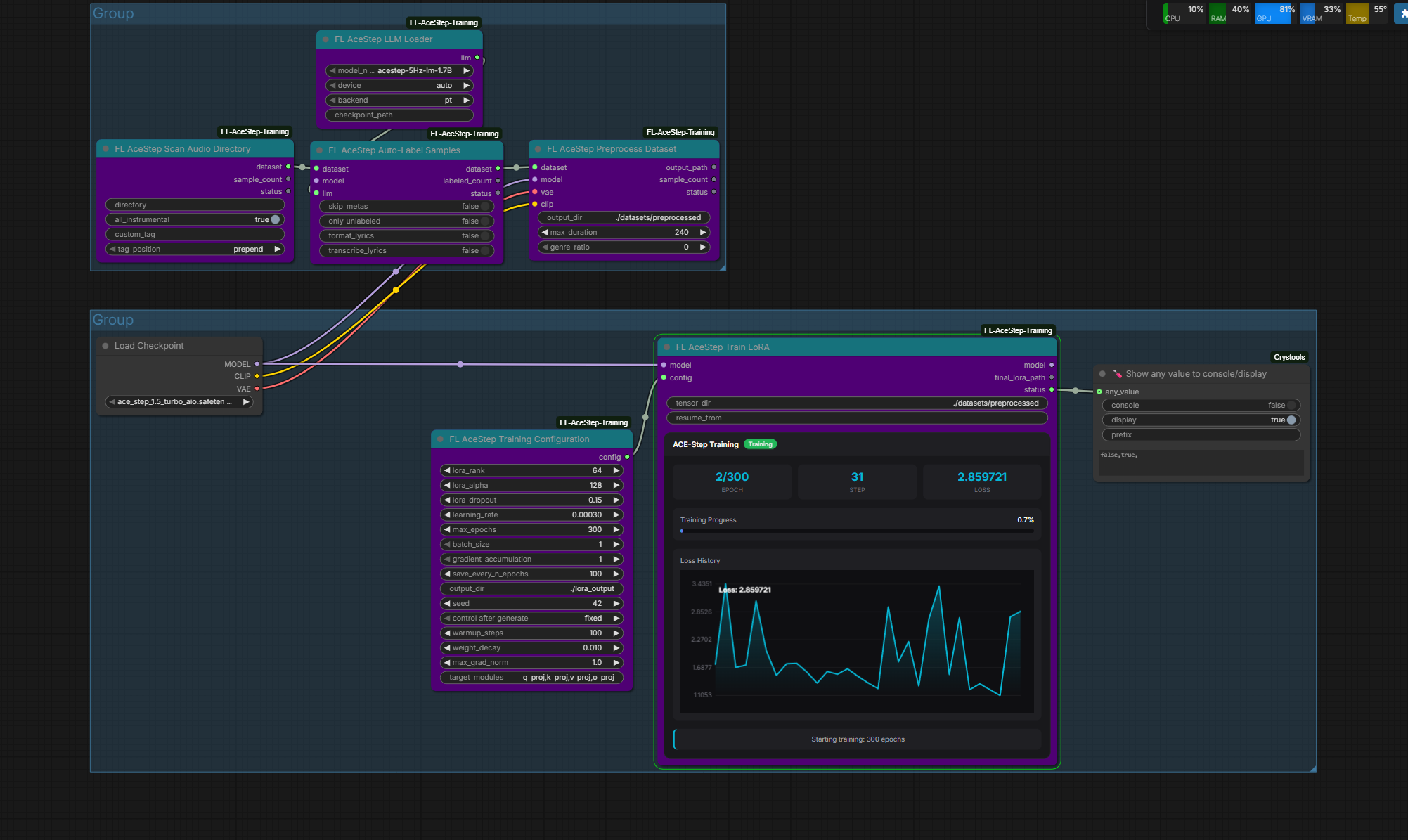
Features
- End-to-End Training — Full LoRA training pipeline inside ComfyUI's node graph
- Dataset Management — Scan audio directories, auto-label with LLM, load sidecar metadata
- Tiled VAE Encoding — Handles long audio via 30-second chunks with 2-second overlap
- Real-Time Training UI — Live loss chart, progress bar, and stats via WebSocket widget
- Auto Model Download — LLM models download automatically from HuggingFace on first use
- Native ComfyUI Types — Uses MODEL, VAE, and CLIP from ComfyUI's built-in checkpoint loader
Nodes
| Node | Category | Description |
|------|----------|-------------|
| FL AceStep LLM Loader | Loaders | Load 5Hz causal LM (0.6B / 1.7B / 4B) for auto-labeling |
| FL AceStep Scan Audio Directory | Dataset | Recursively scan folders for audio files with sidecar metadata |
| FL AceStep Auto-Label Samples | Dataset | Generate captions, BPM, key, genre, and lyrics via LLM |
| FL AceStep Preprocess Dataset | Dataset | VAE-encode audio and CLIP-encode text, save as .pt tensors |
| FL AceStep Training Configuration | Training | Configure LoRA rank/alpha/dropout and training hyperparameters |
| FL AceStep Train LoRA | Training | Run flow matching training loop with real-time progress widget |
Installation
Manual
cd ComfyUI/custom_nodes
git clone https://github.com/filliptm/ComfyUI-FL-AceStep-Training.git
cd ComfyUI-FL-AceStep-Training
pip install -r requirements.txt
Frontend (optional rebuild)
npm install
npm run build
The pre-built JS is included in js/, so rebuilding is only needed if modifying the training widget UI.
Quick Start
Training Pipeline
- Load Checkpoint — Use ComfyUI's native
Load Checkpointnode with an ACE-Step model to get MODEL, VAE, and CLIP - Load LLM (optional) — Add
FL AceStep LLM Loaderif you want auto-labeling - Scan Dataset — Use
FL AceStep Scan Audio Directoryto find your audio files - Label — Connect MODEL, VAE, and LLM to
FL AceStep Auto-Label Samplesfor LLM-generated metadata - Preprocess — Run
FL AceStep Preprocess Datasetwith MODEL, VAE, and CLIP to encode audio/text to tensors - Configure — Set LoRA rank, learning rate, epochs in
FL AceStep Training Configuration - Train — Connect MODEL and config to
FL AceStep Train LoRAand execute
Using Trained LoRAs
Use ComfyUI's native LoRA loading nodes to apply your trained LoRA for inference with the built-in ACE-Step nodes.
Node Details
FL AceStep LLM Loader
Loads one of three 5Hz causal language models for auto-labeling audio samples.
| Input | Type | Default | Notes |
|-------|------|---------|-------|
| model_name | Dropdown | acestep-5Hz-lm-1.7B | Also: 0.6B, 4B |
| device | Dropdown | auto | auto / cuda / cpu |
| backend | Dropdown | pt | pt / vllm |
| checkpoint_path | STRING | (empty) | Optional, leave empty for auto-download |
Output: ACESTEP_LLM
FL AceStep Scan Audio Directory
Recursively scans a directory for audio files and loads accompanying metadata.
| Input | Type | Default | Notes |
|-------|------|---------|-------|
| directory | STRING | — | Path to audio folder |
| all_instrumental | BOOLEAN | True | Mark all samples as instrumental |
| custom_tag | STRING | (empty) | LoRA activation tag (e.g., my_style) |
| tag_position | Dropdown | prepend | prepend / append / replace |
Outputs: ACESTEP_DATASET, sample count, status
FL AceStep Auto-Label Samples
Uses the loaded LLM to generate metadata for each audio sample.
| Input | Type | Default | Notes |
|-------|------|---------|-------|
| dataset | ACESTEP_DATASET | — | From Scan Directory |
| model | MODEL | — | ACE-Step model (purple) |
| vae | VAE | — | ACE-Step VAE (red) — used for audio-to-codes |
| llm | ACESTEP_LLM | — | From LLM Loader |
| skip_metas | BOOLEAN | False | Skip BPM/key/time signature |
| only_unlabeled | BOOLEAN | False | Process only unlabeled samples |
| format_lyrics | BOOLEAN | False | Format user-provided lyrics with LLM |
| transcribe_lyrics | BOOLEAN | False | Transcribe lyrics from audio |
Outputs: ACESTEP_DATASET, labeled count, status
FL AceStep Preprocess Dataset
VAE-encodes audio and CLIP-encodes text to .pt tensor files for training.
| Input | Type | Default | Notes |
|-------|------|---------|-------|
| dataset | ACESTEP_DATASET | — | From label or scan node |
| model | MODEL | — | ACE-Step model (purple) |
| vae | VAE | — | ACE-Step VAE (red) |
| clip | CLIP | — | ACE-Step CLIP (yellow) |
| output_dir | STRING | ./output/acestep/datasets | — |
| max_duration | FLOAT | 240.0 | 10–600 seconds |
| genre_ratio | INT | 0 | 0–100% chance to use genre instead of caption |
Outputs: output path, sample count, status
FL AceStep Training Configuration
| Parameter | Default | Range |
|-----------|---------|-------|
| LoRA Rank | 8 | 4–256 (step 4) |
| LoRA Alpha | 16 | 4–512 (step 4) |
| LoRA Dropout | 0.1 | 0–0.5 |
| Learning Rate | 1e-4 | 1e-6 – 1e-2 |
| Max Epochs | 100 | 10–10000 |
| Batch Size | 1 | 1–8 |
| Gradient Accumulation | 4 | 1–16 |
| Save Every N Epochs | 10 | 5–1000 |
| Seed | 42 | — |
| Optional | | |
| Warmup Steps | 100 | 0–1000 |
| Weight Decay | 0.01 | 0–0.1 |
| Max Grad Norm | 1.0 | 0.1–10.0 |
| Target Modules | q_proj,k_proj,v_proj,o_proj | Comma-separated |
Output: ACESTEP_TRAINING_CONFIG
Mixed precision is fixed to bf16. The turbo model uses 8-step discrete timesteps with shift=3.0.
FL AceStep Train LoRA
Runs the training loop with flow matching loss: MSE(predicted_v, x1 - x0).
| Input | Type | Default | Notes |
|-------|------|---------|-------|
| model | MODEL | — | ACE-Step model (purple) |
| config | ACESTEP_TRAINING_CONFIG | — | From config node |
| tensor_dir | STRING | ./output/acestep/datasets | Directory of .pt files |
| lora_name | STRING | my_lora | Name for the trained LoRA (used as subfolder) |
| resume_from | STRING | (empty) | Path to checkpoint to resume from |
Outputs: MODEL (with LoRA), final LoRA path, status
The training widget displays a live loss chart, progress bar, and per-epoch stats via WebSocket (acestep.training.progress).
Supported Audio Formats
.wav, .mp3, .flac, .ogg, .opus, .m4a
Sidecar files for metadata:
.txtfiles alongside audio for lyricskey_bpm.csvormetadata.csvfor BPM, key, and caption data
Requirements
- Python 3.10+
- NVIDIA GPU with 8GB+ VRAM (bf16 training)
- PyTorch 2.0+
- PEFT (Parameter-Efficient Fine-Tuning)
- Transformers, Diffusers, Accelerate
License
MIT