
Civitai Gallery Explorer
This is a powerful custom node for ComfyUI that brings the full Civitai browsing experience directly into your workflow.
Nodes (2)
CivitAI Gallery Explorer for ComfyUI




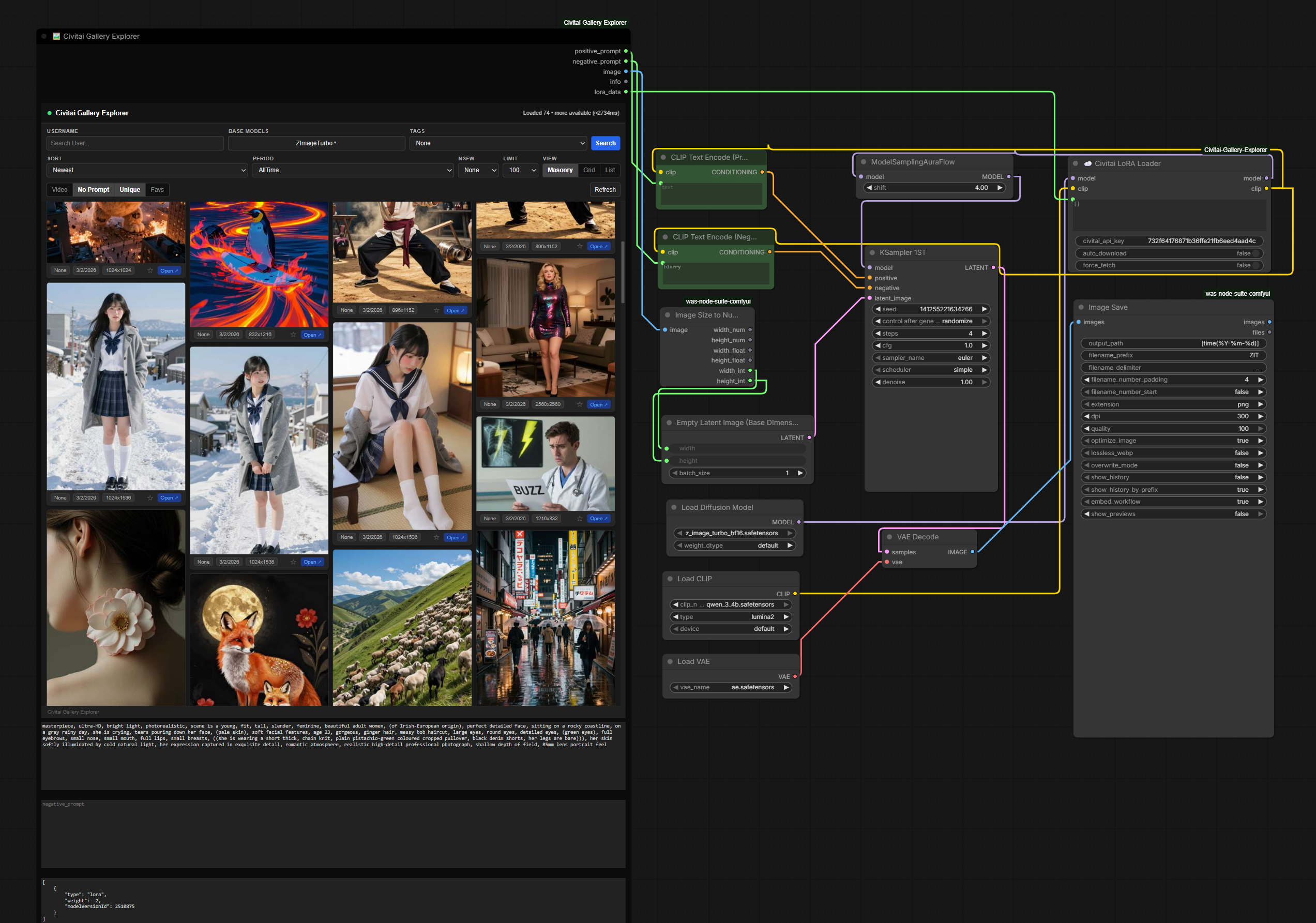
Browse the Civitai image gallery inside a ComfyUI node. Filter and scroll through posts, save favorites on disk, and send the selected positive prompt, negative prompt, preview image, and LoRA metadata into the rest of the graph.
The pack is published on the Comfy Registry as civitai-gallery-explorer (publisher @fabwaseem, about 1.4K downloads). The GitHub repository currently has 3 stars.
Features
- Infinite-scroll gallery with masonry, grid, and list layouts
- Filters for username, base model, tag, sort, period, NSFW level, and page size
- Toggles for video-only results, posts that include a positive prompt, unique prompts, and favorites
- Click a card to fill
positive_prompt,negative_prompt, andlora_data - Image output downloads the selected preview when that output is connected
- Local favorites stored in
civitai_favorites.jsonnext to the node - Civitai LoRA Loader resolves LoRA names, version ids, and hashes, then applies them with ComfyUI's LoRA loader
- Optional auto-download of missing LoRAs, with resume, retries, and TLS verification
- Optional Civitai API key for downloads that require authentication
Installation
ComfyUI Manager
- Open ComfyUI Manager.
- Choose Install Custom Nodes.
- Search for
CivitAI Gallery Explorer. - Install it and restart ComfyUI.
From a shell with the ComfyUI CLI:
comfy node install civitai-gallery-explorer
Git
cd ComfyUI/custom_nodes
git clone https://github.com/fabwaseem/ComfyUI-Civitai-Gallery-Explorer.git
cd ComfyUI-Civitai-Gallery-Explorer
pip install -r requirements.txt
Restart ComfyUI after installing.
Usage
- Add a node from
💡fabwaseem/Civitai:🖼️ Civitai Gallery Explorer☁️ Civitai LoRA Loader
- Search and filter the gallery, then click a card.
- Connect
positive_promptandnegative_promptto your text encoders. - Connect
imagewhen you want the selected preview as an image input. The preview is fetched only when that output is linked. - Connect
lora_datato Civitai LoRA Loader. - On the loader, leave Auto Download enabled to fetch a missing file into the LoRA folder. Force Fetch rechecks a file that is already on disk. An API key is optional and is sent only as a Civitai download token.
An example graph is in assets/example-workflow.json. The same file is also available to ComfyUI as example_workflows/civitai_gallery_explorer.json.
Screenshot
The gallery UI shown above is stored at docs/screenshots/preview.png.

Development
pip install ruff pytest numpy pillow aiohttp tqdm typing_extensions
ruff check .
pytest -q tests
node --check js/Civitai_Gallery_Explorer.js
License
MIT. See LICENSE.
Developed by Waseem Anjum (fabwaseem).