
ComfyUI Labnana
ComfyUI custom nodes for the Labnana (Marswave) image generation API: one node covers text-to-image, image editing and 4K output, plus credit estimation, task history and subscription tools.
Nodes (8)
Every Labnana workflow starts here — the node that holds your key
Check the price before you spend — a dry run that can't cost you a credit
Fetch that fire-and-forget job you submitted an hour ago
Text-to-image, image editing, and 4K in one node — no GPU required
Your whole generation history, one page at a time — and how to audit your spend
Turn any image URL into a ComfyUI tensor — no API key, no fuss
Submit a job and walk away
Your credit balance at a glance — the 'how broke am I' node
ComfyUI-Labnana
<p align="center"> <img src="assets/icon.png" alt="ComfyUI-Labnana logo" width="160"> </p>



中文文档 | English
ComfyUI custom nodes for the Labnana (Marswave) image generation API. One generation node covers text-to-image, image editing and 4K output — submission, waiting and download all happen inside the node. Cost-control and task-history tools included.
- Integration guide: https://labnana.com/docs/openapi/guide
- Full API reference: https://docs.marswave.ai/openapi-labnana.html
Installation
Via ComfyUI-Manager (recommended): open Manager → Custom Nodes Manager, search for Labnana and install. Also available on the Comfy Registry:
comfy node registry-install comfyui-labnana
Manual:
cd ComfyUI/custom_nodes
git clone https://github.com/exoticknight/ComfyUI-Labnana.git
Restart ComfyUI. The only dependency is requests, which ships with ComfyUI. Nodes appear under the Labnana category.
API key
Create a key (starts with ls_) at https://labnana.com/api-keys, then either:
- paste it into the
api_keyfield of the Labnana API Client node, or - set the
LABNANA_API_KEYenvironment variable and leave the field empty — recommended, so the key never leaks into shared workflow JSON files.
For safety, workflow-controlled custom API endpoints are blocked by default so
an environment-provided key cannot be forwarded to another host. Developers
using a trusted proxy or staging service can explicitly opt in by setting
LABNANA_ALLOW_CUSTOM_BASE_URL=1 before starting ComfyUI.
Quick start: text to image
Labnana API Client → Labnana Image Generation → Save Image. Type a prompt, pick a model, image_size and aspect_ratio, press Run. The node handles everything else internally.
- The
provideris derived from the model automatically. image_urlsalso outputs the public result URLs (valid 7 days).- The
seedwidget is never sent to the API — it only forces ComfyUI to re-execute the node instead of serving the cached result. Set it to randomize to regenerate every run.
Editing images (img2img)
Connect a Load Image node to reference_images and write the editing instructions in the prompt. Reference images can come from two inputs, freely combined, subject to the per-model cap (4–14):
reference_images(IMAGE): a ComfyUI image batch, uploaded inline as base64 (adaptively compressed/downscaled under a shared 20 MB request-body budget);reference_image_urls(STRING): onehttps://orgs://URL per line.
Style presets: every generation node accepts an optional system_prompt, prepended to the prompt (the API has no native system-prompt field) — handy for sharing one style/behavior preamble across workflows.
4K and slow jobs
Nothing special to wire — pick 4K as the image size. wan2.7-image-pro supports 4K for text-to-image only; reference-guided requests must use 1K or 2K. If a job needs longer than the default 10-minute wait, raise the node's optional timeout input.
Controlling costs
- Labnana Estimate Credits takes the same inputs as the generation node and returns
creditsandcan_generate— check the price before spending. - Labnana Subscription Info shows monthly, permanent and limited-time credit balances, free-usage balances and plan status.
- Invalid combinations (e.g. 4K on wan2.7-image, too many reference images) fail fast locally before any credits are spent.
When the account has matching freeUsages, 1K/2K generation consumes that
shared account-level allowance before credits. Free usage does not cover 4K;
pure-free accounts may also receive retryable busy responses at peak times.
Models and constraints
| Model | Provider | Sizes | Max ref images | Credits (1K/2K/4K) | |---|---|---|---|---| | gemini-3-pro-image | google | 1K/2K/4K | 14 | 15/15/30 | | gemini-3.1-flash-image | google | 1K/2K/4K | 14 | 10/10/20 | | gpt-image-2 | openai | 1K/2K/4K | 4 | 4/6/10 | | gpt-image-2.5-flare | openai | 1K/2K/4K | 4 | Live estimate; same as Sunburst | | gpt-image-2.5-sunburst | openai | 1K/2K/4K | 4 | Live estimate; same as Flare | | wan2.7-image-pro | alibaba | 1K/2K/4K (4K text-to-image only) | 9 | 6/8/12 | | wan2.7-image | alibaba | 1K/2K | 9 | 4/6 | | seedream-5-0-pro | bytedance | 1K/2K | 10 | 6/15 |
Aspect ratios depend on the model:
- Wan2.7:
1:1, 3:4, 4:3, 9:16, 16:9; - Gemini 3 Pro Image and GPT-Image-2: the eight common ratios through
21:9; - GPT-Image-2.5 Flare and Sunburst: 10 ratios, adding
4:5and5:4; - Gemini 3.1 Flash Image and Seedream 5.0 Pro: all 12 ratios, including
1:4, 4:1, 1:8, 8:1.
GPT-Image-2.5 Flare favors speed; Sunburst favors richer detail. Both tiers cost the same, and the Estimate Credits node returns the current price for the selected size.
Credit prices follow the official docs and may change — the Estimate Credits node always returns the live cost.
Advanced: task management
For batch pipelines and fire-and-forget jobs, the async task API is exposed under Labnana/Advanced:
- Labnana Submit Task — submit only, returns a
task_idimmediately without waiting; - Labnana Get Task — fetch (or wait for) a task by
task_idany time later and download its images; - Labnana List Tasks — paged generation history with status filter;
- Labnana Load Image From URL — turn result URLs (or any image URL) back into an IMAGE batch.
For normal use you never need these — Labnana Image Generation does submit + wait + download in one node.
Example workflows
Ready-made workflows ship in example_workflows/ and appear in ComfyUI under Workflow → Browse Templates → ComfyUI-Labnana (you can also drag the JSON files onto the canvas):
| 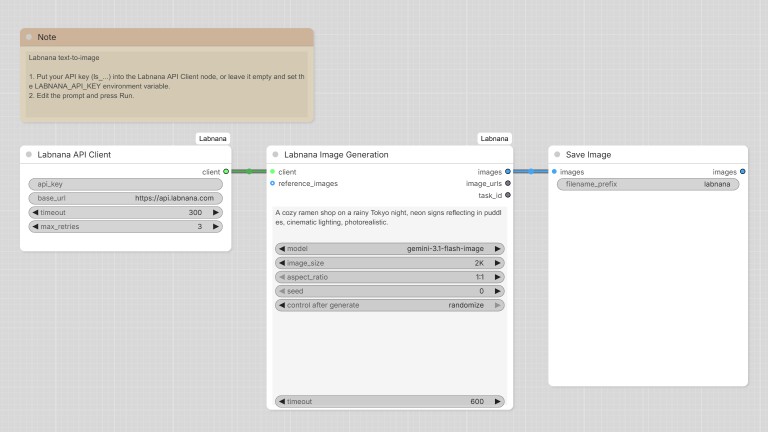 |
| 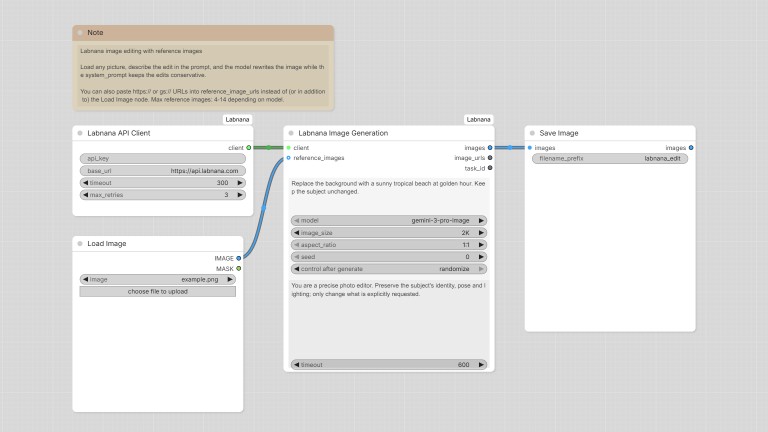 |
|:---:|:---:|
| Text to Image — minimal generation | Image Editing — reference image +
|
|:---:|:---:|
| Text to Image — minimal generation | Image Editing — reference image + system_prompt guardrails |
| 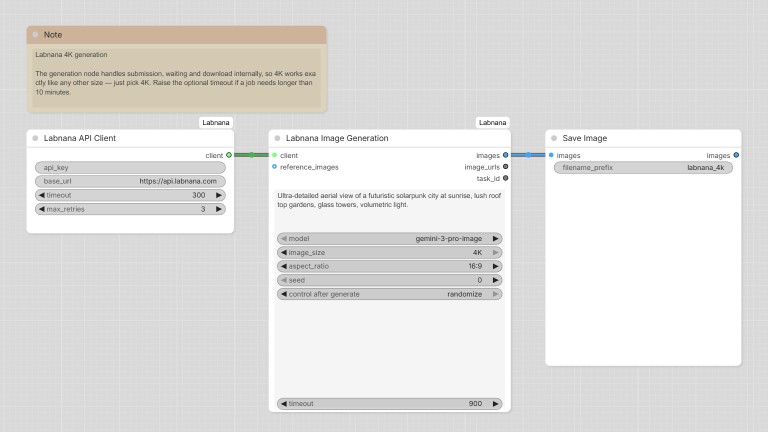 |
| 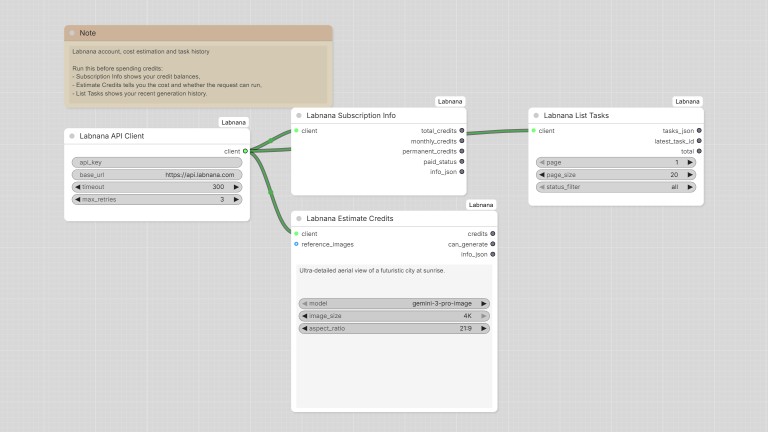 |
| 4K Generation — high-res with a longer timeout | Account & Costs — balance, credit estimate and task history before spending credits |
|
| 4K Generation — high-res with a longer timeout | Account & Costs — balance, credit estimate and task history before spending credits |
Error handling
| Code | Meaning | Action | |---|---|---| | 21007 | Invalid API key | Check the key configuration | | 26004 | Insufficient credits | Top up / upgrade the plan | | 29003 | Parameter error | Check the model/parameter combination | | 29998 | Rate limited | The client already retries with the documented 20–30 s exponential backoff |
All API errors are raised with the error code and a remediation hint, visible in the ComfyUI error dialog and log.
Development
Install the development dependencies, then run the offline checks (no API key or network calls are needed):
python -m pip install -r requirements-dev.txt
python tests/test_offline.py
python -m ruff check .
With LABNANA_API_KEY configured locally, python tests/test_live_models.py
requests free 1K estimates for both new models. Add --generate to generate one
1K image per model when both estimates allow it; generation consumes credits.
| Node | Endpoint |
|---|---|
| Labnana Subscription Info | GET /openapi/v1/user/subscription |
| Labnana Image Generation | POST /openapi/v1/images/generation/async + GET .../tasks/{taskId} polling |
| Labnana Estimate Credits | POST /openapi/v1/images/generation/estimate-credits |
| Labnana Submit Task | POST /openapi/v1/images/generation/async |
| Labnana Get Task | GET /openapi/v1/images/generation/tasks/{taskId} |
| Labnana List Tasks | GET /openapi/v1/images/generation/tasks |
The synchronous endpoint (POST /openapi/v1/images/generation) is implemented in the bundled labnana_api client library but not exposed as a node — the async flow is more robust for every size.