
Edit Drift Fix
Paste an AI edit (Qwen-Image-Edit, FLUX Kontext / FLUX.2 Klein, GPT-Image, Nano Banana) back into the original without drift: aligns geometry and colour, finds the changed area, keeps every other pixel bit-exact.
ComfyUI-EditDriftFix
Helps you work with generative AI without introducing unwanted changes to the original image.
Editing models (Qwen-Image-Edit, FLUX Kontext, FLUX.2 Klein, GPT-Image, Nano Banana) return a whole new picture. Even when you ask for one small change, the frame comes back slightly zoomed and shifted, the colours move, and fine detail is redrawn everywhere. Edit Drift Fix takes the original and the edit and returns the original with only the real change pasted in.
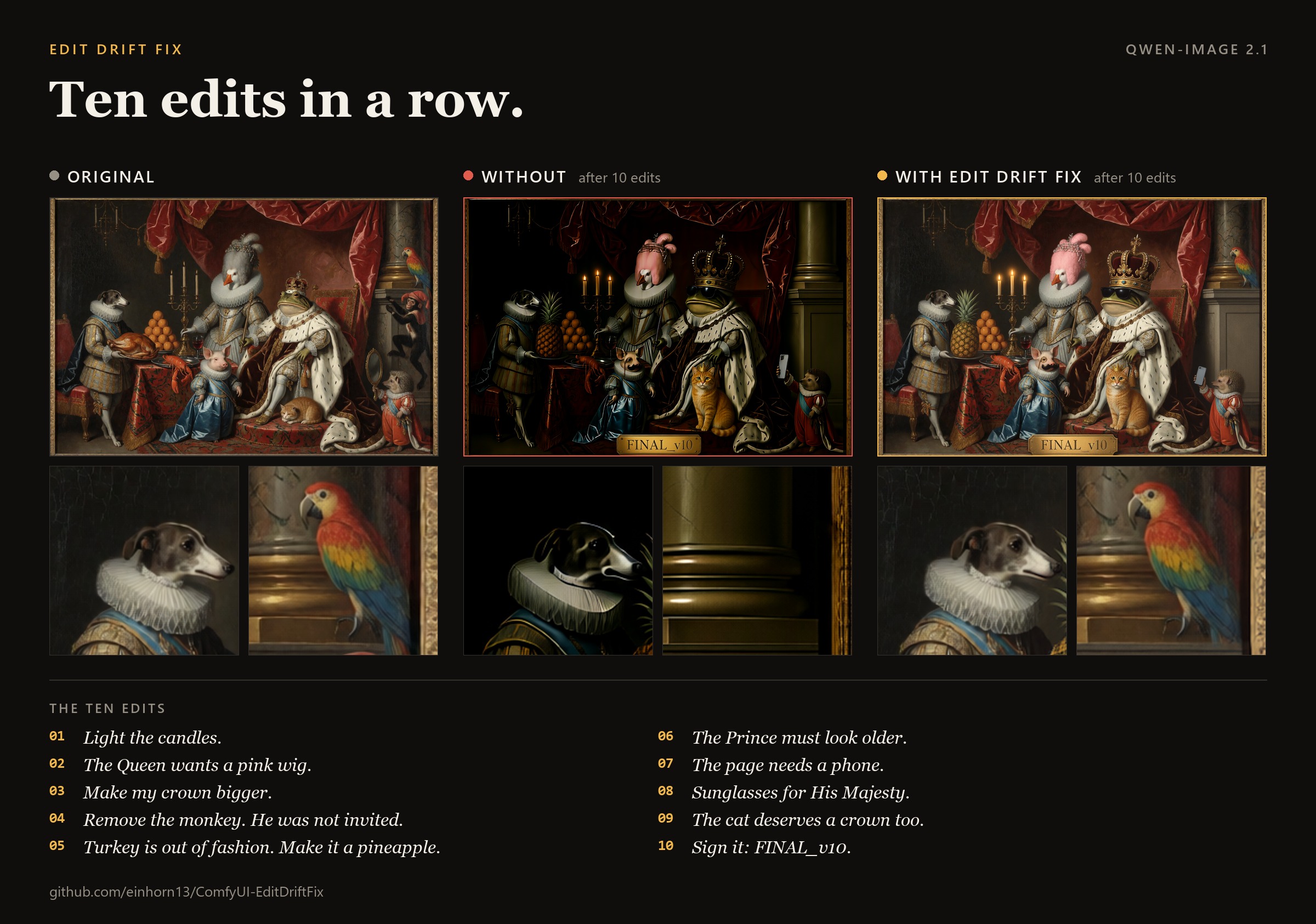
One edit rarely looks broken. The damage shows when you keep editing, because every pass redraws the whole picture again. Below, the same ten prompts were applied twice: once feeding each model output into the next edit, and once with Edit Drift Fix after every edit.
Qwen-Image 2.1
GPT Image
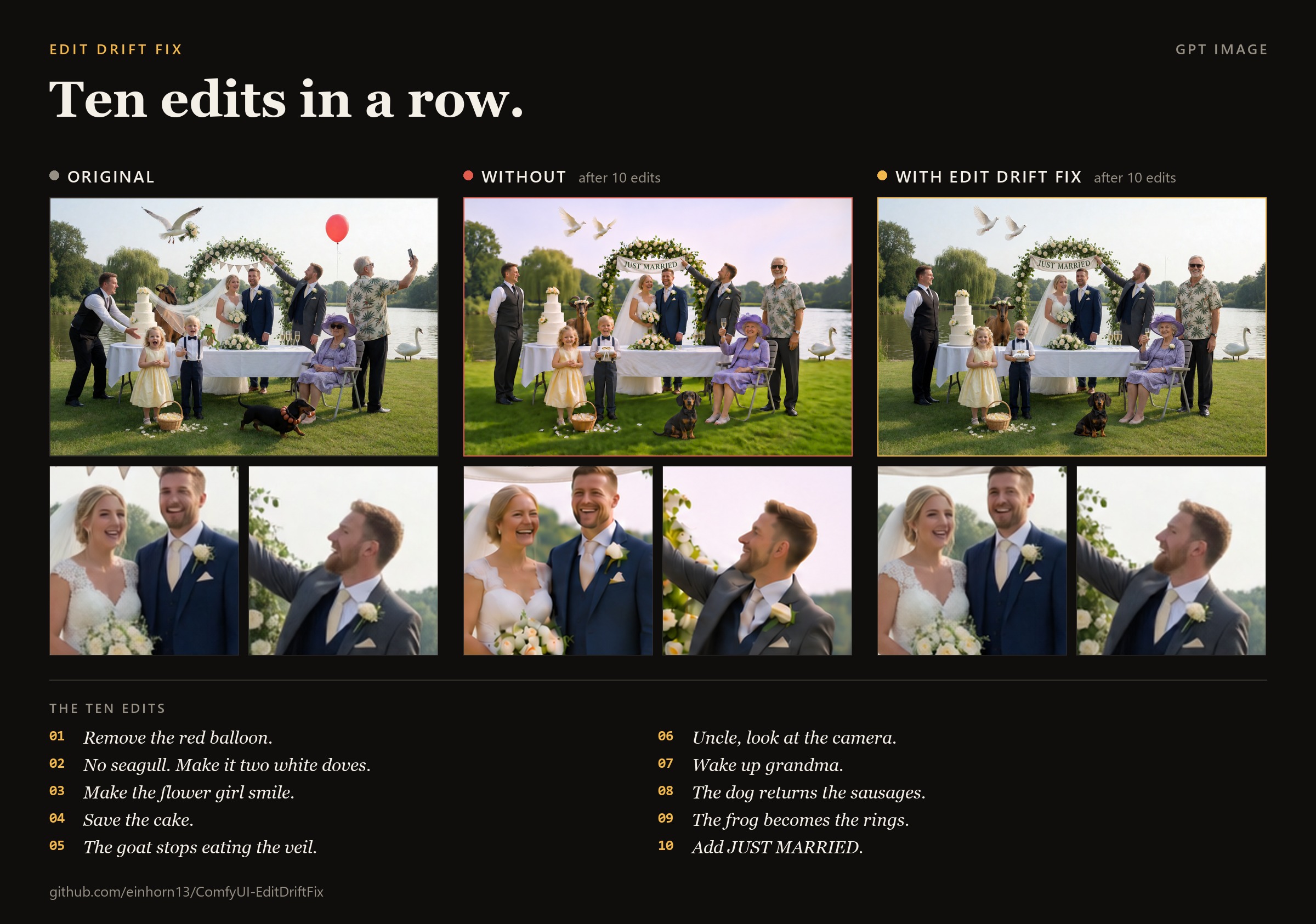
Full-quality videos: Qwen-Image 2.1, GPT Image.
A single edit, up close
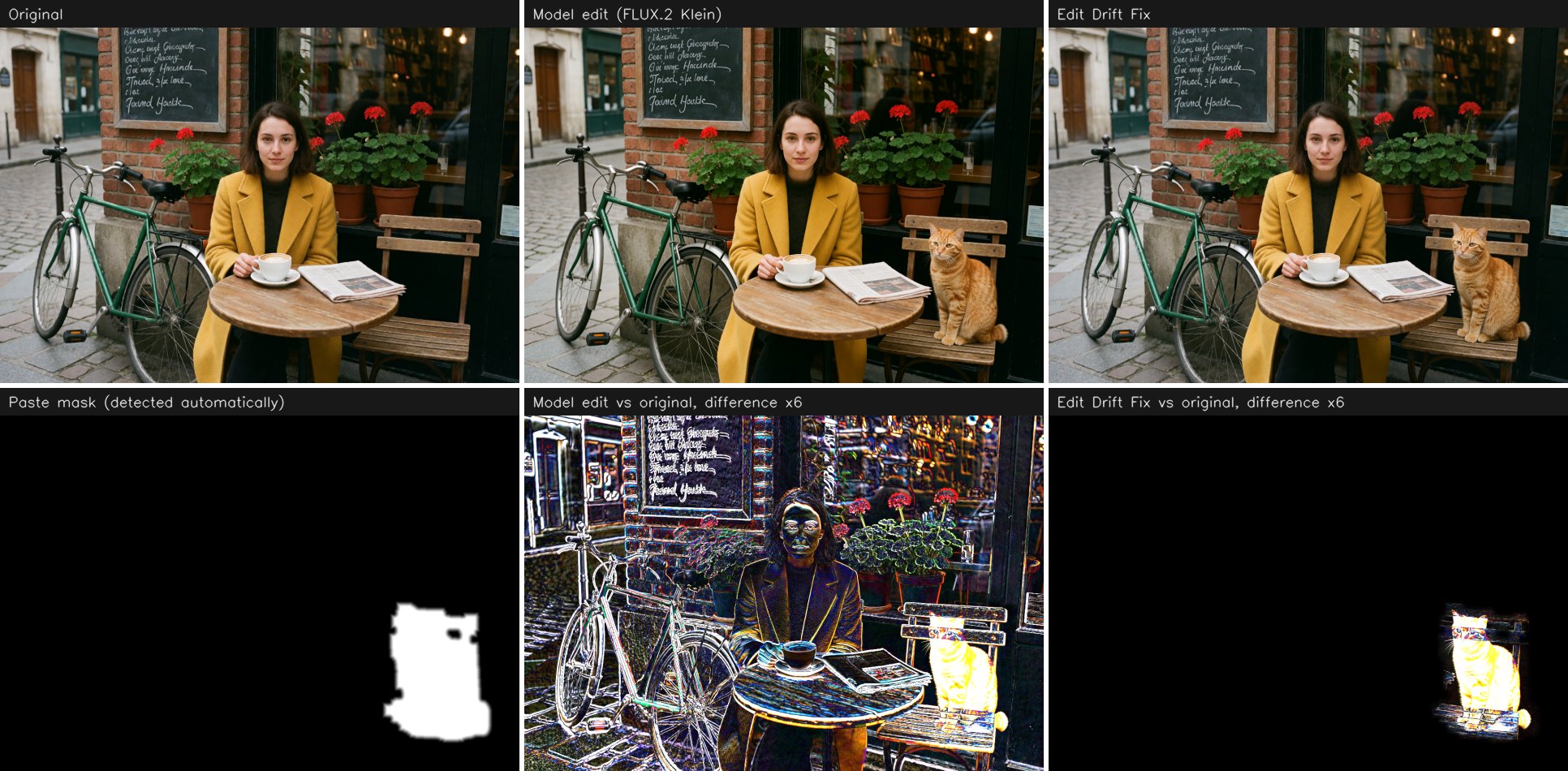
The bottom row shows the difference from the original, amplified 6 times. The raw model output differs everywhere. After Edit Drift Fix only the cat differs.
What it does
- Aligns the edit to the original: size, fractional zoom and shift. The edit is resampled only once.
- Restores colour. The colour and brightness shift is measured on unchanged background only.
- Finds the changed area. The threshold adapts to the noise of the pair, so you do not need to draw a mask.
- Pastes the change with an inward feather, Laplacian-pyramid blending and grain matching.
- Leaves everything else alone. Outside the mask the output pixels are identical to the original.
The node works on image pairs only. It needs no latents, no sampler and no extra models. A 2 MP pair takes about a second on a GPU.
Install
In ComfyUI Manager, search for Edit Drift Fix.
To install by hand:
cd ComfyUI/custom_nodes
git clone https://github.com/einhorn13/ComfyUI-EditDriftFix
pip install -r ComfyUI-EditDriftFix/requirements.txt
The only dependency besides ComfyUI itself is OpenCV.
Quick start
- Add the Edit Drift Fix node (
image/Edit Drift Fix). - Connect the original to
sourceand the model output toedited. - Pick a preset and run.
A ready graph is in example_workflows/edit_drift_fix_basic.json.
| Preset | Use it for |
|---|---|
| spot_edit | a small fix: a detail, lettering, a blemish |
| object_edit | an object replaced, added or removed, with room for shadows and reflections |
| large_soft_edit | a large soft change: lighting, background, clothes |
| full_image | the whole frame changed (style, relight). Geometry is aligned, nothing is pasted |
| custom | your own values |
Picking a preset fills the fields of the node. Changing any field by hand switches the preset to custom.
Settings
| Field | Meaning |
|---|---|
| mask_mode | where the paste area comes from, see Masks |
| sensitivity | higher values let weaker differences (shadows, highlights) into the mask |
| minor_filter | drops weak side changes, such as background text or foliage the model repainted along the way. 0 keeps everything, 1 keeps only the main edit |
| mask_expand | safety margin around the detected edit, % of the diagonal |
| feather | width of the soft transition, % of the diagonal, built inwards |
| color_fix | off, global or global_plus_local |
| grain_match | adds the missing grain of the original to the pasted area, 0 is off |
Advanced settings are in a separate node, Edit Drift Fix Options, which connects to options. It sets the motion model, shift limit, blend mode, colour strength and the handling of global edits. It also has edit_opacity, which mixes the edit with the original inside the mask when the model overdid the change.
Masks
Connect a mask to edit_mask and choose how it is used:
| mask_mode | Behaviour | Typical use |
|---|---|---|
| auto | detect changes automatically | the default |
| auto_inside_mask | detect, but only inside your mask | the model also touched a face or text elsewhere |
| auto_plus_mask | detected changes plus your mask | detection missed a faint shadow or reflection |
| mask_only | exactly your mask | you already have the inpaint mask |
| whole_image | no paste, return the aligned edit | style transfer, relighting |
If the automatic mask covers more than 40% of the frame, the edit is treated as global. The node then returns the aligned edit and says so in the report.
Outputs
| Output | Content |
|---|---|
| image | the result, at the size of the original |
| mask | the soft paste mask |
| aligned_edited | the edit, aligned and colour-corrected, not composited |
| report | JSON with the measurements |
After a run the node shows a one-line summary: motion model, drift in pixels, mask area and confidence. The report also contains the residual shift on the background, the colour difference before and after correction, the number of dropped side regions, and warnings, for example when the mask looks too tight.
Other nodes
| Node | Purpose | |---|---| | Edit Drift Align | alignment only, also returns the validity mask and the transform | | Edit Drift Color | colour correction only | | Edit Drift Mask | change mask only | | Edit Drift Composite | compositing with a mask you supply | | Edit Drift Pad / Unpad | pads the image to the model grid (8/16/32/64) before generation, so the model does not resize it, and crops the padding afterwards |
More examples
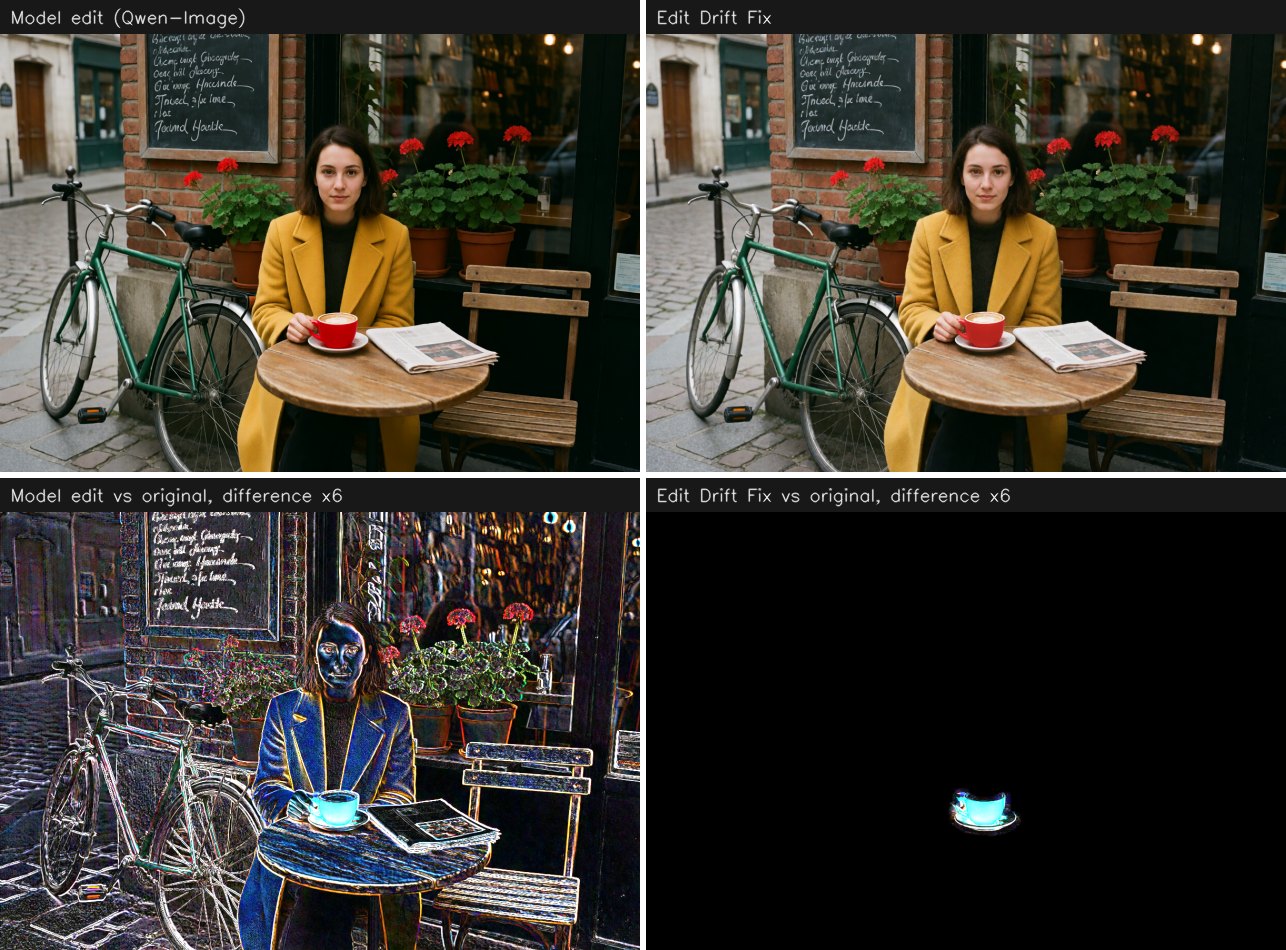
Recolouring a small object with Qwen-Image, preset spot_edit. The mask covers 1% of the frame.
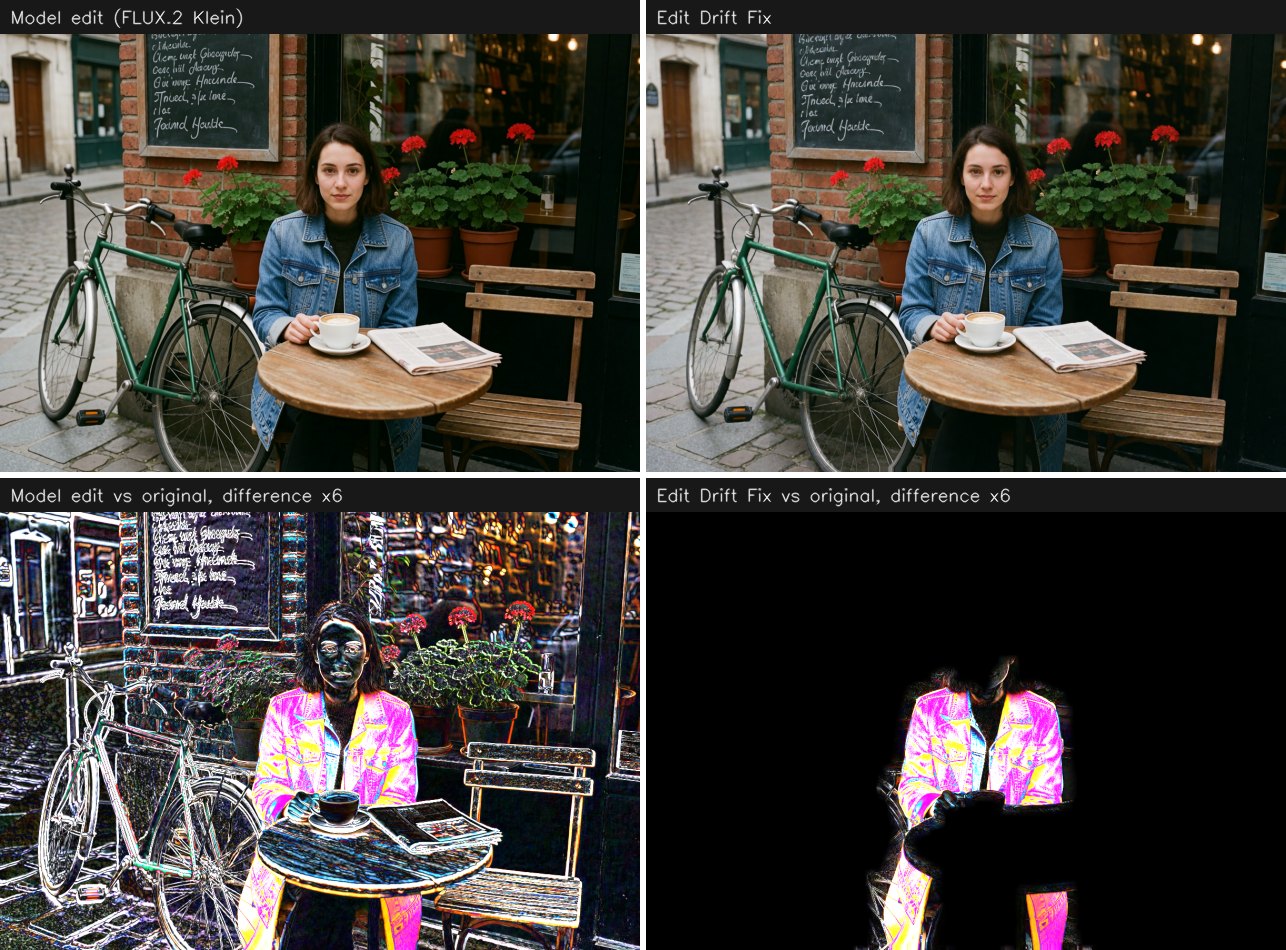
Changing clothes with FLUX.2 Klein, preset object_edit. The model zoomed in by 2%, and the result is aligned back to the original.
License
MIT. Created by @einhorn13. Design references are listed in NOTICE.