
MOSS-TTS 1.5
ComfyUI custom nodes for OpenMOSS MOSS-TTS v1.5 — both the 1.7B Local-Transformer (48 kHz) and the 8B full model (24 kHz). Reference-free TTS, zero-shot voice cloning, audio continuation, hard duration control, 31 languages, stereo output.
ComfyUI-MOSS-TTS-1.5
ComfyUI custom nodes for MOSS-TTS v1.5 by OpenMOSS — supporting both model variants: MOSS-TTS-Local-Transformer-v1.5 (~1.7B, 48 kHz, the fast default) and the full MOSS-TTS-v1.5 (~8B, 24 kHz). Pick either in the Load Model dropdown — same nodes, same API. Five lean nodes for reference-free TTS, zero-shot voice cloning, deterministic duration steering, and audio continuation — no fine-tuning, no separate reference-transcript dance.
- Two models, one nodepack — 1.7B Local-Transformer (48 kHz) or 8B full MOSS-TTS (24 kHz), selected per workflow
- 31 languages (with explicit language tag support)
- Stereo output at the loaded model's native rate (48 kHz for the 1.7B Local-Transformer, 24 kHz for the 8B MOSS-TTS)
- Reference-free synthesis via a plain-text instruction ("male, warm, elderly narrator") — no reference audio needed
- Zero-shot voice cloning from a single reference clip
- Hard duration control via
target_tokens(empirically verified — MOSS obeys it precisely) - Continuation mode — extend a previously generated clip in the same voice
- Audio repetition penalty (v0.5.1) — optional
audio_repetition_penaltyinput on all generate nodes, forwarded to MOSS's native logits penalty. Mild values (1.05–1.15) suppress droning / tempo-freeze / looping-syllable outliers without flattening prosody. - Text-stream samplers (v0.5.4) — optional
text_temperature/text_top_p/text_top_kon all generate nodes to steer MOSS's dual-stream text channel (pacing / alignment) independently of the acousticaudio_*samplers. - Robust attention (v0.5.5) — no
flash_attncrash on a fresh install; the loader'sattention: autofalls back to PyTorch's built-insdpawhen flash-attn is absent. - Empty-text guard (v0.5.6) — an empty / whitespace-only prompt fails fast with a clear message instead of making MOSS generate audio until
max_new_tokens(a multi-minute hang, since it never emits EOS with nothing to say). - Text → token estimator so the token count doesn't have to be a guess
The model itself is Apache-2.0 released by OpenMOSS-Team. This nodepack is MIT.
Requirements
- ComfyUI running on a machine with a CUDA GPU. VRAM in
bfloat16: ~12 GB for the 1.7B Local-Transformer, ~22 GB for the 8B full model. - Python: whatever your ComfyUI already runs on (3.9+). The current model build works on both transformers 4.x and 5.x — see the next bullet.
transformers— no version pin, nothing to install. ComfyUI already ships it (>= 4.50.3), and the current MOSS-TTS v1.5 model build adapts to whichever version you have: its remote code guards withhasattr(processing_utils, "MODALITY_TO_BASE_CLASS_MAPPING")(the transformers 5.0 name for that table) and falls back to the 4.xAUTO_TO_BASE_CLASS_MAPPING, so it loads on 4.x and 5.x out of the box. (transformers 5.x itself needs Python 3.10+, so on Python 3.9 you simply stay on transformers 4.x, which this build supports.) As a safety net the loader still catches a load-timeAttributeErrorand prints a clear upgrade message — in case some future model build ever drops that guard and genuinely needs 5.x.flash_attnis NOT required. MOSS's model code defaults toflash_attention_2, but the loader'sattention: autodetects whetherflash_attnis installed and falls back to PyTorch's built-insdpaif not — so a plain install runs out of the box. Installflash-attnonly if you want that backend.torch,torchaudio(whatever your ComfyUI already ships with)- Free disk for the auto-downloaded weights: ~9.1 GB (1.7B) / ~17 GB (8B) in your Hugging Face cache
That's it — no extra CUDA extensions, no custom kernels.
Installation
cd ComfyUI/custom_nodes
git clone https://github.com/eehrich/ComfyUI-MOSS-TTS-1.5.git MOSS-TTS-ComfyUI
Restart ComfyUI. The first MOSS-TTS Load Model execution downloads the selected checkpoint into your Hugging Face cache (~9.1 GB for the 1.7B, ~17 GB for the 8B).
Known install gotcha — configuration_moss_audio_tokenizer.py dataclass ordering
On Python 3.11+ both audio tokenizers used by MOSS v1.5 (OpenMOSS-Team/MOSS-Audio-Tokenizer-v2 for the 1.7B Local-Transformer, OpenMOSS-Team/MOSS-Audio-Tokenizer for the 8B MOSS-TTS variant) declare their dataclass fields without defaults after the parent class already added defaulted fields, so dataclass(...) raises:
TypeError: non-default argument 'sampling_rate' follows default argument 'problem_type'
Fix once, after the first failed load, in the auto-downloaded file at either
~/.cache/huggingface/modules/transformers_modules/OpenMOSS_hyphen_Team/MOSS_hyphen_Audio_hyphen_Tokenizer_hyphen_v2/<hash>/configuration_moss_audio_tokenizer.py (needed for the 1.7B Local-Transformer)
or ~/.cache/huggingface/modules/transformers_modules/OpenMOSS_hyphen_Team/MOSS_hyphen_Audio_hyphen_Tokenizer/<hash>/configuration_moss_audio_tokenizer.py (needed for the 8B MOSS-TTS)
— give each of these class fields a = None default:
sampling_rate: int = None
downsample_rate: int = None
causal_transformer_context_duration: float = None
encoder_kwargs: list[dict[str, Any]] = None
decoder_kwargs: list[dict[str, Any]] = None
number_channels: int = None
enable_channel_interleave: bool = None
attention_implementation: str = None
compute_dtype: str = None
codec_weight_dtype: str = None
quantizer_type: str = None
quantizer_kwargs: dict[str, Any] = None
Nothing behavioural changes — the real defaults still come from the class's __init__.
Optional: flash-attn for faster attention
Not required. The plugin runs on PyTorch's built-in sdpa out of the box (the Load Model attention: auto default picks it when flash_attn is absent). flash_attention_2 is only a speed win on long contexts. Install it only if you want that.
Linux / WSL (usually straightforward):
pip install flash-attn --no-build-isolation
Windows (into your ComfyUI's Python env — adjust the path):
path\to\ComfyUI\.venv\Scripts\python.exe -m pip install flash-attn --no-build-isolation
On Windows this compiles from source: you need the matching CUDA Toolkit, ninja, and the MSVC C++ Build Tools, plus ~30–90 min and a lot of RAM. Faster and more reliable is a prebuilt wheel matching your exact python / torch / CUDA combo — community builds live at
bdashore3/flash-attention and
kingbri1/flash-attention.
⚠️ Very new CUDA builds (e.g. cu130 with torch 2.9) often have no prebuilt Windows wheel yet, and source compilation against a brand-new toolkit frequently fails. If so, just stay on
sdpa— the quality is identical, only long-context speed differs.
After a successful install, set the Load Model attention input to auto (it will now select flash_attention_2) or force flash_attention_2.
Nodes
All five nodes live under the top-level MOSS TTS 1.5 category in the ComfyUI menu.
MOSS-TTS Load Model
<img src="assets/node-load-model.jpg" alt="MOSS-TTS Load Model node" width="420">
Loads the processor + model and caches the instance in-memory across runs. Subsequent workflow queues re-use the already-loaded model — no re-load penalty.
| Input | Type | Default | Notes |
|---|---|---|---|
| model_id | enum | …MOSS-TTS-Local-Transformer-v1.5 (1.7B) | …MOSS-TTS-Local-Transformer-v1.5 (1.7B) — MossTTSLocal, 48 kHz stereo output, ~12 GB VRAM bf16. …MOSS-TTS-v1.5 (8B) — MossTTSDelay, 24 kHz stereo output, ~22 GB VRAM. Same API, 31 languages, same duration semantics. Each node reads the actual sample rate from processor.model_config.sampling_rate at load time and stamps it on all output audio — no manual configuration needed. The (1.7B) / (8B) suffix is a UI label only; it is stripped before the HF from_pretrained call. |
| device | cuda | cpu | cuda | Falls back to cpu when CUDA is unavailable |
| attention | enum | auto | (optional) Attention backend. auto uses flash_attention_2 only if flash_attn is installed, else PyTorch sdpa (built-in, no extra deps). Force sdpa/eager for max compatibility, or flash_attention_2 if you installed flash-attn. Prevents the "flash_attn is not installed" crash on fresh installs. |
dtype is picked automatically: bfloat16 on CUDA (MOSS's training precision — running in float32 gains no quality, running in float16 risks numerical overflow), float32 on CPU (bfloat16 CPU kernels are patchy).
Output: MOSS_MODEL — pass to any of the Speak / Voice Clone / Voice Continue nodes.
MOSS-TTS Speak
<img src="assets/node-speak.jpg" alt="MOSS-TTS Speak node" width="380">
Text-to-speech with no reference audio. MOSS uses its trained no-reference path (a literal "None" placeholder in the prompt) and picks a voice based on language + instruction. instruction is your only voice-steering knob here.
| Input | Type | Default | Notes |
|---|---|---|---|
| moss_model | MOSS_MODEL | — | From the loader |
| text | STRING | Hello, this is a test. | Multiline |
| language | enum | English | Also nudges MOSS toward a language-typical base voice |
| instruction | STRING | "" | Voice description — e.g. "male, warm, elderly narrator", "young female, cheerful, energetic", "deep voice, dramatic, slow". Without it, MOSS picks whatever the training-data default was for the language. |
| audio_temperature | FLOAT | 1.7 | Sampling temperature |
| audio_top_p | FLOAT | 0.8 | Nucleus sampling |
| audio_top_k | INT | 25 | Top-k sampling |
| target_tokens | INT | 0 | Target duration in audio frames (12.5 fps). 0 = model decides via EOS. |
| max_new_tokens | INT | 4096 | Safety cap on generated audio frames |
| seed | INT | 42 | Random seed |
| audio_repetition_penalty | FLOAT | 1.0 | (optional) Penalty on recently generated audio tokens. 1.0 = off. Mild values (1.05–1.15) suppress the classic AR-TTS failure modes — droning, tempo freeze, smeared/looping syllables — while leaving normal prosody untouched. Above ~1.3 can distort legitimately repeated sounds. |
| text_temperature | FLOAT | 1.0 | (optional) MOSS v1.5 is dual-stream (text + audio); this samples the text stream that drives alignment/pacing, separate from the acoustic audio_temperature. Default 1.0 (MOSS default). Lower = steadier pacing/alignment without flattening the voice. |
| text_top_p | FLOAT | 1.0 | (optional) Nucleus (top-p) cutoff for the text stream. Default 1.0 (off). |
| text_top_k | INT | 50 | (optional) Top-k cutoff for the text stream. Default 50. |
Outputs: audio (stereo at the model's native sample rate) + tokens_generated (INT).
MOSS-TTS Voice Clone
<img src="assets/node-voice-clone.jpg" alt="MOSS-TTS Voice Clone node" width="380">
Generates speech from text in the voice of reference_audio.
| Input | Type | Default | Notes |
|---|---|---|---|
| moss_model | MOSS_MODEL | — | From the loader |
| reference_audio | AUDIO | — | ComfyUI AUDIO type (LoadAudio, another node's output, etc.) |
| text | STRING | Hello, this is a test. | Multiline |
| language | enum | English | Full 31-language list: Arabic, Cantonese, Chinese, Czech, Danish, Dutch, English, Finnish, French, German, Greek, Hebrew, Hindi, Hungarian, Italian, Japanese, Korean, Macedonian, Malay, Persian (Farsi), Polish, Portuguese, Romanian, Russian, Spanish, Swahili, Swedish, Tagalog, Thai, Turkish, Vietnamese. See MOSS README for language codes / flags. |
| instruction | STRING | "" | Optional free-form style/direction hint. Not a reference transcript — MOSS has no reference-text channel. |
| audio_temperature | FLOAT | 1.7 | Sampling temperature |
| audio_top_p | FLOAT | 0.8 | Nucleus sampling |
| audio_top_k | INT | 25 | Top-k sampling |
| target_tokens | INT | 0 | Target duration in audio frames (12.5 fps → 375 ≈ 30 s, 750 ≈ 60 s). 0 = disabled, model decides via EOS. See Duration control. |
| max_new_tokens | INT | 4096 | Safety cap on generated audio frames. MOSS treats this as its internal frame_budget at 12.5 fps → default 4096 caps output at ~5 min. |
| seed | INT | 42 | Random seed. Same seed + same inputs → identical output. |
| audio_repetition_penalty | FLOAT | 1.0 | (optional) Penalty on recently generated audio tokens. 1.0 = off. Mild values (1.05–1.15) suppress the classic AR-TTS failure modes — droning, tempo freeze, smeared/looping syllables — while leaving normal prosody untouched. Above ~1.3 can distort legitimately repeated sounds. |
| text_temperature | FLOAT | 1.0 | (optional) MOSS v1.5 is dual-stream (text + audio); this samples the text stream that drives alignment/pacing, separate from the acoustic audio_temperature. Default 1.0 (MOSS default). Lower = steadier pacing/alignment without flattening the voice. |
| text_top_p | FLOAT | 1.0 | (optional) Nucleus (top-p) cutoff for the text stream. Default 1.0 (off). |
| text_top_k | INT | 50 | (optional) Top-k cutoff for the text stream. Default 50. |
Outputs:
audio— stereo AUDIO at the model's native rate (48 kHz for 1.7B, 24 kHz for 8B), ready forPreviewAudio/SaveAudiotokens_generated— INT, number of audio frames actually produced (divide by 12.5 for seconds)
MOSS-TTS Voice Continue
<img src="assets/node-voice-continue.jpg" alt="MOSS-TTS Voice Continue node" width="380">
Extends a previously generated MOSS clip. MOSS is a prefix-continuation model — it needs the original text that produced previous_audio so it can locate where in the script the audio stopped, then produce audio for the follow-up text. The node concatenates previous_text + " " + text internally and hands the full script + prior audio to MOSS. Voice is inherited from the prior audio (no separate reference).
| Input | Type | Default | Notes |
|---|---|---|---|
| moss_model | MOSS_MODEL | — | From the loader |
| previous_audio | AUDIO | — | Prior MOSS output (typically another node's audio output) |
| previous_text | STRING | "" | The exact text that produced previous_audio. Word-for-word match matters — wrong prior text → garbled output (MOSS can't align its script position). |
| text | STRING | "" | Follow-up text to speak next. Must be non-empty — an empty / whitespace-only prompt raises a clear error instead of hanging (v0.5.6 guard; MOSS never emits EOS with nothing to say and would generate until max_new_tokens). |
| language | enum | English | Same list as Voice Clone |
| audio_temperature | FLOAT | 1.7 | Sampling temperature |
| audio_top_p | FLOAT | 0.8 | Nucleus sampling |
| audio_top_k | INT | 25 | Top-k sampling |
| target_tokens | INT | 0 | Duration of the new segment in frames. 0 = model decides via EOS. Internally the node adds previous_tokens (or measured prefix) before sending to MOSS, because MOSS reads its tokens hint as TOTAL (prefix + new) in continuation mode. |
| max_new_tokens | INT | 4096 | Safety cap on the new segment |
| seed | INT | 42 | Random seed |
| previous_tokens | INT | 0 | Exact frame count of previous_audio. Wire the tokens_generated output of the upstream Speak / Voice Clone / Voice Continue node here for a precise handoff. Leave at 0 to measure from the audio duration (≤ 1 frame off due to rounding). |
| head_trim_frames | INT | 1 | Extra frames trimmed from the START of the new audio (1 frame ≈ 80 ms at MOSS's fixed 12.5 fps, regardless of the variant's sample rate). MOSS's decoder trims the prefix by sample proportion, and its conv-based codec has a receptive field that leaks the last prefix frame into the returned continuation. Default 1 (~80 ms) removes it in most cases. Set to 0 to disable, higher if bleed persists. |
| audio_repetition_penalty | FLOAT | 1.0 | (optional) Penalty on recently generated audio tokens. 1.0 = off. Mild values (1.05–1.15) suppress the classic AR-TTS failure modes — droning, tempo freeze, smeared/looping syllables — while leaving normal prosody untouched. Above ~1.3 can distort legitimately repeated sounds. |
| text_temperature | FLOAT | 1.0 | (optional) MOSS v1.5 is dual-stream (text + audio); this samples the text stream that drives alignment/pacing, separate from the acoustic audio_temperature. Default 1.0 (MOSS default). Lower = steadier pacing/alignment without flattening the voice. |
| text_top_p | FLOAT | 1.0 | (optional) Nucleus (top-p) cutoff for the text stream. Default 1.0 (off). |
| text_top_k | INT | 50 | (optional) Top-k cutoff for the text stream. Default 50. |
Outputs:
audio— new segment only, head-trimmed. Use for per-segment QC / preview (you hear just the delta).tokens_generated— INT, frames of the new segment.full_audio— cumulative:previous_audio + newconcatenated at the model's native sample rate (48 kHz for 1.7B, 24 kHz for 8B). Ifprevious_audiowas at a different rate it is resampled to the target before concatenation. Wire into the NEXT Voice Continue'sprevious_audiowhen the same speaker keeps talking across segments — MOSS's continuation expects the full history so far.full_tokens— INT,previous_tokens + tokens_generated. Wire into the nextprevious_tokensfor a precise chain handoff.
Same-speaker chain pattern (segment-by-segment via your backend):
seg N:   Voice Continue → audio, full_audio, full_tokens
seg N+1: Voice Continue.previous_audio  <-- (seg N).full_audio
         Voice Continue.previous_tokens <-- (seg N).full_tokens
Save both audio (for QC / retake of just this segment) and full_audio (as the prev handoff to the next segment). Retake with a different seed rebuilds full_audio from the same starting prefix.
MOSS-TTS Estimate Tokens
<img src="assets/node-estimate-tokens.jpg" alt="MOSS-TTS Estimate Tokens node" width="380">
Turns a text into a target_tokens estimate you can wire straight into Voice Clone / Voice Continue.
| Input | Type | Default | Notes |
|---|---|---|---|
| text | STRING | "" | Multiline. Word count via whitespace split; CJK (Chinese/Japanese/Korean) falls back to non-whitespace character count. |
| words_per_minute | FLOAT | 150.0 | 150 = calm audiobook narration, 180 = conversational, 220 = fast. For CJK read as characters-per-minute. |
Output: target_tokens (INT). Formula: ceil(word_count / (wpm/60) * 12.5).
Need slack for punctuation-heavy passages? Chain a ComfyUI math node (Multiply / Add) after the output — the estimator deliberately has no built-in buffer so you can compose one that scales with the text.
Duration control
MOSS's build_user_message accepts a tokens field (in audio frames, 12.5 fps). Empirically MOSS obeys this precisely — same text with target_tokens = 100, 200, 400 produces audio of roughly 8, 16, 32 s. This nodepack exposes it as target_tokens on both Voice Clone and Voice Continue.
Practical uses:
- Consistent narration pace across a batch: fix
wpm = 150inEstimate Tokens, MOSS will read every chapter at the same tempo regardless of length. - Speech-rate control without style prompting: chain a multiplier after the estimator.
× 1.4= slow / dramatic,× 0.75= urgent / rushed. Cleaner than adjectives in theinstructionfield. - Fixed video/audio slots: your video shot is 8 s → set
target_tokens = 100. MOSS fits into that slot. - Continuation length steering:
Voice Continue.target_tokens = 375→ about 30 s of extra audio.
max_new_tokens is a separate parameter — a hard cap on frame_budget in MOSS's generation loop (see modeling_moss_tts.py: frame_budget = max_new_frames if max_new_frames is not None else max_new_tokens). Keep it comfortably above target_tokens as a runaway fuse; the default 4096 (~5 min at 12.5 fps) is usually plenty.
Example workflows
Full pipeline — Speak → Clone → Continue (downloadable)
The bundled example_workflows/MOSS-TTS_Full.json wires the whole chain end to end (ComfyUI-Manager also lists it under this pack's example workflows). Drop the JSON on the ComfyUI canvas — or Workflow → Open — to load it, then swap the two String (Multiline) nodes for your own text; everything else is pre-wired.
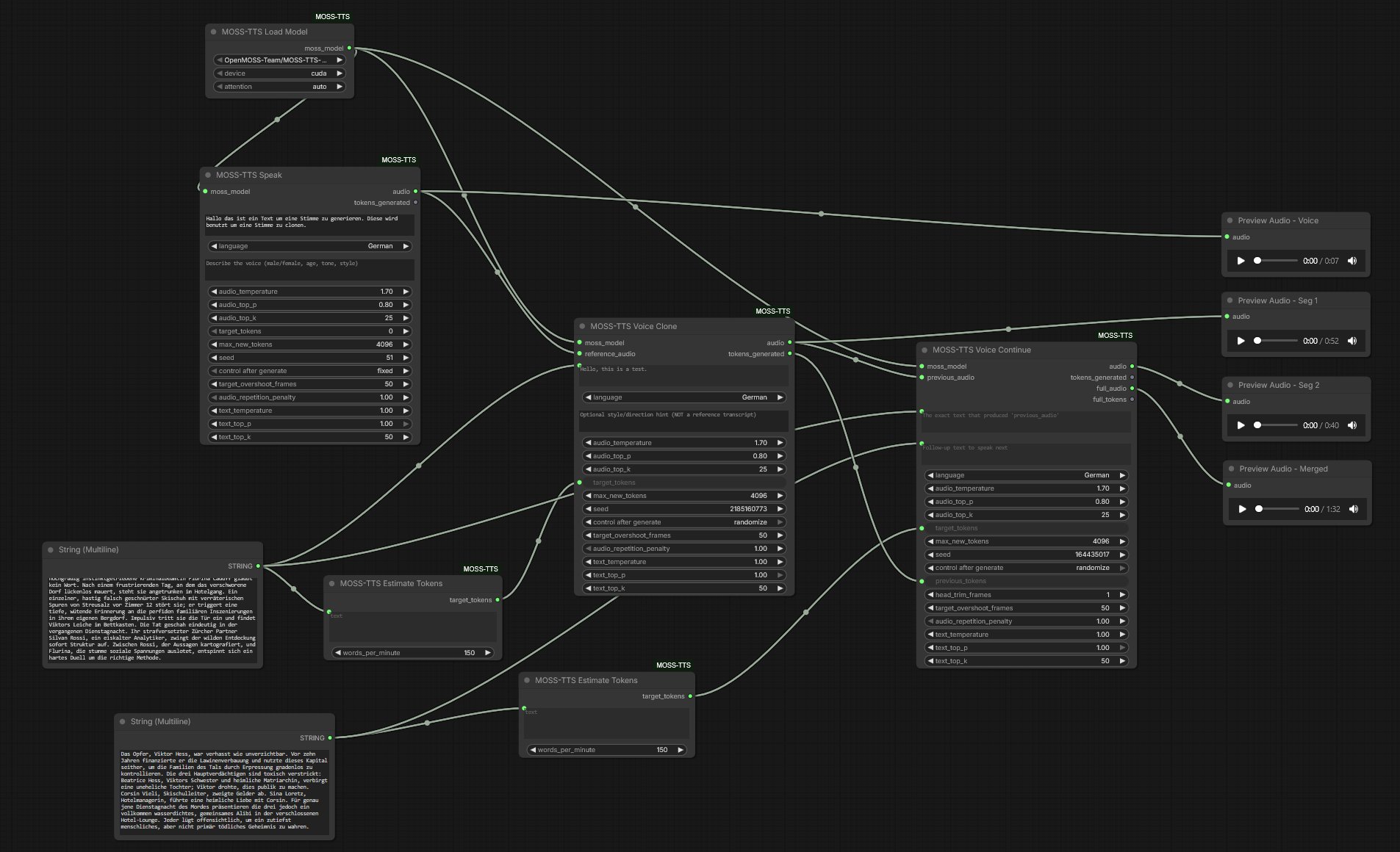
- Load Model once, fanned out to all three generators.
- Speak synthesizes a fresh voice from a short seed line (no reference) → Preview: Voice.
- Voice Clone takes that audio as
reference_audioand narrates segment 1 in the same voice; an Estimate Tokens node sets its duration → Preview: Seg 1. Itstokens_generatedis wired forward as the exact prefix length. - Voice Continue takes the clone's
audio+tokens_generatedand narrates segment 2 — inheriting the voice and continuing the script → Preview: Seg 2. Itsfull_audiooutput is the merged single-take result → Preview: Merged.
This is the canonical "create a voice, then narrate a multi-segment passage in it" pattern; the individual node/workflow shots below break out each piece.
Reference-free narration & single voice clone
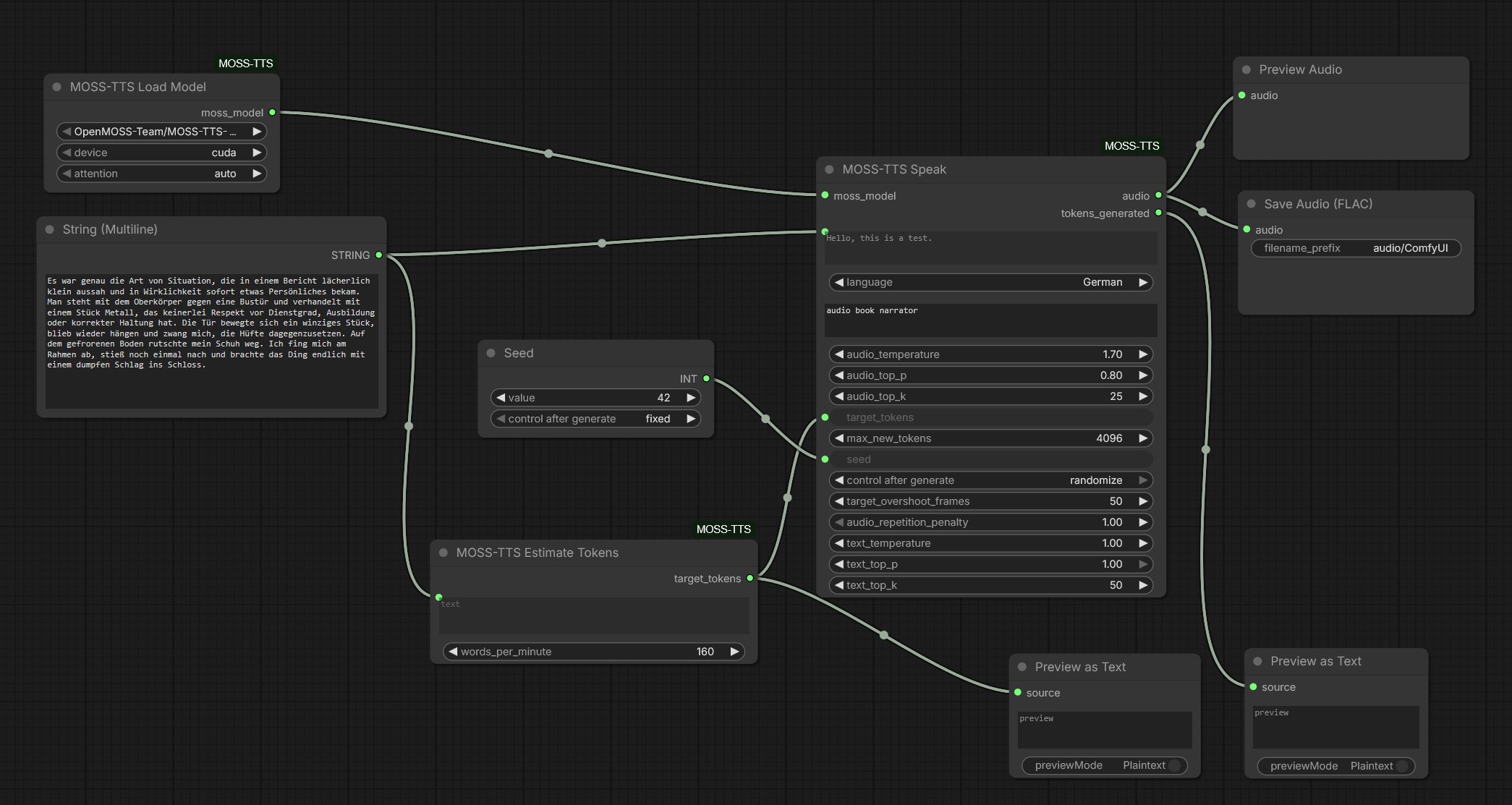
Reference-free narration — Load Model → Speak, with an Estimate Tokens node feeding the duration hint and a Preview/Save on the output:
Voice clone from a reference clip — a Load Audio reference + Load Model → Voice Clone, again with Estimate Tokens driving target_tokens:
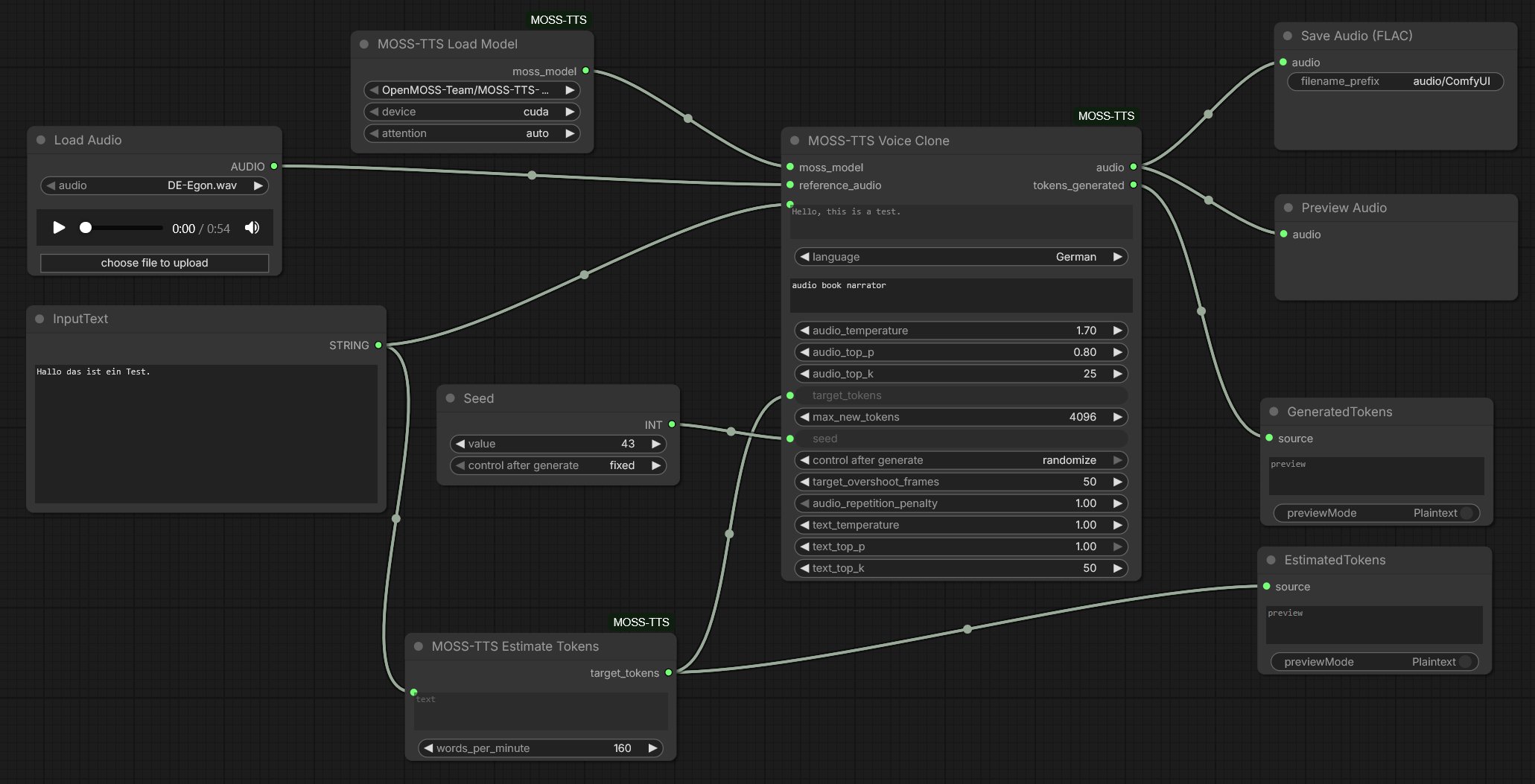
The wiring in condensed form:
Basic voice clone with automatic duration:
[Load Audio]        [MOSS-TTS Load Model]
      \                  /
       > [MOSS-TTS Voice Clone] -> [Save Audio]
                 ^
    [text]  [MOSS-TTS Estimate Tokens] -> target_tokens
Speech-rate control:
[text] -> [Estimate Tokens] -> [Multiply INT × 1.4] -> Voice Clone.target_tokens
Same audio reference, same seed, same text — but 40% slower / more dramatic. Or × 0.75 for urgent.
Continuation chain:
[LoadAudio ref]  [Load Model]
      \             /
       > [Voice Clone] -> audio ─────────────┐
[part 1 text] -> Voice Clone.text            │
       [Voice Clone] -> tokens_generated ─┐  │
                                          v  v
[part 1 text] -------> Voice Continue.previous_text
                       Voice Continue.previous_audio
                       Voice Continue.previous_tokens (exact prefix len)
[part 2 text] -------> Voice Continue.text
[Estimate Tokens (part 2)] -> Voice Continue.target_tokens
                                          │
                                          v
                             [Save Audio (part 2 only)]
Route both the audio and the tokens_generated from the upstream node — the token count keeps the prefix length exact (no rounding drift). Voice Clone / Speak / Voice Continue all expose tokens_generated for this. Voice Continue sees part 1 text as the "you already said this" context, and adds previous_tokens to target_tokens internally before sending MOSS the total-length hint.
For part 3, feed part 1 + part 2 as the new previous_text, wire Voice Continue's own outputs forward, and so on.
Or as a standalone Python demo (what the nodes wrap under the hood):
from transformers import AutoModel, AutoProcessor
import torch, torchaudio

processor = AutoProcessor.from_pretrained(
    "OpenMOSS-Team/MOSS-TTS-Local-Transformer-v1.5",
    trust_remote_code=True,
)
processor.audio_tokenizer = processor.audio_tokenizer.to("cuda")

model = AutoModel.from_pretrained(
    "OpenMOSS-Team/MOSS-TTS-Local-Transformer-v1.5",
    trust_remote_code=True,
    dtype=torch.bfloat16,
).to("cuda")

conv = [processor.build_user_message(
    text="Der Wind hörte auf, noch bevor Tessa Brandt den Grund der Senke erreichte.",
    reference=["voice.wav"],
    language="German",
    tokens=125,   # ~10 s target
)]
batch = processor([conv], mode="generation")
out = model.generate(
    input_ids=batch["input_ids"].to("cuda"),
    attention_mask=batch["attention_mask"].to("cuda"),
    max_new_tokens=4096,
    audio_temperature=1.7, audio_top_p=0.8, audio_top_k=25,
)
audio = processor.decode(out)[0].audio_codes_list[0]
torchaudio.save("out.wav", audio.cpu(), 48000)
Performance & memory
Figures below are for the 1.7B Local-Transformer (the default), single-turn 75-character German sentence, RTX 5090 (bf16). The 8B model loads a larger checkpoint (~17 GB) and needs ~22 GB VRAM, so both load and generation are correspondingly slower.
| Phase | Time (1.7B) | |---|---| | Processor load (audio tokenizer moved to GPU) | ~21 s | | Model load (9.1 GB checkpoint → GPU) | ~16 s | | Generation (4.72 s of audio) | ~2.7 s |
Load happens once per (model_id, device, dtype). Warm-cache generation is real-time on modern hardware.
VRAM: ~12 GB active weight + activations in bfloat16 for the 1.7B (measured on RTX 5090), ~22 GB for the 8B. Peak spikes with long contexts (e.g. very long text or max_new_tokens=16384) can push higher. On the 1.7B an RTX 3090 (24 GB) has comfortable headroom; the 8B wants a 24 GB card with little else resident.
Reference / prev_audio adds runtime VRAM on top of the 12 GB baseline. Voice Clone's reference_audio and Voice Continue's previous_audio are encoded to audio codes by the tokenizer, then held in the transformer's KV cache while the new frames are generated. The overhead scales linearly with the prefix duration:
- At 12.5 fps × 12 codebooks = 150 audio tokens per second
- MOSS-TTS-Local-Transformer-v1.5 has ~24 transformer layers × ~16 attention heads × 64 head_dim, storing K + V in bf16 → roughly ~50 KB of KV cache per audio token
- Empirically: ~1 GB extra VRAM per ~20 s of prefix audio on a 1.7B setup, similar order of magnitude on 8B
Practical implications:
- Very long reference audio (e.g. a 2-minute calibration clip) at Voice Clone time can add several GB before generation even starts. Keep reference clips in the 5–15 s sweet spot.
- Voice Continue with a growing history (chaining segment N as the prefix for segment N+1 with cumulative audio) is the biggest failure mode: VRAM drifts up linearly through a scene and eventually OOMs. If you are chaining segments, pass only the last segment's audio as
previous_audiorather than the concatenation of the whole scene so far. The prefix-continuation semantics still work correctly (see Voice Continue notes — MOSS aligns the prefix at the end ofprevious_textinside the concatenated full script), just with a shorter history. - Watch
nvidia-smiduring a long Continue chain to spot the drift early; a single-segment prefix stays flat at ~12 GB + a few hundred MB.
Troubleshooting
AttributeError: module 'transformers.processing_utils' has no attribute 'MODALITY_TO_BASE_CLASS_MAPPING'(suggestsAUTO_TO_BASE_CLASS_MAPPING): you have an older cached MOSS model build — one from before OpenMOSS added the transformers-4.x/5.x compatibility guard — together with transformers < 5.0.MODALITY_TO_BASE_CLASS_MAPPINGwas introduced in transformers 5.0.0 (every 4.x through 4.57 has onlyAUTO_TO_BASE_CLASS_MAPPING); the old build referenced the 5.0 name unconditionally. Two fixes, either works: (a) delete the cached model dir under~/.cache/huggingface/hub/models--OpenMOSS-Team--MOSS-TTS-*so a fresh download pulls the current build (which guards for both and runs on 4.x too), or (b) upgrade transformers in ComfyUI's Python env:python -m pip install -U "transformers>=5.0"(needs Python 3.10+).Can't load the model … pytorch_model.bin: your model.safetensors download stalled. Re-runhuggingface_hub.hf_hub_download(repo_id=..., filename="model.safetensors")explicitly. Often caused by low disk space in~/.cache/huggingface.std::bad_alloconimport torchcodec: your installedtorchcodecversion was compiled against a different torch. Either match versions (torchcodec 0.8.x with torch 2.8.x, 0.9.x with 2.9.x, 0.10.x with 2.10.x) orpip uninstall torchcodec. The MOSS pipeline itself does not require torchcodec.build_user_message() got an unexpected keyword argument 'reference_text': fixed in0.1.1— MOSS has no reference-text channel. Useinstructionfor style hints, or rely onreference(audio) +languagealone.- Text like
[pause 1.2s]is spoken as literal words: MOSS v1.5 has no built-in pause-marker parser (verified against the source — nopause/silencetokens inadded_tokens.json, no bracketed-marker regex inprocessing_moss_tts.py). For deterministic gaps, generate two clips and concatenate with a silence spacer in ComfyUI, or useVoice Continuein a chain.
License
- This nodepack: MIT
- MOSS-TTS-Local-Transformer-v1.5 model & code: Apache 2.0, copyright OpenMOSS-Team.
Credits
- Model: OpenMOSS-Team / MOSS-TTS
- Wrapper: this repo — a thin bridge to ComfyUI's
AUDIOtype and its category tree.
Not affiliated with OpenMOSS. Star the upstream model if you like the work.