
Fibo Camera Angles
Interactive 3D camera-angle control for Fibo 2.0 Edit in ComfyUI: drag the camera around the subject and get a ready-to-use camera instruction.
Fibo Camera Angles for ComfyUI
An interactive 3D camera control for Bria Fibo 2.0 Edit. Drag the camera around your subject and the node writes a plain-language camera instruction that Fibo 2.0 Edit follows: rotate around the person, move the camera up or down, and frame wider or closer.
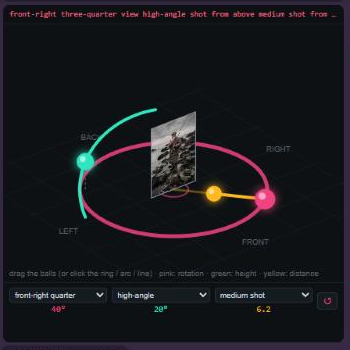
| Ball | Moves along | Controls | |---|---|---| | 🔴 Pink | the ring | Rotation around the subject (front, ¾, side, back) | | 🟢 Green | the arc | Height of the camera (low angle … eye level … high angle) | | 🟡 Yellow | the line | Distance (wide shot … waist up … face close-up) |
You can also click directly on the ring, the arc or the line, use the mouse wheel to zoom, or pick a preset from the three menus. ↺ resets to a front, eye-level shot. When an image is connected, your photo shows on the card in the middle.
Example
Same photo, edited with Fibo 2.0 edit turbo (4 steps) and the node's instructions:
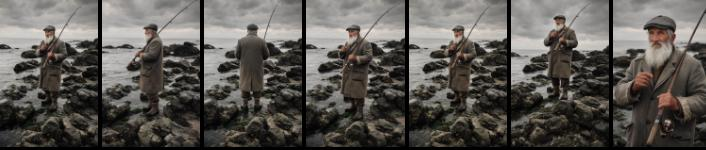
Original · left profile (−90°) · back (180°) · front-right ¾ (45°) · high angle · low angle · close-up
Fibo follows rotation and framing very well. Height works best with strong values (High / Low / Bird).
Installation
ComfyUI Manager: search for Fibo Camera Angles (once listed), or
Manual:
cd ComfyUI/custom_nodes
git clone https://github.com/edvlos/ComfyUI-FiboCameraAngles
Restart ComfyUI. No extra Python dependencies.
You also need a ComfyUI version with Fibo 2.0 support (TextEncodeFibo2) and the Fibo 2.0 models:
| File | Folder |
|---|---|
| fibo2_edit_turbo_int8_convrot.safetensors (or bf16) | models/diffusion_models |
| qwen3vl_4b_int8_convrot.safetensors (or bf16) | models/text_encoders |
| flux2-vae.safetensors | models/vae |
Download: Comfy-Org/Fibo-2.0 on Hugging Face
Usage
Load the workflow from example_workflows/Fibo2_Camera_Angles.json (it also shows up in ComfyUI's workflow templates for this pack):
Load Image ──► Fibo Camera Angles ──► TextEncodeFibo2 (prompt) ──► KSampler (4 steps, CFG 1) ──► VAE Decode ──► Save
     └───────────────────────────────► TextEncodeFibo2 (image 1)
Node inputs
| Input | What it does |
|---|---|
| horizontal_angle | 0 = front, +90 = camera moves to the right, 180 = behind, −90 = left |
| vertical_angle | 0 = eye level, + = camera above looking down, − = camera below looking up |
| zoom | 0 = extreme wide … 5 = full body … 10 = extreme close-up |
| subject | How to call the subject: the man, the woman, the car… |
| subject_is_person | Uses body framing (waist up, face) for people; turn off for objects |
| keep | What must stay the same |
| image (optional) | Only used to show your photo in the 3D view |
| extra (optional) | Text appended to the prompt |
Outputs: prompt (connect to TextEncodeFibo2) and camera_info (JSON with the values).
Example output for 28°, −15°, zoom 5.8:
Change the camera angle: orbit the camera 28 degrees to the right around the woman and lower the camera 15 degrees below the woman's eye level, showing the woman in a front-right three-quarter view, low-angle shot from below, the camera close to the ground looking up at the subject, more sky visible behind, medium shot from the waist up. Keep the same person, face, hair, clothing, lighting and environment; only the camera viewpoint changes.
Tips
- If the result looks like the original, increase the angle or change the seed.
- Angles are relative to the original camera, not to the subject.
- Fibo 2.0 is licensed CC BY-NC 4.0 (non-commercial). This node itself is MIT.
Português
Controle de câmera 3D para o Fibo 2.0 Edit no ComfyUI. Arraste as bolinhas e o nó escreve a instrução de câmera para o Fibo:
- 🔴 rosa (círculo): gira a câmera em volta da pessoa
- 🟢 verde (arco): sobe ou desce a câmera
- 🟡 amarela (reta): aproxima ou afasta
Também dá para clicar direto no círculo, no arco ou na reta, usar a rodinha do mouse e os menus de ângulos prontos.
Instalação: git clone https://github.com/edvlos/ComfyUI-FiboCameraAngles dentro de ComfyUI/custom_nodes e reinicie o ComfyUI. O workflow de exemplo está em example_workflows.
Dicas: o Fibo obedece bem a giro e enquadramento; altura funciona melhor com valores fortes. Se ficar igual à foto, aumente o ângulo ou troque a seed. O Fibo 2.0 tem licença CC BY-NC 4.0 (uso não comercial); este nó é MIT.