
H3 Prompt Writer
A multimodal MiniMax H3 prompt-writing extension for ComfyUI with local and API providers.
ComfyUI MiniMax H3 Prompt Writer
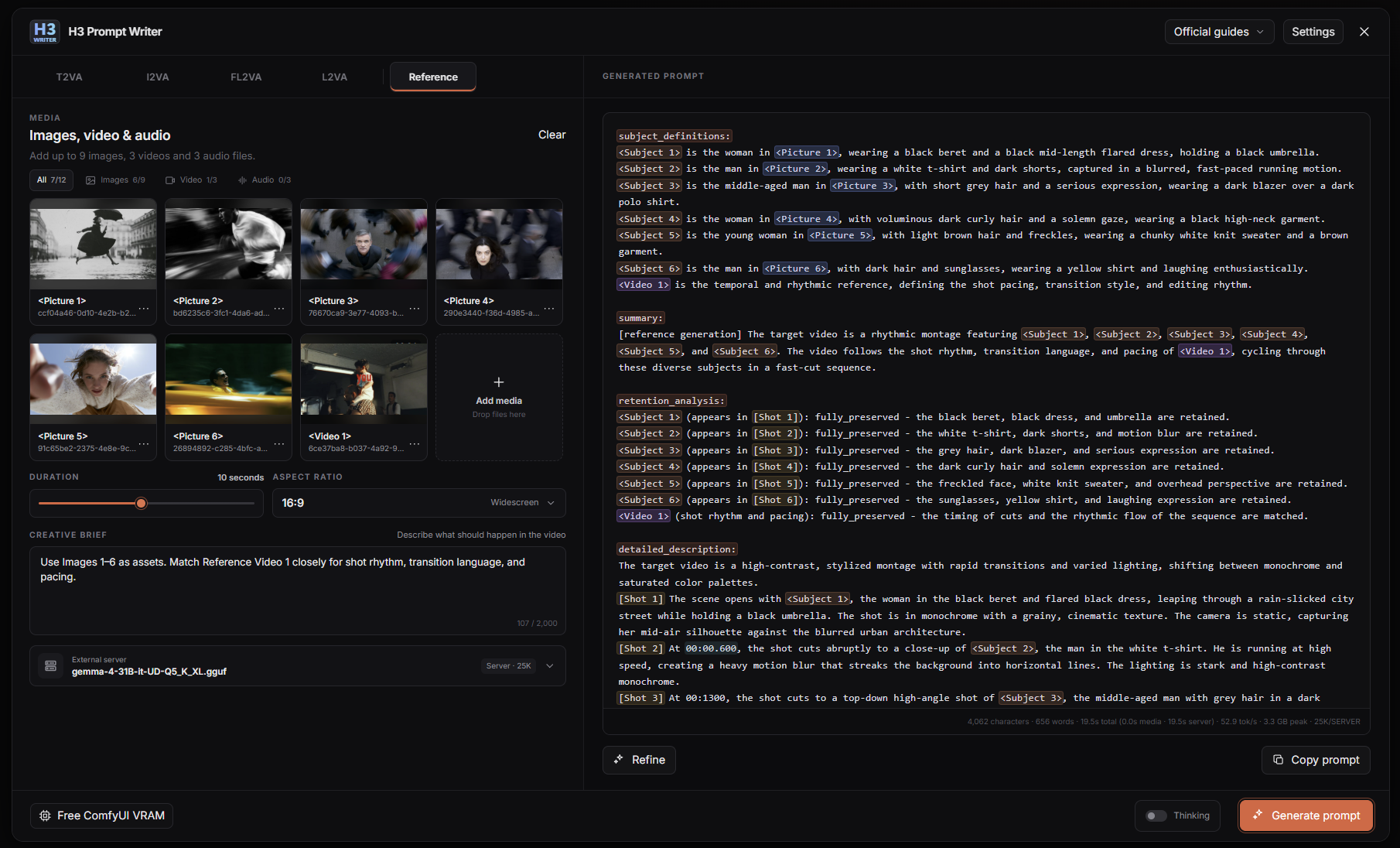
<p align="center"> <img src="web/assets/h3-prompt-writer-launcher.svg" width="96" alt="H3 Prompt Writer"> </p>H3 Prompt Writer is a prompt-writing workspace for MiniMax H3 inside ComfyUI. Start with a plain-language Creative Brief, add optional image, video, or audio references, and generate an editable prompt in the format expected by H3.
It is a ComfyUI UI extension, not a workflow node. It writes prompt text for your existing H3 workflow and helps prepare reference media. The optional Media panel can add media loaders to your workflow. Writer does not run MiniMax H3 or queue a video.
ComfyUI extension: 0.4.6 · Download ZIP · Installation
Standalone for Windows: 0.1.9 · Download ZIP · Setup guide
Highlights
- Sequence: write several independent H3 prompts from one brief, with shared media and per-chunk edits.
- Media Composer: combine pictures and video contact sheets into a collage.
- Media Editor: crop images, trim and crop video, and extract frames.
- Floating Media panel: drag Writer media into ComfyUI workflows.
- Local and remote prompt models: Ollama, Direct GGUF, External llama.cpp, and APIs.
- Standalone for Windows.
- Light theme, adjustable interface size, and Auto VRAM management.
Releases
v0.4.6: Sequence workspace with Official and Compact output, internal planning, format recovery, shared highlighting, and per-chunk refinement.
v0.4.5: Media Composer, Media Editor, Floating Media, themes, and runtime improvements.
v0.4.4: Standalone, Qwen 3.8 and Qwen3-VL, expanded Direct GGUF support.
v0.3: Redesigned Writer, Ollama/API/External setup, and per-mode drafts.
See the Changelog for the full history.
What it does
You do not need to write MiniMax section headings, timestamps, or reference syntax by hand. Describe the video and tell Writer what each reference should contribute:
Use <Picture 1> for character appearance, <Picture 2> for clothes, and only the movement from <Video 1>. The character walks through a rainy Tokyo street at night.
Writer sends your brief, selected mode, prepared references, and the selected writing contract to the prompt model. Single and Official Sequence use the official MiniMax guide. Compact Sequence uses descriptive prose with brief sound and music fields. The result is an editable H3 prompt. You can change it directly, use Refine for a revision, or select Copy prompt and paste it into your H3 workflow.
Key features
- Sequence workspace: plan a longer brief across editable chunks, with Official H3 structure or Compact descriptive prose. See Sequence usage.
- T2VA, I2VA, FL2VA, L2VA, and Reference modes.
- Up to 9 images, 3 videos, and 3 audio references in Reference mode.
- Clear
<Picture N>,<Video N>, and<Audio N>labels for assigning identity, wardrobe, setting, motion, camera, sound, or other roles. - In-place Reference media replacement from the card action or by dropping one file directly on a card, without rebuilding the surrounding asset order.
- Ordered video contact sheets with visible frame-sampling controls, so you can inspect what the prompt model sees.
- Official MiniMax base and Reference guides included for all five modes.
- Editable prompts, Refine, Copy prompt, and a separate saved draft for every mode.
- Automatic context planning and clear controls for releasing local prompt models and ComfyUI VRAM.
See Writing a useful Creative Brief for practical examples.
Choose a provider
| Provider | Choose it when | Setup |
| --- | --- | --- |
| Ollama | You want the simplest local setup | Install Ollama and pull a vision model |
| Direct GGUF | You want Writer to load a supported GGUF inside ComfyUI | Install the optional native runtime and add a matching GGUF + mmproj pair |
| External llama.cpp | You already run llama.cpp or want full control over its runtime | Start llama-server; add a matching mmproj for images and video |
| API providers | You want Gemini, OpenAI, OpenRouter, or a Custom OpenAI-compatible endpoint | Connect a key or an existing endpoint such as LM Studio |
Not sure? Start with Ollama. The provider guide explains the differences. The Ollama and Direct GGUF guides contain the tested local model choices.
Quick start
-
Install MiniMax H3 Prompt Writer from ComfyUI Manager and restart ComfyUI.
-
Open the floating H3 Prompt Writer button or use Extensions > H3 Prompt Writer. No graph node will appear.
-
Open Settings and choose a provider. For the recommended local setup and an 8 GB starting tier, install Ollama, open the app, and run:
ollama pull gemma4:e4b -
Choose a mode, add its media, and write a Creative Brief.
-
Select Generate prompt, review the editable result, then copy it into your H3 workflow.
For Git, ZIP, Windows Portable, update, and provider-specific steps, see Installation.
Privacy and limitations
- With Direct GGUF, External llama.cpp, a local Custom endpoint, or Ollama on this computer, the prompt request and prepared media stay on the local machine. A remote Ollama host receives the brief, instructions, and prepared visual inputs.
- With a remote API provider, the required brief, instructions, prepared images, and video contact sheets are sent to the selected provider. Original video and audio bytes are not uploaded by Writer. Read What leaves this computer before using private media.
- Video understanding uses the ordered contact sheet shown in the preview, not every frame of the encoded video.
- Prompt models do not listen to uploaded audio. Describe the soundtrack, voice, rhythm, or other audio role in the Creative Brief.
- The interface and documentation are in English. Briefs can use other languages, and Writer preserves supplied dialogue and visible text.
- Gemma 4 remains the simplest tested local choice. Direct GGUF also supports Qwen 3.8, compatible Qwen 3.8 fine-tunes, and Qwen3-VL. Untested compatible models may behave differently from the verified pairs.
- Ollama, External llama.cpp, and compatible API endpoints let you try other multimodal models that accept images. Compatibility does not guarantee a good H3 prompt.
- External llama.cpp also accepts text-only models for Music 3, T2VA, and Refine. Image and video requests still need a vision model.
- Direct GGUF supports Gemma 4, Qwen 3.8, compatible Qwen 3.8 fine-tunes, and Qwen3-VL. The tested Qwen 3.8 and Qwen3-VL model and projector pairs are marked as verified. Other compatible combinations are marked as unverified. A missing projector leaves text-only T2VA and Music3 available.
- Gemini and a Custom OpenAI-compatible endpoint were tested live. OpenAI and OpenRouter have automated contract coverage but were not tested live with commercial credentials. Comfy Cloud has not been validated for v0.3.
Documentation
- Installation
- Using Prompt Writer
- Choose a provider
- Ollama
- Direct GGUF
- External llama.cpp
- API providers
- Troubleshooting
- Changelog
The project is released under the MIT License. MiniMax H3 guides and model files keep their upstream terms. Model weights are not bundled with this extension.