
MaskVidExperiments
Video masking tools for ComfyUI: jitter-free subject-tracked crop and uncrop with feathered mask-confined pasting, video mask cleanup, and pixel-to-latent mask reduction aligned to causal video VAE frame grouping.
Nodes (10)
What Is That Latent's Audio Mask Actually Doing? Now It Tells You.
Regenerate Just Part of the Audio in an AV Latent (Set Latent Noise Mask Can't)
Differential Diffusion for Video, Without the Razor-Sharp Mask Edges
Solid Masks for the Frames You Actually Want to Inpaint
See Exactly What Your Latent Mask Actually Looks Like
A Video Mask Vacuum That Won't Eat Your Subject's Soft Edges
The Correct Way to Feed a Video Mask Into Set Latent Noise Mask
Stop Your Video Crops From Jittering (and Reading as Camera Motion)
Subject Crop, but Every Internal Dial Is Now Yours
Paste Your Processed Video Crops Back Without Seams
MaskVidExperiments
Video masking tools for ComfyUI: process a masked subject at high resolution inside a moving crop, then paste the result back into the original frames without jitter or visible seams.
Naive per-frame crops around a moving subject jitter in position and size, and video models read that jitter as camera motion. Subject Crop produces batches that are stable by construction: the crop holds still through mask noise, occlusions, and brief excursions, and follows only sustained motion.
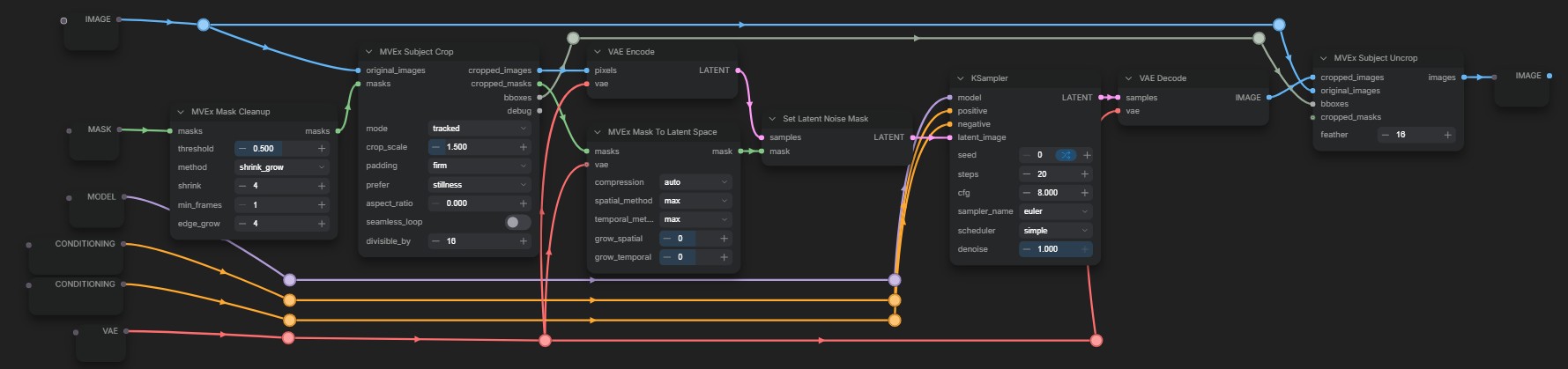
Mask Cleanup removes segmentation noise, Subject Crop cuts a stable batch around the subject, sampling runs on the crops (optionally masked via Mask To Latent Space into Set Latent Noise Mask), and Subject Uncrop pastes the result back into the full frames.
Examples
Subject Crop / Uncrop
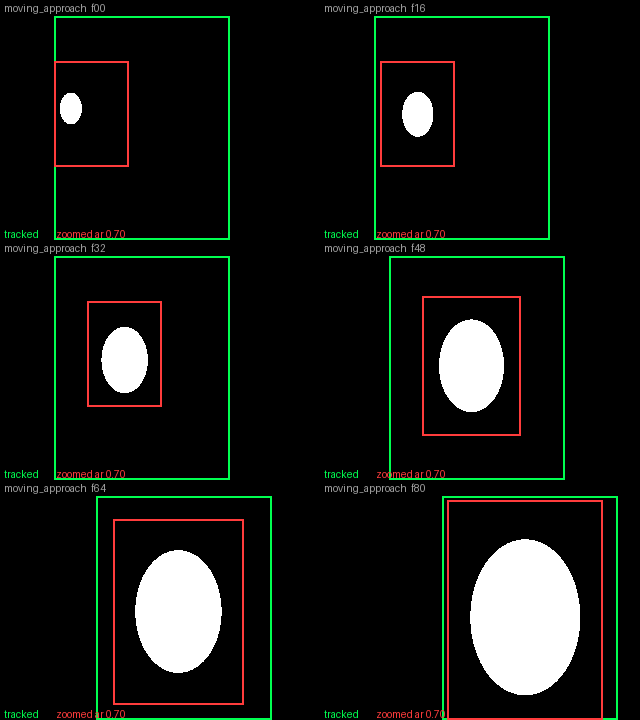
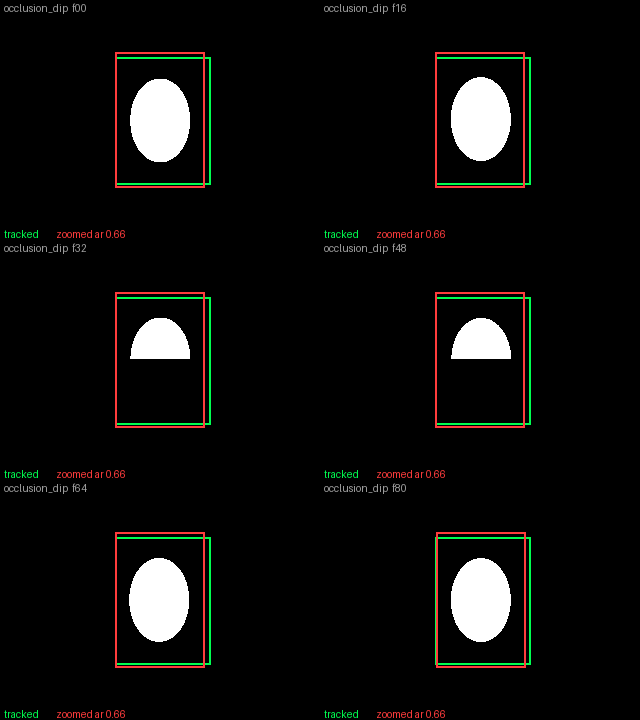
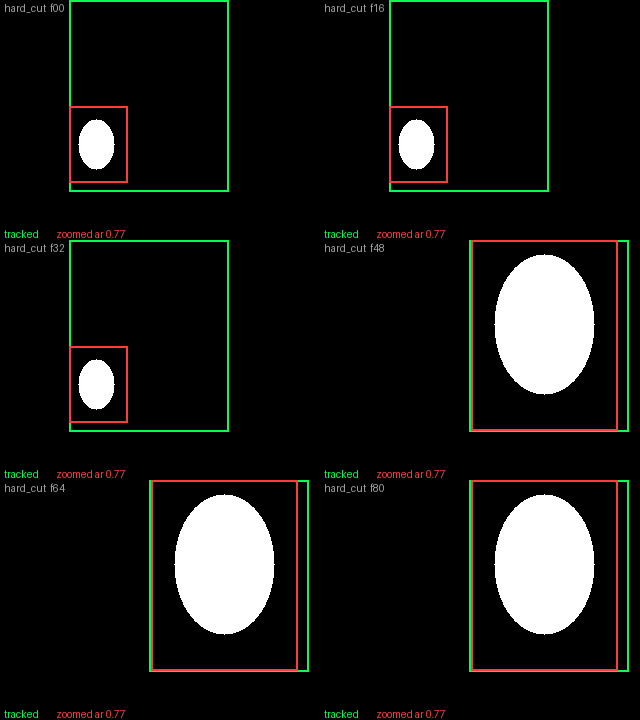
Synthetic stress cases at default settings. Green is the tracked crop, red is zoomed.
| | |
|---|---|
|  |
| 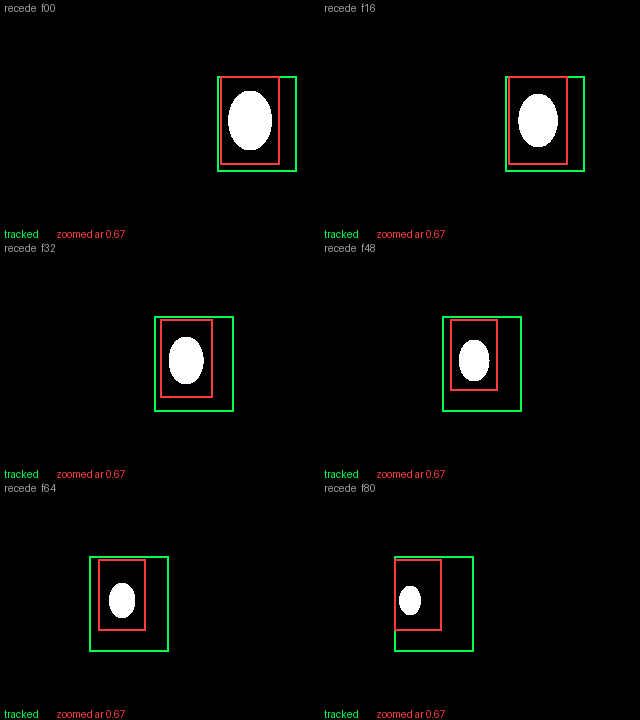 |
| Subject grows while crossing the frame: zoomed follows position and size smoothly, tracked shows the constant-size answer. | Subject shrinks and is still moving at the last frame: the clip ends on a steady, fully padded crop. |
|
|
| Subject grows while crossing the frame: zoomed follows position and size smoothly, tracked shows the constant-size answer. | Subject shrinks and is still moving at the last frame: the clip ends on a steady, fully padded crop. |
|  |
| 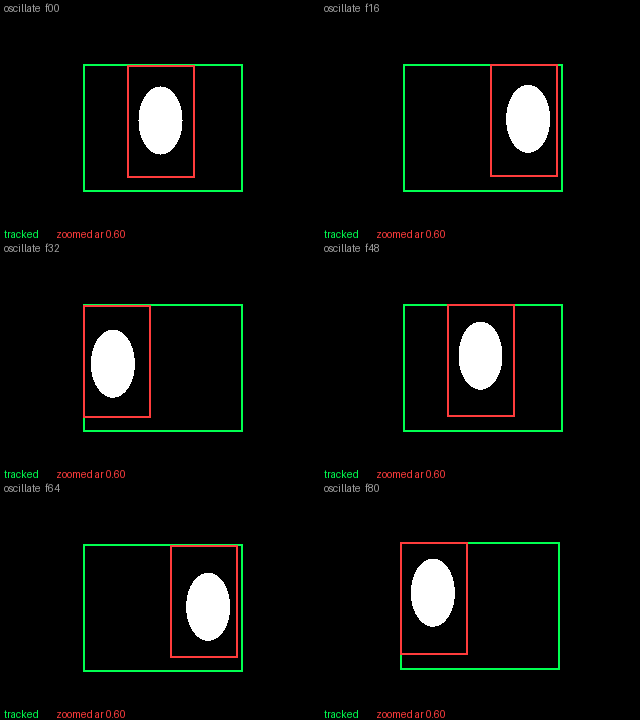 |
| The face-mask case, where half the mask vanishes for a stretch: the crops don't react. | Side-to-side swings: absorbed by a slightly roomier crop that stays put instead of chasing every reversal. |
|
|
| The face-mask case, where half the mask vanishes for a stretch: the crops don't react. | Side-to-side swings: absorbed by a slightly roomier crop that stays put instead of chasing every reversal. |
|  |
| 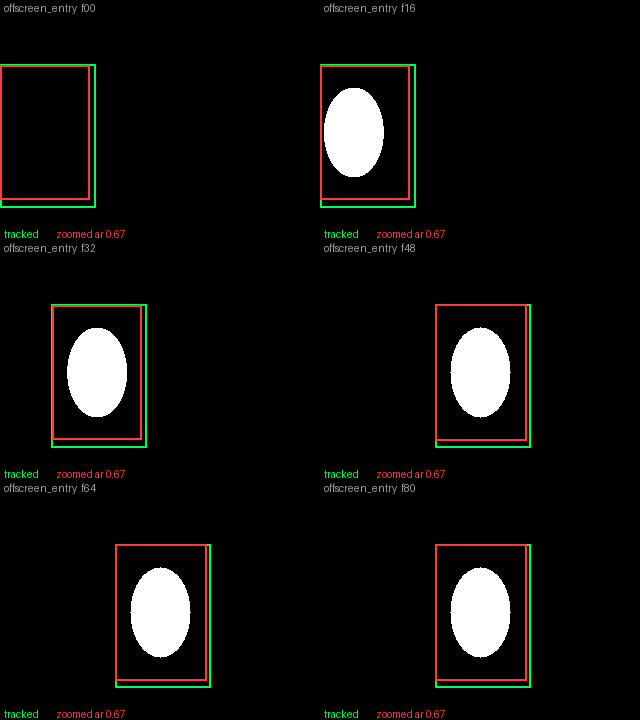 |
| Scene cut: one clean jump to the new framing, no hunting before or after. | Subject enters from off-screen: the clipped mask distorts the apparent size, but the crop settles without lurching. |
|
| Scene cut: one clean jump to the new framing, no hunting before or after. | Subject enters from off-screen: the clipped mask distorts the apparent size, but the crop settles without lurching. |
Mask To Latent Space

Replacing a car with a German shepherd in an LTX video: feeding the pixel mask straight to Set Latent Noise Mask leaves ComfyUI to trilinear-resize it, which blurs the mask across frames and lets the car bleed through. The max-reduced mask from Mask To Latent Space inpaints cleanly.
Installation
Clone into custom_nodes and restart ComfyUI. Needs ComfyUI v0.15.0 or
newer, with no dependencies beyond ComfyUI's own.
cd ComfyUI/custom_nodes
git clone https://github.com/drozbay/MaskVidExperiments
Nodes
Summaries only. Field-level usage lives in each node's tooltips.
MVEx Subject Crop
Crops a region around the masked subject from every frame, sized so the whole batch stacks into one tensor. Position, size, and shape are chosen together over the whole clip, so the crop holds still through mask jitter and follows only sustained motion.
- combined: one static crop with padding around the subject's whole travel.
- tracked: a constant-size crop that stays still until the subject would leave it, then moves as little as possible. Pixel-exact slices, no resampling.
- zoomed: the crop also follows the subject's size, resampled to one fixed output resolution in which the subject keeps a constant share.
crop_scale sets the padding around the subject as a ratio of its size,
padding and prefer set how firmly that padding is kept and whether
stillness or tightness pays for it, and the debug output summarizes what
the planner chose. upscale_megapixels upscales every crop to about that
many pixels on the divisible_by grid, keeping the shape the planner
chose and never downscaling, so no resize node is needed on either side.
resize_method picks the filter used whenever a crop is resampled, and
its auto setting uses bicubic to enlarge and lanczos to shrink.
Setting crop_scale to 0 skips cropping entirely: the whole frame passes
through, still sized to the divisible_by grid and the
upscale_megapixels floor, so the rest of the workflow works unchanged
with tracking off.
MVEx Subject Crop (Advanced) exposes every internal dial, with the
standard node's padding and prefer settings as presets over them.
MVEx Subject Uncrop
Pastes processed crops back into the original frames with a feathered
border, optionally confined by the cropped masks. The paste is pixel-exact
when the crop size was not changed, and crops that were resampled along
the way (zoomed mode, upscale_megapixels, or a resize node in between)
are scaled back to their box automatically, with resize_method picking
the filter for that scale-back. The input order is
bypass-correct: bypassing both Subject Crop and Subject Uncrop passes the
processed frames straight through, so the whole crop pipeline can be A/B'd
with two clicks.
MVEx Mask Cleanup
Removes specks and brief flickering blobs from a video mask batch while
keeping the real subject, including its soft edges. The shrink_grow
method erases anything too thin to survive a shrink and restores the
survivors' exact shapes, and the components method drops blobs that are
both small and short-lived.
MVEx Frame Range Mask
Builds a batch of solid masks at a given resolution, fully masked on the frames you list and empty on the rest. Useful for masking a stretch of a clip for inpainting, or for feeding a temporal mask straight into Mask To Latent Space.
MVEx Mask To Latent Space
Reduces a pixel-space mask batch to latent resolution using the VAE's
spatial and temporal compression, aligned to how causal video VAEs group
frames instead of the trilinear resize ComfyUI applies on its own (see the
example above). Feed the result to Set Latent Noise Mask. auto reads the
geometry from the connected VAE, including the exact frame cycle and 2x2
token grid of chunked models like MiniMax H3, and manual enters it
directly. The mask is unified over each model token, so what you preview
with MVEx Latent Mask To Mask is exactly what the model acts on.
MVEx Audio Mask To Latent
The audio counterpart: regenerates the chosen time ranges of an audio
latent and keeps the rest, on a joint AV latent (MiniMax H3, LTX-2) or a
bare audio latent. Timing and layout come from the connected audio VAE or
from manual widgets, ranges from time_ranges text, a timeline mask, or
start/end times. The node attaches the noise mask itself, since Set Latent
Noise Mask cannot reach the audio side of a joint latent, and merges with
any mask already there so copies chain. MVEx Audio Mask Debug reports
which time ranges a latent's audio mask keeps and regenerates.
MVEx Differential Diffusion (Soft)
Drop-in variant of ComfyUI's Differential Diffusion. The stock node turns a
grayscale denoise mask into hard binary masks that grow as sampling
proceeds, so every intermediate mask has a razor-sharp edge no matter how
feathered the input was. This version thresholds with a soft ramp instead,
so each per-step mask keeps a soft edge whose width follows the blur
already present in the input mask: heavily feathered masks stay feathered
at every step, sharp masks stay sharp. Purely per-pixel with no spatial
blur, so it is temporally stable on video, and softness 0 exactly
reproduces the stock node.
Acknowledgements
- The batchcrop nodes in ComfyUI-KJNodes (which trace back to comfy_mtb) are the prior art that motivated this design. Subject Crop and Subject Uncrop are an independent reimplementation with no code carried over, but they exist because those nodes proved the workflow worth doing.
- ComfyUI-Inpaint-CropAndStitch is the mature crop-and-stitch solution for still-image inpainting. Use it for single images; this pack covers the video case, where applying that workflow per frame produces exactly the jitter described above.
- Mask To Latent Space generalizes WanMaskToLatentSpace from my ComfyUI-WanVaceAdvanced.
- Most of the code in this pack was written with Claude (Fable 5).
License: GNU GPLv3, Copyright (C) 2026 drozbay